

Zoom Telephonics 5341J DOCSIS 3.0 Modem càball
Fiosrachadh modemModem càball DOCSIS 3.0 Ceangal seanail 8 × 4 le astaran suas ri 150 Mbps air ceangal uèirleas Tha Cox a’ moladh modem DOCSIS 3.0 16 × 4 no nas àirde |
Ìre seirbheis as àirdeB’ fheàrr le 150 |
Aghaidh View
|
|
|
Air ais View
|
Tha na puirt a leanas aig an Zoom 5341J air cùl a ’mhodem.
|
|
Seòladh MAC
|
Tha seòlaidhean MAC air an sgrìobhadh mar 12 àireamhan anns a bheil an dà chuid litrichean agus àireamhan (0-9, AF). Tha seòladh MAC gun samhail. Tha a’ chiad sia caractaran den t-seòladh MAC gun samhail dha neach-dèanamh an inneil. |



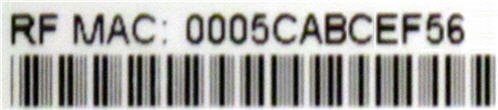
Fuasgladh thrioblaidean

Tha na solais a’ sealltainn suidheachadh làithreach a’ mhodem agad. Gus duilgheadasan ceangail sam bith fhuasgladh, cleachd an clàr gu h-ìosal.
| Solas modem | Inbhe | Trioblaid |
|---|---|---|
| Cumhachd | dheth | Gun chumhachd - Dearbhaich a h-uile ceangal càball agus feuch ris a’ mhodem ath-shuidheachadh. |
| On | Chan eil gin | |
| DS
(Shìos an abhainn) |
A' priobadh uaine | A ’stèidheachadh ceangal bhon eadar-lìn chun choimpiutair - Dearbhaich a h-uile ceangal càball agus feuch ris am modem ath-shuidheachadh. |
| Uaine cruaidh | Chan eil gin - ceangal | |
| A' priobadh gorm | A ’barganachadh sianal DS bannaichte (sìos an abhainn) - Dearbhaich a h-uile ceangal càball agus feuch ris am modem ath-shuidheachadh. | |
| Gorm cruaidh | Tha aon no barrachd sianalan DS (sìos an abhainn) air an ceangal | |
| US
(Suas an abhainn) |
dheth | A ’stèidheachadh ceangal bhon choimpiutair chun eadar-lìn - Dearbhaich a h-uile ceangal càball agus feuch ris am modem ath-shuidheachadh. |
| Solamh | Chan eil gin | |
| A' priobadh gorm | A ’barganachadh sianal bannaichte na SA (suas an abhainn) - Dearbhaich a h-uile ceangal càball agus feuch ris am modem ath-shuidheachadh. | |
| Gorm cruaidh | Tha aon no barrachd sianalan DS (sìos an abhainn) air an ceangal | |
| Air-loidhne | A' priobadh uaine | A ’stèidheachadh ceangal ris an t-solaraiche càball - Dearbhaich a h-uile ceangal càball agus feuch ris am modem ath-shuidheachadh. |
| Uaine cruaidh | Cha robh gin - ceangal air a stèidheachadh | |
| dheth | Offline - Dearbhaich a h-uile ceangal càball agus feuch ris am modem ath-shuidheachadh. | |
| Ceangal | A' priobadh uaine | Chan eil gin - dàta a ’sruthadh |
| Uaine cruaidh | Chan eil gin - ceangailte ri inneal LAN, leithid coimpiutair no router | |
| dheth | Cha do lorgar Ethernet |
Goireasan Dèanadair
Cleachd an goireas a leanas bho Zoom airson fiosrachadh nas mionaidiche air an 5341J.
Gluais_5341J_Quick_Start_Guide [PDF]
Iomraidhean
- Leabhar-làimhe cleachdaichemanual.tools
Published: August 10, 2021
Air ùrachadh: 11 Gearran, 2023
I absolutely cannot find how to disable SIP ALG on my zoom cable modem and I cannot find a telephone number that works to contact zoom.
How do I disable SIP ALG on the Zoom 5341J cable modem and how can I contact Zoom support?
The Zoom 5341J is a bridge-only cable modem, not a gateway or router. Because it does not have built-in routing or firewall capabilities, it does not have a SIP ALG (Session Initiation Protocol Application Layer Gateway) setting to disable. If you are experiencing VoIP issues related to SIP ALG, the setting is likely located in the standalone router connected to the modem's LAN port.
To resolve this, you should log into your router's web interface (common addresses include 192.168.1.1 or 192.168.0.1) and look for SIP ALG under settings typically labeled as "Firewall," "NAT," or "Advanced Settings."
Regarding manufacturer support, Zoom Telephonics (now operating largely under the Motorola Brand for retail cable products) can be reached via the following methods:
Read the full Q&A page
My telephone company says to disable SIP ALG but I do not know how and I have not found any support site or telephone number for customer service for this product. I guess there is no customer service for the Zoom cable mode 534ij. Once you buy it …good luck.
How do I disable SIP ALG on the Zoom 5341J cable modem?
Tha an Meud 5341J is a standalone cable modem, not a gateway or router. Because it does not have built-in routing or firewall functions, it does not have a SIP ALG setting to disable.
If your telephone company is requesting this change, the setting will be located in your standalone wireless router (the device connected to the modem's LAN port) rather than the modem itself. You should log into your router's web interface (commonly found at 192.168.0.1 or 192.168.1.1) and look for SIP ALG under the "Firewall," "NAT," or "Advanced Settings" menus.
Regarding customer service, Zoom Telephonics transitioned its branding to Motorola Network products several years ago. For legacy support, you may try contacting their technical support team at 1-800-753-0797 or visiting their official support site at motorolanetwork.com/support.
Read the full Q&A page