1. Ro-ràdh
This manual provides detailed instructions for the installation, operation, and maintenance of your Loddery Android 14 2 DIN Car Radio. This unit is designed for VW Caddy models from 2003 to 2020, offering advanced features such as wireless CarPlay, Android Auto, GPS navigation, Bluetooth connectivity, FM/RDS radio, and support for a rear view camara.
The system runs on Android 14 with 2GB RAM and 32GB ROM, providing a responsive and versatile user experience. Please read this manual thoroughly before use to ensure proper installation and optimal performance.
2. Toradh thallview
The Loddery Android 14 Car Radio features a 7-inch 1024x600 IPS capacitive touchscreen with a 178° viewing angle. It is powered by a Cortex A7 1.5 GHz x4 processor. Key functionalities include:
- CarPlay gun uèir / Android Auto: Seamless integration with your smartphone for navigation, calls, messages, and music.
- Seòladh GPS: Built-in module supporting online and offline maps (GPS/Beidou/Galileo/Glonass).
- Ceangal WiFi: Access to online apps and browsing.
- Bluetooth 5.0: Gairmean gun làmhan agus sruthadh claisneachd gun uèir.
- Rèidio FM/RDS: Real-time traffic, news, and weather information.
- Smachd Cuibhle Stiùiridh (SWC): Convenient control of radio functions without touching the screen.
- Cùl View Taic Camara: Automatic display when parking for enhanced safety.
- Ceangal Sgàthan & Sgrion Roinnte: Sync smartphone screen and run two apps simultaneously.
- Toradh claisneachd: MOSFET amplifier 4 x 45W, EQ adjustment.
3. Setup agus Stàladh
3.1 Co-fhreagarrachd
This car radio is designed for VW Caddy models from 2003-2020. Installation is plug-and-play for compatible vehicles. Please verify your vehicle's compatibility before installation.
Incompatibility List: Tha an aonad seo neo-fhreagarrach for the following VW models:
- VW Passat: 2004, 2007 2.0L M/T; 2004, 2005 2.8L V6; 2005 1.8T M/T, A/T; 2007 2.0L A/T
- VW CC: 2012 3.0FSI V6
- VW Lavida: 2008 1.6L/2.0L A/T; 2010, 2011 1.4TSI; 2008 1.6L/2.0L M/T; 2009, 2011 2.0L A/T; 2013 1.6L M/T, A/T; 2011 1.4TSI M/T, 1.6L A/T; 2011 1.4TSI DSG
- VW Tiguan: 2016 2.0TSI/GTE
- VW Golf V: 2004 1.6; 2005 1.8; 2004 1.6 A/T; 2008 1.6 A/T, M/T

Figure 3.1: Visual guide for checking compatibility by examining the center console and existing connectors.
3.2 Susbaint a’ phacaid
Dèan cinnteach gu bheil a h-uile nì anns a’ phacaid:
- 1x Car Radio Unit
- Camara 1x
- 2 x càballan cumhachd
- 1x GPS Antenna
- 1x Càball Cuir a-steach Camara
- 1x Leabhar-làimhe Cleachdaiche
- 1x RCA Input/Output Cable
- Càbaill USB 2x
- 1x Canbus Box
- 1x Radio Adapter
3.3 Rèiteachadh tùsail
After physical installation, power on the unit. The Android 14 system will boot up. Follow the on-screen prompts for initial setup, including language selection and time zone. The unit comes with 2GB RAM and 32GB ROM for system operations and app storage.
4. Stiùireadh Obrachaidh
4.1 CarPlay gun uèir / Android Auto
The car radio supports both wireless CarPlay and Android Auto. Connect your smartphone via USB cable or Bluetooth. Once connected, you can access navigation apps (e.g., Waze), make calls, send messages, and stream music (e.g., Spotify). Voice control via Siri or Google Assistant is also supported for safer driving.

Figure 4.1: Wireless CarPlay and Android Auto functionality with voice control examples.
4.2 Seòladh GPS
The unit has a built-in GPS module. You can use pre-installed navigation software or download your preferred navigation apps from the app store. It supports both online and offline maps, utilizing GPS, Beidou, Galileo, and Glonass for fast and accurate positioning.

Figure 4.2: GPS Navigation interface showing route details and map applications.
4.3 Ceangal WiFi
Connect the car radio to a WiFi network or a mobile hotspot to browse the internet, access web pages, and download various applications from the app store (e.g., Waze, YouTube, TikTok).
Figure 4.3: WiFi connectivity enabling access to online applications.
4.4 Bluetooth & Rèidio FM/RDS
Utilize Bluetooth 5.0 for wireless audio streaming and hands-free calling. The FM radio with RDS (Radio Data System) provides station information, real-time traffic updates, news broadcasts, and weather forecasts.
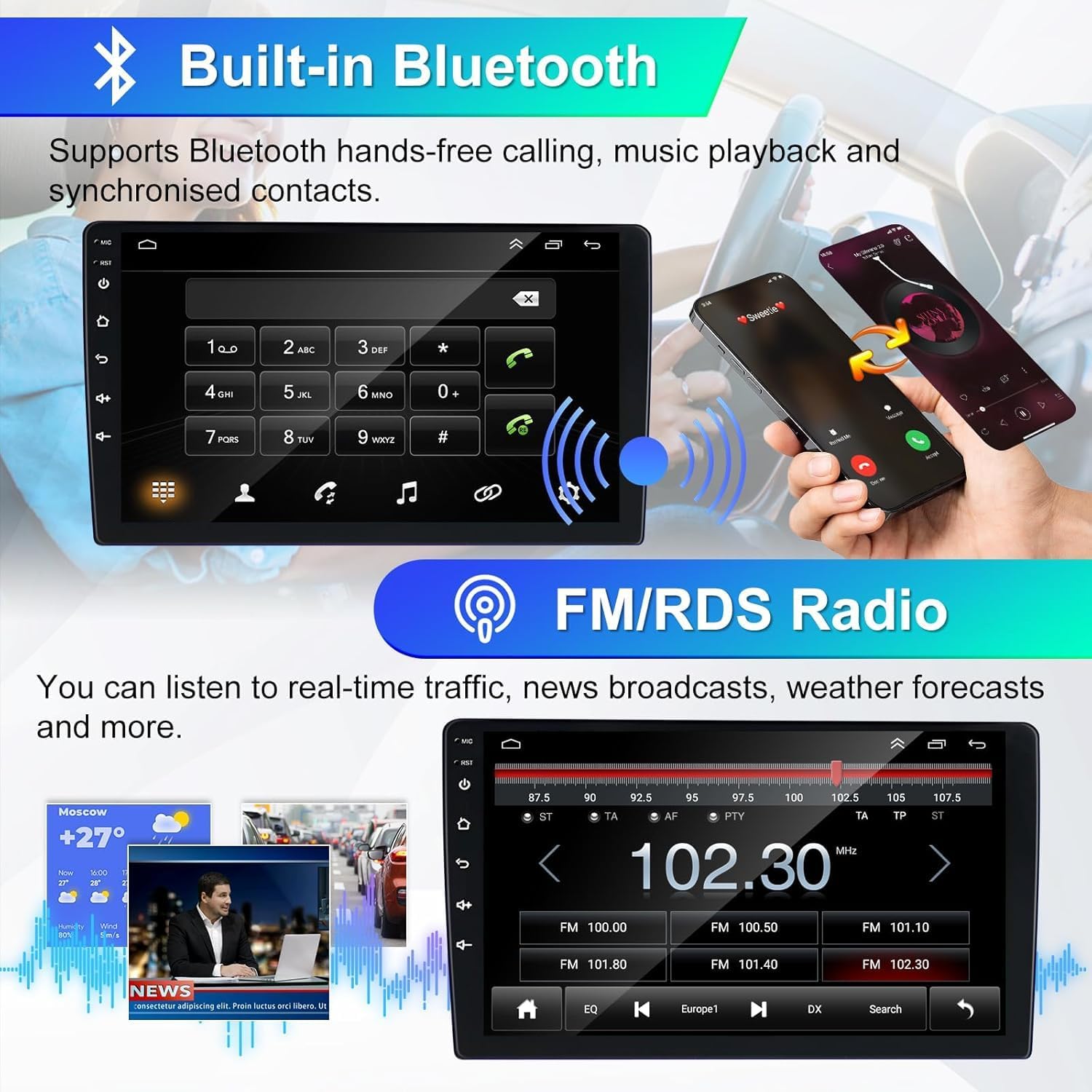
Figure 4.4: Bluetooth hands-free calling and FM/RDS radio interface.
Smachd Cuibhle Stiùiridh 4.5 (SWC)
Control the car radio directly from your steering wheel. This feature allows you to manage navigation, music, and calls, enhancing driving safety and convenience by minimizing screen interaction.

Figure 4.5: Steering Wheel Control functionality and setup options.
4.6 Cùl View Camara
When reversing, the car radio automatically displays the feed from the connected rear view camera, providing increased visibility and making parking safer and easier.
Figear 4.6: Cùl View Camera display with parking assistance.
4.7 Mirror Link & Split Screen
Mirror Link allows you to sync your smartphone screen to the car radio, enabling you to enjoy navigation maps, videos, and other content directly on the larger display. The Split Screen function allows you to operate two applications simultaneously, such as listening to music while navigating.

Figure 4.7: Mirror Link and Split Screen capabilities for enhanced multitasking.
5. Cumail suas
Gus dèanamh cinnteach gum mair rèidio do chàir fad-beatha agus gum bi e ag obair gu h-iomchaidh, lean na stiùiridhean cumail suas seo:
- Glanadh: Cleachd clò bog, tioram airson an sgrion agus an taobh a-muigh a ghlanadh. Seachain innealan-glanaidh sgrìobach no fuasglaidhean.
- Teòthachd: Seachain an aonad a nochdadh do theodhachd anabarrach, solas dìreach na grèine airson ùine mhòr, no taiseachd àrd.
- Ùrachaidhean bathar-bog: Periodically check for and install available software updates to ensure system stability and access to new features.
- Ceanglaichean: Dèan cinnteach gu bheil a h-uile càball agus ceangal tèarainte agus saor bho mhilleadh.
6. A ’dèanamh trioblaid
Ma thachras tu ri duilgheadasan le rèidio a’ chàir agad, thoir sùil air na ceumannan cumanta fuasgladh-cheistean a leanas:
- Gun chumhachd: Thoir sùil air ceanglaichean càball cumhachd agus bogsa fiùs a’ charbaid. Dèan cinnteach gu bheil an lasadh air.
- Gun fhuaim: Verify volume settings, audio source selection, and speaker connections. Check if the mute function is active.
- Sgrion-suathaidh gun fhreagairt: Feuch ri an aonad ath-thòiseachadh. Ma mhaireas an duilgheadas, is dòcha gum bi feum air ath-shuidheachadh factaraidh (thoir sùil air roghainnean an t-siostaim).
- Call Comharra GPS: Dèan cinnteach gu bheil an antenna GPS air a stàladh gu ceart agus gu bheil solas soilleir ann. view nan speur.
- Cùisean Paidhir Bluetooth: Ensure Bluetooth is enabled on both the car radio and your device. Delete previous pairings and try again.
- Fàilligeadh ceangail CarPlay/Android Auto: Check USB cable integrity or Bluetooth connection. Ensure your phone's software is up to date.
Airson cùisean leantainneach, cuir fios gu taic luchd-cleachdaidh.
7. Sònrachaidhean
| Brand | Loddery |
| Modail Àireamh | YI-EU-01-QA1524X-CX41 |
| Siostam | Android 14 |
| RAM | 2 GB |
| ROM | 32 GB |
| Sgrion | 7-inch IPS Capacitive Touchscreen, 1024 x 600 resolution, 178° viewceàrn ing |
| Pròiseasar | Cortex A7 1.5 GHz x4 |
| Bluetooth | Tionndadh 5.0 |
| Còmhlan rèidio | FM (87.5 M-108 M) with RDS (RT, AF, TA) |
| Amplosgadair | MOSFET 4 x 45 W Max Power |
| Cruthan claisneachd | MP3, FLAC, APE, WMA, WAV, AAC, AMR |
| Cruthan bhidio | AVI, ASF, MP4, MOV, MPG, MPEG1/2/4, VOB, MKV, FLV, TS, WMV, RMVB, 3GP |
| Puirt USB | 2 (one for CarPlay, one for data transfer/USB input) |
| Feartan sònraichte | Wireless Apple CarPlay/Android Auto/Mirror Link, Wi-Fi, GPS Navigation (online/offline), EQ Audio Adjustment, DSP, Steering Wheel Control, Rear View Camera Support, Voice Control |
8. Barantas agus Taic
Your Loddery car radio comes with comprehensive support:
- 1 Year After-Sales Support: Assistance with product issues and inquiries for one year from the date of purchase.
- 30-Day Refund Service: Eligibility for a refund within 30 days of purchase, subject to terms and conditions.
- 7*24 Hours Technical Support: Round-the-clock technical assistance for any operational or technical difficulties you may encounter.
Figear 8.1: Os a chionnview of available support and warranty services.
For support, please refer to the contact information provided with your purchase or on the Loddery official weblàrach.


