1. Ro-ràdh
Thank you for choosing the Loddery 7 Inch Android 13 Car Stereo. This manual provides essential information for the proper installation, operation, and maintenance of your new car multimedia system. Please read this manual thoroughly before use to ensure optimal performance and to prevent damage.
This car stereo is specifically designed for the Saab 9-3 93 models from 2007 to 2011, offering an integrated multimedia and navigation experience.
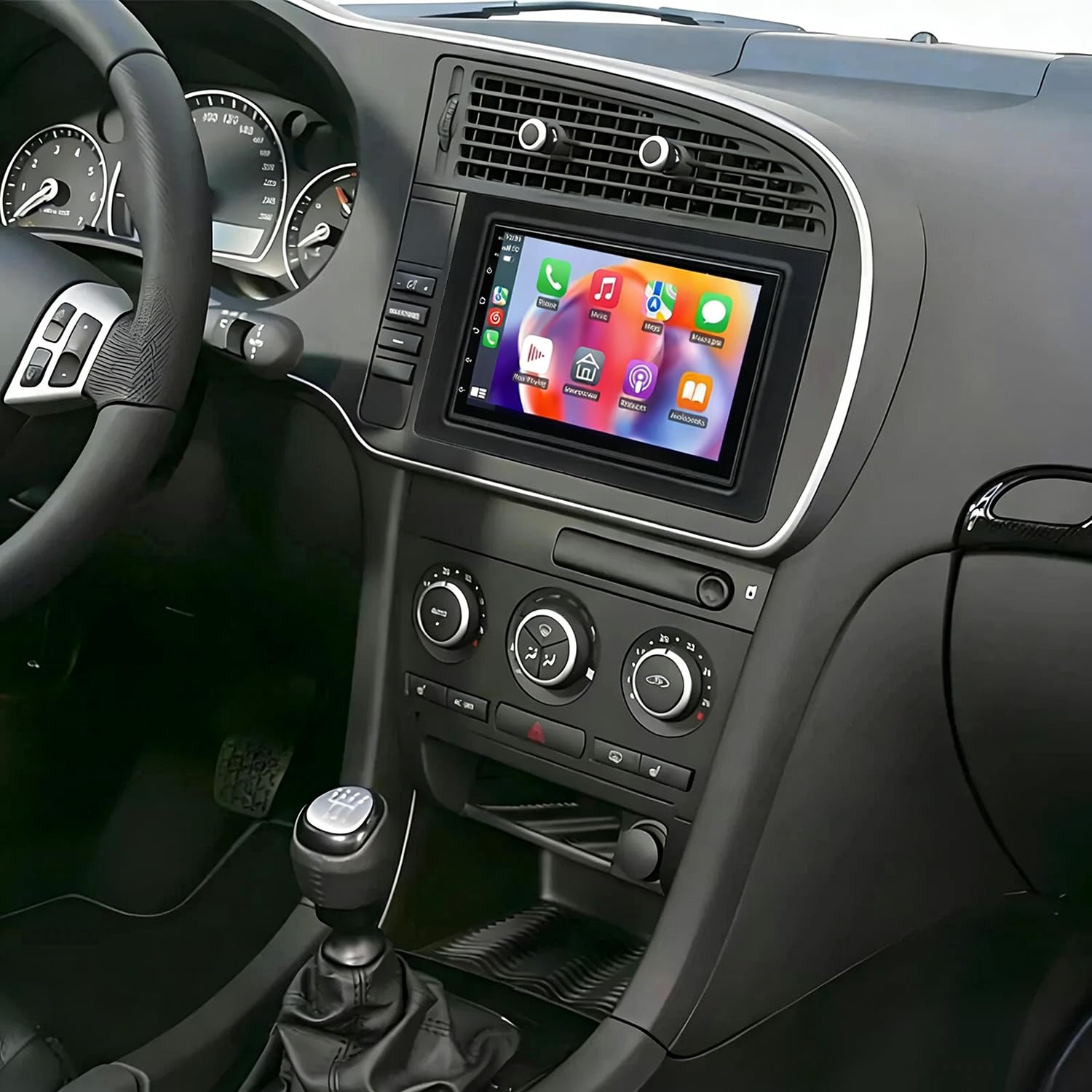
Dealbh 1.1: Aghaidh view of the Loddery 7 Inch Android 13 Car Stereo. This image displays the main unit with its 7-inch touchscreen display, designed to integrate seamlessly into the dashboard of compatible Saab 9-3 models.
2. Pasgan-susbaint
Dèan cinnteach gu bheil na nithean gu lèir a tha air an liostadh gu h-ìosal air an toirt a-steach don phacaid agad:
- 1 x Cluicheadair MP5 Càr (Prìomh Aonad)
- 1 x càball cumhachd
- 1 x GPS Antenna
- 1 x Càball Cuir a-steach Camara Cùil
- 1 x Càball RCA
- 2 x càballan USB
- 1 x Leabhar-stiùiridh (an sgrìobhainn seo)
- 1 x AHD Camera (Backup Camera)
3. Setup agus Stàladh
This car stereo is designed for a plug-and-play installation in compatible Saab 9-3 93 models (2007-2011). While designed for ease of installation, professional installation is recommended to ensure correct wiring and functionality, especially for power connections and accessory integration.
3.1. Sgrùdaidhean ro-stàlaidh
- Dèan cinnteach gu bheil lasadh a’ charbaid dheth agus gu bheil am bataraidh air a dhì-cheangal mus tòisich thu air an stàladh.
- Dearbhaich gu bheil susbaint a’ phacaid gu lèir an làthair.
- Review the wiring diagrams provided in the included physical instruction manual for specific vehicle connections.
3.2. Ceumannan Stàlaidh (Coitcheann)
- Thoir air falbh an t-Aonad a tha ann mar-thà: Carefully remove the factory radio from your Saab 9-3 dashboard.
- Ceangail càball cumhachd: Connect the provided power cable harness to the car stereo and the vehicle's wiring. Ensure all connections are secure.
- Ceangail Antenna GPS: Cuir an antenna GPS ann an àite far a bheil solas soilleir view of the sky (e.g., dashboard, under the windshield) and connect it to the stereo.
- Ceangail càbaill USB: Route the USB cables to a convenient location (e.g., glove compartment) and connect them to the stereo.
- Ceangail Camara Cùil (Roghainneil): If installing the AHD backup camera, route the camera cable from the rear of the vehicle to the stereo and connect it to the 'Rear Camera Input' port. Connect the camera's power to the vehicle's reverse light circuit.
- Ceangail Càbaill RCA (Roghainneil): Ma tha thu a ’cleachdadh taobh a-muigh amplifiers or other audio/video devices, connect the RCA cables as needed.
- Gnìomhachd deuchainn: Before fully reassembling the dashboard, reconnect the vehicle battery and power on the unit to test basic functions (power, audio, touchscreen, GPS signal, camera input).
- Aonad Tèarainte: Once tested, carefully slide the car stereo into the dashboard opening and secure it. Reassemble any removed trim pieces.
3.3. Smachd Cuibhle Stiùiridh
The unit supports the vehicle's steering wheel control function. After installation, you may need to access the unit's settings to map the steering wheel buttons to the desired functions.
4. Stiùireadh Obrachaidh
This section details the primary functions and features of your Loddery Android 13 Car Stereo.
4.1. Obrachadh Coitcheann
- Cumhachd air / dheth: Press and hold the power button (if available) or turn the vehicle ignition on/off.
- Sgrion-touch: The 7-inch 2.5D Tempered Glass Mirror display is a full capacitance touchscreen. Navigate the interface by tapping, swiping, and pinching.
- Sgrion Dachaigh: Faigh cothrom air diofar aplacaidean agus roghainnean bhon sgrìn dachaigh gnàthaichte.
- Roghainnean Cànain: The system supports multiple languages including English, Chinese, French, Italian, Korean, Japanese, Arabic, Spanish, Portuguese, Russian, Turkish, Vietnamese, Hebrew, Polish, and German. Adjust in system settings.
4.2. Ceangalachd
- Wi-Fi: Connect to available Wi-Fi networks or use your mobile phone's hotspot for internet access. Go to Settings > Network & Internet > Wi-Fi.
- Bluetooth 5.0: Pair your smartphone for hands-free calling, phone book synchronization, and audio streaming. Go to Settings > Connected devices > Bluetooth.
- USB: Use the double USB interfaces to connect USB drives for media playback or to charge compatible devices.
4.3. Seòladh
- Built-in Offline Maps: The unit comes with built-in offline map capabilities. An internet connection is required to download map data initially.
- Seòladh air-loidhne: Once connected to Wi-Fi, you can use online navigation applications for real-time traffic and updated maps.
- GPS: The dedicated GPS antenna ensures accurate positioning for navigation.
4.4. CarPlay / Android Auto
- CarPlay gun uèir & uèirleasach: For iOS devices, connect via Bluetooth for wireless CarPlay or use a USB cable for wired CarPlay. This integrates your iPhone's features like navigation, calls, messages, and music directly onto the car stereo display.
- Android Auto: Connect your Android smartphone via USB for Android Auto functionality, mirroring essential apps and features.
4.5. Ath-chluich ioma-mheadhain
- Cruthan claisneachd: Supports APE, FLAC, WAV, MP3, WMA, and other audio formats.
- Cruth bhidio: Supports MKV, RMVB, AVI, MP4, MDV, and other video formats. Video output is supported for external displays.
- Dealbh Formats: Supports PNG, JPEG, JPG, GIF, WBMP, BNP, and other picture formats.
- Rèidio: Tune into FM radio stations. RDS (Radio Data System) is supported for displaying station information.
- Dreuchd DSP: The integrated DSP (Digital Signal Processor) ensures high-fidelity audio reproduction, closely matching the original sound quality.
4.6. Gnìomhachd a’ Chamara Chùil
- The unit supports AHD (Analog High Definition) 1080P camera image input.
- When the vehicle is in reverse gear, the display will automatically switch to the rear camera view.
- You can switch between CVBS and AHD camera input types within the system settings if needed.
4.7. Sgrion Split
Leigidh am feart sgrion-roinnte leat dà aplacaid a ruith aig an aon àm air an taisbeanadh, leithid seòladh agus ath-chluich ciùil.
5. Cumail suas
Nì cumail suas ceart cinnteach gum mair stereo do chàir fad-beatha agus gum bi e ag obair gu math.
- Glanadh sgrion: Cleachd clò bog, gun lint beagan dampnigh le uisge no inneal-glanaidh sgrion a chaidh a dhealbhadh gu sònraichte airson taisbeanaidhean dealanach. Seachain ceimigean cruaidh no stuthan sgrìobach.
- Ùrachaidhean bathar-bog: Periodically check for system software updates via Wi-Fi to ensure you have the latest features and bug fixes.
- Suidheachaidhean Àrainneachdail: Seachain an aonad a nochdadh do theodhachd anabarrach, solas dìreach na grèine airson ùine mhòr, no cus taiseachd.
- Ceanglaichean: Dèan cinnteach gu bheil a h-uile càball agus ceangal tèarainte. Faodaidh ceanglaichean sgaoilte duilgheadasan adhbhrachadh bho àm gu àm.
6. A ’dèanamh trioblaid
This section addresses common issues you might encounter. For more complex problems, please refer to the included physical manual or contact customer support.
- Gun chumhachd:
- Thoir sùil air a h-uile ceangal càball cumhachd.
- Dearbhaich gu bheil fiùs a’ charbaid airson an rèidio slàn.
- Dèan cinnteach gu bheil bataraidh a’ charbaid ceangailte gu ceart agus air a luchdadh.
- Unit Does Not Turn Off with Car / Battery Drain:
- This indicates an incorrect wiring connection, specifically the ACC (accessory) wire. The unit's power should be cut when the ignition is off. Consult a professional installer to verify the ACC and constant power (B+) wires are correctly connected to the vehicle's harness.
- Check the unit's power settings for any 'always on' options, though this is typically a wiring issue.
- Gun fhuaim no droch chàileachd fuaim:
- Thoir sùil air ceanglaichean uèir luchd-labhairt.
- Verify volume levels and mute settings.
- Adjust equalizer and DSP settings in the audio menu.
- Ensure RCA cables (if used) are securely connected.
- GPS Signal Not Found:
- Dèan cinnteach gu bheil an antenna GPS ceangailte gu tèarainte agus air a chuir suas ann an àite far a bheil solas soilleir. view nan speur.
- Thoir sùil air roghainnean GPS ann an clàr-taice an t-siostaim.
- Sgrion-suathaidh gun fhreagairt:
- Ath-thòiseachadh an aonad.
- Dèan cinnteach gu bheil an sgrion glan agus saor bho sprùilleach.
- CarPlay/Android Auto gun cheangal:
- For wireless CarPlay, ensure Bluetooth is on and paired.
- For wired connections, try a different USB cable.
- Dèan cinnteach gu bheil siostam obrachaidh an fhòn agad ùraichte.
- Thoir sùil air roghainnean a’ fòn airson ceadan CarPlay/Android Auto.
- Factory Settings Keyword: If prompted for a factory setting password, use 000000.
7. Sònrachaidhean
| Feart | Sònrachadh |
|---|---|
| Siostam | Android 13 |
| Chipset | 8227L-DEMO |
| Meud sgrion | 7 òirlich |
| Fuasgladh sgrion | 1024x600 |
| Cuimhne | 4GB RAM + 64GB ROM |
| Chip rèidio | MT6625 |
| Toradh cumhachd | 4x45W |
| Teòthachd obrach | -20 ℃ gu 75 ℃ |
| Cumhachd Ampsliseag lifier | TDA7388 |
| Còmhlan rèidio | FM/RDS |
| Toradh bhidio | Taic |
| Cuir-a-steach Aiseagach | AHD/CVBS |
| Micreofon taobh a-muigh | Taic |
| Sgrion Split | Taic |
| Mapaichean | Mapaichean far-loidhne togte a-steach (feumaidh eadar-lìon gus dàta a luchdachadh sìos) |
| Wi-Fi | Taic |
| USB | Eadar-aghaidh USB dùbailte |
| Teicneòlas ceangail | Bluetooth |
| Modh Toraidh Fuaim | Stereo |
| Seòrsa stàladh | Deas-bhòrd mount |
| Cuideam nì | 4.98 not |
| Meud pacaid | 16.93 x 13.39 x 6.3 òirleach |
8. Barantas agus Taic
For warranty inquiries or technical support regarding your Loddery 7 Inch Android 13 Car Stereo, please contact the manufacturer or seller directly through your purchase platform. Please have your purchase details and product model number (fit for Saab 9-3 93 2007-2011) available when contacting support.


