
Ro-ràdh
This manual provides essential information for the safe and efficient use of your Xiaomi 55-inch 4K UHD Smart Quantum MagiQ S Mini LED Google TV. Please read these instructions thoroughly before operating the device and retain them for future reference.
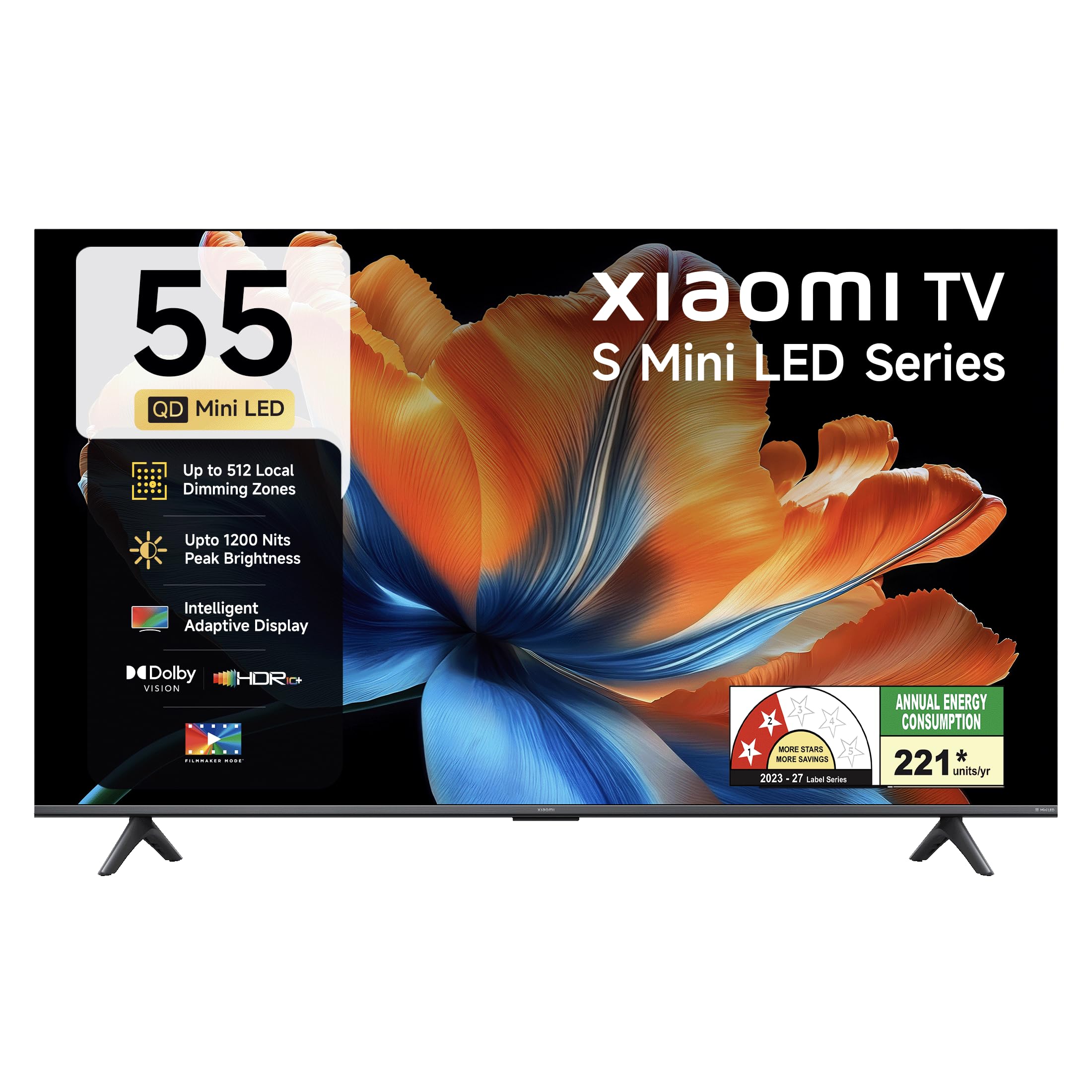
Ìomhaigh: Aghaidh view of the Xiaomi 55-inch 4K UHD Smart Quantum MagiQ S Mini LED Google TV, showcasing an dealbhadh bezel caol aige.
Stiùireadh rèiteachaidh
1. A’ fosgladh agus na pàirtean a tha air an toirt a-steach
Carefully remove all items from the packaging. Ensure all components listed below are present and undamaged.

Image: Contents of the product box, including the TV unit, remote control, user manual, two stand units, four screws, two AAA batteries, and a power cord.
- 1 Aonad Tbh LED
- 1 Smachd Iomallach
- 1 Leabhar-làimhe Cleachdaiche (an sgrìobhainn seo)
- 2 Aonad Seasamh
- 4 Screws for stand installation
- 2 bataraidh AAA (airson smachd iomallach)
- 1 Corda cumhachd
2. Stàladh Seasamh no Gèilleadh Balla
Your television supports both table-top stand installation and wall mounting. Choose the method suitable for your environment.
- Airson Stàladh Seasamh: Attach the two provided stand units to the bottom of the TV using the four screws. Ensure they are securely fastened.
- Airson stàladh balla: Use a compatible VESA wall mount (sold separately). Follow the instructions provided with your wall mount kit. Ensure the wall can support the TV's weight.
3. A 'ceangal innealan taobh a-muigh
Connect your external devices such as set-top boxes, gaming consoles, or audio systems to the TV's ports.

Ìomhaigh: Cùl view of the TV highlighting connectivity ports: Optical, Earphone, AV In, 3 HDMI ports (one with eARC), 2 USB 2.0 ports, Antenna, and Ethernet.
- Puirt HDMI (x3): Connect gaming consoles, Blu-ray players, or set-top boxes. One port supports eARC for enhanced audio return channel functionality.
- Puirt USB (x2): Ceangail innealan stòraidh USB airson ath-chluich meadhanan.
- Port Ethernet: Airson ceangal eadar-lìn uèirleas.
- Toradh optigeach: Airson ceangal ri siostaman claisneachd taobh a-muigh.
- A-steach AV: Airson innealan nas sine a cheangal le bhith a’ cleachdadh bhidio co-dhèanta agus claisneachd steiriò.
- Antena: Airson antenna talmhaidh no càball a cheangal.
4. A’ chiad chumhachd air agus an rèiteachadh
After connecting all necessary cables, plug the power cord into an electrical outlet. Press the power button on the remote control or the TV to turn it on. Follow the on-screen instructions for initial setup, which typically includes:
- Taghadh cànain
- Ceangal lìonra (Wi-Fi no Ethernet)
- Logadh a-steach cunntas Google
- Scanadh sianal
Operating Your Xiaomi Smart TV
1. Gnìomhan Smachd Iomallach
The included remote control provides access to all TV functions. Insert the two AAA batteries into the remote control, ensuring correct polarity.

Image: Xiaomi remote control, featuring dedicated quick access buttons for popular streaming services and Google Assistant voice control.
- Putan Cumhachd: Tionndaidh an telebhisean air no dheth.
- Putan Neach-cuideachaidh Google: Cuiridh e smachd gutha an gnìomh airson susbaint a lorg, innealan dachaigh snasail a smachdachadh, agus barrachd.
- Pad seòlaidh: Air a chleachdadh gus clàran-bìdh a sheòladh agus nithean a thaghadh.
- Meud suas/sìos: Ag atharrachadh an ìre fuaim.
- Sianal Suas/Sìos: Ag atharrachadh seanalan Tbh.
- Putanan Ruigsinneachd Luath: Dedicated buttons for Netflix, Prime Video, YouTube, Disney+ Hotstar, SonyLIV, and Live TV.
- Putan Mute: A’ cur stad air fuaim an telebhisean.
2. Google TV Interface and Applications
Your TV runs on the Android 14 OS with Google TV, offering a personalized content experience. Access a wide range of applications from the Google Play Store.

Image: The PatchWall interface, providing customized content recommendations and curation from various streaming platforms.
- Eadar-aghaidh cleachdaiche susbaint an toiseach: A’ cur susbaint bho na seirbheisean sruthadh agad uile ann an aon àite.
- Pro pearsantafiles: Cruthaich pro fa lethfiles airson molaidhean pearsantaichte.
- Aplacaidean le taic: Pre-installed and downloadable apps include Netflix, Prime Video, YouTube, Zee5, JioCinema, SonyLiv, and more.
- Neach-taic Google: Use voice commands for navigation, search, and smart home control.
3. Roghainnean Dealbh is Fuaim
Dèan an fheum as fheàrr agad viewing and listening experience through various picture and sound modes.
Roghainnean dealbhan:
- Modh neach-dèanamh fhilmichean: Disables post-processing effects to display content as intended by the director.
- Sealladh Dolby: Enhances HDR content with dynamic metadata for optimized image quality frame by frame.
- HDR10+: Uses dynamic data to enhance every frame, providing an immersive viewann an eòlas.
- Modh comhfhurtachd sùla: Reduces blue light and flicker for a more comfortable viewann an eòlas.
- Inneal MEMC: Motion Estimation, Motion Compensation technology for smoother motion in fast-paced scenes.
- AI Picture Optimization Engine: Advanced AI algorithms analyze content in real-time to enhance clarity, contrast, and color reproduction.

Image: Filmmaker Mode, designed to preserve original colors, contrast, and motion for an authentic cinematic experience.

Image: Dolby Vision technology, optimizing image quality with deeper blacks and brighter highlights.

Image: HDR10+ dynamic frame-by-frame tuning, ensuring consistent detail across dark and bright scenes.

Image: Eye Care Mode, providing flicker-free visuals with DC Dimming and reduced blue light for comfortable viewing.
Roghainnean Fuaim:
- Toradh 34 Watts: Powerful built-in box speakers.
- Fuaim Dolby: A’ lìbhrigeadh fuaim bheairteach, soilleir agus cumhachdach.
- DTS-X & DTS Brìgheil:X: A’ toirt seachad claisneachd ioma-thaobhach, inntinneach.
- Fuaim Xiaomi: Preset audio configurations developed for optimal sound quality.

Image: Xiaomi Sound, offering tailored audio experiences through expert-developed configurations.
4. Ceangal agus Sruthadh
Your TV offers versatile connectivity options for seamless streaming and device integration.
- Wi-Fi dà-chòmhlan: Connects to 2.4GHz and 5GHz wireless networks.
- Bluetooth: Connect wireless headphones, speakers, or other Bluetooth accessories.
- Google Cast Built-in: Stream content directly from compatible apps on your smartphone or tablet.
- Apple AirPlay 2: Sruth susbaint bho innealan Apple.
- Miracast: Mirror your Android device's screen wirelessly.

Image: Stream content from your phone using Google Cast or Apple AirPlay 2.
Cùram is cumail suas
Nì cùram ceart cinnteach gum mair an telebhisean agad fad-beatha agus gum bi e ag obair gu math.
- Glanadh sgrion: Sguab an sgrion gu socair le clò bog, gun lint. Airson comharran stòlda, cleachd fuasgladh glanaidh sònraichte airson sgrion air a chur air a’ chlò, chan ann gu dìreach air an sgrion.
- Glanadh bodhaig: Wipe the TV's frame and back panel with a soft, dry cloth. Avoid abrasive cleaners or solvents.
- Fionnarachadh: Dèan cinnteach gu bheil sruth-adhair iomchaidh timcheall air an telebhisean. Na cuir bacadh air fosglaidhean fionnarachaidh.
- Cumhachd dheth: Cuir dheth an telebhisean an-còmhnaidh agus tarraing a-mach am pluga bhon t-socaid cumhachd e mus glan thu e no mura tèid a chleachdadh airson ùine mhòr.
- Ùrachaidhean bathar-bog: Periodically check for and install software updates to ensure optimal performance and security.
Fuasgladh cheistean cumanta
Refer to this section for solutions to common operational problems.
| Trioblaid | Fuasgladh |
|---|---|
| Chan eil telebhisean a’ tionndadh air | Ensure the power cord is securely plugged into both the TV and a working electrical outlet. Check if the power outlet is active. Try pressing the power button on the TV itself. |
| Gun dealbh, ach tha fuaim ann | Check the input source. Ensure the connected device (e.g., set-top box) is turned on and functioning. Try a different HDMI cable or port. |
| Gun fhuaim, ach tha dealbh ann | Check the volume level and ensure the TV is not muted. Verify audio output settings (e.g., internal speakers, external sound system). Check audio cables for external devices. |
| Chan eil smachd iomallach a 'freagairt | Replace the AAA batteries in the remote control. Ensure there are no obstructions between the remote and the TV. Re-pair the Bluetooth remote if necessary (refer to TV settings). |
| Chan urrainn dhuinn ceangal a dhèanamh ri Wi-Fi | Ensure your Wi-Fi router is on and working. Re-enter the Wi-Fi password. Try restarting both the TV and the router. Check if other devices can connect to the Wi-Fi network. |
Sònrachaidhean Teicnigeach
Detailed specifications for the Xiaomi 55-inch 4K UHD Smart Quantum MagiQ S Mini LED Google TV (Model L55MC-IN).

Image: Physical dimensions and weight of the Xiaomi 55-inch TV, both with and without the stand.
| Feart | Sònrachadh |
|---|---|
| Modail Àireamh | L55MC-IN |
| Meud sgrion | 55 òirleach (138 cm) |
| Teicneòlas taisbeanadh | Mini LED |
| Fuasgladh | 4K Ultra HD (3840 x 2160) |
| Ìre Ath-nuadhachaidh | 60 Hz (DLG 120 Hz) |
| Soilleireachd as àirde | Suas ri 1200 Nits |
| Siostam-obrachaidh | Android 14 OS with Google TV |
| RAM | 2 GB |
| ROM (Stòradh a-staigh) | 32 GB |
| Toradh Fuaim | 34 watt |
| Teicneòlasan Fuaime | Dolby Audio, DTS-X, DTS Virtual:X |
| Ceangalachd | Dual Band Wi-Fi, Bluetooth, 3 HDMI (1 eARC), 2 USB, Optical, Ethernet, AV In |
| Sgrionadh Sgrion | Google Cast, Apple AirPlay 2, Miracast |
| Feartan sònraichte | Filmmaker Mode, MEMC, Eye Comfort Mode, AI Picture Optimization Engine |
| Meudan toraidh (D x W x H) | 31.2D x 31.2W x 76.9H Centimeters (with stand) |
| Item Weight Without Stand | 11.6 cileagram |
| Caitheamh cumhachd | 230 watt |
| Dùthaich Tùs | Na h-Innseachan |
Fiosrachadh Barantais
Your Xiaomi TV comes with a comprehensive warranty provided by the brand from the date of purchase.
- Barantas Coitcheann: 3-year comprehensive warranty for non-prebook customers (purchases between April 22nd - May 31st).
- Pre-book Customer Warranty: 4-year comprehensive warranty for pre-book customers (purchases between April 22nd - April 30th).
Warranty claims can be made using your Amazon invoice as proof of purchase. For detailed terms and conditions, please refer to the official Xiaomi warranty policy or contact customer support.
Taic Luchd-cleachdaidh
For any assistance, service requests, or queries regarding your Xiaomi TV, please contact Xiaomi customer support.

Ìomhaigh: Tharview of Xiaomi's customer support commitments, including quick installation, prompt call-backs, and swift doorstep solutions.
- Seirbheisean stàlaidh: New TV installations are typically completed within 3 hours of your appointment.
- Service Requests: Bi an dùil ri gairm air ais bhon sgioba taic taobh a-staigh 60 mionaid airson iarrtas seirbheis sam bith.
- Taic air an làrach: Experts aim to arrive at your home within 24 hours of your service request.
Please visit the official Xiaomi India weblàrach-lìn no thoir sùil air an fhiosrachadh conaltraidh a tha air a thoirt seachad ann am pasgan an toraidh agad airson na mion-fhiosrachadh taic as ùire.


