
1. Ro-ràdh
This manual provides essential information for setting up, operating, and maintaining your iFFALCON 50U95A 50-inch 4K QD-Mini LED Smart Google TV. Please read it thoroughly before using the product to ensure safe and optimal performance. Keep this manual for future reference.
The iFFALCON 50U95A combines advanced QD-Mini LED display technology with a 144Hz native refresh rate, HDR 1000nit peak brightness, and an ONKYO 2.1 Hi-Fi audio system to deliver an immersive viewing and listening experience. Powered by Google TV, it offers a wide range of smart features and content.
2. Fiosrachadh Sàbhailteachd Cudromach
Lean ceumannan sàbhailteachd bunaiteach an-còmhnaidh nuair a bhios tu a’ cleachdadh an telebhisean seo gus cunnart teine, clisgeadh dealain agus leòn a lùghdachadh.
- Na nochd an telebhisean gu uisge no taiseachd.
- Na fosgail a’ chaibineat; thoir aire do luchd-obrach teisteanasach airson a h-uile seirbheiseachadh.
- Ensure proper ventilation and do not block ventilation openings.
- Use only the power adapter and cable supplied with the unit.
- Position the TV on a stable, level surface to prevent it from falling.
- Cùm an telebhisean air falbh bho sholas dìreach na grèine, stòran teas, agus teòthachd anabarrach.
- Thoir a-mach am pluga bhon telebhisean rè stoirmean dealanaich no nuair nach tèid a chleachdadh airson ùine mhòr.
3. Dè tha air a ghabhail a-steach
Dèan cinnteach gu bheil a h-uile pàirt anns a’ phacaid:
- iFFALCON 50U95A 50-inch 4K QD-Mini LED Smart Google TV
- Adapter cumhachd
- Càball cumhachd
- Smachd Iomallach
- Seasamh Tbh (2 phìos)
- Leabhar-làimhe cleachdaiche (an sgrìobhainn seo)

Ìomhaigh: Aghaidh view of the iFFALCON 50U95A 50-inch TV. This image shows the television from the front, highlighting its slim bezels and stand.
4. Suidhich
4.1 A 'ceangal an Stand
- Cuir an telebhisean gu faiceallach le aghaidh sìos air uachdar bog, còmhnard gus casg a chur air milleadh air an sgrion.
- Cuir pìosan an t-seasamh còmhla ris na tuill sgriubha aig bonn an telebhisean.
- Daingnich na standan leis na sgriothan a tha air an toirt seachad. Dèan cinnteach gu bheil iad ceangailte gu daingeann.

Ìomhaigh: Taobh view of the iFFALCON 50U95A TV with stand. This image illustrates the television's profile and how the stand supports it.
4.2 Ceangal iomaill
The TV features multiple connectivity options:
- Puirt HDMI (x4): Connect Blu-ray players, gaming consoles, and other HDMI-enabled devices.
- Port USB (x1): Ceangail innealan stòraidh USB airson ath-chluich meadhanan.
- Wi-Fi & Bluetooth: Airson ceanglaichean lìonra gun uèir agus goireasan.
Ìomhaigh: Cùl view of the iFFALCON 50U95A TV showing ports. This image displays the back panel of the television, indicating the location of various input and output ports.
4.3 A’ cur cumhachd air adhart
- Ceangail an càball cumhachd ris an telebhisean agus an uair sin ri socaid cumhachd.
- Brùth am putan cumhachd air an smachd iomallach no air an telebhisean fhèin.
- Lean an stiùireadh air an sgrion airson an stèidheachaidh tùsail, a’ gabhail a-steach ceangal lìonra agus logadh a-steach cunntas Google TV.
5. Stiùireadh Obrachaidh
5.1 Gnìomhan Smachd Iomallach
The remote control allows you to navigate the TV's interface, adjust settings, and access smart features. Refer to the remote control diagram in the separate quick start guide for button layout.
5.2 Eadar-aghaidh Google TV
Your iFFALCON TV runs on Google TV, providing a personalized experience with content recommendations, access to streaming apps, and Google Assistant voice control.
- Sgrion Dachaigh: Access your favorite apps, movies, and shows.
- Neach-taic Google: Brùth air a’ phutan Google Assistant air an inneal iomallach agad gus òrdughan gutha a chleachdadh airson susbaint a lorg, innealan dachaigh snasail a smachdachadh, agus barrachd.
- Aplacaidean: Luchdaich sìos is stiùirich aplacaidean bhon Google Play Store.
5.3 Roghainnean Dealbh is Fuaime
Faigh cothrom air clàr-taice nan roghainnean gus do ghnàthachadh vieweòlas èisteachd is èisteachd:
- Modhan dealbh: Choose from various presets (e.g., Standard, Vivid, Movie, Game) or customize brightness, contrast, color, and sharpness.
- Modhan fuaim: Select audio presets (e.g., Standard, Music, Movie) or adjust equalizer settings.
- Roghainnean HDR: The TV supports HDR10, HDR10+, Dolby Vision, and HLG. Ensure your content source is HDR compatible for optimal performance.
- Maighstir a’ Gheama: Activate Game Master mode for reduced input lag and optimized gaming performance.
6. Prìomh fheartan
6.1 QD-Mini LED Display Technology
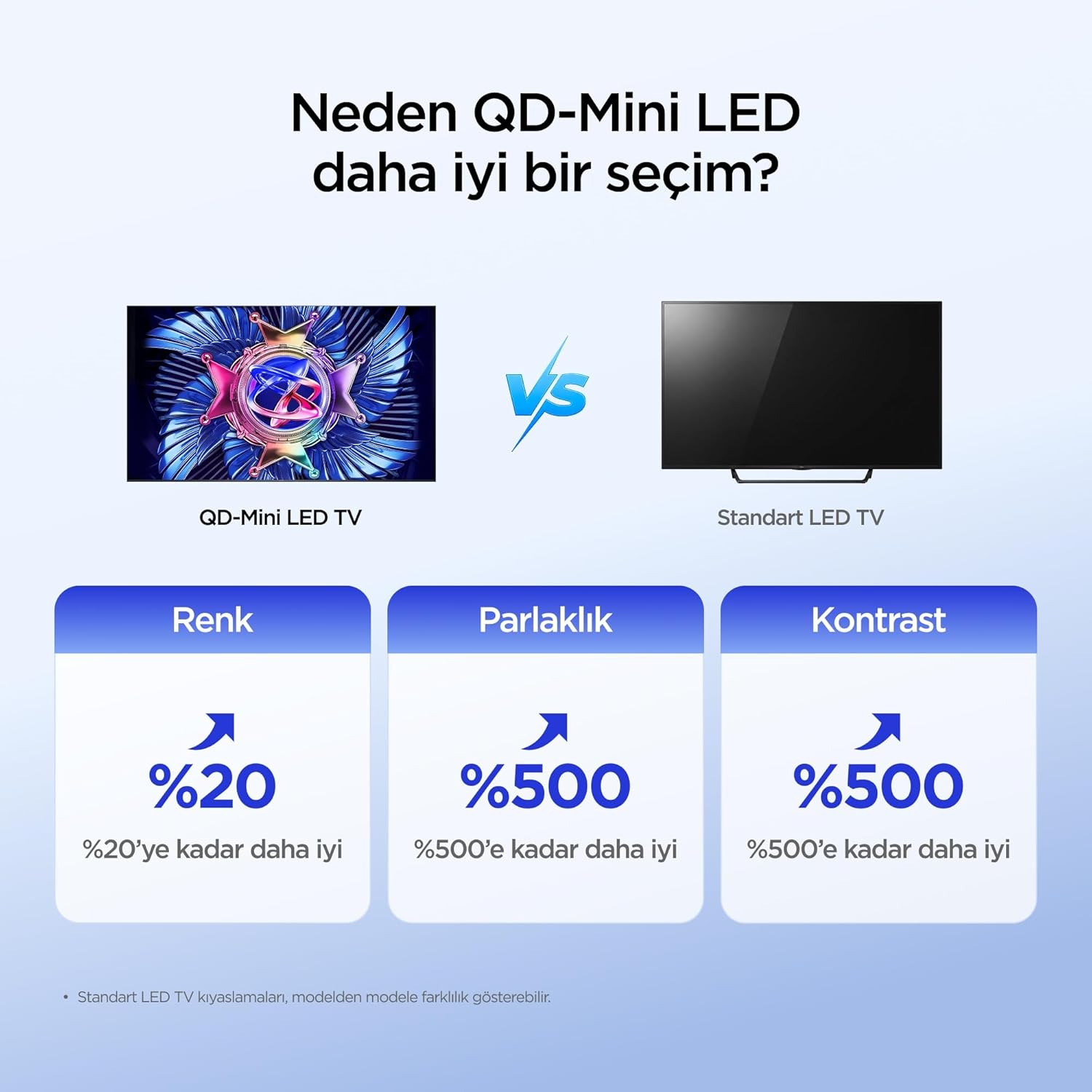
The iFFALCON 50U95A utilizes QD-Mini LED technology, combining Quantum Dot color with Mini LED backlighting. This results in superior brightness, contrast, and color accuracy compared to traditional LED TVs.

Image: Comparison illustrating the benefits of QD-Mini LED over standard LED TVs in terms of color, brightness, and contrast.
With over 500 local dimming zones, the TV provides precise light control at a pixel level, enhancing detail in both bright and dark scenes. It achieves a peak brightness of 1000 nits, ensuring vibrant images even in well-lit environments.

Image: A vibrant image demonstrating the 1000 nits peak brightness capability of the TV.
6.2 144Hz Native Refresh Rate
Experience smoother motion and clearer images with the 144Hz native refresh rate. This is particularly beneficial for fast-paced action movies and gaming, reducing motion blur and ghosting.

Image: A dynamic image of a race car, illustrating the smooth motion provided by the 144Hz native refresh rate.
6.3 ONKYO 2.1 Hi-Fi Audio System with Dolby Atmos
The integrated ONKYO 2.1 channel speaker system delivers rich, immersive stereo sound with deep bass. Combined with Dolby Atmos, it creates a cinematic audio experience, bringing sound to life with incredible clarity and depth.

Image: A living room scene depicting sound waves emanating from the TV, illustrating the immersive audio experience of the 2.1 speaker system.
6.4 AI PQ Pro Processor
The AI PQ Pro Processor intelligently analyzes and optimizes content pixel by pixel. This advanced processor enhances picture quality, delivering sharper details, improved contrast, and more vibrant colors for an overall superior viewann an eòlas.

Image: A visual representation of the AI PQ Pro Processor chip, highlighting its role in optimizing image quality.
6.5 Matte HVA Panel & Ultra Slim Design
The Matte HVA Panel reduces glare and reflections, providing a comfortable viewing experience even in bright rooms. Its ultra-slim design allows for seamless integration into any living space, whether on a stand or wall-mounted.

Image: A comparison showing the reduced reflections and improved viewing experience of a Matte HVA Panel compared to a standard panel.

Image: A visual representation of the TV's ultra-slim design, highlighting its sleek profile.
7. Cumail suas
7.1 Glanadh na Sgrion
- Cuir dheth an telebhisean agus dì-phlugaich an càball cumhachd.
- Sguab an scrion gu socair le clò bog gun lint.
- Airson comharran stòlda, cuir beagan uisge orra.ampnigh an clò le uisge no le inneal-glanaidh sgrion sònraichte (na spraeadh gu dìreach air an sgrion).
- Seachain ceimigean cruaidh, stuthan sgrìobach, no innealan-glanaidh stèidhichte air deoch làidir a chleachdadh.
7.2 Glanadh a’ Chaibineit
- Sguab an caibineat le clò bog, tioram.
- Do not use liquid or aerosol cleaners directly on the cabinet.
8. A ’dèanamh trioblaid
| Trioblaid | Adhbhar a dh’fhaodadh a bhith ann | Fuasgladh |
|---|---|---|
| Gun chumhachd | Corda cumhachd gun cheangal; socaid cumhachd gun obair. | Dèan cinnteach gu bheil an càball cumhachd ceangailte gu tèarainte. Dèan deuchainn air an t-socaid le inneal eile. |
| Gun dealbh, ach tha fuaim ann | Incorrect input source selected; backlight off. | Brùth am putan “Input” air an smachd iomallach gus an stòr ceart a thaghadh. Thoir sùil air roghainnean an deilbh. |
| Gun fhuaim, ach tha dealbh ann | Volume muted or too low; incorrect audio output selected. | Unmute volume or increase level. Check audio output settings (e.g., TV speakers, external soundbar). |
| Chan eil smachd iomallach ag obair | Tha bataraidhean marbh no air an cur a-steach gu ceàrr; bacadh eadar an inneal-smachd agus an telebhisean. | Cuir bataraidhean ùra nan àite. Dèan cinnteach gu bheil loidhne-sheallaidh shoilleir agad gu glacadair IR an Tbh. |
| Duilgheadasan le ceangal Wi-Fi | Facal-faire ceàrr; cùisean leis an router; Tbh ro fhada bhon router. | Cuir a-steach facal-faire Wi-Fi a-rithist. Ath-thòisich an router. Gluais an telebhisean nas fhaisge air an router no cleachd leudaiche Wi-Fi. |
If the problem persists after trying these solutions, please contact iFFALCON customer support.
9. Sònrachaidhean
| Feart | Mion-fhiosrachadh |
|---|---|
| Modail | 50U95A |
| Meud sgrion | 50 òirlich |
| Teicneòlas taisbeanadh | QD-Mini LED |
| Fuasgladh | 4K (3840 x 2160) |
| Ìre Ath-nuadhachaidh | 144 Hz (Dùthchasach) |
| Soilleireachd as àirde | 1000 not |
| Taic HDR | HDR10, HDR10+, Dolby Vision, HLG |
| Siostam claisneachd | ONKYO 2.1 Channel Speakers, Dolby Atmos, DTS Virtual:X |
| Siostam-obrachaidh | Tbh Google |
| Pròiseasar | AI PQ Pro Processor |
| Ceangalachd | 4x HDMI, 1x USB, Wi-Fi, Bluetooth |
| Meudan (D x W x H) | 6.9D x 111.1L x 64.6À cm |
| Cuideam | 13 kg |
10. Barantas agus Taic
Your iFFALCON 50U95A TV comes with a Barantas an neach-dèanamh 2-bliadhna. This warranty covers defects in materials and workmanship under normal use. For warranty claims or technical support, please contact iFFALCON customer service through their official weblàrach-lìn no am fiosrachadh conaltraidh a tha air a thoirt seachad ann an sgrìobhainnean an toraidh agad.
For the latest support information, FAQs, and software updates, visit the official iFFALCON support weblàrach: www.iffalcon.com