
1. Ro-ràdh
The aosu T2 Pro is an advanced wireless outdoor security camera featuring innovative dual-lens technology for comprehensive home surveillance. It combines a fixed wide-angle lens with a pan-tilt-zoom (PTZ) camera to eliminate blind spots and provide multi-directional coverage. Designed for ease of use and robust performance, this solar-powered camera offers 3K resolution, full-color night vision, AI human and vehicle tracking, and flexible local storage options without requiring a subscription.
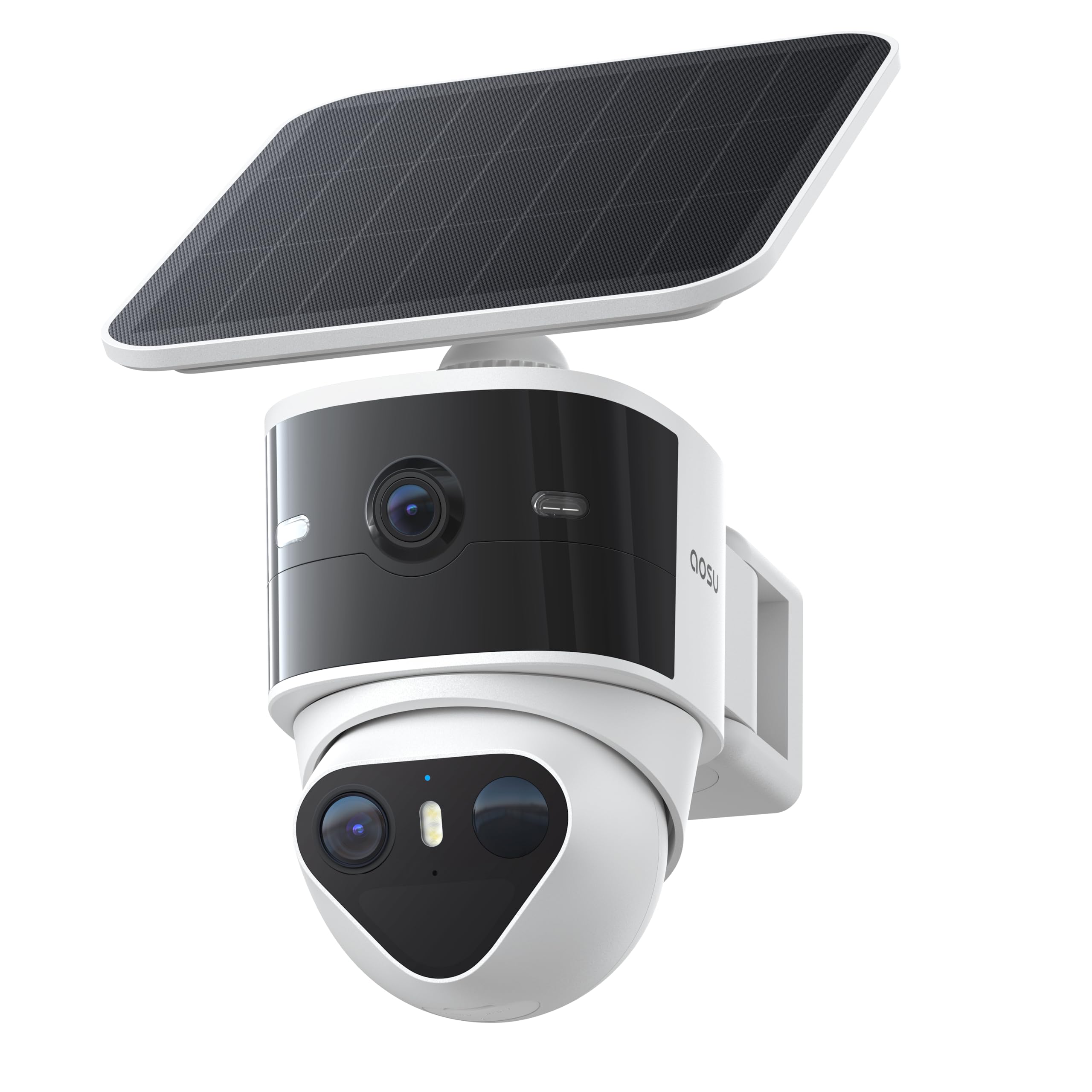
Image: The aosu T2 Pro camera unit, featuring its dual lenses and integrated solar panel, mounted on a wall bracket.
2. Dè tha sa bhogsa
Dèan cinnteach gu bheil a h-uile nì an làthair mus lean thu air adhart leis an stàladh:
- Camara tèarainteachd grèine
- Bracaid sreap
- Càball cosgais
- Sgriothan leudachaidh
- Stiogairean suidheachadh
3. Suidhich
The aosu T2 Pro is designed for a simple 3-step wireless installation. Follow these instructions for optimal setup:
3.1 Stàladh Corporra
- Tagh àite: Tagh àite a-muigh a bheir seachad solas soilleir view of the desired monitoring area and receives adequate sunlight for the solar panel. The camera is IP65 weatherproof, suitable for various conditions.
- Sreap a' Bhràic: Use the provided positioning stickers to mark drill holes. Secure the mounting bracket to the wall using the expansion screws.
- Ceangail an Camara: Slide the aosu T2 Pro camera onto the mounted bracket until it locks securely. Adjust the angle of the solar panel to maximize sun exposure.

Image: The aosu T2 Pro camera mounted on a wall, with its solar panel positioned to capture sunlight.
3.2 Suidheachadh Aplacaid
- Download the aosu App: Lorg airson "aosu" in your smartphone's app store (iOS or Android) and download the application.
- Cruthaich cunntas: Fosgail an aplacaid agus lean an stiùireadh air an sgrion gus cunntas cleachdaiche ùr a chruthachadh.
- Cuir inneal ris: In the app, select the option to add a new device. Scan the QR code located on your aosu T2 Pro camera.
- Ceangail ri Wi-Fi: Follow the app prompts to connect your camera to your home's 2.4GHz Wi-Fi network.
Video: aosu T2 Pro Solar Security Cameras Installation Guide. This video demonstrates the step-by-step process of physically installing the camera and connecting it to the aosu mobile application.
4. Stiùireadh Obrachaidh
The aosu T2 Pro offers a range of features for effective surveillance and home security.
4.1 Dual Cam Technology
The camera features a dual-lens system: a 170-degree fixed wide-angle lens and a 360-degree pan-tilt-zoom (PTZ) camera. This provides comprehensive coverage without blind spots.
- Ceàrn farsaing View: A’ toirt seachad farsaingeachdview de d' mhaoin.
- PTZ Tracking: Automatically zooms in and tracks movement detected by the wide-angle lens, ensuring the entire event is captured.
- Lock-Capture System: On-device AI detects people and vehicles, then the PTZ camera tracks their movement, capturing the full story in one continuous clip.

Ìomhaigh: Dealbh-adhair view illustrating the 170-degree wide-angle view and 360-degree PTZ tracking coverage provided by the aosu T2 Pro camera.
4.2 Video Quality & Night Vision
Both lenses capture video in crisp 3K resolution, allowing for clear identification of details.
- Dual 3K UHD: Delivers ultra-clear details and supports up to 8x hybrid zoom.
- Sealladh Oidhche làn-dhathte: Enhanced IR-assisted technology ensures consistent clarity and color even in low-light conditions.

Image: A close-up of the aosu T2 Pro's dual lenses, highlighting its 3K UHD video capabilities.
4.3 Audio & Alerts
The camera includes features for active deterrence and communication.
- Còmhradh Dà-shligheach: Communicate with visitors or deter intruders directly through the camera.
- Siren & Lights: Trigger a siren and spotlights in response to detected activity.
- Rabhaidhean gnàthaichte: Set fence lines, driveway zones, and loitering alerts to receive real-time notifications.
4.4 AI Detection
On-device AI differentiates between people and vehicles, reducing false alarms and providing more accurate alerts.
- Human & Vehicle Tracking: Focuses on relevant movements.
- Lùghdachadh air rabhaidhean meallta: Filters out insignificant motion like leaves or insects.
4.5 Smachd App
Manage your camera and view footage through the intuitive aosu app.
- Beò View: Faigh cothrom air biadh ann an àm fìortage from both cameras.
- Event Recordings: Review recorded events triggered by motion.
- Remote PTZ Control: Manually control the PTZ camera's direction and zoom.
- Ath-chluich Smart: Gu dìreach view important clips on a timeline for a daily overview.
- Roinn Teaghlaich: Grant role-based access to family and friends.
5. Riaghladh Cumhachd
The aosu T2 Pro is designed for continuous operation with its solar charging capabilities.
- Solar cumhachd: A high-efficiency solar panel keeps the 9,200mAh battery charged, providing year-round security.
- 24/7 Coverage: The combination of battery and solar power ensures continuous operation even during overcast days or power outagtha.
- Flexible Solar Panel Mounting: The detachable solar panel allows for optimal positioning to maximize sunlight exposure.
Image: A visual representation of the solar panel efficiently charging the camera under sunlight, ensuring continuous power.
6. Stòradh
Do mhactage is securely stored with flexible options.
- Stòradh Ionadail: Supports microSD card storage up to 256GB (card not included) for secure recording and playback without a subscription.
- Stòradh Cloud: Optional cloud storage is available via in-app purchase for automatic backup and easy sharing.

Image: A close-up of the camera's microSD card slot, indicating support for local storage up to 256GB.
7. Cumail suas
To ensure optimal performance and longevity of your aosu T2 Pro camera, regular maintenance is recommended:
- Clean Lenses and Solar Panel: Glan lionsan a’ chamara agus am pannal grèine bho àm gu àm le clò bog, tioram.amp cloth to remove dust, dirt, or debris that may obstruct vision or reduce charging efficiency.
- Thoir sùil air stàladh: Ensure the mounting bracket remains secure and the camera is firmly attached, especially after severe weather conditions.
- Cum sùil air inbhe bataraidh: Regularly check the battery level via the aosu app to ensure consistent charging and performance.
- Ùrachaidhean firmware: Keep the camera's firmware updated through the aosu app to benefit from the latest features, security enhancements, and bug fixes.
8. A ’dèanamh trioblaid
If you encounter issues with your aosu T2 Pro camera, try the following steps:
- Gun chumhachd: Ensure the solar panel is clean and receiving direct sunlight. Check the battery level in the app. If necessary, charge the camera directly using the USB-C charging cable.
- Gun cheangal Wi-Fi: Verify your Wi-Fi network is 2.4GHz. Ensure the camera is within range of your router. Restart your router and the camera.
- Càileachd bhidio truagh: Check your Wi-Fi signal strength. Clean the camera lenses. Ensure there are no obstructions in the camera's field of view.
- Cùisean lorg gluasad: Adjust detection sensitivity settings in the app. Ensure detection zones are correctly configured.
- App nach eil a’ freagairt: Close and reopen the aosu app. Ensure your smartphone's operating system is up to date.
9. Sònrachaidhean
| Feart | Mion-fhiosrachadh |
|---|---|
| Brand | aosu |
| Ainm Modail | Aosu Security Camera T2 Pro |
| Teicneòlas ceangail | Bluetooth, Ethernet, Wireless, QR Code Scan |
| Feartan sònraichte | Blindspot Eliminated, Coordinated Defense, Dual 3K Cam Fusion, Lock-Capture System, Color Night Vision, 2-Way Audio |
| Cleachdadh a-staigh / a-muigh | A-muigh |
| Innealan co-fhreagarrach | Android, iOS, Amazon Alexa, Neach-taic Google |
| Seòrsa Mount | Srath balla |
| Dath | Geal |
| Seòrsa stàlaidh | Air a chuir suas le balla |
| Cruth | Domhsa |
| Seòrsa rabhaidh | Fuaim agus Gluasad |
| Fuasgladh fhathast èifeachdach | 5 BP |
| Fuasgladh glacadh bhidio | 3K |
| Ìre frèam | 15 frèamaichean gach dàrna |
| Raon Lèirsinn Oidhche | 10 Meatair |
| Sealladh na h-oidhche | Dath na h-oidhche |
| Meudan nì | 6 x 7 x 2.5 òirleach |
| Stòr cumhachd | Solar cumhachd, cumhachd bataraidh |
| Viewann an Ceàrn | 360 ceum |
| Zoom Optical | 8 x |
| Cuimhne Flash le taic Meud as àirde | 256 GB |
10. Barantas agus Taic
For warranty information and customer support, please refer to the official aosu website or contact their customer service directly. The brand is known for its solid customer service and commitment to product reliability.


