
1. Ro-ràdh
This manual provides essential instructions for the installation, operation, and maintenance of your aosu WirelessCam Lite 4-Cam Kit security camera system. Please read this guide thoroughly before using the product to ensure proper functionality and safety.
The aosu WirelessCam Lite system offers comprehensive indoor and outdoor surveillance with 2K resolution, 6X digital zoom, AI human detection, and local storage via the aosuBase. Its wire-free design allows for flexible placement and easy setup.
2. Dè tha sa bhogsa
Dèan cinnteach gu bheil na pàirtean uile an làthair sa phacaid agad:
- aosu WirelessCam Lite Cameras (4 units)
- aosuBase Station
- A 'stàladh sgriothan agus acraichean
- Càball cosgais
- Càball Ethernet
- Power Adapter for aosuBase
- Leabhar-stiùiridh (an sgrìobhainn seo)
3. Toradh thallview
3.1 aosu WirelessCam Lite Camera
The aosu WirelessCam Lite is a compact, battery-powered camera designed for versatile indoor and outdoor use. It features 2K QHD resolution, a wide-angle lens, PIR motion sensor, AI human detection, and color night vision capabilities.
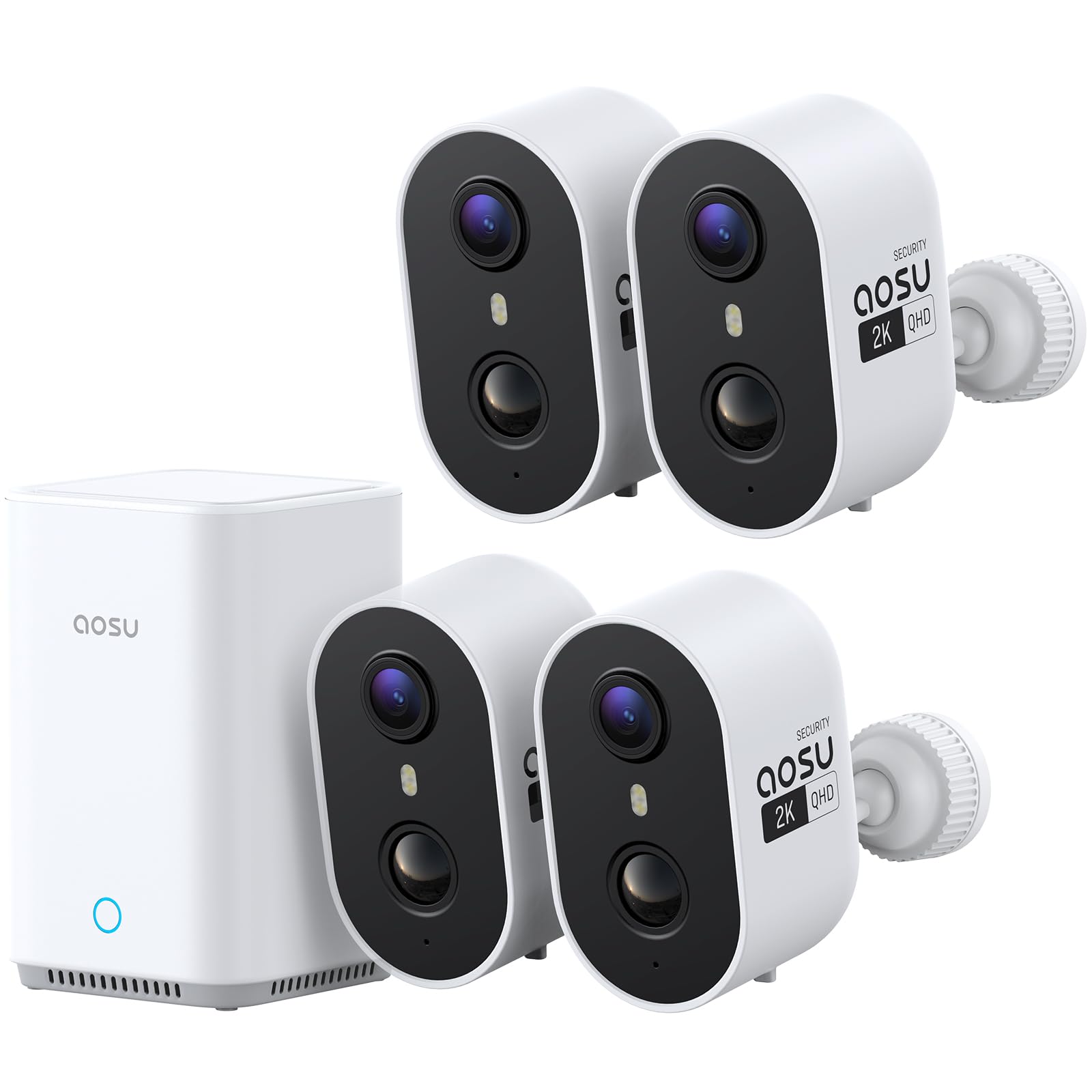
Image: The aosu WirelessCam Lite camera, a compact white unit with two lenses on the front.
3.2 aosuBase Station
The aosuBase serves as the central hub for your security system. It provides local storage for recordings (expandable up to 1TB via microSD card, sold separately), enhances camera connectivity, and manages system settings. It also helps optimize camera battery life.

Image: An aosu WirelessCam Lite camera next to the aosuBase station, illustrating the complete system.
3.3 Prìomh fheartan
- Rùn 2K QHD: Glac foo bhidio soilleir agus mionaideachtage.
- Sùm didseatach 6X: Zoom in on important details within the video feed.
- 100% gun uèir: Battery-powered cameras for flexible placement without power cables.
- Cleachdadh a-staigh / a-muigh: Tha an ìre dìon-sìde IP65 a’ dèanamh cinnteach à seasmhachd ann an diofar shuidheachaidhean.
- PIR + AI Human Detection: Reduces false alerts by focusing on human movement.
- Sealladh oidhche dath: Provides vivid, full-color video even in low-light conditions.
- aosuBase Local Storage: Built-in 32GB storage, expandable up to 1TB via microSD card (not included), with no subscription fees.
- Fuaim dà-shligheach: Communicate directly through the camera.
- Multi-Cam Live-View: Monitor up to 4 cameras simultaneously via the aosu app.
- Camera-to-Camera Tracking: Groups events from the same person across multiple cameras into a single timeline.
4. Stiùirich rèiteachaidh
4.1 Charging the Cameras
Before initial use, fully charge all aosu WirelessCam Lite cameras using the provided charging cable and a standard USB power adapter (not included). A full charge can provide up to 120 days of battery life, depending on usage and settings.
4.2 aosu App Installation
- Download the 'aosu' app from the Apple App Store or Google Play Store.
- Cruthaich cunntas no log a-steach ma tha fear agad mu thràth.
4.3 aosuBase Setup
- Connect the aosuBase to a power outlet using the provided power adapter.
- Connect the aosuBase to your home router using the provided Ethernet cable.
- Open the aosu app, tap the '+' icon, and follow the on-screen instructions to add the aosuBase.
4.4 Camera Pairing and Installation
- In the aosu app, after setting up the aosuBase, select to add a new camera.
- Follow the app's instructions to pair each camera with the aosuBase.
- Tagh àite stàlaidh: Select a location that provides optimal coverage and a clear view of the area you wish to monitor. Consider areas like front doors, garages, or backyards. The cameras are suitable for both indoor and outdoor environments.
- Stàlaich an camara: Use the provided mounting screws and anchors to securely attach the camera to a wall or ceiling. The magnetic base allows for easy adjustment of the camera angle.

Image: A smartphone screen displaying a successful one-step connection, indicating the ease of setup.

Image: Two images showing the aosu camera, one placed on an indoor shelf and another mounted on an outdoor wall, demonstrating flexible placement.
5. Stiùireadh Obrachaidh
5.1 Beò View
Open the aosu app to access the live feed from your cameras. You can view up to four cameras simultaneously for comprehensive monitoring.

Image: A smartphone held in hands, showing a split screen with live feeds from four different aosu cameras, providing a multi-camera view.
5.2 Clàradh agus Ath-chluich
The system automatically records events triggered by motion detection. Recordings are stored locally on the aosuBase. You can review foo air a chlàradhtage through the app, which features a timeline for easy navigation and a camera-to-camera tracking function to follow individuals across different camera views.

Ìomhaigh: Dealbh-adhair view of a house and yard with arrows indicating a person being tracked across multiple camera zones, demonstrating the camera-to-camera tracking feature.
5.3 Rabhaidhean agus Fiosan
The PIR sensor and AI human detection work together to provide accurate alerts, minimizing false alarms. You will receive notifications on your smartphone when significant activity is detected. The system can also trigger a siren and spotlight to deter intruders.

Image: A delivery person walking towards a house, with a white bracket highlighting them, indicating the camera's AI human detection feature.

Image: A security camera mounted above a garage, emitting light and a warning message on a phone, showing its ability to deter intruders with an alarm and spotlight.
5.4 Fuaim Dà-shligheach
Utilize the two-way audio feature through the aosu app to speak with visitors or deter unwanted guests directly from your smartphone.

Image: A person inside a house talking through a voice changer to a child playing in the yard, demonstrating the two-way audio feature.
5.5 Sealladh na h-Oidhche
The cameras are equipped with full color night vision, providing clear and detailed images even in very low light conditions. This allows for better identification of objects and individuals compared to traditional infrared night vision.

Image: A split image comparing advanced 2K full color night vision on the left with traditional infrared night vision on the right, showing the superior detail and color in the advanced mode.
5.6 Amalachadh Dachaigh Ghlic
The aosu WirelessCam Lite system is compatible with smart home platforms like Alexa, allowing for voice control and integration into your existing smart home ecosystem.

Image: A woman in a kitchen interacting with a smart display, which shows a camera feed, illustrating smart home integration with Alexa.
6. Cumail suas
6.1 Glanadh
Regularly clean the camera lens with a soft, dry cloth to ensure optimal image clarity. Avoid using harsh chemicals or abrasive materials.
6.2 Riaghladh Bataraidh
Monitor the battery levels of your cameras via the aosu app. Recharge cameras promptly when battery levels are low to ensure continuous protection. The aosuBase helps extend camera battery life.

Image: A graphic showing an aosu camera and the aosuBase, with a large '30% Longer Battery Life' text, indicating the energy-saving benefits of connecting to the aosuBase.
6.3 Ùrachaidhean Firmware
Keep your camera and aosuBase firmware updated through the aosu app to benefit from the latest features and security enhancements.
7. A ’dèanamh trioblaid
| Trioblaid | Adhbhar a dh’fhaodadh a bhith ann | Fuasgladh |
|---|---|---|
| Camera not connecting to aosuBase | Out of range, low battery, network issue | Move camera closer to aosuBase, recharge battery, check aosuBase network connection. |
| Rabhaidhean meallta tric | Sensitivity too high, environmental factors | Adjust motion detection sensitivity in the app, ensure camera is not pointed at moving foliage or busy streets. |
| Deagh chàileachd bhidio | Dirty lens, weak Wi-Fi signal | Clean the camera lens, ensure strong Wi-Fi signal between camera and aosuBase. |
| Gun chlàradh | SD card full/missing, motion detection off | Insert/replace microSD card in aosuBase, enable motion detection in app settings. |
8. Sònrachaidhean
| Feart | Mion-fhiosrachadh |
|---|---|
| Brand | aosu |
| Ainm Modail | aosu WirelessCam Lite |
| Teicneòlas ceangail | Wireless (Bluetooth, Ethernet, Wi-Fi) |
| Cleachdadh a-staigh / a-muigh | A-staigh, a-muigh |
| Fuasgladh glacadh bhidio | 2K (Rùn èifeachdach 3 MP) |
| Zoom Optical | 6x (Digital Zoom) |
| Feartan sònraichte | Built-in 32GB Local Recording, Camera-to-Camera Track & Sync, Multi-Cam Live-View, Night Vision, True 2K QHD Resolution |
| Sealladh na h-oidhche | Color Night Vision (26 Feet Range) |
| Ìre dìon-uisge | IP65 |
| Stòr cumhachd | Cumhachd bataraidh (5 volts) |
| Seòrsa Rianadair | aosu App |
| Innealan co-fhreagarrach | Alexa |
| Meud cuimhne Flash air a stàladh | 32 GB (aosuBase) |
| Ìre frèam | 15 frèamaichean gach dàrna |
9. Barantas agus Taic
Your aosu WirelessCam Lite 4-Cam Kit is covered by a manufacturer's warranty. For detailed warranty information, please refer to the warranty card included in your product packaging or visit the official aosu weblàrach.
For technical support, troubleshooting assistance, or any product-related inquiries, please contact aosu customer service through the contact information provided on the official aosu website or within the aosu app.
Bhidio Oifigeil Bathar:
Bhidio: Taisbeanadh bhidio toraidh oifigeilasing the features and benefits of the aosu WirelessCam Lite security camera system, including its 2K resolution, local storage, and easy installation.