
1. Ro-ràdh
Thank you for choosing the ACEMAGIC M5 Mini PC. This manual provides essential information for setting up, operating, and maintaining your device. Please read it carefully to ensure optimal performance and longevity of your Mini PC.
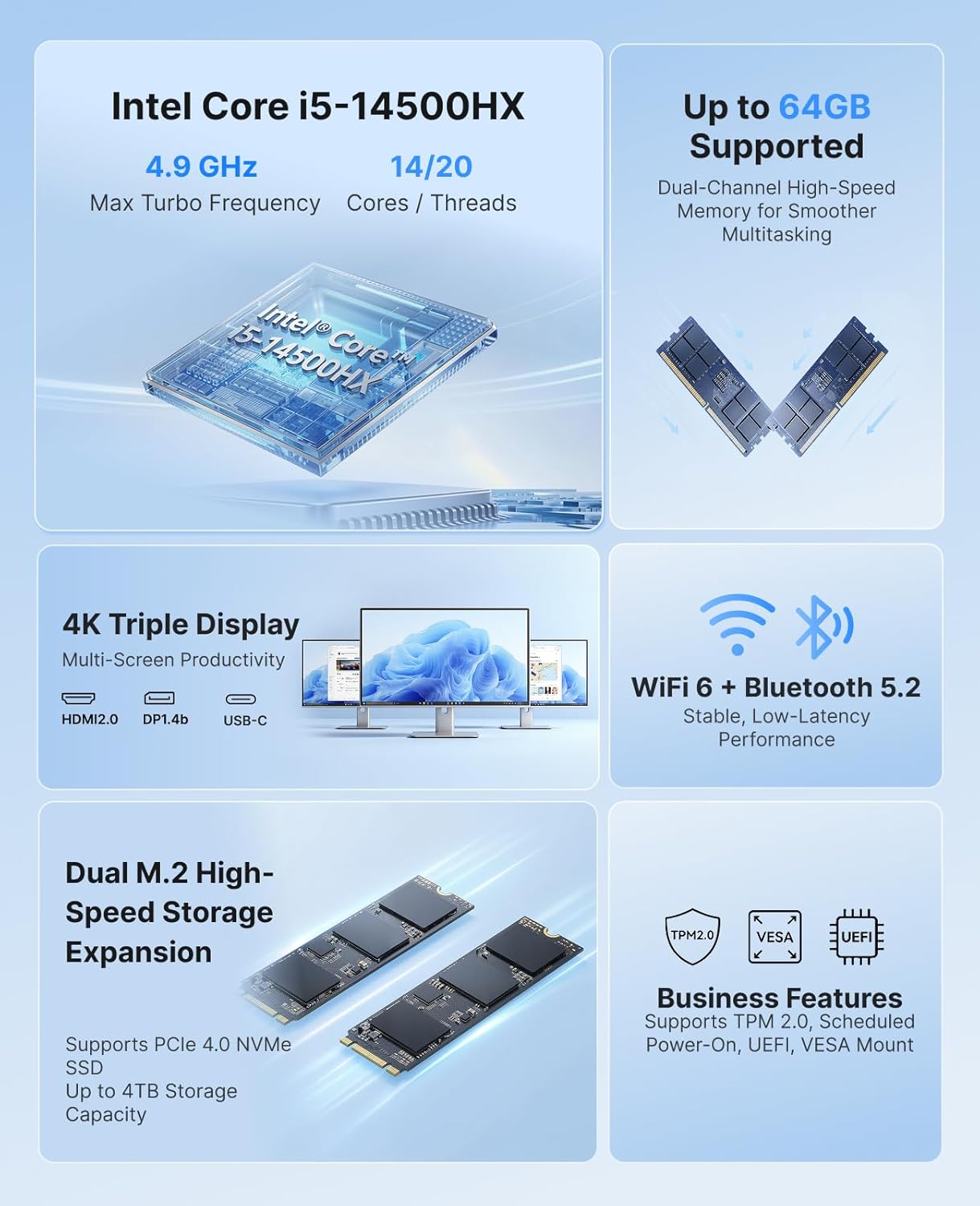
The ACEMAGIC M5 is a compact and powerful computing solution, featuring an Intel Core i5-14500HX processor, 32GB DDR4 RAM, and a 1TB NVMe PCIe4.0 SSD. It comes pre-installed with Windows 11 Pro and supports triple 4K display output, making it suitable for various applications from office work to multimedia entertainment.
2. Dè tha sa bhogsa
Thoir sùil air susbaint a’ phacaid agad. Ma tha rud sam bith a dhìth no millte, cuir fios gu taic luchd-cleachdaidh.
- 1 x ACEMAGIC M5 Mini PC
- 1 x Adaptor Cumhachd
- 1 x càball HDMI
- 1 x VESA Mount & Screws
- 1 x Leabhar-làimhe Cleachdaiche

Image: Contents of the ACEMAGIC M5 Mini PC package, including the Mini PC unit, power adapter, HDMI cable, VESA mount, and user manual.
3. Toradh thallview
The ACEMAGIC M5 Mini PC is designed for high performance in a compact form factor. Below is an overview of its key features and connectivity options.

Ìomhaigh: Tharview of the ACEMAGIC M5 Mini PC highlighting its Intel Core i5-14500HX processor, up to 64GB RAM support, dual M.2 high-speed storage expansion, 4K triple display, WiFi 6 + Bluetooth 5.2, and business features like TPM 2.0 and VESA mount.
3.1 Front and Side Ports
Ìomhaigh: Dlùth-shealladh view of the ACEMAGIC M5 Mini PC showing the front and side ports. The front includes a power button, USB 3.2 Gen 2 Type-A ports, and a 3.5mm audio jack. The sides feature ventilation grilles.
- Putan Cumhachd: Gus cumhachd a thoirt air / dheth an inneal.
- Puirt USB 3.2 Gen 2 Seòrsa-A (x2): For connecting peripherals like keyboards, mice, or external drives.
- Jack claisneachd 3.5mm: Airson fònaichean-cluaise no luchd-labhairt.
- Grillaichean fionnarachaidh: A’ dèanamh cinnteach à sruth-adhair ceart airson fuarachadh
3.2 Puirt Chùil

Image: A diagram illustrating the rear ports of the ACEMAGIC M5 Mini PC. It shows multiple USB ports, HDMI, DisplayPort, LAN, and DC power input.
- Port Seòrsa-C (x1): 10Gbps data transfer, DP1.4 4K@60Hz video output, and 15W PD output.
- Puirt USB 3.2 Gen 2 Seòrsa-A (x4): High-speed connectivity for various USB devices.
- RJ45 Gigabit Ethernet Port (x1): Airson ceangal lìonra uèirleas.
- HDMI 2.0 Port (x1): Supports 4K@60Hz video output.
- DisplayPort 1.4b (x1): Supports 4K@60Hz video output.
- DC Power Input (x1): Ceangail an adapter cumhachd a-steach an seo.
4. Stiùireadh Stèidheachaidh
Follow these steps to set up your ACEMAGIC M5 Mini PC for the first time.
- Ceangail an Taisbeanadh: Connect your monitor(s) to the Mini PC using the HDMI, DisplayPort, or Type-C ports. The device supports up to three 4K displays simultaneously.
- Ceangail peripherals: Cuir a-steach do mheur-chlàr, luchag, agus innealan USB sam bith eile a-steach do na puirt USB a tha rim faighinn.
- Ceangal cumhachd: Connect the power adapter to the DC power input port on the back of the Mini PC, then plug the adapter into a power outlet.
- Cumhachd air: Brùth am putan cumhachd air aghaidh a’ Mini PC. Lasaidh an solas comharra cumhachd.
- Suidheachadh tùsail: The Mini PC comes with Windows 11 Pro pre-installed. Follow the on-screen instructions to complete the initial Windows setup. It is recommended to avoid connecting to Wi-Fi or LAN initially to prevent long updates from delaying desktop access.
5. Stiùireadh Obrachaidh
5.1 Gnìomh Bunaiteach
- Cumhachd air / dheth: Press the power button once to turn on. To turn off, click the Start menu in Windows and select Power > Shut down.
- Ath-thòiseachadh: Bho chlàr-taice Tòisich, tagh Cumhachd > Ath-thòisich.
- Modh cadail: Bho chlàr-taice Tòisich, tagh Cumhachd > Cadal.
5.2 Configuration Taisbeanaidh
The ACEMAGIC M5 supports triple 4K display output, allowing for enhanced multitasking and visual fidelity.

Image: A user working with three monitors connected to the ACEMAGIC M5 Mini PC, demonstrating its triple 4K display capability via HDMI, DisplayPort, and USB-C.
- Connect up to three monitors using any combination of HDMI, DisplayPort, and Type-C ports.
- To configure display settings in Windows, right-click on the desktop and select
Sgrìobhainnean co-cheangailte - M5

Leabhar-stiùiridh coimpiutair-uchd dà-sgrion Acemagic X1
Leabhar-stiùiridh coileanta airson an Acemagic X1 Dual Screen Laptop, a’ còmhdach suidheachadh, feartan, paramadairean bunaiteach, fuasgladh dhuilgheadasan, stiùiridhean sàbhailteachd, agus roghainnean ceangail.
Leabhar-làimhe Cleachdaiche ACEMAGIC Mini PC
Leabhar-làimhe cleachdaiche airson an ACEMAGIC Mini PC (Modail M1A/Tank03). A’ toirt seachad stiùireadh mionaideach air feartan toraidh, cruth eadar-aghaidh, stèidheachadh luath, modhan solais coileanaidh, agus ùrachaidhean bathar-cruaidh a’ gabhail a-steach stàladh RAM agus M.2 SSD. A’ gabhail a-steach àicheadhan cudromach agus ceumannan sàbhailteachd.
ACEMAGIC AX18PRO Laptop User Manual
Comprehensive user manual for the ACEMAGIC AX18PRO laptop, detailing specifications, features, safety notices, and touchpad usage. Learn how to operate your device for study and entertainment.
ACEMAGIC S1 Mini PC: Fuasgladh dhuilgheadasan aithneachadh SSD
Stiùireadh airson fuasgladh fhaighinn air duilgheadasan aithneachadh SSD air a’ PC beag ACEMAGIC S1, a’ còmhdach stàladh SSD NVMe agus SATA agus aithneachadh BIOS.
Leabhar-làimhe Cleachdaiche ACEMAGIC AX15
Leabhar-làimhe cleachdaiche airson an leabhar notaichean ACEMAGIC AX15, a’ còmhdach chomharrachaidhean, stiùiridhean sàbhailteachd, agus cleachdadh a’ phlàta-suathaidh.
Oideachadh Bathar-bog S1: Cuspairean Taisbeanaidh a ghnàthachadh
Ionnsaich mar a nì thu gnàthachadh air cuspairean taisbeanaidh le bhith a’ cleachdadh bathar-bog S1. Tha an stiùireadh seo a’ còmhdach atharrachadh chùl-raointean, cur ris agus deasachadh teacsa, atharrachadh stoidhlichean cruth-clò, agus riaghladh roghainnean taisbeanaidh airson PC Tùr Mini ACEMAGIC S1.Ask a question about this manual
Ask about setup, troubleshooting, compatibility, parts, safety, or missing instructions. Manuals+ will review the question and use this page’s manual context to help answer it.