
1. Ro-ràdh
This manual provides detailed instructions for the setup, operation, maintenance, and troubleshooting of your GMKtec G3 Pro Mini PC. Please read this guide thoroughly before using your device to ensure optimal performance and longevity.
The GMKtec G3 Pro is a compact desktop computer designed for various applications, including office work, business, multimedia, and online learning. It features an Intel Core i3-10110U processor, 16GB DDR4 RAM, and a 512GB PCIe M.2 SSD, offering efficient performance in a small form factor.
2. Dè tha sa bhogsa
Dèan cinnteach gu bheil a h-uile nì anns a’ phacaid:
- GMKtec Nucbox G3 Pro Mini PC (16GB RAM, 512GB SSD)
- Càball HDMI
- Adapter cumhachd
- Leabhar-làimhe cleachdaiche
- Gèarradh VESA le sgriothan

3. Toradh thallview
The GMKtec G3 Pro Mini PC is designed for compact and efficient computing. It features a robust set of ports and internal components to support various tasks.
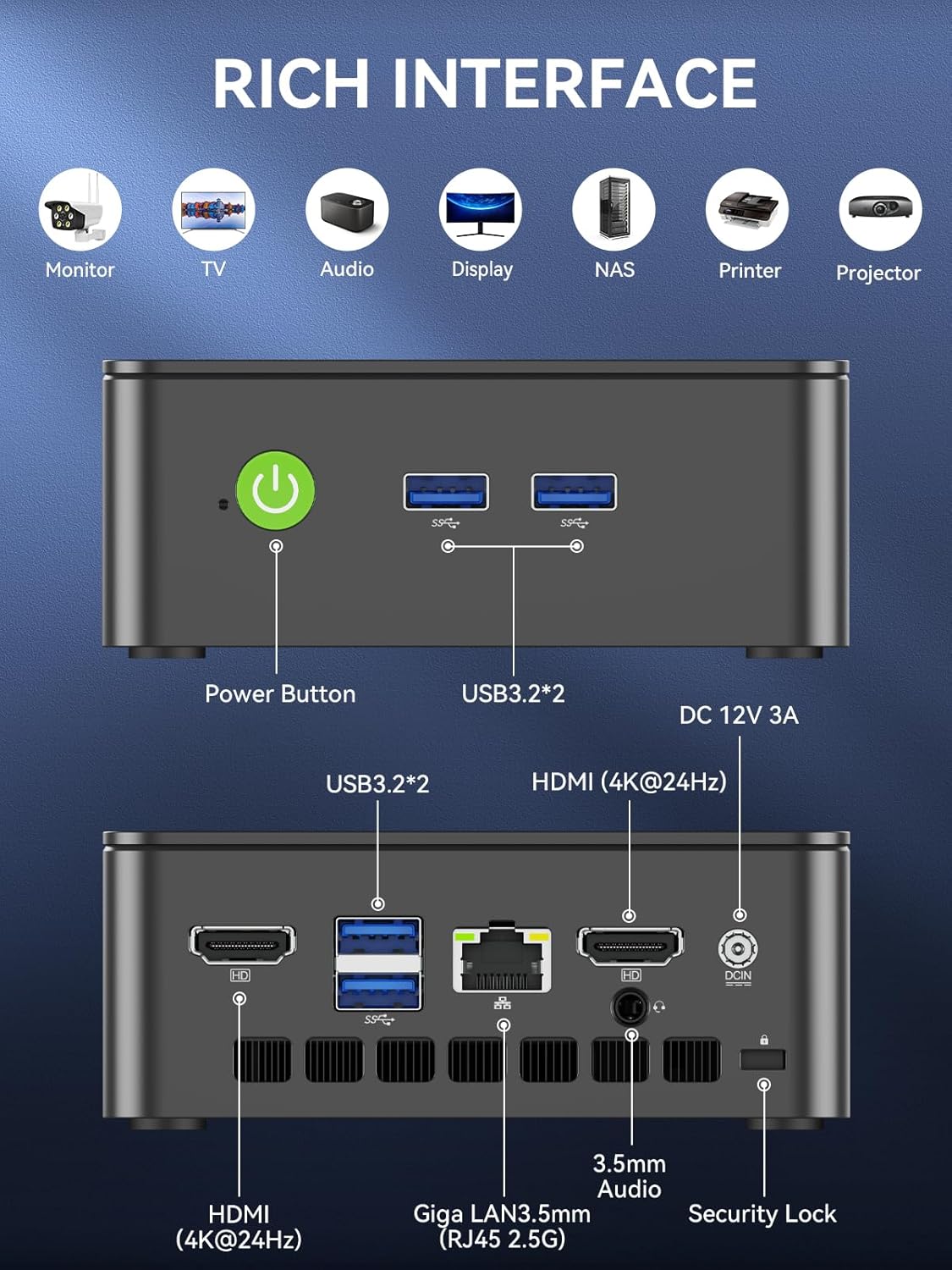
Pannal aghaidh
- Putan Cumhachd: Gus an inneal a thionndadh air / dheth.
- USB 3.2 x 2: For connecting peripherals such as keyboards, mice, or external storage devices.
Pannal cùil
- HDMI (4K@60Hz) x 2: For connecting to displays, supporting dual 4K output.
- USB 3.2 x 2: Additional ports for peripherals.
- Jack claisneachd 3.5mm: Airson ceangal chluas-cinn no luchd-labhairt taobh a-muigh.
- Giga LAN (RJ45 2.5GbE): Airson ceangal lìonra uèirleas.
- DC ANN: Port cuir a-steach cumhachd.
- Security Lock Slot: For securing the device to a desk.
Co-phàirtean a-staigh
- Dual DDR4 RAM Slots: Supports up to 64GB RAM.
- M.2 2280 PCIe Gen3*4 Slot: For NVMe SSDs, supporting up to 8TB.
- M.2 2242 SATA3.0 Slot: For SATA SSDs, supporting up to 1TB.
- Cooling Fan & Vents: Integrated cooling system to maintain optimal operating temperatures.

4. Stiùirich rèiteachaidh
Lean na ceumannan seo airson stèidheachadh tùsail:
- Ceangail peripherals: Connect your keyboard, mouse, and any other necessary USB devices to the available USB 3.2 ports.
- Ceangail an Taisbeanadh: Use an HDMI cable to connect your monitor(s) to the HDMI ports on the rear panel. The device supports dual 4K@60Hz displays.
- Ceangal cumhachd: Plug the power adapter into the DC IN port on the mini PC, then plug the adapter into a power outlet.
- Cumhachd air: Brùth am putan cumhachd air a’ phannal aghaidh gus am mini PC a thionndadh.
- Initial Operating System Setup: Lean an stiùireadh air an sgrion gus rèiteachadh Windows 11 Pro a chrìochnachadh.
- Ceangal lìonra: For faster setup, avoid connecting to a wired LAN initially. Connecting LAN might trigger long updates, delaying desktop access. Connect to Wi-Fi 6 or connect to the 2.5GbE LAN port after initial setup is complete.

5. Stiùireadh Obrachaidh
Cumhachd air / dheth
- Gus cumhachd a thoirt air: Brùth am putan cumhachd aon uair.
- Gus cumhachd a thoirt dheth: From the operating system, select 'Shut down'. Alternatively, press and hold the power button for 5 seconds to force a shutdown (use only when necessary).
BIOS Settings and Performance Modes
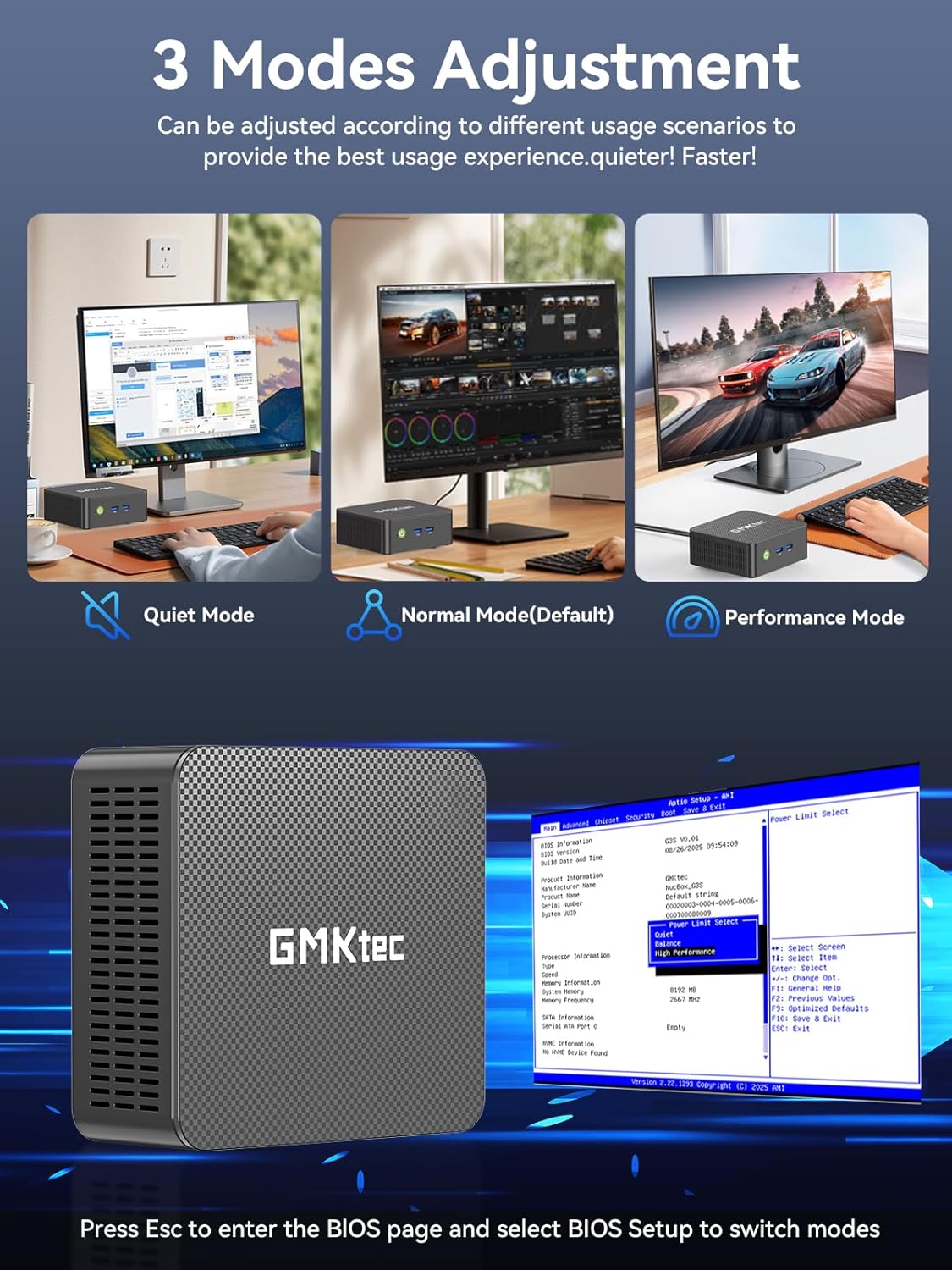
The GMKtec G3 Pro supports different performance modes that can be adjusted via the BIOS settings to optimize for quiet operation, normal use, or maximum performance.
- A’ faighinn cothrom air BIOS: Press the 'Esc' key repeatedly during startup to enter the BIOS page.
- Modhan atharrachaidh: Navigate to the BIOS Setup and select your desired mode (Quiet Mode, Normal Mode, Performance Mode) based on your usage scenario.
6. Leudachadh stòraidh
The GMKtec G3 Pro offers flexible storage expansion options:
- M.2 2280 NVMe PCIe Slot: Supports high-speed NVMe SSDs up to 8TB for primary storage or additional high-performance storage.
- M.2 2242 SATA Slot: Supports SATA SSDs up to 1TB for additional storage capacity.
To install or upgrade storage, refer to the detailed instructions in the full user manual or consult a qualified technician.
7. Ceangalachd
The Mini PC provides comprehensive connectivity options:
- Wi-Fi 6 (802.11ax): Offers high-speed wireless internet access up to 600Mbps.
- Bluetooth 5.2: For connecting wireless devices such as keyboards, mice, and headphones.
- 2.5GbE Ethernet (RJ45): Provides ultra-fast wired network speeds, up to 2.5 times faster than standard Gigabit Ethernet.

8. Suidheachadh Taisbeanaidh Dhùbailte
The GMKtec G3 Pro supports connecting two 4K@60Hz displays simultaneously via its two HDMI 2.0 ports. This allows for an extended desktop experience, enhancing productivity for multitasking, content creation, or entertainment.
Simply connect two monitors using HDMI cables to the respective ports on the rear of the mini PC. The operating system will automatically detect the displays, and you can configure their arrangement and resolution through the display settings.

9. Siostam fuarachaidh
The GMKtec G3 Pro is equipped with a smart quiet cooling fan and strategically placed cooling vents to ensure efficient heat dissipation. This design allows for ultra-quiet operation, typically below 38dB, even under load, providing a comfortable working environment.

10. Sònrachaidhean
| Feart | Sònrachadh |
|---|---|
| Brand | GMKtec |
| Ainm Modail | G3Pro |
| Siostam-obrachaidh | Windows 11 pro |
| Modail CPU | Intel Core i3-10110U |
| Luas CPU | Suas gu 4.1 GHz |
| Grafaigeachd coprocessor | Intel UHD Graphics 1200MHz |
| Cuimhne RAM air a stàladh | 16 GB DDR4 (Dual Channel) |
| Meud as motha de chuimhne RAM | 64 GB |
| Tuairisgeul diosc cruaidh | 512 GB M.2 2280 PCIe Gen3*2 + 1*M.2 2242 SATA |
| Teicneòlas ceangail | Bluetooth 5.2, WiFi 6, Ethernet (2.5GbE), HDMI (4K@60Hz) |
| Toradh bhidio | HDMI x 2 |
| Fuasgladh taisbeanaidh as àirde | 4096 × 2160 piogsail |
| Gu h-iomlan puirt USB | 4 (USB 3.2) |
| Caitheamh cumhachd | 6 watts (àbhaisteach) |
| Feartan sònraichte | Wake On LAN, PXE Boot, RTC Wake, Auto Power On |
11. Cumail suas
To ensure the longevity and optimal performance of your GMKtec G3 Pro Mini PC, consider the following maintenance tips:
- Cùm glan: Regularly clean the exterior of the mini PC with a soft, dry cloth. Ensure cooling vents are free from dust and obstructions.
- Ùrachaidhean bathar-bog: Cùm an siostam obrachaidh agus na draibhearan agad air an ùrachadh chun na dreachan as ùire airson leasachaidhean tèarainteachd is coileanadh.
- Sguabadh ceart: Always shut down the mini PC properly through the operating system to prevent data corruption.
- Suidheachaidhean Àrainneachdail: Operate the mini PC in a well-ventilated area, away from direct sunlight, excessive heat, and moisture.
12. A ’dèanamh trioblaid
If you encounter issues with your GMKtec G3 Pro Mini PC, try the following basic troubleshooting steps:
- Gun chumhachd: Dèan cinnteach gu bheil an inneal-atharrachaidh cumhachd ceangailte gu tèarainte ris a’ mini PC agus ri socaid cumhachd a tha ag obair. Feuch socaid eadar-dhealaichte ma tha sin riatanach.
- Gun taisbeanadh: Verify that the HDMI cables are securely connected to both the mini PC and the monitor(s). Ensure monitors are powered on and set to the correct input source.
- Gun cheangal eadar-lìn: For Wi-Fi, check your router and network settings. For wired Ethernet, ensure the cable is properly connected and the network adapter is enabled in the operating system.
- Coileanadh slaodach: Close unnecessary applications, check for background processes, and ensure sufficient free storage space. Consider adjusting performance modes in BIOS.
- Cùisean Iomallach: Try connecting USB devices to different ports. Ensure drivers are installed correctly for specialized peripherals.
For more complex issues, refer to the comprehensive troubleshooting section in the full user manual or contact customer support.
13. Barantas agus Taic
Your GMKtec G3 Pro Mini PC comes with a Barantas cuibhrichte 1-bliadhna from the date of purchase, covering defects due to design and workmanship.
Airson ceistean sam bith, taic theicnigeach, no tagraidhean barantais, cleachd na seanalan taic a leanas:
- Taic Post-d: Contact the professional after-sales team at taic@gmktec.com.
- Taic air-loidhne: Visit the GMKtec store on Amazon or the official GMKtec weblàrach airson Ceistean Cumanta agus goireasan a bharrachd.
- 24/7 Client Support: Dedicated support is available to assist you with your needs.