
1. Ro-ràdh
Tapadh leibh airson ceannachasing the Sharp PS-916 Bluetooth Party Speaker System. This system includes two identical portable Bluetooth speakers designed to deliver powerful audio with versatile connectivity options. Please read this manual carefully before using the product to ensure proper operation and to maximize your listening experience.
Susbaint a’ phacaid:
- 2 x Sharp PS-916 Party Speakers
- 1 x càball cosgais
- 1 x Smachd Iomallach
- 1 x Leabhar-làimhe Cleachdaiche

Image: The Sharp PS-916 system includes two speakers for a complete stereo experience.
2. Suidhich
2.1 A’ cur cosgais air na luchd-labhairt
The PS-916 speakers are equipped with rechargeable batteries, providing up to 12 hours of playback. Before initial use, fully charge both speakers.
- Connect the charging cable to the DC IN port on the rear of each speaker.
- Plug the other end of the charging cable into a suitable power adapter (not included) or USB power source.
- The charging indicator light will illuminate. It will change color or turn off once charging is complete.
2.2 A’ cur cumhachd air/dheth
To power on or off each speaker, press and hold the ON/STAND BY INPUT putan suidhichte air a’ phannal smachd.
Paidhreachadh Bluetooth 2.3 (Luchd-labhairt Singilte)
- Ensure the speaker is powered on and in Bluetooth mode. The Bluetooth indicator will flash, indicating it is ready for pairing.
- Air an inneal gluasadach agad, leig le Bluetooth agus rannsaich na h-innealan a tha rim faighinn.
- Select "Sharp PS-916" from the list of devices.
- Cho luath ‘s a bhios e ceangailte, sguiridh an comharra Bluetooth de bhith a’ priobadh agus fuirichidh e seasmhach.
Paidhir Stereo gun Uèir Fìor 2.4 (TWS) (Dà Neach-labhairt)
TWS allows you to connect two PS-916 speakers wirelessly for a stereo sound experience.
- Power on both PS-916 speakers.
- Ensure neither speaker is currently connected to a Bluetooth device.
- On one of the speakers (this will be the primary speaker), press the TWS button. The speaker will enter TWS pairing mode.
- The primary speaker will automatically search for the secondary speaker. Once connected, you will hear an audible confirmation, and the TWS indicator lights on both speakers will illuminate.
- A-nis, ceangail an inneal gluasadach agad ris a’ phrìomh neach-labhairt tro Bluetooth mar a tha air a mhìneachadh ann an earrann 2.3. Cluichidh an claisneachd tron dà neach-labhairt ann an stereo.
3. Obrachadh
3.1 Pannal Smachd Os a chionnview

Image: Main control panel for the Sharp PS-916 speaker.
- ON/STAND BY INPUT: Power on/off, switch input modes (Bluetooth, USB, TF, AUX, FM).
- PLAY/PAUSE (►/∕∕): Cluich no stad ath-chluich claisneachd.
- PREVIOUS (◀◀): Rach don t-slighe roimhe.
- NEXT (▶▶): Gabh air adhart chun ath cheum.
- KNOB VOLUME: Cuairtich gus am prìomh-fhuaim atharrachadh.
- TWS: Initiate or disconnect True Wireless Stereo pairing.
- Cothromaiche: Cycle through preset equalizer modes.
- BAS: Activate or deactivate bass boost.
- SOLAS: Change or turn off the LED light effects.
- MIC CONTROL: Adjust microphone volume or echo (if applicable).
3.2 puirt a-steach
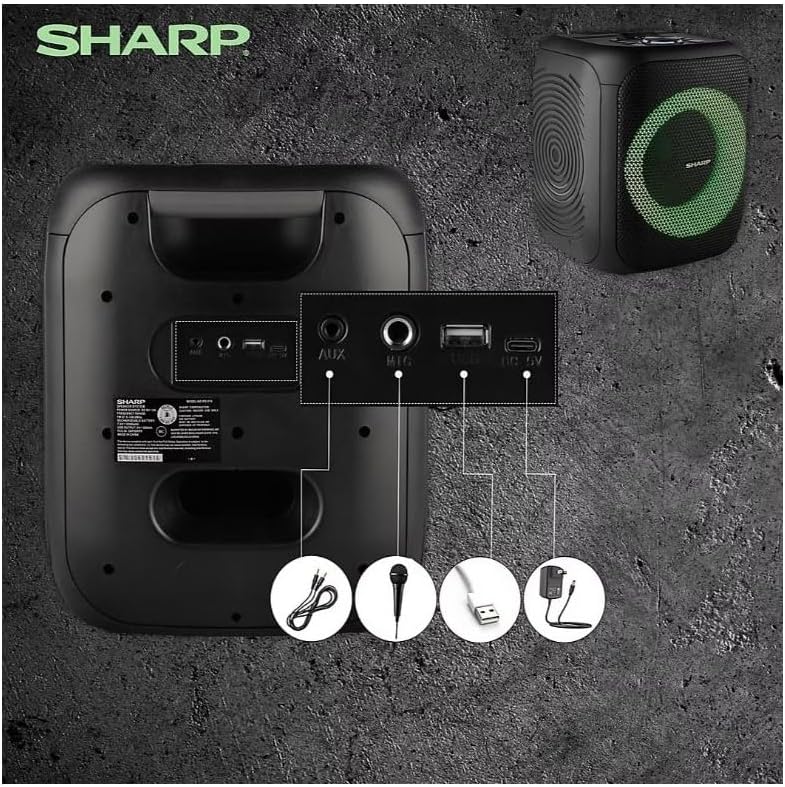
Image: Rear panel with various input and charging ports.
- AUX IN: Ceangail innealan claisneachd taobh a-muigh le bhith a’ cleachdadh càball claisneachd 3.5mm.
- MIC IN: Connect a microphone (sold separately) for karaoke or announcements.
- USB: Cuir a-steach draibh USB flash airson ath-chluich claisneachd.
- TF CARD: Insert a TF (microSD) card for audio playback.
- DC ANN: Connect the charging cable to power and charge the speaker.
3.3 Playing Audio from USB/TF Card
- Insert a USB flash drive or TF card into the corresponding port.
- Brùth an ON/STAND BY INPUT button repeatedly until the display shows the USB or TF mode.
- Tòisichidh an ath-chluich gu fèin-ghluasadach. Cleachd an CLÀR/stad, ROIMH-RADH, agus ATHAIR putanan gus smachd a chumail air ath-chluich.
3.4 A’ cleachdadh cuir-a-steach AUX
- Connect one end of a 3.5mm audio cable to the AUX IN port on the speaker.
- Ceangail an ceann eile ri jack headphone no toradh claisneachd an inneil taobh a-muigh agad.
- Brùth an ON/STAND BY INPUT button repeatedly until the display shows AUX mode.
- Smachd air ath-chluich agus meud bhon inneal taobh a-muigh agad.
3.5 Obrachadh Rèidio FM

Image: The PS-916 features an integrated FM Tuner.
- Brùth an ON/STAND BY INPUT button repeatedly until the display shows FM mode.
- Brùth agus cùm an CLÀR/stad putan gus stèiseanan FM a tha rim faighinn a sganadh agus a shàbhaladh gu fèin-ghluasadach.
- Cleachd an ROIMH-RADH agus ATHAIR putanan airson gluasad tro stèiseanan sàbhalaidh.
3.6 LED Light Effects
Brùth an LAOIDH button to cycle through different LED light modes or to turn the lights off.
4. Cumail suas
4.1 Glanadh
- Cuir dheth an cumhachd an-còmhnaidh agus dì-cheangail e bhon stòr cumhachd mus glan thu e.
- Cleachd clò bog, tioram gus na h-uachdaran a-muigh a sguabadh.
- Na cleachd innealan-glanaidh leaghaidh, aerosolan no fuasglaidhean, oir dh’fhaodadh iad sin milleadh a dhèanamh air a’ chrìochnachadh no air na pàirtean a-staigh.
4.2 Stòradh
- Stòraich na luchd-labhairt ann an àite fionnar, tioram air falbh bho sholas dìreach na grèine agus teòthachd anabarrach.
- Ma bhios tu ga stòradh airson ùine mhòr, cuir cosgais air a’ bhataraidh gu timcheall air 50% gach beagan mhìosan gus slàinte a’ bhataraidh a chumail suas.
5. A ’dèanamh trioblaid
If you encounter issues with your Sharp PS-916 speakers, please refer to the following common problems and solutions:
| Trioblaid | Fuasgladh comasach |
|---|---|
| Chan eil an neach-labhairt a’ dol air. | Dèan cinnteach gu bheil am bataraidh air a luchdadh. Ceangail an càball cosgais agus feuch ris a-rithist. |
| Gun fhuaim bhon neach-labhairt. | Thoir sùil air an ìre fuaime air an dà chuid an neach-labhairt agus an inneal ceangailte agad. Dèan cinnteach gu bheil am modh cuir-a-steach ceart air a thaghadh. |
| Chan urrainnear inneal Bluetooth a cheangal. | Ensure the speaker is in Bluetooth pairing mode (indicator flashing). Move your device closer to the speaker. Disconnect from other Bluetooth devices. |
| Dh’fhàillig paidhreachadh TWS. | Ensure both speakers are powered on and not connected to any other Bluetooth devices. Try initiating TWS pairing again. |
| Fuaim air a mhilleadh. | Reduce the volume on both the speaker and your connected device. Ensure the audio source is not distorted. |
6. Sònrachaidhean
| Feart | Mion-fhiosrachadh |
|---|---|
| Brand | biorach |
| Ainm Modail | PS-916 |
| Configuration Labhraiche | 8" Woofer, 1" Tweeter (per speaker) |
| Cumhachd Toraidh as àirde | 400 Watts (gach neach-labhairt) |
| Cumhachd Toraidh RMS | 40 Watts (gach neach-labhairt) |
| Teicneòlas ceangail | Bluetooth |
| Cur a-steach a bharrachd | USB, TF Card, 3.5mm AUX, Microphone Input |
| Beatha bataraidh | Suas gu 12 uairean |
| Feartan sònraichte | True Wireless Stereo (TWS) Pairing, Bass Boost, LED Light Effects, FM Tuner |
| Dath | Dubh |
| Cuideam nì | 6.5 notaichean (gach neach-labhairt) |
| UPC | 728434122111 |
| GTIN | 728434122111 |
7. Barantas & Taic
7.1 Fiosrachadh Barantais
This Sharp PS-916 product comes with a 90-day limited warranty. This warranty covers manufacturing defects under normal use. It does not cover damage caused by misuse, accidents, unauthorized modifications, or normal wear and tear.
7.2 Taic teachdaiche
For technical assistance, warranty claims, or further inquiries, please refer to the contact information provided with your purchase documentation or visit the official Sharp support weblàrach.