
1. Ro-ràdh
This manual provides detailed instructions for the cudinham X6 Print Pod Mini Thermal Printer. This compact, inkless printer is designed for various uses, including creating stickers, notes, and labels directly from your smartphone or tablet. Please read this manual thoroughly before use to ensure proper operation and longevity of your device.
2. Dè tha sa bhogsa
Dèan cinnteach gu bheil a h-uile nì anns a’ phacaid:
- cudinham X6 Mini Thermal Printer
- 10 Rolls Printing Paper (Thermal Paper & Sticker Paper)
- Corda cumhachd Type-C
- Leabhar-làimhe cleachdaiche

Figear 2.1: Clàr-innse pacaid
3. Toradh thallview
The cudinham X6 Mini Thermal Printer features a simple and intuitive design. Key components include:
- Stòr pàipear: Where printed paper exits.
- Putan Cumhachd: Used to turn the printer on/off and initiate feeding.
- Comharra cumhachd: Shows the device's power status.
- Port USB: Airson an inneal a luchdadh a-nuas.
- Cover Opening Button: Releases the top cover for paper loading.
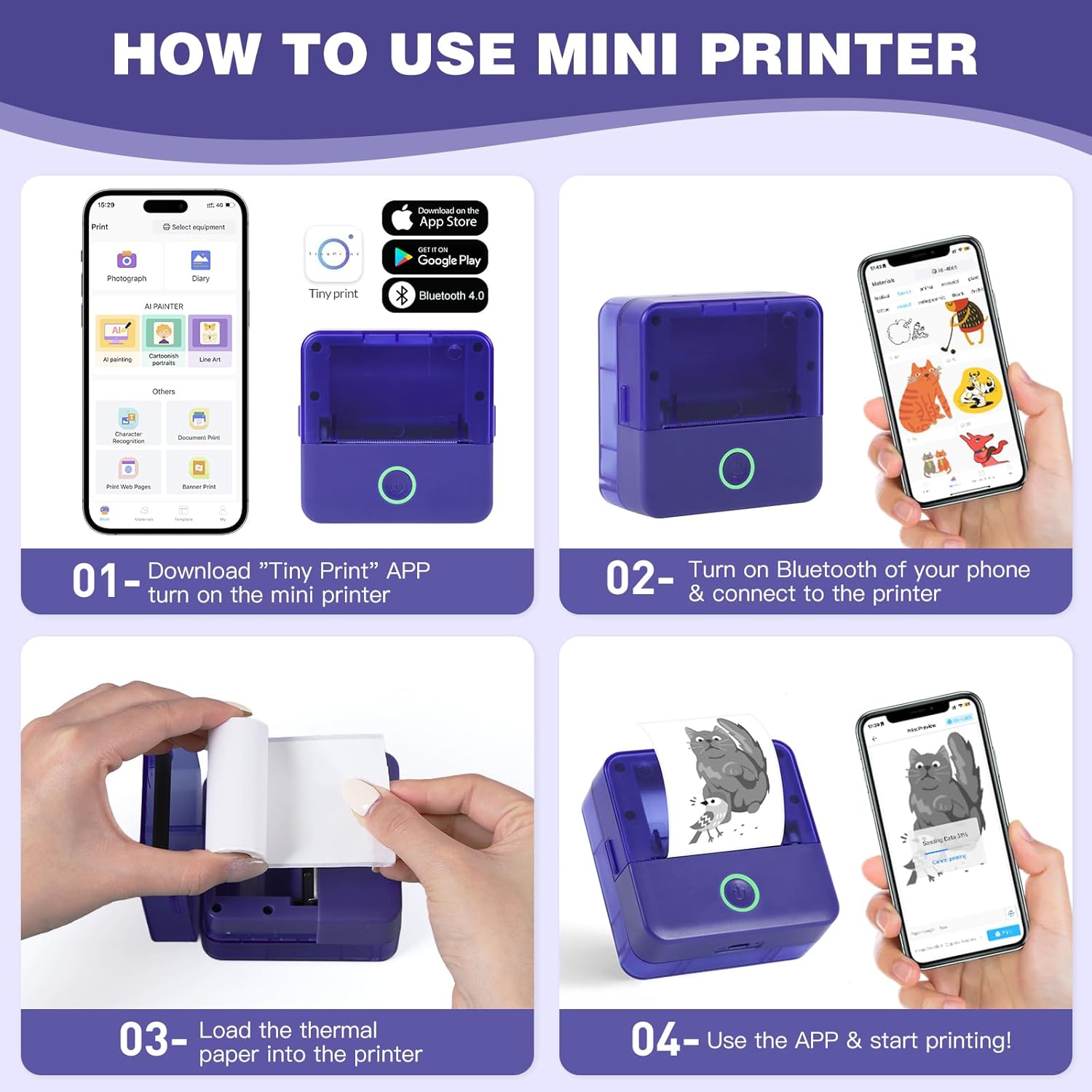
Figure 3.1: Printer Components and How to Use
4. Suidhich
4.1 A’ cur cosgais air a’ chlò-bhualadair
Before first use, ensure the printer is fully charged. Connect the provided Type-C power cord to the printer's USB port and a suitable power adapter (not included). The power indicator light will show charging status.
4.2 Installing Thermal Paper
- Press the cover opening button to open the top cover of the printer.
- Remove any existing paper roll or the adjuster from the right side if present.
- Load a new thermal paper roll into the paper compartment. Ensure the printing side (smooth side) is facing up and aligned with the print head.
Tip: To distinguish the printing side, gently scratch the paper surface with your nail; the side that leaves a mark is the printing side. - If removed, install the adjuster on the right side to secure the paper roll.
- Pull out a small portion of the paper (approximately 1cm) beyond the paper outlet.
- Dùin am mullach còmhdach gu daingeann gus an cliog e na àite.

Figure 4.1: Opening the Paper Compartment

Figure 4.2: Loading the Paper Roll

Figure 4.3: Closing the Cover after Paper Loading
4.3 Luchdaich sìos aplacaid agus ceangal Bluetooth
- Download the "Tiny Print" app from the App Store (iOS) or Google Play Store (Android).
- Turn on the mini printer by pressing and holding the power button until the indicator light illuminates.
- Dèan comas air Bluetooth air do fòn cliste no tablet.
- Open the "Tiny Print" app and follow the in-app instructions to connect to your printer via Bluetooth. Look for a device named "X6H-XXXX" or similar.
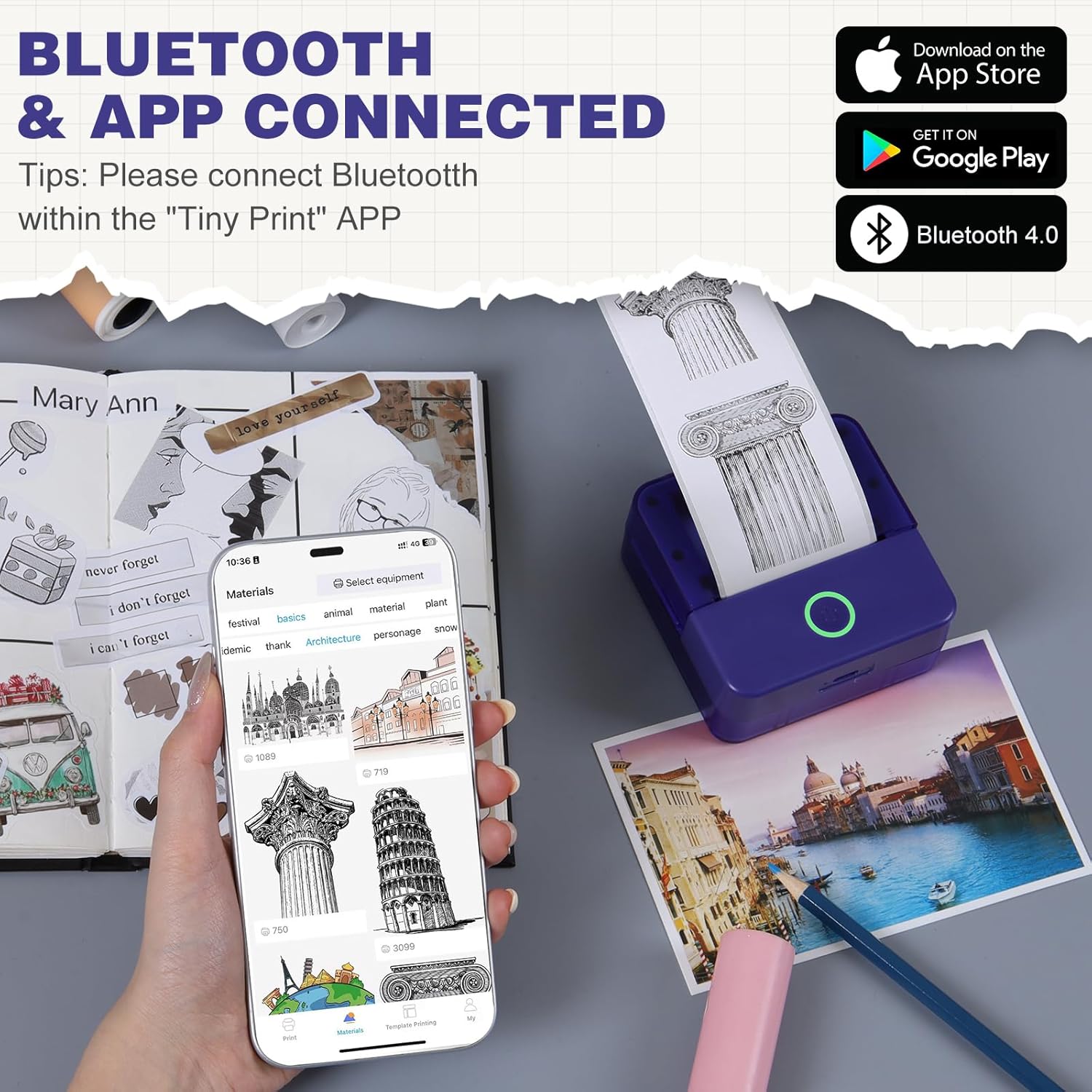
Figure 4.4: App Interface and Bluetooth Connection
Video 4.1: Demonstrating the setup and connection process for the cudinham X6 Mini Thermal Printer.
5. Stiùireadh Obrachaidh
The "Tiny Print" app offers various functions for printing. Ensure your printer is connected via Bluetooth before proceeding.
5.1 Clò-bhualadh Bunasach
- Clò-bhualadh dhealbhan: Select "Photo Printing" in the app, choose an image from your gallery, adjust as needed, and tap "Print."
- Text Printing: Select "Text Printing" or a template, input your text, customize fonts and sizes, and tap "Print."
- Teamplaidean: The app provides multiple free templates for notes, to-do lists, labels, and more. Select a template, customize it, and print.

Figure 5.1: Multi-functionality of the Tiny Print App

Figure 5.2: Image Printing Settings

Figure 5.3: Text Printing Settings
5.2 Adjusting Print Settings
Within the app, you can adjust the print depth for both images and text. For optimal results, especially with images, it is recommended to use the high-definition printing mode and set the print depth between 4 and 7. Experiment with settings to achieve your desired print quality.
Bhidio 5.1: Tharview of the cudinham X6 Print Pod Mini Printer's features and printing capabilities.
6. Cumail suas
6.1 Glanadh Ceann a’ Chlò-bhualaidh
To maintain print quality, regularly clean the print head. Use a soft, lint-free cloth lightly dampened with alcohol. Gently wipe the print head to remove any dust or paper residue. Ensure the printer is turned off and disconnected from power before cleaning.
6.2 Stòradh Pàipeir
Store thermal paper in a cool, dry place away from direct sunlight and heat to prevent premature fading or damage. Avoid touching the printing surface of the paper with bare hands as oils can affect print quality.

Figure 6.1: Different Types of Thermal Paper
7. A ’dèanamh trioblaid
| Trioblaid | Adhbhar a dh’fhaodadh a bhith ann | Fuasgladh |
|---|---|---|
| Chan eil am clò-bhualadair a’ tionndadh air | Bataraidh ìosal; Putan cumhachd gun a bhith air a bhrùthadh gu ceart. | Charge the printer; Press and hold the power button for 3 seconds. |
| Poor print quality (faint/blurry) | Print head dirty; Incorrect print depth setting; Low battery. | Clean the print head; Adjust print depth in the app (recommended 4-7); Charge the printer. |
| Printer not connecting via Bluetooth | Bluetooth off on phone/printer; App not recognizing printer. | Ensure Bluetooth is enabled on both devices; Restart the app and printer; Re-pair the device in the app. |
| Suim pàipeir | Paper loaded incorrectly; Foreign object in paper path. | Open the cover, remove jammed paper, re-load correctly; Check for obstructions. |
8. Sònrachaidhean
| Feart | Mion-fhiosrachadh |
|---|---|
| Ainm Modail | X6 |
| Brand | cudinham |
| Teicneòlas clò-bhualaidh | Teirmeach |
| Teicneòlas ceangail | Bluetooth |
| Toradh Clò-bhualadair | Teirmeach (Moncromach) |
| Astar Clò-bhualaidh as Motha (Moncromach) | 20 ppm |
| Meadhanan Clò-bhualaidh | Pàipear Teirmeach |
| Meud na duilleige | 57x22 Millimeatairean |
| Meud as motha de na meadhanan | 52x350mm |
| Meudan toraidh | 3.35 x 1.77 x 3.35 òirleach |
| Cuideam nì | 13.2 unnsa |
| Bataraidhean | 1 Bataraidh Neo-àbhaisteach (air a ghabhail a-steach) |
| Eadar-aghaidh bathar-cruaidh | USB |
9. Barantas agus Taic
For warranty information and customer support, please refer to the warranty card included in your package or contact cudinham customer service directly. Keep your purchase receipt for warranty claims.
Fiosrachadh conaltraidh:
- Dèanadair: Cudinham
- Neach-reic: Cudinham Home
- Please refer to the product packaging or official weblàrach-lìn airson fiosrachadh conaltraidh taic as ùire.