
1. Ro-ràdh
This manual provides essential information for the safe and efficient use of your HP 17.3 Inch FHD Business Laptop. Please read this guide thoroughly before operating your device to ensure optimal performance and longevity. This laptop is designed for business and everyday computing tasks, offering a large display, robust performance, and portability.
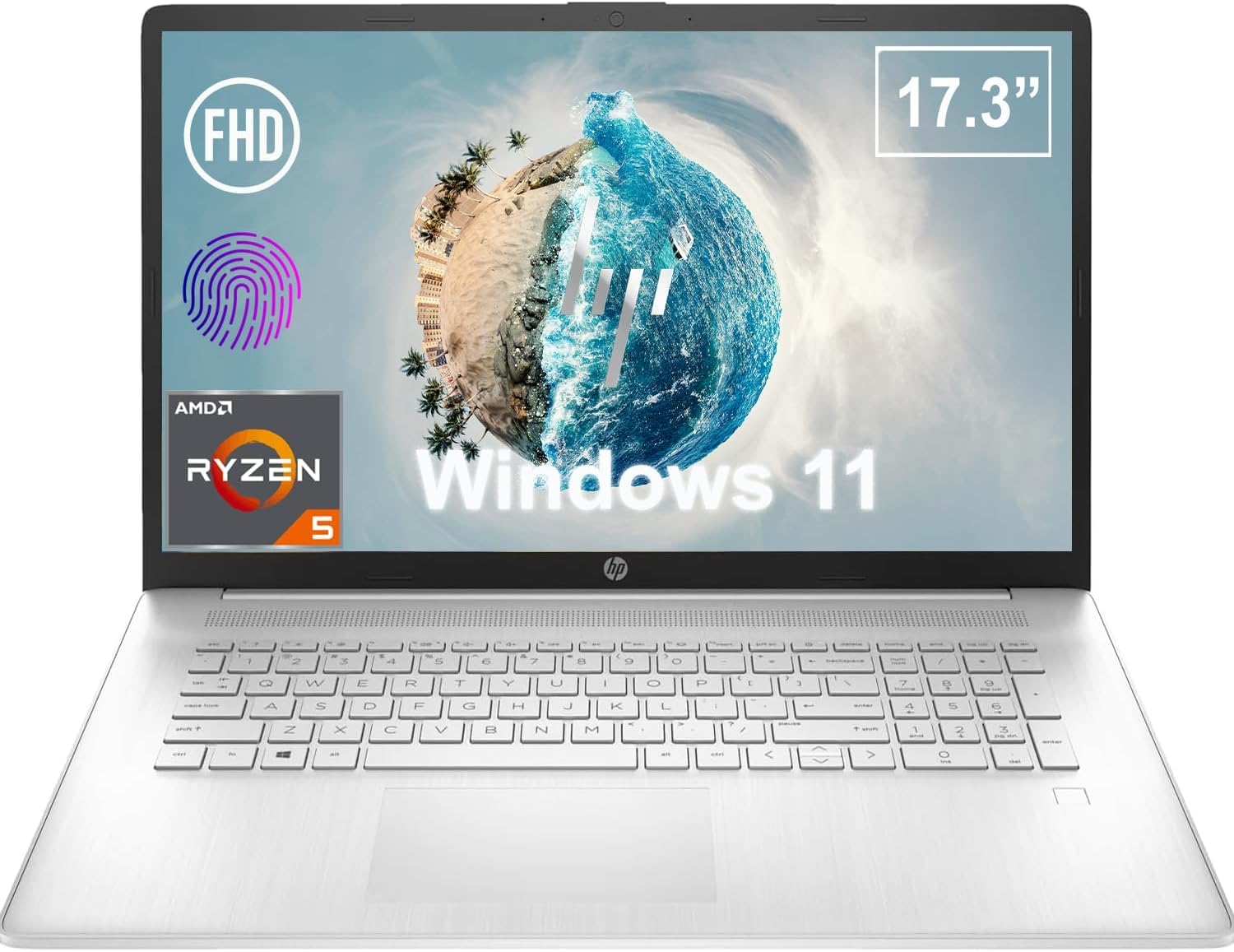
Figear 1.1: Aghaidh view of the HP 17.3 Inch FHD Business Laptop, showcasing the large display and keyboard.
2. Suidhich
2.1 Fosgladh a’ bhogsa agus sgrùdadh tùsail
Thoir a h-uile pàirt a-mach às a’ phacaid gu faiceallach. Dèan cinnteach gu bheil na nithean a leanas an làthair:
- HP 17.3 Inch FHD Business Laptop
- Power Adapter (45 W Smart AC Power Adapter)
- Sgrìobhainnean (an leabhar-làimhe seo, fiosrachadh barantais)
Inspect the laptop and accessories for any signs of damage. If any items are missing or damaged, contact your retailer or HP support immediately.
2.2 A’ ceangal an inneal-atharrachaidh cumhachd
Before first use, ensure the laptop is fully charged. Connect the power adapter to the AC smart pin port on the side of the laptop and then plug the adapter into a power outlet.
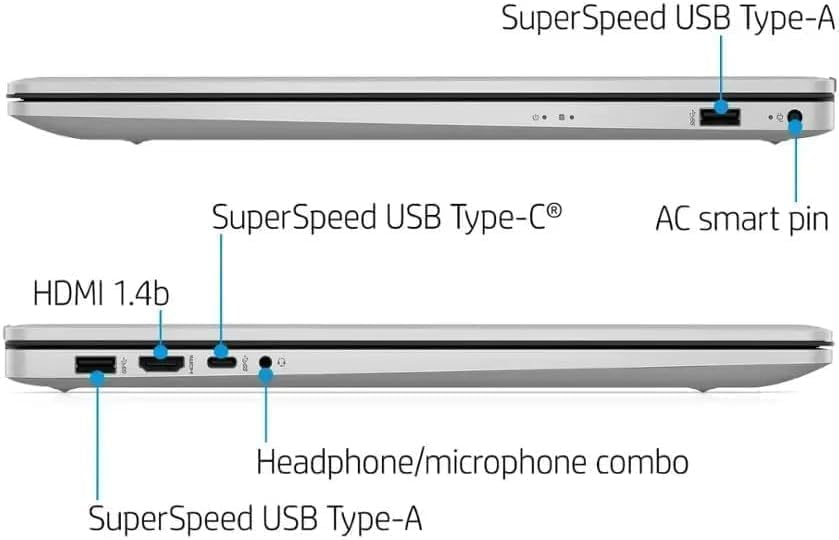
Figear 2.1: Taobh view illustrating the location of the AC smart pin and other ports.
2.3 A’ chiad chumhachd air agus suidheachadh Windows
Press the power button to turn on the laptop. Follow the on-screen instructions to complete the Windows 11 Home setup process. This includes setting up your user account, network connection, and initial preferences.
3. A’ cleachdadh an laptop
3.1 Meur-chlàr agus Pad-suathaidh
The laptop features a full-size QWERTY keyboard with a 10-key number pad for efficient data entry. The integrated touchpad provides precise cursor control. Refer to the operating system's settings for customizing touchpad gestures and keyboard shortcuts.
3.2 Leughadair Meòir-lorg
For enhanced security and convenient login, utilize the integrated fingerprint reader. Set up your fingerprints through Windows Hello in the Windows 11 settings.
3.3 Webcam and Microphones
The HP True Vision 720p HD Camera and integrated dual array digital microphones are located at the top of the display. These are suitable for video conferencing and online communication.
3.4 Ceangalachd
- Wi-Fi: The laptop supports 802.11a/b/g/n/ac Wi-Fi for wireless internet access. Connect to available networks via the Windows network settings.
- Bluetooth: Bluetooth 5 allows for wireless connection to compatible devices such as headphones, mice, and keyboards. Enable and manage Bluetooth devices through Windows settings.
3.5 Ports and External Devices
Tha diofar phuirt aig an laptop airson innealan taobh a-muigh a cheangal:
- 1 x USB Type-C (5Gbps, Data Only): For connecting USB-C compatible devices and data transfer.
- 2 x USB Type-A (5Gbps): For connecting standard USB devices like external drives, mice, or keyboards.
- 1 x HDMI 1.4b: For connecting to external displays or projectors.
- 1 x Headphone/Microphone Combo: For connecting a headset with a single 3.5mm jack.
- 1 x AC Smart Pin: For connecting the power adapter.

Figear 3.1: Fosgailte view of the laptop, highlighting the keyboard and touchpad area.
3.6 Riaghladh Bataraidh
The laptop is powered by a 3-Cell, 41 Wh Li-ion battery, offering up to 8 hours and 30 minutes of video playback. Use the provided 45 W Smart AC Power Adapter for charging. HP Fast Charge technology allows for quicker charging times.
4. Cumail suas
4.1 Glanadh an Laptop
Gus coltas agus gnìomhachd an laptop a chumail suas:
- Cleachd clò bog gun lint dampair a nighe le uisge no le inneal-glanaidh sgrion sònraichte airson an taisbeanaidh.
- Airson a’ mheur-chlàir agus an chassis, cleachd clò bog, tioram. Seachain ceimigean cruaidh no stuthan sgrìobach.
- Dèan cinnteach gu bheil an laptop dheth agus gun a bhith a’ cleachdadh a’ phlug mus glan thu e.
4.2 Ùrachaidhean bathar-bog
Ùraich an siostam-obrachaidh agus na draibhearan Windows agad gu cunbhalach gus dèanamh cinnteach à coileanadh, tèarainteachd agus co-chòrdalachd as fheàrr. Gheibhear cothrom air Ùrachadh Windows tron chlàr-taice Roghainnean.
4.3 Security Software
The laptop comes preloaded with McAfee LiveSafe for security. Ensure this software is active and updated to protect against viruses and other threats.
5. A ’dèanamh trioblaid
Tha an earrann seo a’ dèiligeadh ri cùisean cumanta a dh’ fhaodadh tu a thighinn tarsainn air leis an laptop HP agad.
5.1 Cùisean Cumhachd
- Chan eil an laptop a’ tionndadh air: Ensure the power adapter is securely connected to both the laptop and a working power outlet. Verify the battery is charged.
- Bataraidh gun a bhith a ’togail cosgais: Thoir sùil air an inneal-atharrachaidh cumhachd agus a’ chàball airson milleadh. Feuch socaid cumhachd eadar-dhealaichte.
5.2 Cùisean Taisbeanaidh
- Gun ìomhaigh air an sgrion: Ceangail monitor taobh a-muigh gus faicinn a bheil an duilgheadas le taisbeanadh an laptop. Ath-thòisich an laptop.
- Ìomhaigh a’ priobadh no a’ saobhadh: Update graphics drivers. Adjust display resolution and refresh rate in Windows settings.
5.3 Cùisean Ceangail
- Chan eil Wi-Fi a’ ceangal: Ensure Wi-Fi is enabled. Restart your router and the laptop. Check network settings for correct password and configuration.
- Inneal Bluetooth gun a bhith a’ paidhreachadh: Dèan cinnteach gu bheil Bluetooth air a chomasachadh air an dà inneal. Dèan cinnteach gu bheil an inneal ann am modh paidhridh agus taobh a-staigh ruigsinneachd.
Airson cùisean nas iom-fhillte, thoir sùil air taic HP weblàrach-lìn no cuir fios gu seirbheis teachdaiche.
6. Sònrachaidhean
| Feart | Mion-fhiosrachadh |
|---|---|
| Brand | HP |
| Ainm Modail | HP 17 |
| Modail Àireamh | i5-1135G7 |
| Meud sgrion | 17.3 òirlich |
| Seòrsa Taisbeanaidh | IPS, Anti-Glare, LED |
| Fuasgladh | 1920 x 1080 (FHD) |
| Ìre Ath-nuadhachaidh | 60 Hz |
| Pròiseasar | AMD Ryzen 5 5500U (6 Cores, 12 Threads, up to 4.0 GHz Max Boost Clock) |
| Grafaigean | Grafaigean AMD Radeon Amalaichte |
| Cuimhne RAM | 32 GB DDR4-3200 MHz (Max 64 GB) |
| Stòradh | SSD 1 TB PCIe NVMe M.2 |
| Siostam-obrachaidh | Windows 11 Home, 64-bit, English |
| Ceangal gun uèir | Wi-Fi 802.11a/b/g/n/ac, Bluetooth 5 |
| Puirt | 1x USB Type-C (5Gbps), 2x USB Type-A (5Gbps), 1x HDMI 1.4b, 1x Headphone/Microphone Combo, 1x AC Smart Pin |
| Webcam | Camara HP True Vision 720p HD |
| Fuaim | Dual Speakers, Integrated Dual Array Digital Microphones |
| Bataraidh | 3-Cell, 41 Wh Li-ion (Up to 8.5 hours video playback) |
| Adapter cumhachd | 45 W Smart AC Power Adapter |
| Meudan (W x D x H) | 40.07 x 25.78 x 2.06 cm (14.14"F x 9.31"L x 0.78"Th) |
| Cuideam | A 'tòiseachadh aig 2.07 kg |
| Feartan sònraichte | Fingerprint Reader, Lightweight Design, HP Fast Charge |
7. Barantas & Taic
7.1 Fiosrachadh Barantais
This HP laptop comes with a 1-year manufacturer's limited warranty. For detailed terms and conditions, please refer to the warranty documentation included with your product or visit the official HP support weblàrach.
7.2 Taic teachdaiche
If you encounter issues that cannot be resolved using the troubleshooting steps in this manual, please contact HP customer support. You can find contact information and additional resources on the official HP weblàrach:
- Taic HP Weblàrach: taic.hp.com
- HP Store: Bùth HP air Amazon