
1. Ro-ràdh
This manual provides essential information for the safe and efficient use of your Haier H55C95EUX 55-inch OLED 4K HDR Smart TV. Please read these instructions thoroughly before operating your television and retain them for future reference.
The Haier H55C95EUX features a 55-inch OLED display for deep blacks and vibrant colors, 4K HDR resolution, a 144Hz refresh rate for smooth motion, integrated Harman Kardon sound, and the Google TV operating system for smart functionality and voice control.

Dealbh 1.1: Thairisview of Haier C95 Series OLED TV features, highlighting Harman Kardon audio, 144Hz gaming, Dolby Vision IQ, Dolby Atmos, HDR10+, Google TV, and 3GB RAM with 32GB storage.
2. Fiosrachadh Sàbhailteachd
Lean ceumannan sàbhailteachd bunaiteach an-còmhnaidh nuair a bhios tu a’ cleachdadh an telebhisean seo gus cunnart teine, clisgeadh dealain agus leòn a lùghdachadh.
- Stòr cumhachd: Ceangail an telebhisean ri solar cumhachd AC 220-240V, 50/60Hz a-mhàin.
- Fionnarachadh: Dèan cinnteach gu bheil fionnarachadh iomchaidh timcheall an telebhisean. Na cuir bacadh air fosglaidhean fionnarachaidh.
- Uisge agus Taiseachd: Na cuir an telebhisean fosgailte do uisge no taiseachd. Na cuir nithean làn lionntan, leithid vasaichean, air an telebhisean.
- Glanadh: Tarraing am pluga den telebhisean a-mach às a’ bhalla mus glan thu e. Cleachd clò bog, tioram. Na cleachd innealan-glanaidh leaghaidh no innealan-glanaidh aerosol.
- Stàladh: If wall-mounting, ensure the wall mount is compatible with the VESA standard (100 x 100 mm) and can support the TV's weight.
- Clann: Supervise children to ensure they do not play with the television.
3. Dè tha sa bhogsa
Thoir am bogsa a-mach gu faiceallach agus dèan cinnteach gu bheil a h-uile nì an làthair agus gun mhilleadh.
- Haier H55C95EUX 55-inch OLED 4K HDR Smart TV
- Smachd Iomallach
- Leabhar-làimhe cleachdaiche (an sgrìobhainn seo)
- Càball cumhachd
- Pàirtean Seasamh Tbh (ma tha sin iomchaidh)
4. Suidhich
4.1 Stàladh Corporra
Before installation, consider the TV's dimensions to ensure proper placement.

Dealbh 4.1: Aghaidh view dimensions of the 55-inch Haier TV, indicating a width of 1225mm and a height of 749mm.

Image 4.2: Detailed dimensions of the Haier 55-inch TV, showing measurements with and without the stand.
Stàladh seasamh
- Cuir an telebhisean aghaidh sìos air uachdar bog, còmhnard gus casg a chur air milleadh air an sgrion.
- Ceangail pàirtean an stand ris na sliotan ainmichte aig bonn an Tbh a’ cleachdadh nan sgriothan a tha air an toirt seachad.
- Dèan cinnteach gu bheil an stand ceangailte gu tèarainte mus cuir thu an telebhisean dìreach.
Stàladh balla
If wall-mounting, use a VESA-compatible mount (100 x 100 mm) and follow the mount manufacturer's instructions. Ensure the wall can support the TV's weight.
4.2 Innealan ceangail
Tha iomadh port aig an telebhisean agad airson innealan taobh a-muigh a cheangal.
- HDMI: Connect Blu-ray players, game consoles, or set-top boxes to the HDMI 2.1 ports for high-quality audio and video.
- USB: Ceangail innealan stòraidh USB airson ath-chluich meadhanan.
- Ethernet: Airson ceangal eadar-lìn uèirleas seasmhach.
- Bluetooth: Ceangail fònaichean-cluaise gun uèir no innealan Bluetooth eile.
4.3 A’ chiad chumhachd air agus an rèiteachadh
- Ceangail an càball cumhachd ris an telebhisean agus ri socaid balla.
- Brùth am putan cumhachd air an smachd iomallach no an telebhisean.
- Lean an stiùireadh air an sgrion gus an rèiteachadh tùsail a chrìochnachadh, a’ gabhail a-steach taghadh cànain, ceangal lìonra (Wi-Fi no Ethernet), agus logadh a-steach cunntas Google TV.
5. Obrachadh an Tbh agad
5.1 Smachd Iomallach
The included remote control allows you to navigate the TV's features. It may feature a solar cell for eco-friendly charging and USB-C for backup charging.

Image 5.1: The Haier TV remote control, featuring navigation, volume, and app access buttons.
5.2 Eadar-aghaidh Google TV
Your TV runs on Google TV, providing access to a wide range of streaming services, apps, and personalized content.

Image 5.2: The Google TV home screen, showcasindiofar aplacaidean sruthadh agus molaidhean susbaint.
Smachd guth
Use the built-in voice control feature to search for content, launch apps, and control your TV hands-free. Simply say "Hey Google" or press the voice assistant button on your remote.

Image 5.3: Demonstrating voice control functionality with the Haier TV and Google TV.
5.3 Roghainnean Dealbh is Fuaime
Teicneòlas OLED
The OLED display provides absolute blacks and infinite contrast for a lifelike viewann an eòlas.

Image 5.4: Visual representation of OLED technology, showcasing dubhan domhainn agus dathan beòthail.
Harman Kardon Sound
Experience immersive audio with clear dialogues and cinematic depth, delivered by the integrated Harman Kardon sound system.

Image 5.5: Depiction of the Harman Kardon sound system, emphasizing clear and powerful audio.
Dolby Atmos
Enjoy three-dimensional, immersive sound that moves around you, enhancing your audio experience.
Ìre ùrachaidh 144Hz
The 144Hz refresh rate ensures smooth and fluid motion, ideal for fast-paced content like gaming and sports.

Image 5.6: Visual comparison illustrating the fluidity of 144Hz motion compared to 60Hz, particularly beneficial for gaming.
6. Cumail suas
6.1 Glanadh an telebhisean agad
- Thoir a-mach am pluga bhon telebhisean an-còmhnaidh mus glan thu e.
- Cleachd clò bog, tioram, gun lint gus an sgrion agus a’ chaibineat a sguabadh.
- Airson comharran stòlda, cuir beagan uisge orra.ampnigh an clò le uisge no le inneal-glanaidh sgrion sònraichte. Na spraeadh an inneal-glanaidh gu dìreach air an sgrion a-riamh.
- Seachain a bhith a 'cleachdadh sgrathan glanaidh, cèir, no solventan.
6.2 Ùrachaidhean bathar-bog
Your Haier TV may receive software updates to improve performance and add new features. Ensure your TV is connected to the internet to receive these updates automatically or check for them manually through the settings menu.
7. A ’dèanamh trioblaid
Ma thachras duilgheadasan leis an telebhisean agad, thoir sùil air na fuasglaidhean cumanta a leanas:
| Trioblaid | Fuasgladh comasach |
|---|---|
| Gun chumhachd | Check if the power cable is securely connected to the TV and the wall outlet. Ensure the outlet is functioning. Try pressing the power button on the TV itself. |
| Gun Dealbh, ach Tha Fuaim An làthair | Thoir sùil air an stòr cuir-a-steach. Dèan cinnteach gu bheil an inneal ceangailte air agus ag obair gu ceart. Feuch càball no port HDMI eadar-dhealaichte. |
| Gun fhuaim, ach tha dealbh an làthair | Check the volume level. Ensure the TV is not muted. Verify audio output settings (e.g., internal speakers, external sound system). Check audio cables if using external speakers. |
| Iomallach smachd nach eil ag obair | Check the remote control's battery level. Ensure there are no obstructions between the remote and the TV's IR sensor. If it's a solar remote, ensure it has sufficient light exposure. |
| Cùisean Ceangal Lìonra | Restart your router and modem. Check Wi-Fi password. If using Ethernet, ensure the cable is connected properly. Try connecting to a different network if available. |
8. Sònrachaidhean
| Feart | Mion-fhiosrachadh |
|---|---|
| Ainm Modail | H55C95EUX |
| Meud sgrion | 55 òirlich |
| Teicneòlas taisbeanadh | OLED |
| Fuasgladh | 4K (3840 x 2160) |
| Ìre Ath-nuadhachaidh | 120 Hz (Motion Enhancement: 144Hz) |
| Cruth HDR le taic | Sealladh Dolby |
| Siostam-obrachaidh | Tbh Google |
| Stòradh a-staigh | 32 GB |
| Siostam claisneachd | Harman Kardon 2.1 Sound System |
| Surround Sound Format | Dolby Atmos |
| Ceangalachd | Bluetooth, Ethernet, HDMI (x4), USB (x1) |
| Teicneòlas gun uèir | Bluetooth, WiFi |
| Modh smachd | Smachd Iomallach, Guth |
| Meudan toraidh (DxWxH) | 29.5P x 122.5l x 76.8H cm (with stand) |
| Inbhe sreap VESA | 100 x 100 mm |
| Clas Èifeachdas Cumhachd (SDR) | F (77 kWh/1000h) |
| Clas Èifeachdas Cumhachd (HDR) | G (70 kWh/1000h) |
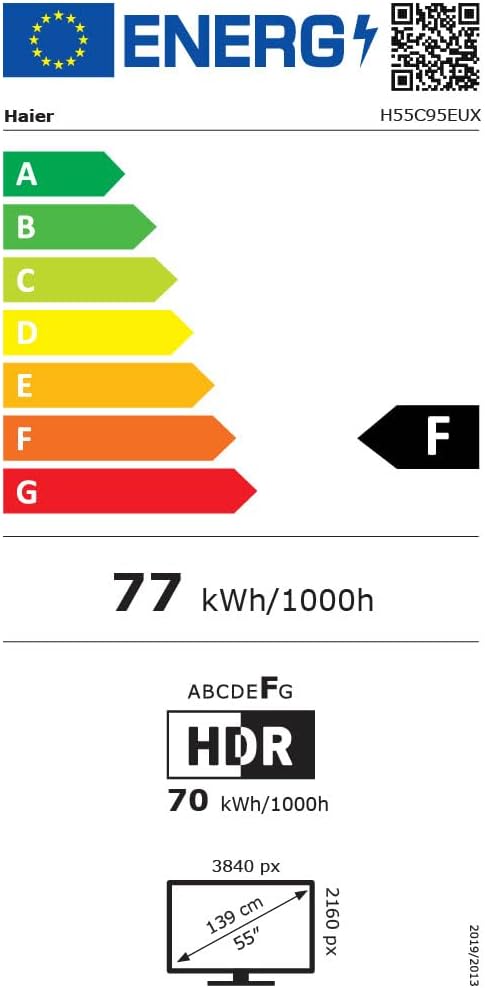
Image 8.1: EU Energy Label for the Haier H55C95EUX TV. For more details, visit the Stòr-dàta EPREL.
9. Barantas & Taic
Your Haier H55C95EUX television comes with a Barantas an neach-dèanamh 2-bliadhnaCùm dearbhadh ceannach airson tagraidhean barantais.
For technical support, service, or further inquiries, please refer to the contact information provided on the official Haier website or your local authorized service center.