
Ro-ràdh
Thank you for choosing the Altec Lansing Comfort Pro Over Ear Bluetooth Headphones. These headphones are designed to provide a high-quality audio experience with advanced features such as Active Noise Cancellation (ANC), Environmental Noise Cancellation (ENC), Spatial Audio, and a long-lasting battery. This manual will guide you through the setup, operation, and maintenance of your new headphones.
Dè th' anns a' Bhocsa
- Altec Lansing Comfort Pro Wireless Headphones
- USB-C Charging Cable (not explicitly listed but implied for charging)
- Audio Cable (not explicitly listed but common for wired use)
- Carrying Case (implied by images)
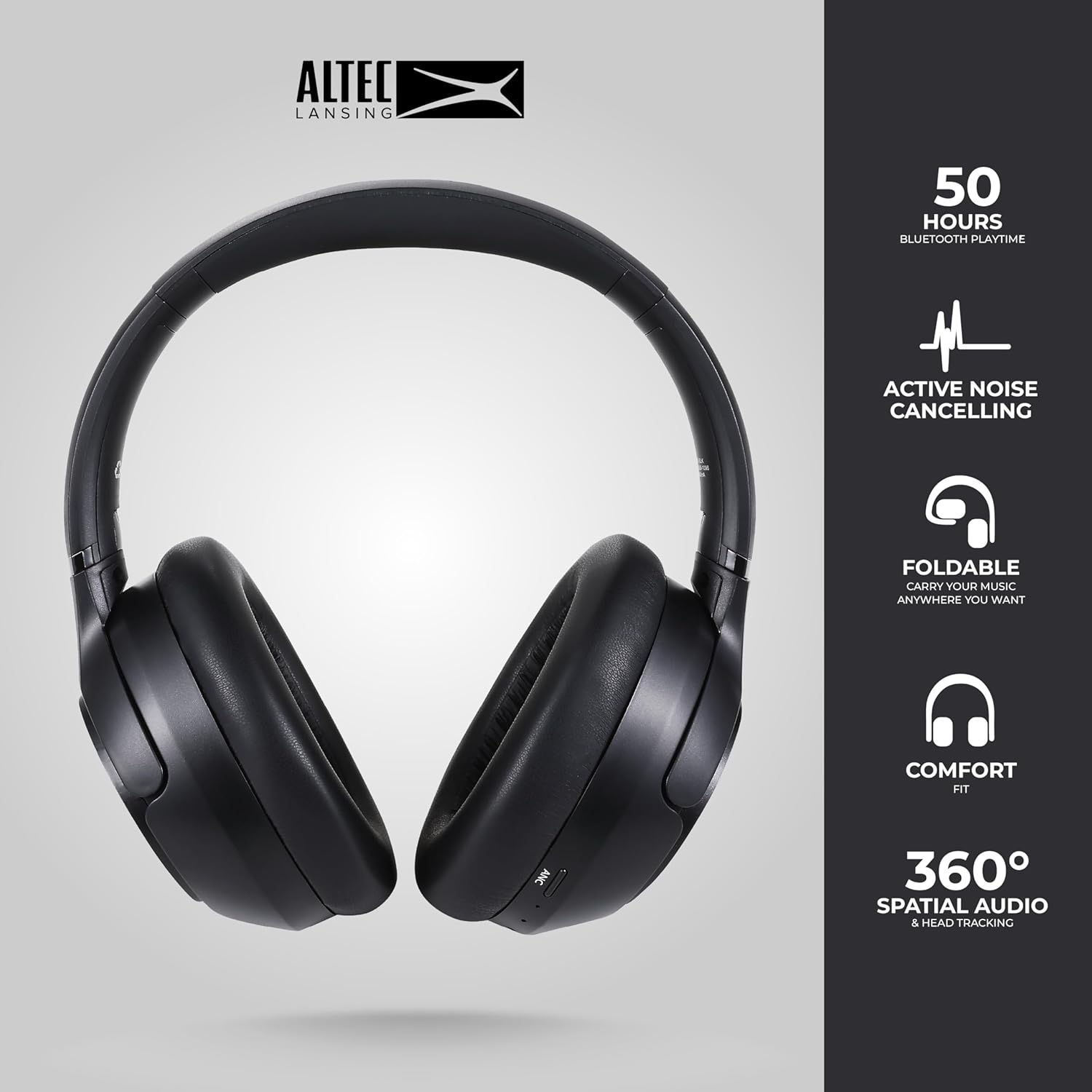
Image: The Altec Lansing Comfort Pro headphones, showcasing their sleek design and key features like 50 hours Bluetooth playtime, Active Noise Cancelling, foldable design, comfort fit, and 360° Spatial Audio & Head Tracking.
Suidhich
1. A 'cur cosgais air na fònaichean-làimhe
Before first use, fully charge your headphones. Connect the provided USB-C charging cable to the charging port on the headphones and the other end to a USB power source. The LED indicator will show charging status and turn off or change color when fully charged. A full charge typically takes approximately two hours.
2. A ’toirt cumhachd air / dheth
- Gus cumhachd a thoirt air: Brùth agus cum sìos am putan Cumhachd airson timcheall air 3 diogan gus an las an comharra LED suas.
- Gus cumhachd a thoirt dheth: Brùth agus cum sìos am putan Cumhachd airson timcheall air 3 diogan gus an tèid an comharra LED dheth.
3. Càraid Bluetooth
The headphones support Bluetooth 5.4 for stable connectivity and multipoint pairing for connecting to two devices simultaneously.
- Dèan cinnteach gu bheil na fònaichean-cluaise air an cuir dheth.
- Brùth is cum sìos am putan Cumhachd airson timcheall air 5-7 diogan gus am bi an comharra LED a’ priobadh gu luath (mar as trice gorm is dearg), a’ comharrachadh modh càraideachaidh.
- On your device (smartphone, laptop, tablet), go to Bluetooth settings and enable Bluetooth.
- Lorg airson available devices and select "Altec Lansing Comfort Pro" from the list.
- Aon uair ‘s gu bheil e ceangailte, sguiridh an comharra LED de bhith a’ priobadh agus fuirichidh e gorm seasmhach.
- For multipoint pairing, connect to the first device, then put the headphones back into pairing mode and connect to the second device. The headphones will intelligently switch between the two connected devices.

Ìomhaigh: Mion-fhiosrachadh view of the Altec Lansing Comfort Pro headphones highlighting the adjustable headband and the soft, lightweight ear cushions designed for comfort during extended use.
Ag obrachadh
Smachdan headphone
The headphones feature intuitive controls located on the earcups. Refer to the image below for button identification.

Ìomhaigh: Sealladh dlùth view of the right earcup of the Altec Lansing Comfort Pro headphones, showing the power button, volume controls, and other function buttons.
- Putan Cumhachd: Press and hold to power on/off. Short press for play/pause, answer/end calls.
- Meud suas (+): Brùth goirid gus an fhuaim a mheudachadh. Brùth fada airson an ath thrac.
- Meud sìos (-): Brùth goirid gus an fhuaim a lùghdachadh. Brùth fada airson an trac roimhe.
- Putan ANC: Press to cycle through Active Noise Cancellation modes (ANC On, Ambient Mode, ANC Off).
- Putan ioma-ghnìomhach (MFB): Double press to activate Voice Assistant (Siri/Google Voice). Triple press to activate Low Latency Mode.
Cur às do Fhuaim Ghnìomhach (ANC) & Cur às do Fhuaim Àrainneachdail (ENC)
The Comfort Pro headphones feature powerful ANC to block out external noise and ENC for clear calls. Press the dedicated ANC button to toggle between ANC On, Ambient Mode (allowing some environmental sounds for awareness), and ANC Off. ENC is automatically active during calls to ensure your voice is clear.
Fuaim Spàsail
Experience immersive sound with Spatial Audio. This feature creates a 3D soundstage, making audio feel more lifelike. Spatial Audio is automatically enabled when supported by your device and content.
Modh Latency Ìosal
For gaming or video playback where audio-visual synchronization is critical, activate Low Latency Mode by triple-pressing the MFB. This reduces audio delay for a more synchronized experience.
Neach-taic Guth
Access your device's voice assistant (Siri or Google Voice) by double-pressing the MFB. You can then issue commands through the headphone's microphone.
Stiùireadh Call
- Freagairt/Cuireadh Call: Goirid brùth air a 'phutan Power.
- Call a dhiùltadh: Brùth agus cum am putan Cumhachd airson 2 dhiog.
Cumail suas
Glanadh
Gus coileanadh agus coltas do chluas-cinn a chumail suas:
- Sguab na cupannan-cluaise agus am bann-cinn le clò bog, tioram, gun lint.
- Airson salachar stòlda, aotrom dampnigh an clò le uisge. Seachain ceimigean cruaidh, fuasglaidhean no innealan-glanaidh sgrìobach a chleachdadh.
- Na leig le taiseachd a dhol a-steach do fhosglaidhean sam bith.
Stòradh
When not in use, store your headphones in the provided carrying case to protect them from dust, scratches, and impacts. The foldable design allows for compact storage.

Image: The Altec Lansing Comfort Pro headphones neatly folded and stored inside their protective carrying case, emphasizing portability and protection.
Cùram Bataraidh
- Seachain a bhith a’ leigeil às a’ bhataraidh gu tur gu tric.
- Store the headphones with a partial charge if not used for extended periods.
- Seachain teòthachd anabarrach, a dh’ fhaodadh beatha bataraidh a mhilleadh.
Fuasgladh thrioblaidean
If you encounter any issues with your Altec Lansing Comfort Pro headphones, refer to the following common solutions:
- Cha tionndaidh na fònaichean-cluaise air: Dèan cinnteach gu bheil na fònaichean-cluaise làn-luchdaichte. Ceangail iad ri stòr cumhachd agus feuch ris a-rithist an dèidh beagan mhionaidean.
- Chan urrainnear paidhir a dhèanamh leis an inneal:
- Dèan cinnteach gu bheil na fònaichean-cluaise ann am modh paidhreachaidh (tha an LED a’ priobadh gu luath).
- Cuir Bluetooth dheth agus air air an inneal agad.
- Delete "Altec Lansing Comfort Pro" from your device's Bluetooth list and attempt to pair again.
- Feuch ri paidhir a dhèanamh le inneal eadar-dhealaichte gus cùisean sònraichte don inneal a dhiùltadh.
- Gun fhuaim no meud ìosal:
- Thoir sùil air na h-ìrean fuaim air na fònaichean-cluaise agus an inneal ceangailte agad.
- Dèan cinnteach gu bheil na fònaichean-cluaise ceangailte gu ceart tro Bluetooth.
- If using a wired connection, ensure the audio cable is fully inserted into both the headphones and the audio source.
- Chan eil ANC ag obair gu h-èifeachdach:
- Dèan cinnteach gu bheil ANC air a ghnìomhachadh le bhith a’ putadh air a’ phutan ANC.
- Atharraich freagarrachd nan cluasan-cluaise gus dèanamh cinnteach gu bheil iad a’ ròn gu math timcheall do chluasan.
- ANC is most effective against low-frequency, constant noise. It may not completely block out voices or sudden, high-frequency sounds.
- Neach-cuideachaidh Gutha gun fhreagairt: Ensure your device's voice assistant is enabled and that the headphones are properly connected. Double-press the MFB firmly.
Sònrachaidhean
| Ainm Modail | MX3050 (MZX3050-BLK-STK-6) |
| Teicneòlas ceangail | Wireless (Bluetooth) |
| Tionndadh Bluetooth | 5.4 |
| Beatha bataraidh | Up to 60 Hours (40 Hours with ANC activated) |
| Feartan Smachd Fuaim | Active Noise Cancellation (ANC), Environmental Noise Cancellation (ENC) |
| Cruth cluaise | Thar-chluas |
| Modh smachd | App, Voice, On-headphone buttons |
| Innealan co-fhreagarrach | Fònaichean sgairteil, coimpiutairean-uchd, tablaidean |
| Stuth | Fabric/Silicone and Plastic/Metal (Combination) |
| Cuideam nì | 1 Punnd |
| Ìre an aghaidh uisge | Uisge-dhìonach |
Barantas agus Taic
For warranty information and customer support, please refer to the documentation included with your purchase or visit the official Altec Lansing website. You can typically find detailed warranty terms, FAQs, and contact information for technical assistance there.
Goireasan air-loidhne: www.alteclansing.com