
1. Ro-ràdh
Thank you for choosing the Thomson 24-inch HD LED Smart TV, model 24HT2S15. This manual provides essential information to help you set up, operate, and maintain your new television. Please read it thoroughly before use and retain it for future reference.

Ìomhaigh: Aghaidh view of the Thomson 24-inch HD LED Smart TV, showcasing its frameless design and key features like HD resolution and Dolby Audio.
Prìomh fheartan:
- TiVo OS with Voice Control: Intuitive interface combining live TV and streaming apps, personalized recommendations, and voice commands.
- Taisbeanadh gun uèir: Mirror your smartphone, tablet, or laptop screen to the TV.
- Fuaim Dolby: Enhanced sound experience with improved dialogue, detail, and surround effects.
- HDR 10: Sharper contrast and realistic colors for an immersive viewann an eòlas.
- Smachd Iomallach Backlit: Easy navigation in low light with direct access buttons for popular streaming services.
- Adjustable Side Feet: Flexible positioning options for the TV.
- Tuner Trì-fhillte: Integrated tuners for cable, satellite, and antenna reception.
2. Dè tha sa bhogsa
Nuair a bhios tu a’ fosgladh a’ phacaid, dèan cinnteach gu bheil na nithean a leanas uile an làthair:
- Thomson 24-inch HD LED Smart TV (Model 24HT2S15)
- Smachd Iomallach
- Adapter cumhachd
- Leabhar-làimhe cleachdaiche
- Cairt Barantais
- Adjustable Side Feet (2x)
If any items are missing or damaged, please contact your retailer or Thomson customer support.
3. Suidhich
3.1 Dì-phapadh agus suidheachadh
Carefully remove the TV from its packaging. It is recommended to have two people for this process. Place the TV on a stable, flat surface or mount it on a wall using a compatible VESA mount (not included).
Dèan cinnteach gu bheil fionnarachadh iomchaidh timcheall an telebhisean. Na cuir bacadh air fosglaidhean fionnarachaidh.
3.2 A 'ceangal an Stand
If you are not wall-mounting the TV, attach the included side feet:
- Place the TV face down on a soft, clean cloth to prevent screen damage.
- Cuir gach seasamh còmhla ris na tuill sgriubha co-fhreagarrach aig bonn an Tbh.
- Secure the stands using the provided screws. The feet are adjustable from 30 cm to 60 cm distance.

Image: The Thomson 24-inch Smart TV showing its dimensions, including a screen diagonal of 60 cm (24 inches), width of 53 cm, and height of 37 cm with the stand. The adjustable stand feet are also illustrated.
3.3 Ceangal iomaill
Connect your external devices to the TV's ports. Refer to the diagram below for port locations.

Ìomhaigh: Mion-fhiosrachadh view of the rear connection panel of the Thomson 24-inch Smart TV, illustrating various ports including 2x USB 2.0, Antenna input, Satellite input, 3x HDMI 1.4 (one with ARC), Service port, Headphone jack, AV IN, Digital Optical Audio Out, and LAN port.
- Cumhachd: Connect the power adapter to the TV and then to a wall outlet.
- Antenna/Saideal: Connect your antenna or satellite cable to the respective input.
- HDMI: Use HDMI cables to connect devices like Blu-ray players, game consoles, or set-top boxes. HDMI 1.4/ARC supports Audio Return Channel.
- USB: Cuir a-steach draibhean USB airson ath-chluich meadhanan no ùrachaidhean bathar-bog.
- LAN: Ceangail càball Ethernet airson ceangal eadar-lìn uèirleas.
- AV ANN: Airson innealan nas sine a bhios a’ cleachdadh bhidio co-dhèanta agus claisneachd steiriò.
- Fòn-cluaise: Ceangail fònaichean-làimhe airson èisteachd prìobhaideach.
- Toradh Fuaime Optaigeach Didseatach: Connect to an external sound system for digital audio.
3.4 A’ chiad chumhachd air agus a’ chiad shuidheachadh
- Cuir an telebhisean a-steach do shoitheach cumhachd.
- Brùth am putan cumhachd air an smachd iomallach no an telebhisean.
- Follow the on-screen instructions to select your language, country, and perform channel scanning for your triple tuner (cable/satellite/antenna).
- Ceangail ris an lìonra Wi-Fi agad le bhith ga thaghadh bhon liosta agus a’ cur a-steach am facal-faire.
- Complete the TiVo OS setup, including signing in or creating an account.
4. Obrachadh an Tbh agad
4.1 Gnìomhan Smachd Iomallach
The backlit remote control provides easy access to all TV functions, even in dim lighting. It includes dedicated buttons for popular streaming services.

Image: The Thomson Smart TV remote control, highlighting its backlit buttons, voice control microphone, and direct access buttons for Netflix, YouTube, Prime Video, Disney+, and Canal+.
- Putan Cumhachd: Tionndaidh an telebhisean air / dheth.
- Putanan àireamh: Tagh seanalan gu dìreach.
- Pad Seòlaidh (Suas/Sìos/Clì/Deas/Ceart gu leòr): Seòl tro na clàran-bìdh agus tagh roghainnean.
- Air ais/Amach: Till air ais chun sgrion roimhe no fàg air clàr-taice.
- Meud suas/sìos: Atharraich an ìre fuaim.
- Sianal Suas/Sìos: Atharraich seanalan Tbh.
- Balbh: Mute no unmute an fhuaim.
- Dachaigh: Access the TiVo OS home screen.
- Putan Smachd Guth: Activate voice commands (microphone icon).
- Putanan Ruigsinneachd Dhìreach: Launch Netflix, YouTube, Prime Video, Disney+, Canal+ instantly.
4.2 TiVo OS agus Feartan Smart
The TiVo OS provides a unified platform for live TV and streaming content. Explore personalized recommendations and access your favorite apps.

Image: The Thomson Smart TV screen showing various streaming application icons like Netflix, YouTube, Disney+, Prime Video, Plex, DAZN, Canal+, and Pluto TV, indicating integrated smart TV capabilities.
- Cothrom an aplacaid: Navigate to the home screen to find and launch pre-installed apps or download new ones from the app store.
- Smachd guth: Press the voice control button on your remote and speak commands to search for content, launch apps, or control TV functions.
- Taisbeanadh gun uèir: Use the Wireless Display feature to mirror content from your compatible smartphone, tablet, or laptop directly to your TV screen.

Image: An illustration demonstrating the voice control feature of the Thomson Smart TV, showing a remote control with a microphone icon and examples of voice commands like "Open Netflix" or "Play movies with Tom Hanks."

Image: The Thomson Smart TV displaying content mirrored from a smartphone, illustrating the Wireless Display and Google Cast features for seamless content sharing.
4.3 Leasachaidhean Dealbh is Fuaime
- HDR 10: Experience improved contrast, brightness, and color accuracy with HDR10 content. This technology enhances both bright and dark scenes for a more dynamic picture.
- Fuaim Dolby: Enjoy rich, clear, and powerful sound. Dolby Audio optimizes dialogue, enhances detail, and provides an immersive surround sound experience.

Image: A side-by-side comparison of picture quality, demonstrating the enhanced contrast and color vibrancy of HDR10 on the right compared to standard SDR on the left, with a building and landscape scene.

Image: An illustration depicting sound waves emanating from a TV screen, with the Dolby Audio logo prominently displayed, signifying enhanced audio quality for an immersive viewann an eòlas.
5. Cumail suas
5.1 Glanadh an telebhisean agad
- Sgrion: Sguab an sgrion gu socair le clò bog, gun lint. Airson comharran stòlda, sguab beaganampNigh an clò le uisge no le inneal-glanaidh sgrion sònraichte. Na spraeadh leaghan gu dìreach air an sgrion a-riamh.
- Caibineat: Sguab caibineat agus seasamh an telebhisean le clò bog, tioram.
- Smachd air astar: Glan an smachd iomallach le clò bog, tioram.
Rabhadh:
- Thoir a-mach am pluga bhon telebhisean an-còmhnaidh mus glan thu e.
- Na cleachd innealan-glanaidh sgrìobach, cèir, no fuasglaidhean.
5.2 Ùrachaidhean bathar-bog
Your Smart TV may receive software updates to improve performance and add new features. It is recommended to enable automatic updates or check for updates periodically through the TV's settings menu to ensure optimal functionality and security.
6. A ’dèanamh trioblaid
Ma thachras tu ri duilgheadasan leis an telebhisean agad, thoir sùil air na duilgheadasan agus na fuasglaidhean cumanta a leanas:
| Trioblaid | Adhbhar a dh’fhaodadh a bhith ann | Fuasgladh |
|---|---|---|
| Gun chumhachd | Càball cumhachd air a dhì-cheangal; duilgheadas le socaid cumhachd | Dèan cinnteach gu bheil càball cumhachd ceangailte gu tèarainte. Dèan deuchainn air an t-socaid le inneal eile. |
| Gun dealbh, ach tha fuaim ann | Incorrect input source; faulty cable | Check the input source (e.g., HDMI 1, Antenna). Ensure cables are connected correctly. |
| Gun fhuaim, ach tha dealbh ann | Fuaim air a mhùchadh no ro ìosal; duilgheadas le siostam claisneachd taobh a-muigh | Unmute the TV or increase volume. Check audio settings and external audio connections. |
| Chan eil smachd iomallach ag obair | Bataraidhean marbh; bacadh; smachd iomallach gun a bhith air a chàradh | Replace batteries. Remove any obstructions. Re-pair the remote if necessary (refer to TV settings). |
| Chan urrainn dhuinn ceangal a dhèanamh ri Wi-Fi | Facal-faire ceàrr; duilgheadas leis an router; Tbh ro fhada bhon router | Verify Wi-Fi password. Restart your router. Move TV closer or use a wired LAN connection. |
| Feartan snasail nach eil a’ freagairt | Network issue; temporary software glitch | Check internet connection. Restart the TV by unplugging it for a minute and plugging it back in. |
If the problem persists after trying these solutions, please contact Thomson customer support.
7. Sònrachaidhean
Detailed technical specifications for the Thomson 24HT2S15 Smart TV:
| Feart | Mion-fhiosrachadh |
|---|---|
| Brand | MacThòmais |
| Modail Àireamh | 24HT2S15 |
| Meud sgrion | 24 òirleach (60 cm) |
| Teicneòlas taisbeanadh | LED |
| Fuasgladh | 768p (1366 x 768 piogsail) |
| Ìre Ath-nuadhachaidh | 60 Hz |
| Co-mheas taobh | 16:9 |
| Teicneòlas ceangail | Ethernet, HDMI, USB, Wi-Fi |
| Feartan sònraichte | Parental Controls, TiVo OS, Voice Control, HDR10, Dolby Audio |
| Meudan an toraidh (leis an stand) | 8P x 53l x 37H cm (mu 8 x 53 x 37 cm) |
| Cuideam | 3.33 kg |
| Co-phàirtean air an toirt a-steach | Power Adapter, User Manual, Warranty Card, Remote Control |
| Cànanan le taic | Fraingis, Beurla, Eadailtis, Spàinntis, Gearmailtis |
| Clas Èifeachdas Cumhachd | E |
| Fiosrachadh mu Thoradh EPREL | https://eprel.ec.europa.eu/qr/1969520 |
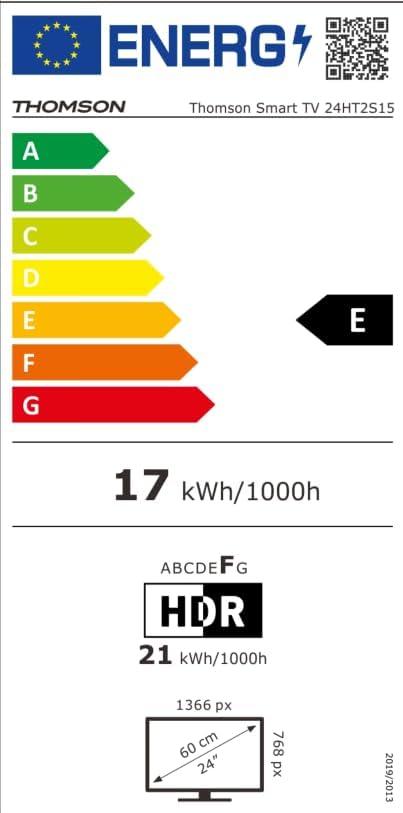
Image: The EU Energy Label for the Thomson Smart TV 24HT2S15, showing an energy efficiency class of E and energy consumption of 17 kWh/1000h for SDR and 21 kWh/1000h for HDR.
8. Barantas agus Taic
8.1 Fiosrachadh Barantais
Thomson products are covered by a 3-year warranty. For detailed information regarding warranty claims, returns, or defective products, please refer to the warranty card included in your package or visit the Thomson support weblàrach.
For specific information on purchases made via Amazon, consult Amazon's help pages regarding returns and defective products.
8.2 Taic teachdaiche
If you require further assistance or have questions not covered in this manual, please contact Thomson customer support:
- Dèanadair: Sruthview GmbH
- Post-d: cuir fios gu @sruthview.com
- Weblàrach: www.sruthview.com
- Fòn: +4318900066
Please have your model number (24HT2S15) and purchase details ready when contacting support.