
1. Ro-ràdh
Thank you for choosing the PureMate 12L/Day Dehumidifier. This appliance is designed to effectively remove excess moisture from your indoor environment, helping to prevent dampness, condensation, mould, and musty odours. By maintaining optimal humidity levels, it contributes to a healthier and more comfortable living space. Please read this manual thoroughly before operating the dehumidifier to ensure safe and efficient use.
This dehumidifier features a 12-litre per day extraction capacity, an automatic humidity sensor, a digital display, a 24-hour timer, auto shut-off, and options for continuous drainage or manual tank emptying. It is also equipped with castor wheels and a carry handle for easy portability.
2. Stiùireadh Sàbhailteachd
To reduce the risk of fire, electric shock, or injury, always observe the following basic safety precautions:
- Leugh a h-uile stiùireadh gu faiceallach mus cleachd thu an inneal.
- Ensure the power supply matches the rating label on the dehumidifier.
- Do not operate the dehumidifier with a damaged cord or plug. If the supply cord is damaged, it must be replaced by the manufacturer, its service agent, or similarly qualified persons to avoid a hazard.
- Cuir an aonad an-còmhnaidh air uachdar daingeann, rèidh.
- Maintain at least 20 cm (8 inches) clearance around the unit for proper air circulation.
- Na cuir a-steach stuthan a-steach don t-slighe a-steach no a-mach.
- Cùm an inneal air falbh bho thùsan teas, solas dìreach na grèine, agus stuthan lasanta.
- Thoir a-mach am pluga bhon aonad mus glan, mus gluais thu no mus dèan thu obair-chàraidh sam bith.
- Chan eilear an dùil an inneal seo a chleachdadh le daoine (a’ toirt a-steach clann) le comasan corporra, mothachaidh no inntinn nas lugha, no dìth eòlas agus eòlas, mura d’ fhuair iad stiùireadh no stiùireadh a thaobh cleachdadh an inneil le neach le uallach airson an sàbhailteachd.
- Bu chòir clann a bhith fo stiùir gus dèanamh cinnteach nach cluich iad leis an inneal.
- Do not use the appliance in areas where water is likely to splash onto it.
3. Toradh thallview
The PureMate 12L/Day Dehumidifier is designed for efficient moisture removal and ease of use. Below are the key components and features.

Dealbh 3.1: Aghaidh view of the PureMate 12L/Day Dehumidifier, showing its compact design and the '12L Per Day' capacity label.
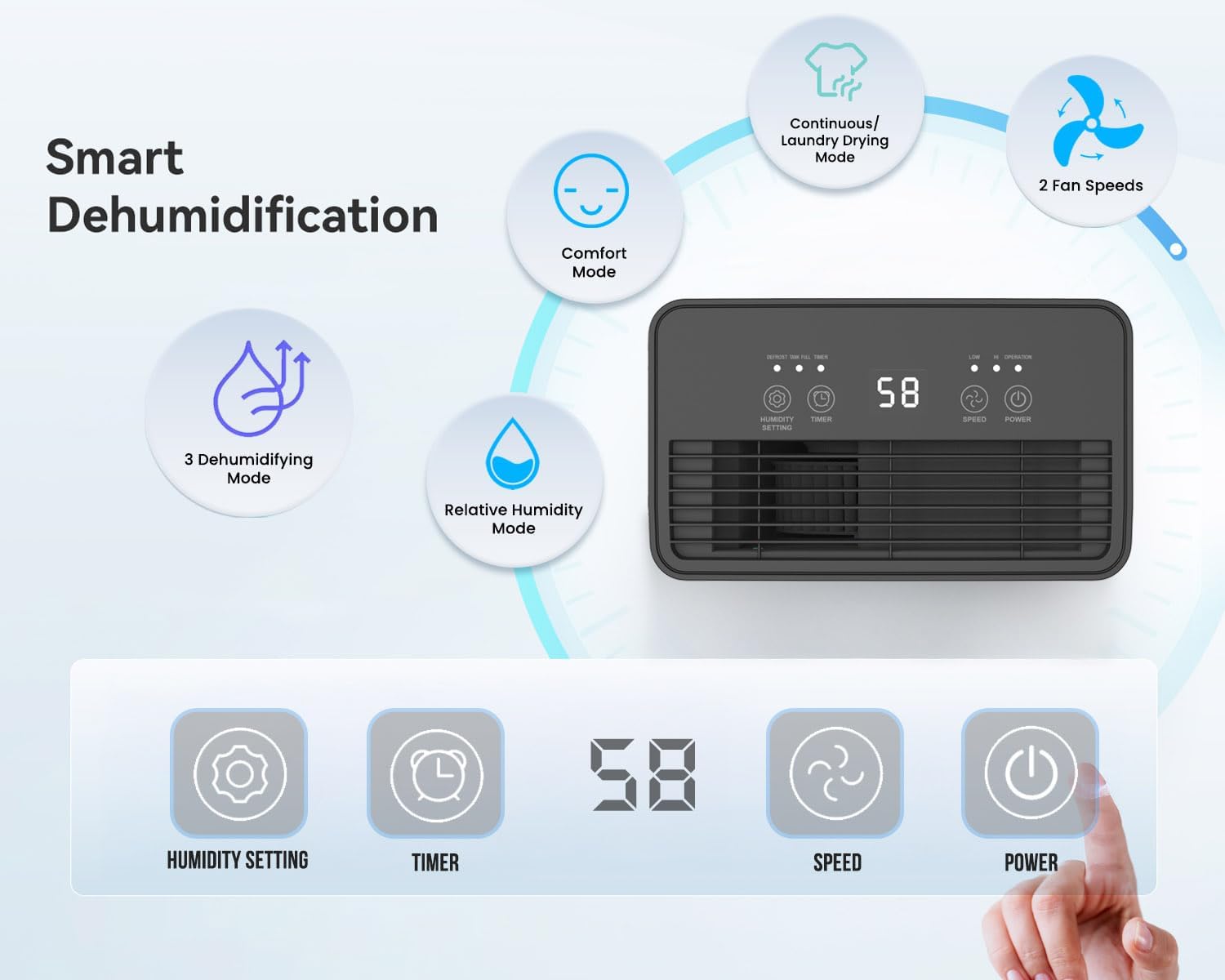
Dealbh 3.2: Illustration of the dehumidifier's smart features and control panel. It highlights Comfort Mode, Continuous/Laundry Drying Mode, 2 Fan Speeds, 3 Dehumidifying Modes, Relative Humidity Mode, and the digital display with buttons for Humidity Setting, Timer, Speed, and Power.
Prìomh fheartan:
- Thoir air falbh taise cumhachdach: Extracts up to 12 litres of moisture per day.
- Customisable Humidity Control: Offers Continuous Mode, Comfort Mode, and adjustable Relative Humidity (30-90% RH).
- Taisbeanadh is Smachdan Didseatach: Intuitive LED display and touch panel for easy operation.
- Clàr-ama 24-uair: Allows scheduled operation.
- Cuir dheth gu fèin-ghluasadach: Activates when the 2-litre water tank is full.
- Roghainnean Drèanaidh Dhùbailte: Manual tank emptying or continuous drainage via a hose.
- Criathrag Adhair a ghabhas nighe: Improves air quality by capturing dust.
- Dealbhadh so-ghiùlain: Equipped with castor wheels and an integrated handle for easy movement.
- Gnìomh fuaim ìosal: Operates quietly at 33-37 dB.
4. Suidhich
4.1 A’ dì-phapadh
- Thoir an dì-taiseadair a-mach às a phacaid gu faiceallach.
- Thoir air falbh a h-uile stuth pacaidh, a’ gabhail a-steach teip no filmichean dìona sam bith.
- Cùm am pacaigeadh airson stòradh no còmhdhail san àm ri teachd ma bhios feum air.
4.2 Suidheachadh
Tha suidheachadh ceart deatamach airson coileanadh agus sàbhailteachd as fheàrr.
- Place the dehumidifier on a firm, level surface to prevent vibration and water spillage.
- Ensure there is at least 20 cm (8 inches) of clear space around the air inlet and outlet to allow for proper airflow. Do not block these openings.
- Seachain an aonad a chur faisg air innealan a bhios a’ gineadh teas no ann an solas dìreach na grèine.
- For best results, close all doors and windows in the room where the dehumidifier is operating to create an enclosed environment.
4.3 Ceangal cumhachd
- Ensure the power cord is fully extended and not damaged.
- Plug an sreang cumhachd a-steach do ionad dealain stèidhichte a tha a rèir an voltage riatanasan an aonaid.
5. Stiùireadh Obrachaidh
The dehumidifier features an intuitive touch control panel and digital display for easy operation.

Dealbh 5.1: Close-up of the dehumidifier's touch control panel and the removable 2-litre water tank, illustrating the high-extraction capacity and drainage options.
5.1 Cumhachd air / dheth
- Brùth an CUMHACHD putan air a’ phannal smachd gus an aonad a thionndadh air no dheth.
5.2 Dehumidifying Modes
The dehumidifier offers several operating modes to suit different needs:
- Relative Humidity Mode: Brùth an SUIDHEACHADH LUACHMHOR button to set your desired humidity level between 30% and 90% RH (Relative Humidity) in 5% increments. The unit will automatically adjust its operation to maintain this level.
- Modh comhfhurtachd: This mode automatically sets the target humidity based on the current room temperature for optimal comfort.
- Modh leantainneach: The unit operates continuously without targeting a specific humidity level, ideal for very damp conditions or for drying laundry.
- Modh tiormachaidh nigheadaireachd: Similar to Continuous Mode, this setting is optimized for drying clothes indoors by continuously removing moisture from the air.

Dealbh 5.2: Visual representation of the Continuous mode and various humidity solutions provided by the dehumidifier, including dry laundry, protection against black mould, and elimination of window condensation.
5.3 Luas luchd-leantainn
- Brùth an LAOIDH button to cycle between different fan speeds (e.g., Low, High). Higher fan speed results in faster dehumidification.
5.4 Uaireadair 24-uair
- Brùth an TIMER button to set the desired operating duration (in hours) for the unit to turn on or off automatically.
- Each press increases the timer setting. Once the desired time is set, the unit will operate for that duration or turn off after that duration, depending on its current state.

Dealbh 5.3: Depicts the 24-hour timer function and the quiet operation of the dehumidifier (33-37 dB), allowing for undisturbed use even during sleep.
5.5 Digital Display and Indicator Lights
- The digital display shows the current room humidity level or the set humidity/timer value.
- Solas Comharra Taiseachd: The unit features an LED light that changes color based on the ambient humidity level:
- DEARG: Humidity level is greater than 65%.
- UAINE: Humidity level is between 40% and 55%.
- GORM: Humidity level is less than 40%.
- Gnìomh dì-reothadh fèin-ghluasadach: The unit automatically performs defrosting when frost builds up on the evaporator coils, ensuring efficient operation in cooler temperatures.

Dealbh 5.4: Illustrates the Automatic Dehumidification Mode, where the unit adjusts target humidity based on room temperature, and the Auto Defrost Function. Also shows the Humidity Indicator Light with its color codes (Red, Green, Blue) for different humidity ranges.
6. Roghainnean Drèanaidh
The PureMate dehumidifier offers two methods for water drainage:
6.1 Manual Water Tank Emptying
- The dehumidifier is equipped with a 2-litre water tank.
- When the tank is full, the unit will automatically shut off, and an indicator light (usually 'Full' or 'Tank Full') will illuminate.
- Tarraing an tanca uisge a-mach às an aonad gu faiceallach.
- Falmhaich an t-uisge a chaidh a chruinneachadh a-steach do sinc no drèana.
- Reinsert the empty water tank firmly into the unit. The dehumidifier will resume operation.
6.2 Drèanadh Leantainneach
- For maintenance-free operation, you can connect a 12mm hose (not included) for continuous drainage.
- Locate the continuous drainage outlet on the back or side of the unit.
- Attach one end of a 12mm hose to this outlet.
- Ensure the other end of the hose is placed in a drain or a larger container, ensuring a downward slope for gravity drainage.
- Once connected, the water will bypass the internal tank and drain directly.
7. Cumail suas
Bidh cumail suas cunbhalach a’ dèanamh cinnteach à coileanadh as fheàrr agus fad-beatha an dì-taiseadair agad.
7.1 Glanadh an criathar adhair
The washable air filter helps to capture dust and improve air quality. Clean it regularly, typically every two weeks, or more often if used in a dusty environment.
- Cuir dheth an dì-taiseadair agus dì-phlugaich e bhon t-socaid cumhachd.
- Lorg agus thoir air falbh an criathrag adhair (mar as trice aig cùl no taobh an aonaid).
- Gently wash the filter under running tap water. For stubborn dirt, use a soft brush and mild detergent.
- Rinse thoroughly and allow the filter to air dry completely before reinserting it. Do not use a dryer or direct heat.
- Once dry, place the filter back into its position.
7.2 Glanadh an tanca uisge
Clean the water tank periodically to prevent mould and bacteria growth.
- Cuir dheth agus thoir air falbh an aonad.
- Thoir air falbh an tanca uisge.
- Wash the tank with warm water and a mild detergent. Rinse thoroughly.
- Dry the tank completely before placing it back into the dehumidifier.
7.3 Glanadh an taobh a-muigh
- Sguab taobh a-muigh an dehumidifier le inneal bog, damp aodach.
- Na cleachd innealan-glanaidh sgrìobach, fuasglaidhean no ceimigean cruaidh, oir faodaidh iad sin milleadh a dhèanamh air an uachdar.
8. A ’dèanamh trioblaid
Ma thachras tu ri duilgheadasan leis an inneal-dì-taiseachaidh agad, thoir sùil air na duilgheadasan agus na fuasglaidhean cumanta a leanas:
| Trioblaid | Adhbhar a dh’fhaodadh a bhith ann | Fuasgladh |
|---|---|---|
| Chan eil an dì-taiseadair a’ tionndadh air. | No power supply. Power cord not plugged in. Water tank full or not correctly inserted. | Check power connection. Empty and reinsert water tank correctly. |
| No water collected or very little water collected. | Room humidity is already low. Temperature is too low (below 5°C). Air filter is clogged. Dehumidifier is in continuous drainage mode. | Increase target humidity setting. Ensure room temperature is adequate. Clean the air filter. Check if continuous drainage hose is properly connected and draining. |
| Tha an aonad fuaimneach. | Chan eil an aonad air uachdar rèidh. Tha an criathrag adhair dùinte. | Place unit on a flat, stable surface. Clean the air filter. |
| Tha an sruth-adhair lag. | Air inlet/outlet blocked. Air filter clogged. | Ensure clear space around the unit. Clean the air filter. |
If the problem persists after trying these solutions, please contact PureMate customer support.
9. Sònrachaidhean
Detailed technical specifications for the PureMate 12L/Day Dehumidifier PM411.

Dealbh 9.1: Diagram illustrating the dimensions of the PureMate Dehumidifier: 41.5cm Height, 29cm Width, 17cm Depth.
| Feart | Sònrachadh |
|---|---|
| Brand | PureMate |
| Ainm Modail | PM411 |
| Comas dehumidification | 12 Litres per Day |
| Meud tanca | 2 liotair |
| Meudan toraidh (D x W x H) | 17 x 29 x 41.5 cm |
| Cuideam nì | 8 kg |
| Modh obrachaidh | Automatic, Continuous |
| Feartan sònraichte | Countdown Timer, Programmable |
| Ìre Teothachd Uarach | 30 Ceuman Celsius |
10. Barantas agus Taic
For warranty information, please refer to the warranty card included with your product or visit the official PureMate website. If you require technical support, troubleshooting assistance beyond this manual, or have any questions regarding your PureMate 12L/Day Dehumidifier, please contact PureMate customer service through their official channels.