
1. Ro-ràdh
Tapadh leibh airson ceannachasing the Baseus PicoGo Magnetic Power Bank. This user manual provides essential information for the safe and efficient operation of your device. Please read it thoroughly before use and retain it for future reference.
2. Toradh thallview
The Baseus PicoGo Magnetic Power Bank is a Qi2 Certified 15W ultra-fast wireless portable charger with a built-in stand. Its ultra-slim 5000mAh battery pack is designed for convenience and efficiency, compatible with iPhone 12-17 series and other USB-C devices.
2.1 Susbaint a’ phacaid
- Baseus PicoGo Magnetic Power Bank
- Càball Cìsean USB-C gu USB-C
- Leabhar-làimhe cleachdaiche
2.2 Cruth inneal
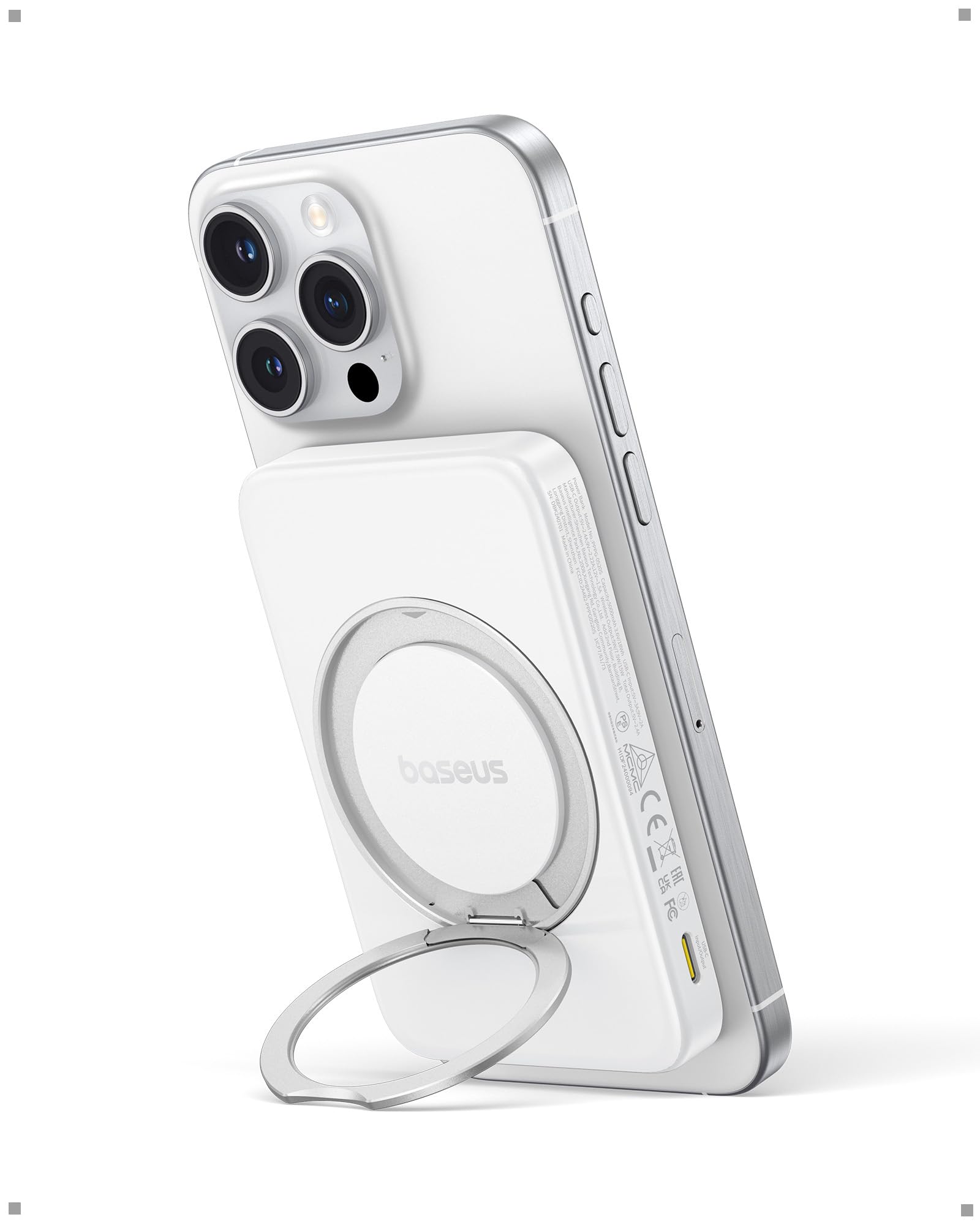
Figure 1: Baseus PicoGo Magnetic Power Bank (Moon White)
The power bank features a sleek design with a magnetic charging surface, LED indicators for battery status, a power button, and USB-C input/output ports. It also includes an integrated rotatable stand for versatile viewing ceàrnan.

Figure 2: Dimensions of the Baseus PicoGo Power Bank (4.07 x 2.63 x 0.54 inches)
The device is ultra-slim, measuring 0.54 inches thick and weighing 6 ounces, making it highly portable.

Figear 3: Dùin suas view of the power bank's USB-C input/output ports and power button.
3. Suidhich
3.1 A’ cur cosgais air a’ bhanca cumhachd
- Connect the provided USB-C to USB-C cable to the power bank's USB-C input/output port.
- Ceangail ceann eile a’ chàball ri inneal-atharrachaidh cumhachd USB-C co-chòrdail (nach eil air a ghabhail a-steach).
- The LED indicators will illuminate to show the charging status. A full charge is indicated when all LEDs are solid.
3.2 A’ cur cumhachd air/dheth
- To power on the device, press the power button once. The LED indicators will light up.
- To power off the device, press and hold the power button for a few seconds until the LEDs turn off.
4. Stiùireadh Obrachaidh
4.1 Wireless Charging (MagSafe Qi2)
The Baseus PicoGo Power Bank supports Qi2-certified 15W ultra-fast MagSafe wireless charging.
- Dèan cinnteach gu bheil am banca cumhachd air a ghearradh gu leòr.
- Align your MagSafe-compatible iPhone (iPhone 12-17 series) with the magnetic charging surface on the power bank. The magnets will snap into place, securing the phone.
- The phone's screen will indicate that charging has begun.

Figure 4: An iPhone receiving 15W wireless charging from the power bank.
For a visual demonstration of the magnetic and stand features, please watch the video below:
Video 1: Official Baseus demonstration of the PicoGo Qi2 Magnetic Power Bank, highlighting its rotatable stand and magnetic attachment.
Cosgais Uèirle 4.2 (USB-C)
The power bank's USB-C port supports 20W fast charging for compatible devices.
- Connect your device to the power bank's USB-C input/output port using a compatible USB-C cable.
- Ensure the power bank is powered on. Charging will begin automatically.

Figure 5: An iPhone connected to the power bank via a USB-C cable for wired charging.
4.3 Using the Multi-Function Stand
The integrated magnetic ring stand offers flexible viewroghainnean.
- Gently pull out the ring stand from the back of the power bank.
- Rotate the inner metal ring 360° and adjust the angle freely from 40° to 120° to suit your viewann an roghainn.
- The stand can be used for watching videos, participating in online meetings, or as a secure non-slip grip for selfies and calls.

Figure 6: The power bank's rotatable stand supporting an iPhone for hands-free viewing.
4.4 A’ cur cosgais air iomadh inneal
The power bank allows for simultaneous charging of two devices.
- You can wirelessly charge one device (e.g., iPhone) while simultaneously charging another device via the USB-C port.
- The power bank can also be recharged via USB-C while it is wirelessly charging a device.
5. Cumail suas
- Keep the power bank dry and clean. Avoid exposure to moisture, dust, or extreme temperatures.
- Glan an inneal le clò bog, tioram. Na cleachd ceimigean cruaidh no stuthan sgrìobach.
- Cùm am banca cumhachd ann an àite fionnar, tioram nuair nach eilear ga chleachdadh.
- For extended storage, ensure the battery is charged to approximately 50% to prolong its lifespan.
6. A ’dèanamh trioblaid
6.1 Cùisean Coitcheann
- Inneal nach eil a’ cur cosgais: Ensure the power bank is charged and powered on. Check cable connections and try a different cable or power adapter.
- Cìs slaodach: Verify that your device and cables support fast charging. Ensure proper alignment for wireless charging.
- Overheating: The power bank features intelligent cooling. If excessive heat is detected, charging may slow down or stop. Remove the device from charging and allow it to cool down.
6.2 Brìgh nan Comharran LED
The LED indicators provide information about the power bank's status:
- LEDan soladach: Indicate remaining battery level.
- LEDs a’ lasadh: Indicate the power bank is charging.
7. Fiosrachadh Sàbhailteachd
The Baseus PicoGo Power Bank is equipped with advanced safety features to protect your devices and ensure safe operation.

Figure 7: Icons representing various safety protections including over-voltage, fo-voltage, overcharge, over-discharge, NTC temperature, over-current, short circuit, and over-power protection.
Am measg nan dìonan sin tha:
- Thar-Voltage Dìon
- Fo-Voltage Dìon
- Dìon Overcharge
- Dìon thar-sgaoileadh
- Dìon Teòthachd NTC
- Dìon thar-làthaireach
- Dìon cuairt ghoirid
- Dìon thar-chumhachd
7.1 Intelligent Cooling and Heat Dissipation
The power bank incorporates advanced dual cooling technology with sensitive NTC thermistors for real-time temperature control and graphene aerogel for superior heat dissipation. This ensures safer and more reliable charging by keeping your device cool.

Figure 8: Illustration of the dual heat dissipation system using graphene aerogel for optimal thermal management.
7.2 Air-Travel Friendly
With a 5000mAh capacity, the Baseus PicoGo Power Bank is designed to be air-travel friendly, allowing you to stay powered up wherever you go, in compliance with most airline regulations.

Figure 9: The 5000mAh power bank is suitable for air travel, keeping devices charged on the go.
8. Sònrachaidhean
| Feart | Mion-fhiosrachadh |
|---|---|
| Modail Àireamh | PPPG-0520S |
| Comas Bataraidh | 5000 mìleamp Uairean (mAh) |
| Toradh cìs gun uèir | Suas ri 15W (Teisteanas Qi2) |
| Toradh / Toradh USB Type-C | Suas gu 20W |
| Meudan toraidh | 4.07 x 2.63 x 0.54 òirleach |
| Cuideam nì | 6 unnsa |
| Feartan sònraichte | Qi2 15W MagSafe wireless portable charger with foldable stand, ultra-slim, LED indicator lights, short circuit protection, over charging protection, pocket size. |
| Dath | Gealach Geal |
8.1 Co-chòrdalachd Uile-choitcheann
The power bank is compatible with a wide range of devices, including:
- Magnetic Wireless (15W Max): iPhone 12-16 Series (For iOS 17.4 and Later), iPhone 17 Series.
- USB-C Port (20W Max): iPad Air/Pro Series, AirPods Series, Samsung S20-S24 Series, Apple Watch Series.

Figure 10: The power bank offers broad compatibility for both wireless and wired charging across various Apple and Samsung devices.
9. Barantas & Taic
Baseus is committed to providing high-quality products and excellent customer service.
- 2-Year Hassle-Free Warranty: Enjoy peace of mind with our comprehensive warranty.
- Gealladh Airgead-air-ais 30-latha: If you are not satisfied, you can return the product within 30 days for a full refund.
- Taic Luchd-cleachdaidh Fad-beatha: Our dedicated support team is available to assist you with any questions or issues.
For further assistance, please visit the official Baseus weblàrach-lìn no cuir fios chun sgioba taic teachdaiche againn.