
AOC XL2-211
AOC XL2-211 Smart Projector User Manual
Model: XL2-211
Ro-ràdh
This manual provides essential information for the safe and efficient operation of your AOC XL2-211 Smart Projector. Please read it thoroughly before using the device and retain it for future reference.
The AOC XL2-211 is a portable 1080P Full HD smart projector featuring Android 12.0, Wi-Fi 6, Bluetooth 5.0, and a fully enclosed optical engine for dust protection. It offers a large projection screen size from 40 to 250 inches, integrated stereo speakers, and versatile connectivity options.
Fiosrachadh Sàbhailteachd
Lean na ceumannan sàbhailteachd a leanas gus casg a chur air milleadh air a’ phroiseactair agus gus sàbhailteachd an neach-cleachdaidh a dhèanamh cinnteach:
- Na seall gu dìreach a-steach do lionsa a’ phròiseictar nuair a bhios an lamp tha air adhart.
- Dèan cinnteach gu bheil fionnarachadh ceart ann gus casg a chuir air cus teasachadh. Na cuir bacadh air fosglaidhean fionnarachaidh.
- Cleachd an inneal-atharrachaidh cumhachd a tha air a thoirt seachad leis a’ phròiseictar a-mhàin.
- Cùm am proiseactair air falbh bho uisge no lionntan eile.
- Na feuch ri am proiseactair a thoirt às a chèile no a chàradh thu fhèin. Cuir fios gu luchd-obrach seirbheis teisteanasach.
- Cuir am proiseactair air uachdar seasmhach, còmhnard.
Susbaint pacaid
Dèan cinnteach gu bheil a h-uile nì anns a’ phacaid:
- AOC XL2-211 Smart Projector
- Càball cumhachd
- Càball HDMI
- Smachd Iomallach
- Leabhar-làimhe cleachdaiche (an sgrìobhainn seo)

Image: The AOC XL2-211 Smart Projector and its included accessories, including the power cable, HDMI cable, and remote control.
Bathar seachadview
Com-pàirtean proiseactair
Familiarize yourself with the main components of your projector:
- Lionsa teilgean: A’ leigeil a-mach an ìomhaigh.
- Putan Cumhachd: Tionndaidh am proiseactair air / dheth.
- Focus Sensor: Used for automatic focus adjustment.
- Grillaichean fionnarachaidh: Ensure proper airflow for cooling.
- Puirt inntrigidh: HDMI, USB, Audio Out (3.5mm jack).
- Cur a-steach cumhachd: A’ ceangal ris a’ chàball cumhachd.

Ìomhaigh: Cùl view of the AOC XL2-211 projector, highlighting the HDMI, USB, and power input ports.
Suidhich
1. Ceangal Cumhachd
- Ceangail an càball cumhachd ri port cuir a-steach cumhachd a’ phròiseictar.
- Cuir ceann eile a’ chàball cumhachd a-steach do shocaid balla.
2. Suidheachadh Tùsail
- Place the projector on a stable surface or mount it on a tripod (not included).
- Dèan cinnteach gu bheil uachdar an teilgean rèidh agus saor bho bhacaidhean.
- The projector supports flexible placement, including tabletop and tripod mounting.
3. A' tionndadh air/dheth
- Brùth am putan cumhachd air an proiseactair no an smachd iomallach gus a thionndadh air.
- Brùth is gleidh am putan cumhachd gus a thionndadh dheth.
4. Fòcas agus Keystone Correction
The projector features automatic focus and keystone correction for a clear, rectangular image.
- Fòcas Auto: The projector will automatically adjust the focus upon startup or movement. You can enable/disable this in the settings.
- Ceartachadh clach-iuchrach fèin-ghluasadach: The projector automatically corrects image distortion caused by angled projection. This can also be adjusted in settings.
- Atharrachadh làimhe: For fine-tuning, manual focus and keystone correction options are available in the Projection Settings menu.

Image: The AOC XL2-211 projector displaying its intelligent auto-focus and keystone correction capabilities, ensuring a clear image from various angles.
Stiùireadh Obrachaidh
1. Seòladh agus Eadar-aghaidh
The projector runs on Android 12.0, providing a user-friendly interface. Use the remote control to navigate through menus and select options.
- Sgrion Dachaigh: Access installed applications, settings, and media sources.
- Clàr-taice Roghainnean: Adjust network, Bluetooth, projection, language, and other system settings.
2. Roghainnean ceangail
The projector offers multiple ways to connect and display content:
Wireless Connectivity (Wi-Fi 6 & Bluetooth 5.0)
- Wi-Fi: Ceangail ris an lìonra dachaigh agad airson ruigsinneachd eadar-lìn agus sruthadh. Seòl gu Roghainnean> Gun uèir a cheangal.
- Sgàthan sgrion: Wirelessly cast content from your smartphone (iPhone, Android) or tablet. Ensure both devices are on the same Wi-Fi network.
- Bluetooth: Connect external Bluetooth speakers or headphones for enhanced audio. Go to Roghainnean> Bluetooth to pair devices.

Image: The AOC XL2-211 projector displaying content mirrored from a smartphone, illustrating seamless wireless sharing.
Ceangal Wired
- HDMI: Connect devices like laptops, gaming consoles, or TV decoders using an HDMI cable.
- USB: Plug in USB drives to play media files gu dìreach.
- Toradh Fuaime (Seacaid 3.5mm): Ceangail fònaichean-cluaise le uèir no luchd-labhairt taobh a-muigh.
Ìomhaigh: Mion-fhiosrachadh view of the AOC XL2-211 projector's input panel, showing HDMI, USB, and audio ports for versatile connections.
3. Ath-chluich nam Meadhanan
The projector supports various media formats and streaming applications.
- Aplacaidean sruthadh: Access pre-installed apps like Netflix, Hulu, Disney+, Prime Video, and YouTube.
- Meadhanan Ionadail: Play videos, photos, and music from a connected USB drive.
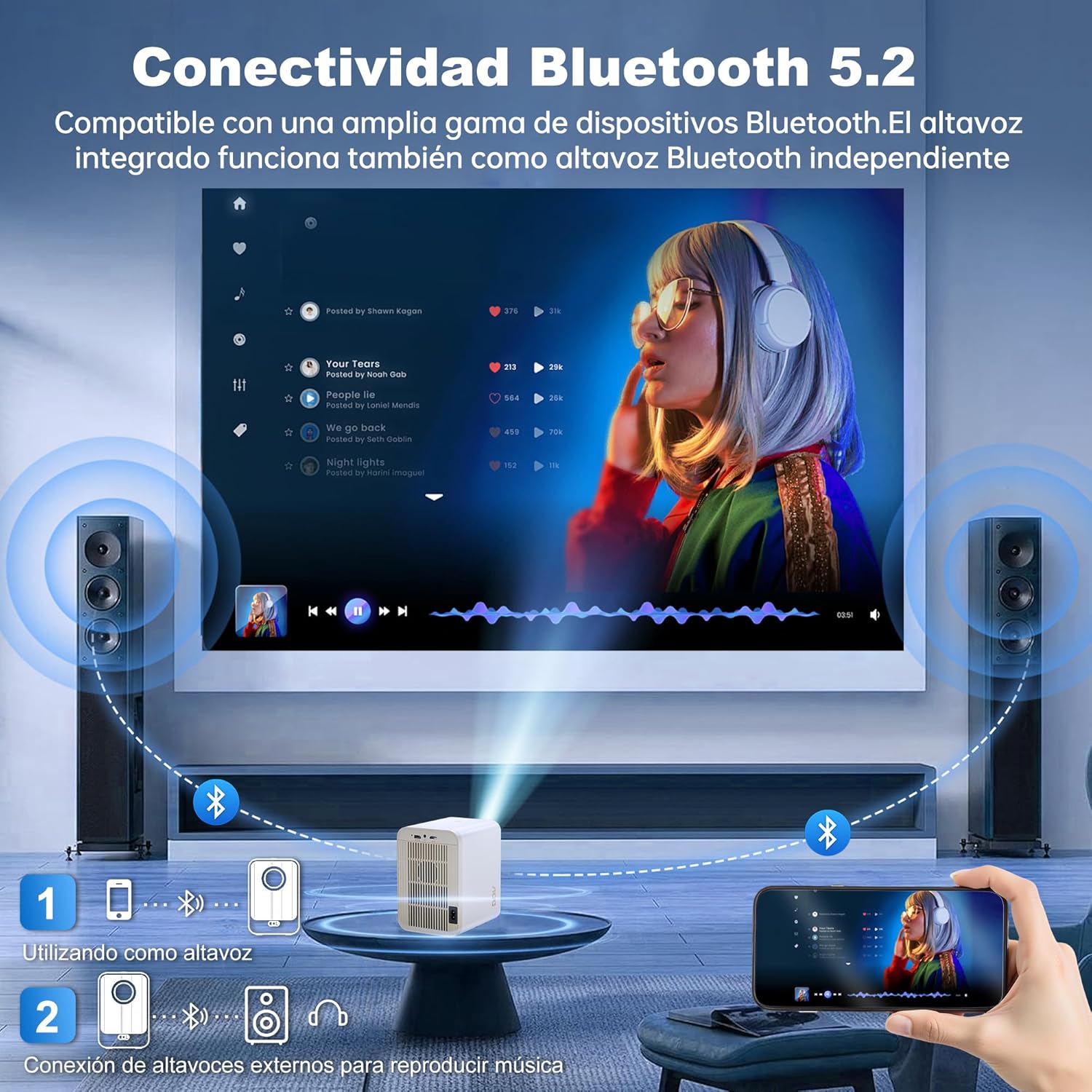
Image: The AOC XL2-211 projector displaying its smart interface with various streaming applications, ready for entertainment.
4. Toradh claisneachd
The projector includes built-in 2x12W stereo speakers. For alternative audio experiences:
- Connect Bluetooth speakers or headphones via Roghainnean> Bluetooth.
- Use the 3.5mm audio jack for wired external speakers or headphones.

Image: The AOC XL2-211 projector wirelessly connected to external Bluetooth speakers, demonstrating enhanced audio capabilities.
Cumail suas
1. Glanadh a’ Phròiseictar
- Ensure the projector is turned off and unplugged before cleaning.
- Cleachd clò bog, tioram gus taobh a-muigh a’ phròiseictar a sguabadh.
- For the lens, use a lens cleaning cloth and specialized lens cleaning solution. Do not use abrasive materials.
- The fully enclosed optical engine minimizes dust accumulation, but regular external cleaning is recommended.
2. Stòradh
- Store the projector in a cool, dry place away from direct sunlight and extreme temperatures.
- If storing for an extended period, place it back in its original packaging or a protective case.
Fuasgladh thrioblaidean
| Trioblaid | Adhbhar a dh’fhaodadh a bhith ann | Fuasgladh |
|---|---|---|
| Chan eil ìomhaigh air a thaisbeanadh | Càball cumhachd air a dhì-cheangal, stòr cuir-a-steach ceàrr, caip lionsa air. | Check power connection, select correct input source (HDMI/USB), remove lens cap. |
| Tha an ìomhaigh blurry | Out of focus, incorrect keystone correction. | Allow auto-focus to adjust, or manually adjust focus/keystone in Projection Settings. |
| Gun fhuaim | Volume too low, external audio device not connected/paired, internal speakers disabled. | Increase volume, ensure Bluetooth device is paired or wired audio is connected, check audio settings. |
| Chan urrainn dhomh ceangal ri Wi-Fi/Bluetooth | Incorrect password, device too far, interference. | Verify password, move device closer to router/projector, restart devices. |
| Chan eil smachd iomallach ag obair | Low batteries, obstruction. | Replace batteries, ensure no obstruction between remote and projector. |
Sònrachaidhean
| Feart | Mion-fhiosrachadh |
|---|---|
| Brand | AOC |
| Modail Àireamh | XL2-211 |
| Fuasgladh Dùthchasach | 1280 x 800 piogsail |
| Fuasgladh le taic | 1920 x 1080 piogsail (làn HD) |
| Gile | 12000 Lumens (300 ANSI) |
| Co-mheas coimeas | 12000:1 |
| Siostam-obrachaidh | Android 12.0 |
| RAM | 1 GB |
| ROM | 8 GB |
| Ceangal gun uèir | Wi-Fi 6 (2.4G/5G), Bluetooth 5.0 |
| Puirt a-steach | HDMI, USB, Audio (3.5mm jack), TF Card |
| Puirt Toraidh | Audio (3.5mm jack) |
| Labhraiche | Built-in 2x12W Stereo Speakers |
| Meud ro-mheasaidh | 40-250 òirleach |
| Factor foirm | So-ghiùlain |
| Meudan toraidh | 19 x 21 x 26 cm |
| Cuideam nì | 750 gram |
| Caitheamh cumhachd | 40 watt |
Barantas agus Taic
Fiosrachadh Barantais
Your AOC XL2-211 Smart Projector comes with a barantas aon-bhliadhna bho cheann-latha a’ cheannaich, a’ còmhdach lochdan saothrachaidh. Cùm dearbhadh do cheannaich airson tagraidhean barantais.
Taic Luchd-cleachdaidh
For technical assistance, troubleshooting, or warranty inquiries, please contact AOC customer support. Refer to the official AOC weblàrach-lìn airson an fhiosrachadh conaltraidh as ùire.
Goireasan air-loidhne: Tadhail air an AOC Brand Store airson fiosrachadh a bharrachd mu thoraidhean agus Ceistean Cumanta.
Taisbeanadh bhidio
Watch this official video for a visual guide on setting up and using your AOC XL2-211 Smart Projector, including unboxing, connectivity, and key features.
Video: An official demonstration of the AOC XL2-211 Smart Projector, showcasing its unboxing, setup, and various functionalities.
Ask a question about this manual
Ask about setup, troubleshooting, compatibility, parts, safety, or missing instructions. Manuals+ will review the question and use this page’s manual context to help answer it.