
1. Ro-ràdh
Welcome to the OnePlus 15 user manual. This guide provides essential information for setting up, operating, maintaining, and troubleshooting your new smartphone. The OnePlus 15 is designed for high performance and extended battery life, featuring a Snapdragon 8 Elite Gen 5 processor, a 7300mAh battery, and a triple 50 MP camera system. Please read this manual thoroughly to ensure optimal use of your device.
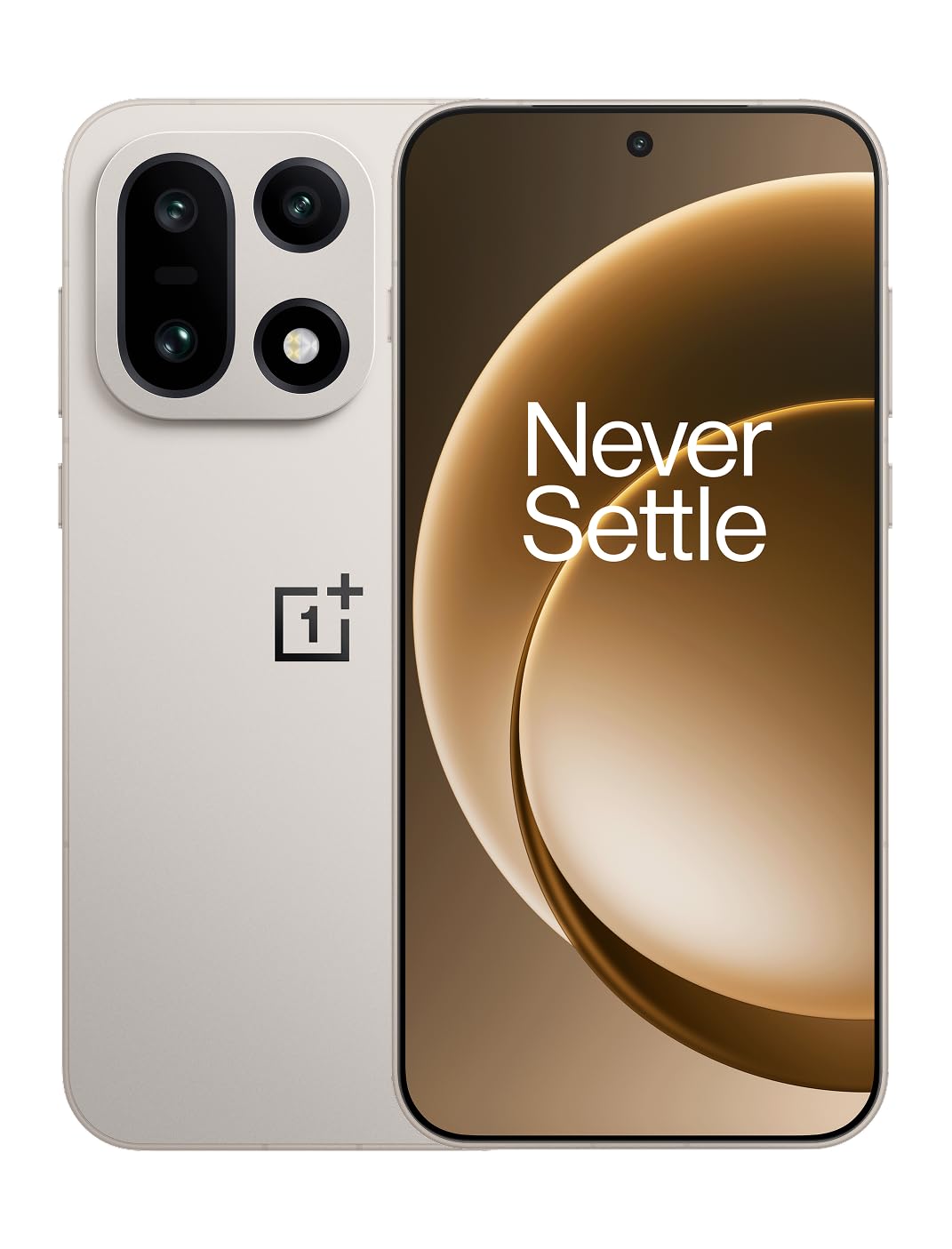
Figear 1: Aghaidh view of the OnePlus 15 smartphone.
2. Dè tha sa bhogsa
Dearbhaich gu bheil a h-uile nì an làthair ann am pasgan an toraidh agad:
- OnePlus 15 Smartphone (x1)
- Inneal-lìonaidh (x1)
- USB Data Cable (x1)
- SIM Ejector Tool (x1)
- Quick Guide (x1)
- Safety Guide (x1)

Figure 2: Included items in the OnePlus 15 package.
3. Suidhich
3.1. Stàladh cairt SIM
The OnePlus 15 supports Dual-SIM functionality. To install your SIM card(s):
- Lorg treidhe a’ chairt SIM air taobh an inneil.
- Cuir an inneal-tilgeil SIM a-steach don toll beag ri taobh an treidhe agus brùth gu daingeann gus an tig an treidhe a-mach.
- Cuir do chairt(ean) Nano-SIM anns an treidhe leis na ceanglaichean òir a’ coimhead sìos. Dèan cinnteach gu bheil iad nan suidhe gu ceart.
- Cuir an treidhe cairt SIM a-steach don fhòn gu faiceallach.

Figear 3: Taobh view of the OnePlus 15, highlighting the SIM card tray.
3.2. A’ chiad chumhachd air agus an rèiteachadh
Gus an inneal agad a chur air airson a’ chiad uair:
- Brùth is cum sìos am putan Cumhachd (suidhichte air an taobh dheas) gus an nochd suaicheantas OnePlus.
- Lean na stiùiridhean air an sgrion gus an rèiteachadh tùsail a chrìochnachadh, a’ gabhail a-steach taghadh cànain, ceangal Wi-Fi, logadh a-steach cunntas Google, agus roghainnean tèarainteachd.
3.3. A 'cur cosgais air a' Bhataraidh
The OnePlus 15 is equipped with a 7300mAh battery. To charge your device:
- Cìsean le sreang: Connect the provided USB Data Cable to the Type-C port on the bottom of the phone and the other end to the charger. Plug the charger into a power outlet.
- Cìs gun uèir: Place the phone on a compatible wireless charging pad. Ensure the phone is centered on the pad for efficient charging.
A full charge provides approximately 68.7 hours of talk time.

Figure 4: Illustration of the 7300mAh battery capacity.
4. Ag obrachadh an inneal agad
4.1. Taisbeanadh
The OnePlus 15 features a 6.78-inch AMOLED display with a 2772x1272 resolution and a 165 Hz refresh rate. This provides smooth visuals and vibrant colors. Adjust display settings such as brightness, color mode, and refresh rate in the device settings menu.
4.2. Coileanadh
Powered by the Snapdragon 8 Elite Gen 5 processor and 16GB of RAM, the OnePlus 15 delivers fast and efficient performance for multitasking, gaming, and demanding applications. The Tri-Chip System, combining the Snapdragon 8 Elite Gen 5 with a dedicated Wi-Fi chip and CPU scheduler, optimizes for speed, connectivity, and power efficiency.
Bhidio 1: Tharview of the OnePlus 15's performance capabilities and user experience.
4.3. Siostam Camara
The device is equipped with a Triple 50 MP camera system, offering wide, ultra-wide, and telephoto lenses for versatile photography. The DetailMax Engine enhances photo quality in various lighting conditions, including day, night, and motion shots. Both front and rear cameras are available for capturing images and videos.

Figear 5: Cùl view den OnePlus 15, a’ taisbeanadhasing the triple camera system.
Figure 6: DetailMax Engine for stunning photos.
4.4. Ceangalachd
The OnePlus 15 supports a range of connectivity options:
- Wireless: Wi-Fi, Bluetooth, NFC, Infrared.
- Uèir: USB Type-C.
- Seòladh: Dual-band GPS (L1+L5) and Galileo (E1+E5a).
- SIM: Dual SIM support for managing multiple networks.
4.5. Siostam-obrachaidh
The device runs on Android 16 with OxygenOS 16, providing a fast and smooth user experience. Regular software updates will be provided to enhance features and security.
5. Cumail suas
5.1. Seasmhachd agus Dìon
The OnePlus 15 is built with IP66/IP68/IP69 and IP19K ratings, offering resistance against dust and water. While designed to be durable, avoid exposing the device to extreme conditions or prolonged submersion in water.

Figure 7: OnePlus 15 demonstrating water resistance.
5.2. Glanadh an inneil agad
Use a soft, lint-free cloth to clean the screen and body of your phone. Avoid using abrasive materials or harsh chemicals, which can damage the display or finish.
5.3. Ùrachaidhean bathar-bog
Periodically check for software updates in the device settings. Keeping your software up-to-date ensures you have the latest features, security patches, and performance improvements.
6. A ’dèanamh trioblaid
This section addresses common issues you might encounter with your OnePlus 15.
6.1. Inneal gun a bhith a’ tionndadh air
- Dèan cinnteach gu bheil am bataraidh air a luchdadh. Ceangail am fòn ris an charger agus feith beagan mhionaidean mus feuch thu ri a thionndaidh air a-rithist.
- Brùth is cum sìos am putan Cumhachd airson co-dhiù 10-15 diogan gus ath-thòiseachadh a sparradh.
6.2. Droch Cheangal Lìonra
- Thoir sùil a bheil a’ chairt SIM agad air a cur a-steach gu ceart.
- Verify that airplane mode is not enabled.
- Ath-thòisich an inneal.
- If issues persist, contact your network provider.
6.3. Aplacaidean a’ tuiteam no a’ reothadh
- Dùin agus ath-fhosgladh an aplacaid.
- Clear the app's cache and data in device settings.
- Dèan cinnteach gu bheil an aplacaid air ùrachadh chun dreach as ùire aige.
- If the issue is widespread, consider restarting the phone.
6.4. Bataraidh a’ Drèanadh Gu Luath
- Lùghdaich soilleireachd na sgrìn agus fad ùine-ama na sgrìn.
- Disable unused features like Wi-Fi, Bluetooth, or GPS when not needed.
- Identify and close power-intensive applications running in the background.
- Check for recent software updates, as they often include battery optimizations.
7. Sònrachaidhean
Detailed technical specifications for the OnePlus 15 (Model: CPH2749).
| Feart | Mion-fhiosrachadh |
|---|---|
| Ainm Modail | OnePlus 15 |
| Àireamh Modail Nì | CPH2749 |
| Meudan toraidh | 6.36 x 3.02 x 0.32 òirleach |
| Cuideam nì | 1.28 not |
| Siostam-obrachaidh | Android 16 |
| Modail CPU | Snapdragon 8 Elite Gen 5 |
| Luas CPU | 4.61 GHz |
| Meud Cuimhne RAM Stàlaichte | 16 GB |
| Comas stòraidh cuimhne | 512 GB |
| Meud taisbeanaidh sgrion seasmhach | 6.78 òirlich |
| Fuasgladh | 2772*1272 |
| Ìre Ath-nuadhachaidh | 165 Hz |
| Comas Bataraidh | 7300 mìleamp Uairean (7300mAh) |
| Ùine Còmhraidh Fòn | 68.7 Uairean |
| Teicneòlasan ceangail | Infrared, NFC, USB, Wi-Fi, Bluetooth |
| GPS | Dual band: GPS(L1+L5) Galileo(E1+E5a) |
| Feartan sònraichte | Dual SIM, Wireless Charging |
| Jack fuaim | Type-C headphones: supported Type-C digital headphones & Type-C analog headphones |
| Feartan Camara Eile | Front, Rear (Triple 50 MP Camera System) |
| Rangachadh IP | IP66/IP68/IP69 and IP19K rated |
| Dath | Sand Storm |
8. Fiosrachadh Barantais
Your OnePlus 15 device is covered by a limited manufacturer's warranty. Please refer to the included Safety Guide or visit the official OnePlus website for detailed warranty terms and conditions, including coverage duration and service procedures. Keep your proof of purchase for warranty claims.
9. Taic
For further assistance, technical support, or to access additional resources, please visit the official OnePlus support website or contact customer service. You can find contact details and FAQs on the OnePlus weblàrach.
Goireasan air-loidhne: www.oneplus.com/support