
1. Ro-ràdh
Thank you for choosing the Magcubic HY350MAX Portable Projector. This manual provides essential information for setting up, operating, and maintaining your device. Please read it thoroughly before use to ensure optimal performance and safety.

Figure 1: Magcubic HY350MAX Portable Projector Overview
2. Dè tha sa bhogsa
Dèan cinnteach gu bheil a h-uile nì anns a’ phacaid:
- 1 x Magcubic HY350MAX Portable Projector
- 1 x Air Mouse Remote Control
- 1 x Leabhar-làimhe Cleachdaiche
3. Feartan toraidh
The Magcubic HY350MAX projector offers a range of advanced features for an immersive vieweòlas:
- Fuasgladh Àrd: Native 1080P Full HD (1920x1080) with support for 4K and 8K content decoding, enhanced by HDR10+.
- Gile: 600 ANSI Lumens for clear images even in ambient light.
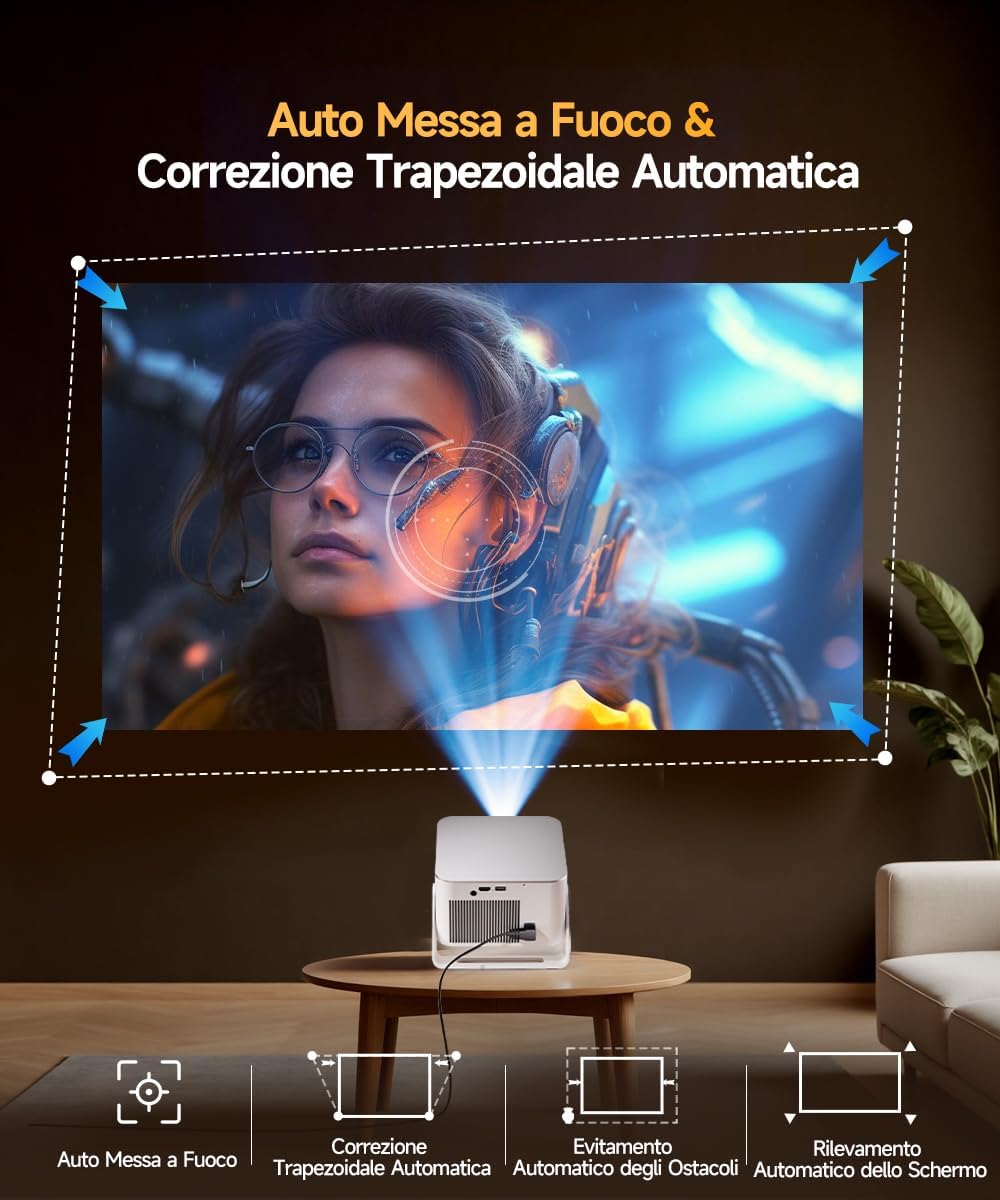
- Fèin-ghluasad Glic: Automatic focus, 6D keystone correction, screen detection, and intelligent obstacle avoidance for a perfectly aligned and sharp image.
- Integrated Smart System: Powered by Allwinner H726 chip, 2GB RAM, and 16GB internal storage, running Android 14 with over 6000 pre-installed apps.
- Ceangal adhartach: Dual-band WiFi 6 (2.4 GHz and 5 GHz) for fast and stable wireless screen mirroring, and Bluetooth 5.4 for audio device connections.
- Fuaim bogaidh: Built-in 12W Hi-Fi stereo speaker.
- Ro-mheasadh sùbailte: 180° rotation allows projection onto walls or ceilings. Short throw ratio of 1.0:1, projecting 40 to 140 inches.
- Co-fhreagarrachd Uile-choitcheann: HDMI and USB ports for connecting PS5, laptops, TV sticks, USB drives, smartphones, and tablets.
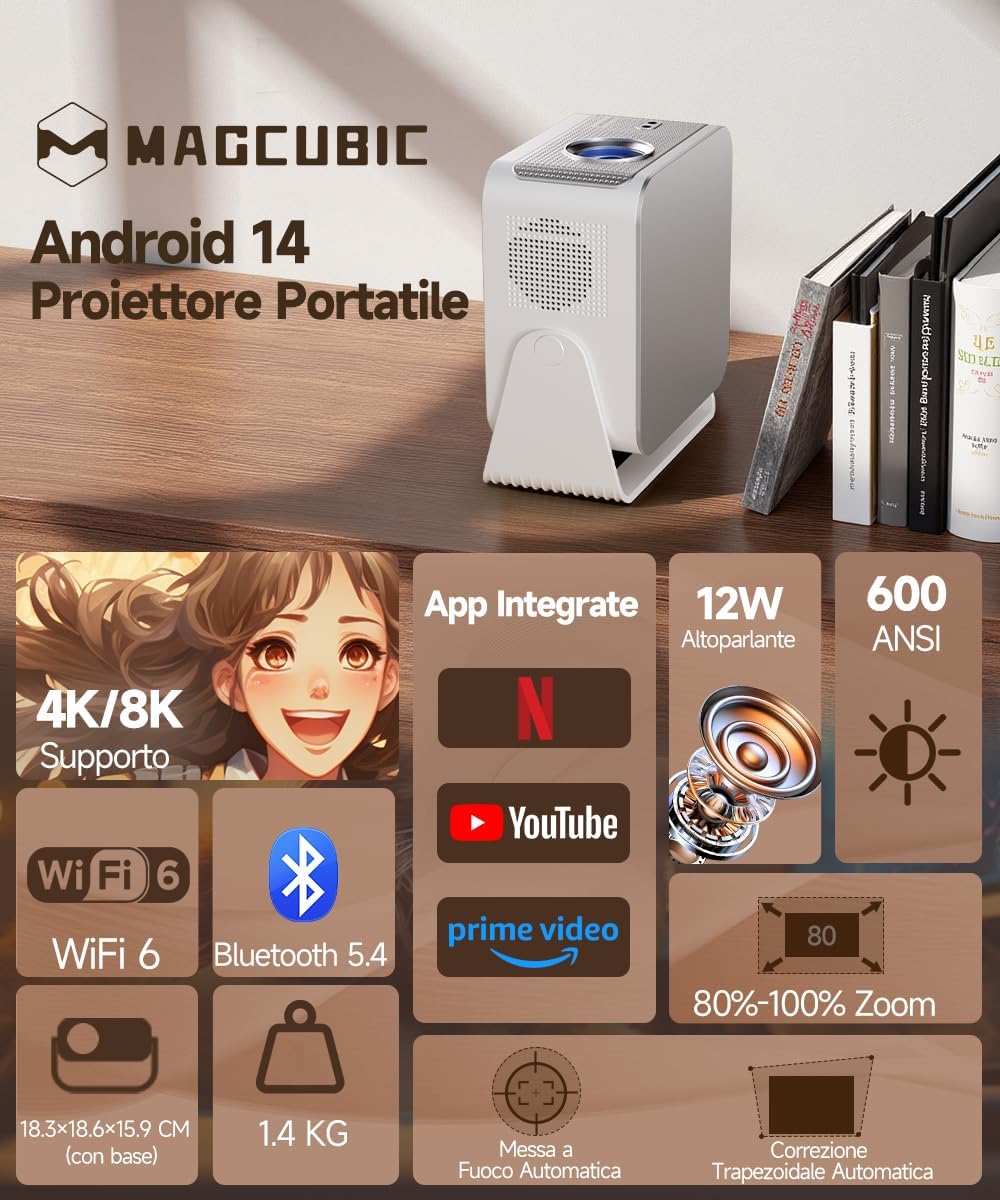
Figure 2: Key Features of the HY350MAX Projector

Figure 3: 1080P Native Resolution Clarity

Figure 4: Android 14 and Integrated Applications
4. Suidhich
4.1 Placement and Power
- Place the projector on a stable, flat surface. The 180° rotation feature allows for versatile placement, including ceiling projection.
- Ceangail an càball cumhachd ris a’ phroiseactair agus an uair sin ri socaid cumhachd.
- For optimal projection, ensure the room is sufficiently dark.

Figure 5: Flexible 180° Rotation for Placement
4.2 Initial Image Adjustment
The projector features automatic focus and keystone correction. Upon powering on or moving the projector, it will automatically adjust the image for clarity and shape.
- Fòcas fèin-ghluasadach: The projector will automatically focus the image. This works best for projection distances under 2.5 meters.
- Ceartachadh clach-iuchrach fèin-ghluasadach: The projector will automatically correct the image's trapezoidal distortion.
- Fòcas làimhe: If the projection distance is greater than 2.5 meters or if automatic focus is not sensitive enough, use the remote control to adjust focus manually.

Figure 6: Automatic Image Correction Features

Figure 7: Auto and Manual Focus Guide
4.3 Innealan ceangail
The projector supports various input methods:
- HDMI: Connect gaming consoles (e.g., PS5), laptops, or TV sticks using an HDMI cable.
- USB: Cuir a-steach draibhean USB airson ath-chluich meadhanan.
- WiFi 6: Connect to your home network for streaming and wireless screen mirroring from smartphones and tablets.
- Bluetooth 5.4: Paidhir le luchd-labhairt Bluetooth no fònaichean-cluaise taobh a-muigh airson claisneachd nas fheàrr.
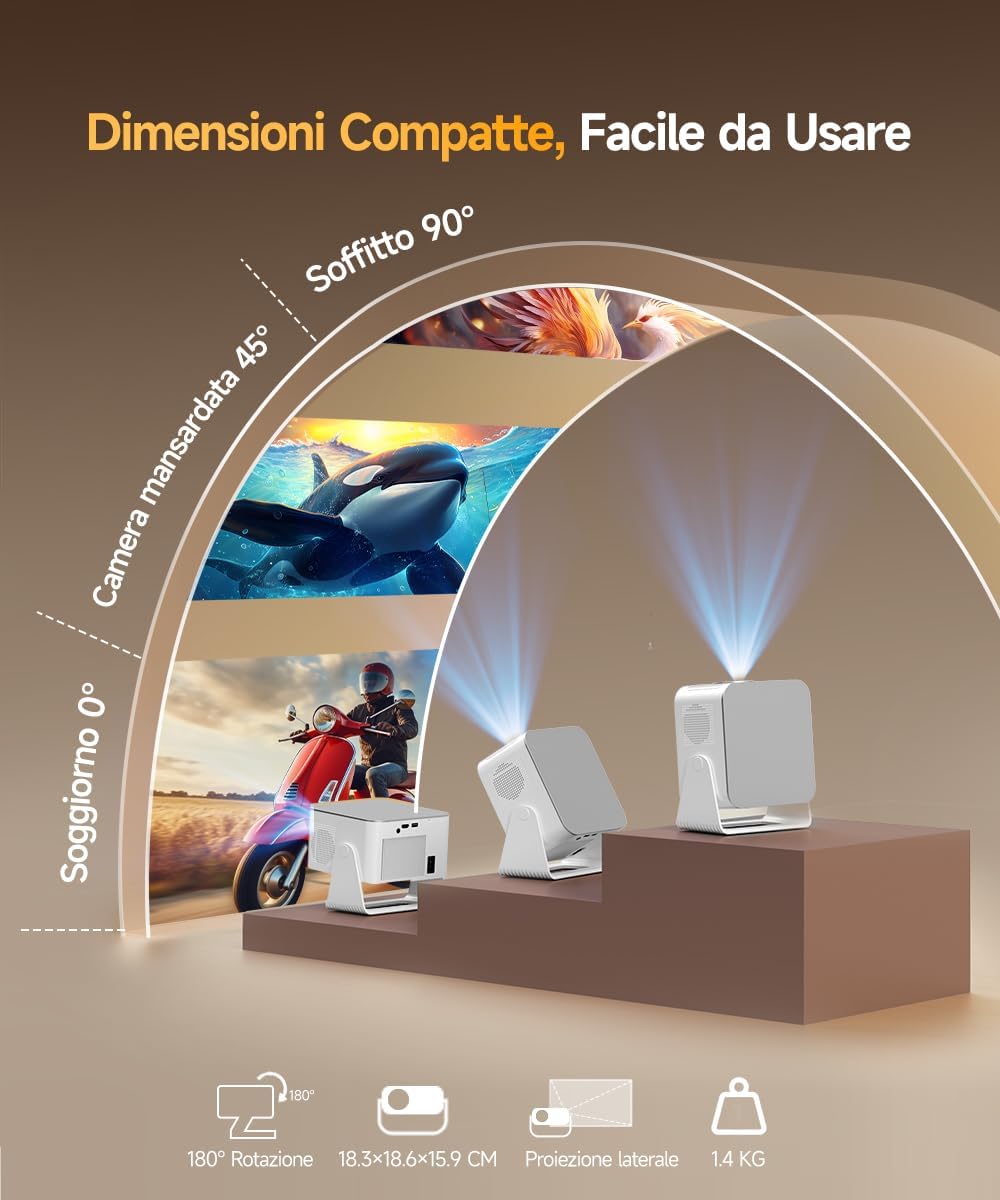
Figure 8: Universal Connectivity Options
Figear 9: WiFi 6 agus Bluetooth 5.4
4.4 Air Mouse Remote Control Setup
To use the Air Mouse function of your remote control, follow these steps:
- Activate Bluetooth on your projector.
- Simultaneously press the left and right directional buttons on the remote control until the projector emits an audible signal.
- Press the button with the 'mouse' symbol on the remote control to activate the Air Mouse function.
- Move your wrist to control the on-screen cursor.

Figure 10: Air Mouse Remote Control Usage
Video 1: Demonstrates the steps to pair and use the Air Mouse remote control for navigation.
5. Stiùireadh Obrachaidh
5.1 Cumhachd air / dheth
Brùth am putan cumhachd air a’ phroiseactair no an smachd iomallach gus an inneal a thionndadh air no dheth.
5.2 A’ seòladh an eadar-aghaidh
The projector runs on Android 14, providing a user-friendly interface. Use the remote control (or Air Mouse) to navigate through menus, select apps, and adjust settings.
- Sgrion Dachaigh: Access integrated apps, input sources (HDMI, USB), and settings.
- App Store: Download additional applications as needed.
- Roghainnean: Adjust display, sound, network, and system preferences.
5.3 Sgàthan sgrion
Utilize the WiFi 6 dual-band connectivity for seamless screen mirroring from compatible devices.
- Ensure both your device (smartphone, tablet, laptop) and the projector are connected to the same WiFi network.
- Select the screen mirroring option on the projector's interface (e.g., Airplay, Miracast).
- Initiate screen mirroring from your device's settings.
5.4 Toradh Fuaim
The projector features a built-in 12W Hi-Fi stereo speaker. For external audio, use Bluetooth 5.4 to connect to speakers or headphones.
- To connect via Bluetooth, go to the projector's settings, select Bluetooth, and pair with your desired audio device.
Bhidio 2: Tharview of the projector's features, including automatic adjustments, connectivity, and smart interface.
Video 3: Demonstration of the projector's image quality and clarity with various nature scenes.
6. Cumail suas
6.1 Glanadh
- Cleachd clò bog, tioram gus taobh a-muigh a’ phròiseictar a ghlanadh.
- Airson an lionsa, cleachd clò agus fuasgladh sònraichte airson glanadh lionsa. Seachain stuthan sgrìobach.
- Dèan cinnteach gu bheil fosglaidhean fionnarachaidh saor bho dhuslach agus bhacaidhean.
6.2 Stòradh
Nuair nach eilear ga chleachdadh airson ùine mhòr, stòraich am proiseactair ann an àite fionnar, tioram, air falbh bho sholas dìreach na grèine agus teòthachd anabarrach.
7. A ’dèanamh trioblaid
Ma thachras tu ri duilgheadasan leis a’ phroiseactair agad, thoir sùil air na fuasglaidhean cumanta a leanas:
- Gun chumhachd: Check the power cable connection and ensure the power outlet is functional.
- Gun dealbh: Verify the input source is correctly selected (HDMI, USB, WiFi). Ensure the lens cap is removed.
- Ìomhaigh neo-shoilleir: Allow the automatic focus to complete. If still blurry, manually adjust focus using the remote control. Ensure the projection surface is flat.
- Ìomhaigh Shaobhte: The automatic keystone correction should resolve this. If not, check projector placement or manually adjust keystone settings if available.
- Gun fhuaim: Check volume settings on both the projector and the connected source device. Ensure Bluetooth audio devices are correctly paired.
- Duilgheadasan Ceangail WiFi/Bluetooth: Ensure the projector is within range of the router/Bluetooth device. Restart both devices.
Airson tuilleadh cuideachaidh, cuir fios gu taic luchd-cleachdaidh.
8. Sònrachaidhean
| Feart | Sònrachadh |
|---|---|
| Brand | Magcubic |
| Modail Àireamh | HY350MAX |
| Fuasgladh Dùthchasach | 1920 x 1080 (1080P Làn HD) |
| Fuasgladh taisbeanaidh as àirde | 7680 x 4320 (Taic 8K) |
| Gile | 600 Lumens ANSI |
| Co-mheas coimeas | Àrd |
| Teicneòlas ceangail | Bluetooth 5.4, HDMI, USB, WiFi 6 (5 Ghz+2.4 Ghz) |
| Siostam-obrachaidh | Android 14 |
| CPU | Allwinner H726 |
| RAM | 2 GB |
| Stòradh a-staigh | 16 GB |
| Fuaim | 12W Hi-Fi Stereo Speaker |
| Meud ro-mheasaidh | 40 - 140 òirlich |
| Projection Distance (Min/Max) | 0.9 m / 3.1 m |
| Cuideam | 1.4 cileagram |
| Caitheamh cumhachd | 100 watt |
| Feartan sònraichte | Integrated Apps, Auto Focus, Auto Keystone Correction, Intelligent Image Adjustment, 180° Rotatable, HDR10+ |
Video 4: Comparison between Magcubic HY350MAX and HY350 models, highlighting system and CPU upgrades.
9. Barantas agus Taic
Magcubic is committed to providing quality products and customer satisfaction.
- Barantas Bathar: Barantas neach-dèanamh 1-bliadhna.
- Gealladh Aisigidh: Gealladh airgead air ais 30-latha.
- Taic teachdaiche: 24-hour live customer assistance.
- Taic Teicnigeach: Taic theicnigeach fad-beatha.
For any inquiries or support needs, please refer to the contact information provided with your purchase or visit the official Magcubic weblàrach.


