
Ro-ràdh
This manual provides detailed instructions for the installation, operation, and maintenance of your Fortdows 10.4 Inch Tesla-Style Car Radio Stereo. This unit is designed to integrate seamlessly into Chevrolet Cruze models from 2009 to 2015, offering advanced features such as Wireless CarPlay, Android Auto, Bluetooth 5.0, GPS navigation, 5G WiFi, and a 1080P backup camera. Please read this manual thoroughly before use to ensure proper functionality and safety.

Image: The Fortdows 10.4 Inch Tesla-Style Car Radio Stereo installed in a Chevrolet Cruze dashboard, showcasing its large display and integrated design.
Feartan toraidh
- Co-fhreagarrachd carbaid: Designed for Chevrolet Cruze 2009-2015 models.
- Coileanadh: Equipped with a Quad-Core processor, 2GB RAM, and 64GB ROM for efficient operation and ampstòradh airson aplacaidean agus meadhanan.
- Amalachadh fòn cliste: Supports Wireless Apple CarPlay, Android Auto, and Mirror Link for seamless connection with iOS and Android devices, enabling access to navigation, messages, music, and other applications.
- Bluetooth 5.0: Advanced Bluetooth for hands-free calling, wireless music streaming, and voice control, including phonebook synchronization.
- Seòladh: Features online and offline GPS navigation with accurate positioning and real-time traffic updates.
- Ceangal: Integrated 5G WiFi for internet access, application downloads, and online content streaming.
- Taisbeanadh: 10.4-inch 1024x768 HD IPS touchscreen with a Tesla-style design, offering clear visuals, vivid colors, and sensitive touch response. Includes a split-screen function for multitasking.
- Feartan sàbhailteachd: Comes with a 1080P HD backup camera for clear reversing images and obstacle avoidance.
- Càileachd claisneachd: 15-band EQ equalizer for sound customization and FM/RDS radio for clear station reception.
- Smachd: Supports original steering wheel controls for convenient operation without diverting attention from the road.
Dè th' anns a' Bhocsa
Tha am pasgan a’ toirt a-steach a h-uile pàirt riatanach airson stàladh agus obrachadh:
- 1x Main Unit (Car Radio Stereo)
- 1x 1080P Backup Camera
- 1 x càball cumhachd
- 1x Crobh-bhàr (airson toirt air falbh sgeadachadh)
- 1 x càball USB
- 1x GPS Antenna
- Micreofon 1x
- 1x Càball Cuir a-steach Camara
- 1x Canbus Decoder
- 1x RCA Input/Output Cable
- 1x Original USB Cable
- 1x Radio Antenna
- 1x Reversing Cable
- 1x Leabhar-làimhe Cleachdaiche

Image: A visual representation of the accessory wire kit items included with the Fortdows Car Radio Stereo, showing the main unit, various cables, antennas, and the backup camera.
Stàladh agus stàladh
The Fortdows Car Radio Stereo is designed for a plug-and-play installation in Chevrolet Cruze models from 2009 to 2015. Professional installation is recommended, but if you have experience with car audio systems, you may perform the installation yourself. Ensure the vehicle's power is disconnected before beginning installation.
Ceumannan stàlaidh:
- Thoir air falbh Rèidio Factaraidh: Carefully remove the existing factory radio and dashboard trim using the provided crowbar or appropriate tools.
- Ceangail acfhainn uèir: Connect the Fortdows main unit to the vehicle's wiring harness. The included Canbus decoder ensures compatibility with vehicle systems.
- Stàlaich Antennas: Connect the GPS antenna and radio antenna to their respective ports on the main unit. Position the GPS antenna in a location with a clear view na speuran airson gabhail ris a’ chomharra as fheàrr.
- Stàladh camara cùil: Install the 1080P backup camera at the rear of the vehicle, typically near the license plate. Route the camera input cable to the main unit and connect it.
- Ceangal microfòn: Ceangail am micreofon taobh a-muigh airson càileachd gairm nas fheàrr nuair a bhios tu ag obrachadh gun làmhan.
- Ceanglaichean deuchainn: Before fully reassembling the dashboard, temporarily reconnect the vehicle's power and test the unit's basic functions (power on, audio, touchscreen response).
- Secure Unit and Reassemble: Secure the Fortdows main unit in the dashboard opening. Reinstall all removed trim pieces and ensure they are properly seated.
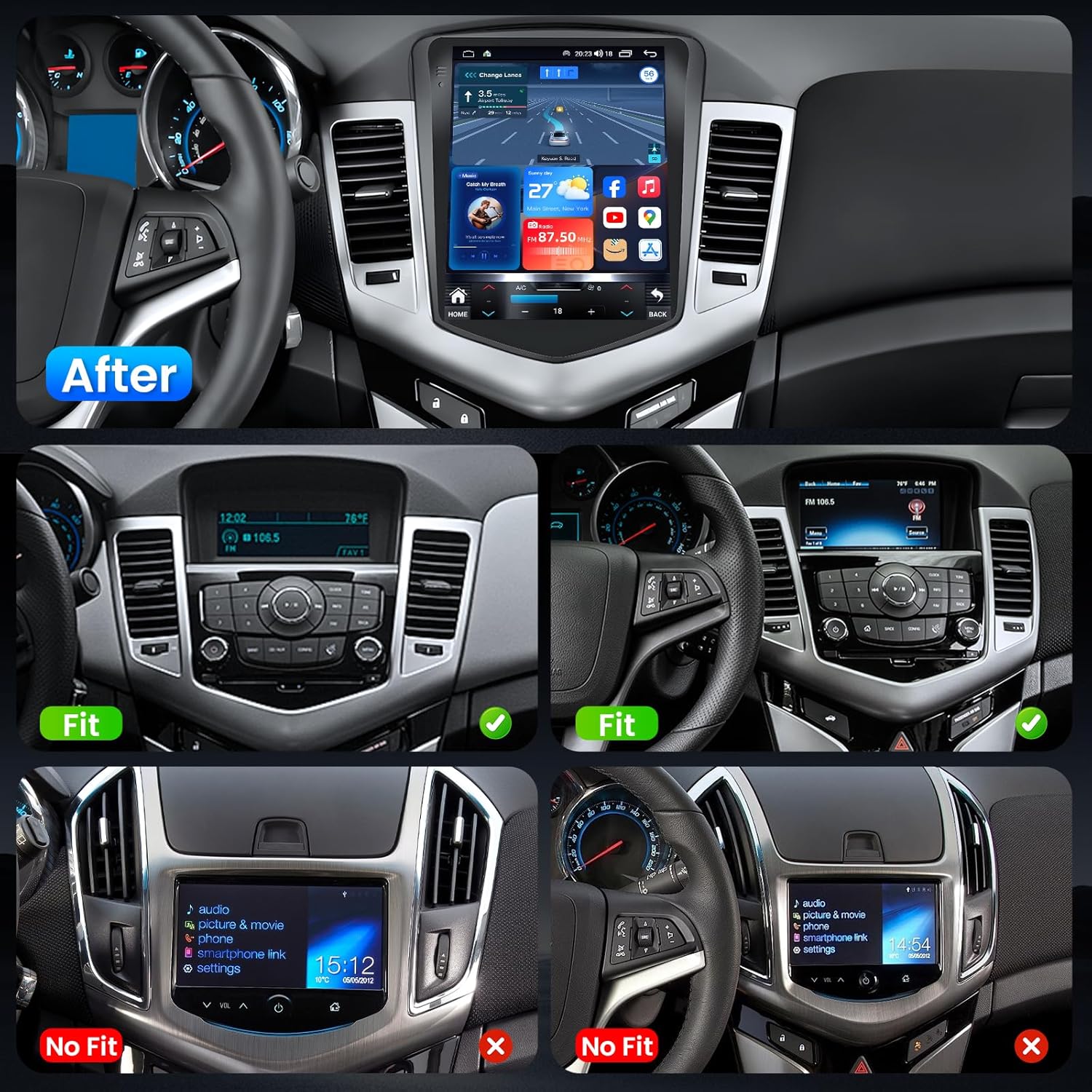
Image: A comparison showing the original Chevrolet Cruze dashboard and the dashboard after installation of the Fortdows 10.4 Inch Tesla-Style Car Radio Stereo, highlighting the integrated fit.

Image: Visual guide indicating suitable and unsuitable dashboard configurations for the Fortdows Car Radio Stereo installation in Chevrolet Cruze models.
Stiùireadh Obrachaidh
Cumhachd air / dheth
The unit powers on automatically when the vehicle's ignition is turned on. The system will display an Android boot screen during startup. To power off, turn off the vehicle's ignition.
Eadar-aghaidh touchscreen
The 10.4-inch HD IPS touchscreen provides a responsive and intuitive user experience. Navigate through menus and applications by tapping, swiping, and pinching. The display resolution is 1024x768 pixels, offering clear image and text display with accurate color representation and wide viewing ceàrnan.

Image: A visual comparison highlighting the superior 1024x768P resolution, better color accuracy, higher contrast, and improved brightness of the Fortdows screen compared to standard 800x600P screens.

Image: Illustrates the 1024x768P IPS touchscreen, emphasizing its clear image and text display with accurate color representation.
Gnìomh Sgrion Roinnte
Utilize the split-screen feature to run two applications simultaneously, such as navigation and music playback, enhancing usability and convenience.

Image: Demonstrates the split-screen functionality, showing two applications running concurrently, along with various theme options for display customization.

Image: Shows the split-screen function in action, allowing dual application use on the same screen for enhanced multitasking.
Wireless CarPlay & Android Auto
Connect your iOS or Android smartphone wirelessly via Bluetooth to access CarPlay or Android Auto. This allows you to use phone applications, send messages, make calls, and navigate directly from the car stereo display, promoting safer driving by minimizing phone interaction.
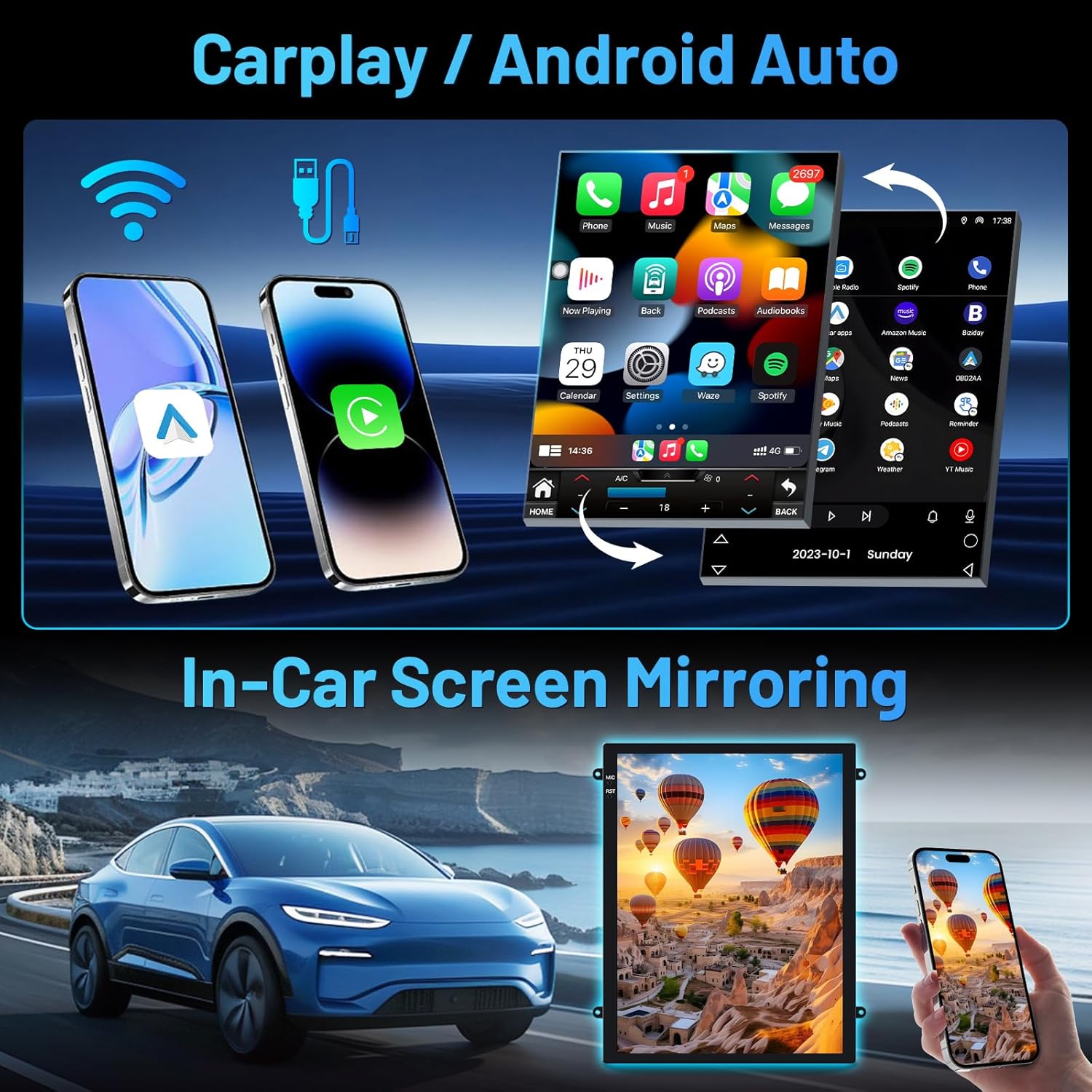
Image: Illustrates the wireless CarPlay and Android Auto features, showing smartphone screens mirrored on the car radio display for integrated functionality.
Bluetooth 5.0
The integrated Bluetooth 5.0 module enables stable and fast connections for hands-free calling and wireless audio streaming. Pair your phone to make and receive calls, play music, and sync your phonebook for easy contact access.

Image: Displays the Bluetooth 5.0 connectivity for hands-free calls and music, alongside the 15-band EQ function for sound customization and FM/RDS radio interface.
GPS Navigation & 5G WiFi
The unit supports both online and offline GPS navigation. Download offline maps for use in areas with poor signal. The built-in 5G WiFi allows for high-speed internet access, enabling map updates, app downloads, and online music streaming.

Image: Shows the GPS navigation interface with both online and offline map capabilities, along with an icon indicating 5G WiFi connectivity.

Image: Highlights the precise positioning of the GPS navigation system, supporting both online and offline maps for intuitive and user-friendly guidance.

Image: Illustrates the 5G WiFi function, emphasizing enhanced network speed and capability for faster downloads and internet access.
Camara Cùl-taic 1080P
The included 1080P HD backup camera provides a clear, wide-angle view of the area behind your vehicle, complete with auxiliary line guidance. The display automatically switches to the camera view when the vehicle is put into reverse, aiding in parking and maneuvering.

Image: Shows the 1080P backup camera providing real-time video feedback with lane guidance, along with an illustration of steering wheel control functions.

Image: Depicts the 1080P rear view camera providing high-definition video feedback and auxiliary line guidance for safer reversing.
Smachd Cuibhle Stiùiridh (SWC)
The unit retains compatibility with your vehicle's original steering wheel controls. This allows you to manage audio volume, track selection, and other radio functions directly from your steering wheel, maintaining driving habits and convenience.

Image: Shows the car radio interface being controlled via original steering wheel buttons, emphasizing convenience and safety.
Audio Features (15-Band EQ & FM/RDS Radio)
Customize your audio experience with the 15-band EQ equalizer, allowing adjustments for various sound profiles (e.g., pop, rock, classical). The FM/RDS radio provides access to local stations, news, weather, and music, with the ability to preset favorite stations.

Image: Displays the FM RDS Radio interface, highlighting its ability to provide entertainment and information during your journey.
Amalachadh nam Meadhanan
Bhidio Oifigeil Bathar
Video: An official product video demonstrating the features and functionality of the Fortdows Car Radio Stereo for Chevy Cruze 2009-2015.
Cumail suas
- Glanadh sgrion: Cleachd clò bog, gun lint airson an sgrion-suathaidh a ghlanadh. Airson smugaid stòlda, suathadh gu socairampnigh an clò le uisge no le inneal-glanaidh a tha sàbhailte airson sgrionaichean. Seachain stuthan sgrìobach no ceimigean cruaidh.
- Ùrachaidhean bathar-bog: Periodically check for software updates through the unit's settings menu or the manufacturer's weblàrach gus dèanamh cinnteach à coileanadh as fheàrr agus ruigsinneachd air feartan ùra.
- Cùram Coitcheann: Avoid exposing the unit to extreme temperatures, direct sunlight for prolonged periods, or excessive moisture. Ensure all connections remain secure.
Fuasgladh thrioblaidean
| Trioblaid | Adhbhar a dh’fhaodadh a bhith ann | Fuasgladh |
|---|---|---|
| Chan eil aonad a ’toirt cumhachd air | Ceangal cumhachd sgaoilte; Fiùs sèidte; Duilgheadas le bataraidh a’ charbaid. | Check all power cable connections. Inspect vehicle fuses. Verify vehicle battery health. |
| Slow boot-up time | Normal Android system startup; Excessive background apps. | Allow sufficient time for the system to load. Close unnecessary applications running in the background. |
| Gun toradh claisneachd | Fuaim ro ìosal; Mothachadh air a ghnìomhachadh; Cùis uèirleadh luchd-labhairt. | Meudaich an tomhas-lìonaidh. Thoir sùil a bheil am fuaim balbh gnìomhach. Dearbhaich ceanglaichean luchd-labhairt. |
| Chan eil Bluetooth/CarPlay/Android Auto a’ ceangal | Incorrect pairing; Device not discoverable; Software glitch. | Ensure Bluetooth is enabled on both devices. Re-pair the device. Restart both the car stereo and the smartphone. |
| GPS comharra air chall | GPS antenna obstruction; Antenna not properly connected. | Dèan cinnteach gu bheil antenna GPS soilleir view na speuran. Thoir sùil air ceangal an antenna. |
| Camara cùil gun taisbeanadh | Camera cable loose; Camera power issue; Incorrect gear selection. | Check camera cable connections. Ensure camera is receiving power. Confirm vehicle is in reverse gear. |
Sònrachaidhean
| Feart | Mion-fhiosrachadh |
|---|---|
| Brand | Daingneach |
| Ainm Modail | Daingneach |
| Seòrsa Seirbheis Carbaid | Car (Chevrolet Cruze 2009-2015) |
| Meud sgrion | 10.4 òirlich |
| Seòrsa Taisbeanaidh | LCD, IPS Touchscreen |
| Fuasgladh sgrion | 1024 x 768 |
| Siostam-obrachaidh | Android, iOS (via CarPlay/Android Auto) |
| Pròiseasar | Quad-Core |
| RAM | 2 GB |
| Comas stòraidh cuimhne | 64 GB |
| Teicneòlas ceangail | Bluetooth 5.0, USB, Wi-Fi (5G), Ethernet |
| Siostam seòlaidh saideal le taic | GPS (North America, South America maps) |
| Modh Toraidh Fuaim | Stereo (15-band EQ) |
| Feartan sònraichte | 1024*768 Touchscreen, 5G WIFI & Hotspot, Waterproof (camera), Wireless CarPlay, Android Auto, Voice Control, 1080P Backup Camera, FM/RDS Radio, Steering Wheel Control. |
| UPC | 739411409903 |
| ASIN | B0FRM33NPM |

Image: Details the 4-Core processor with 2GB RAM and 64GB ROM, highlighting performance improvements and stable frame rate.
Barantas agus Taic
The Fortdows Car Radio Stereo comes with a Barantas an neach-dèanamh 1-bliadhna covering defects in materials and workmanship. For technical support, troubleshooting assistance, or warranty claims, please contact Fortdows customer service through the retailer where the product was purchased or visit the official Fortdows weblàrach.