
Ro-ràdh
Thank you for choosing the Digitus DA-70919 USB-C 8K 12-Port Docking Station. This device is designed to expand the connectivity of your USB-C enabled laptop or computer, providing a comprehensive solution for video output, data transfer, network access, and power delivery. Please read this manual carefully to ensure proper installation and operation.
Bathar seachadview
The Digitus DA-70919 docking station offers 12 essential ports to enhance your workspace. It supports high-resolution video output, fast data transfer, and efficient power delivery to your host device.

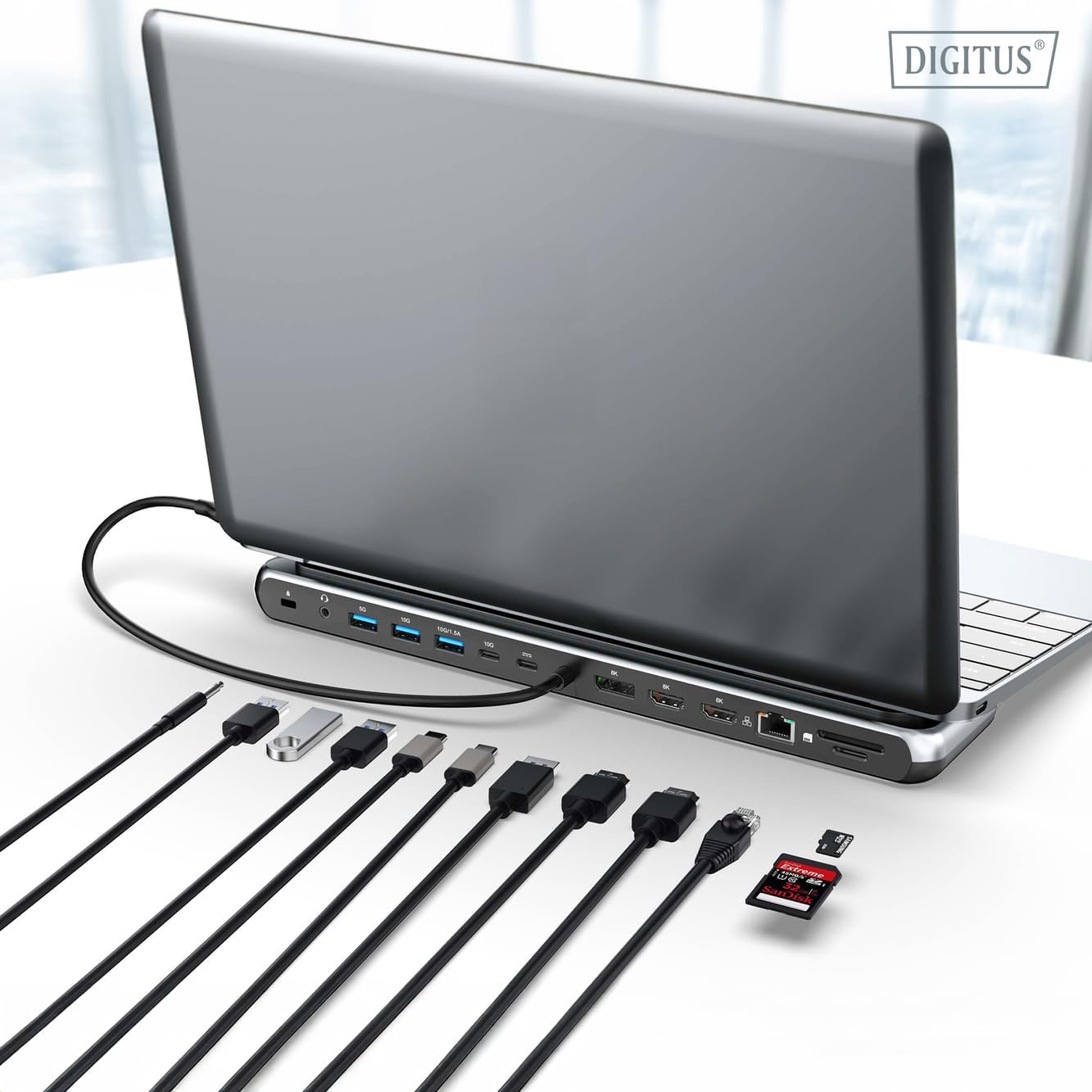
Figear 1: Detailed diagram of the Digitus DA-70919 docking station ports and their functions. This diagram labels each of the 12 ports on the docking station, including Audio Jack, USB-A, USB-C, USB-C PD, DisplayPort, HDMI, RJ45 Gigabit Ethernet, and SD/MicroSD card slots, along with anti-theft protection.

Figear 2: Aghaidh view of the Digitus DA-70919 docking station showing all accessible ports. A clear view of the docking station's front panel, displaying the various input and output ports including USB-A, USB-C, HDMI, DisplayPort, Ethernet, and card readers.
Prìomh fheartan:
- Toradh bhidio: 2x HDMI, 1x DisplayPort (DP) supporting up to 8K/30Hz for single display, or multi-display configurations.
- Puirt Dàta USB: 2x USB-A 3.2 Gen 2 (10Gbps), 1x USB-A 3.2 Gen 1 (5Gbps), 1x USB-C 3.2 Gen 2 (10Gbps).
- Lìbhrigeadh cumhachd (PD): USB-C PD 3.0 port for charging your host laptop (up to 85W output).
- Lìonra: Gigabit Ethernet (RJ45) for stable wired internet connection.
- Luchd-leughaidh nan cairtean: SD and MicroSD card slots with 104 MBps transfer speed.
- Fuaim: Seac claisneachd 3.5mm airson fònaichean-cluaise no luchd-labhairt.
Stiùiridhean rèiteachaidh
Follow these steps to set up your Digitus DA-70919 docking station:
- Check Host USB-C Port Compatibility: Ensure your laptop's USB-C port supports DisplayPort Alternate Mode (DP Alt Mode) for video output and Power Delivery for charging. Without DP Alt Mode, video output will not function.

Figear 3: Guide to USB-C port compatibility for DisplayPort Alternate Mode. This graphic explains which types of USB-C ports on your laptop support the full functionality of the docking station, specifically highlighting the requirement for DisplayPort Alternate Mode (DP Alt Mode) for video output.
- Ceangail ris an inneal aoigheachd: Connect the integrated USB-C cable from the docking station to the USB-C port on your laptop.
- Ceangail an inneal-atharrachaidh cumhachd (Roghainneil ach air a mholadh): If you wish to charge your laptop via the docking station or power high-demand peripherals, connect a USB-C Power Delivery adapter (not included, up to 100W recommended) to the USB-C PD input port on the docking station.
- Ceangail taisbeanaidhean taobh a-muigh: Ceangail na sgrùdairean agad ris na toraidhean HDMI agus/no DisplayPort air an stèisean docaidh a’ cleachdadh chàbaill iomchaidh.
- Ceangail peripherals: Plug in your USB devices (keyboard, mouse, external drives), Ethernet cable, SD/MicroSD cards, and audio devices to the corresponding ports on the docking station.
- Stàladh an dràibhear: In most cases, the docking station is plug-and-play and does not require additional drivers. If prompted, allow your operating system to install any necessary drivers automatically.
Stiùireadh Obrachaidh
Modhan taisbeanaidh
Tha an stèisean docaidh a’ toirt taic do dhiofar rèiteachaidhean taisbeanaidh:
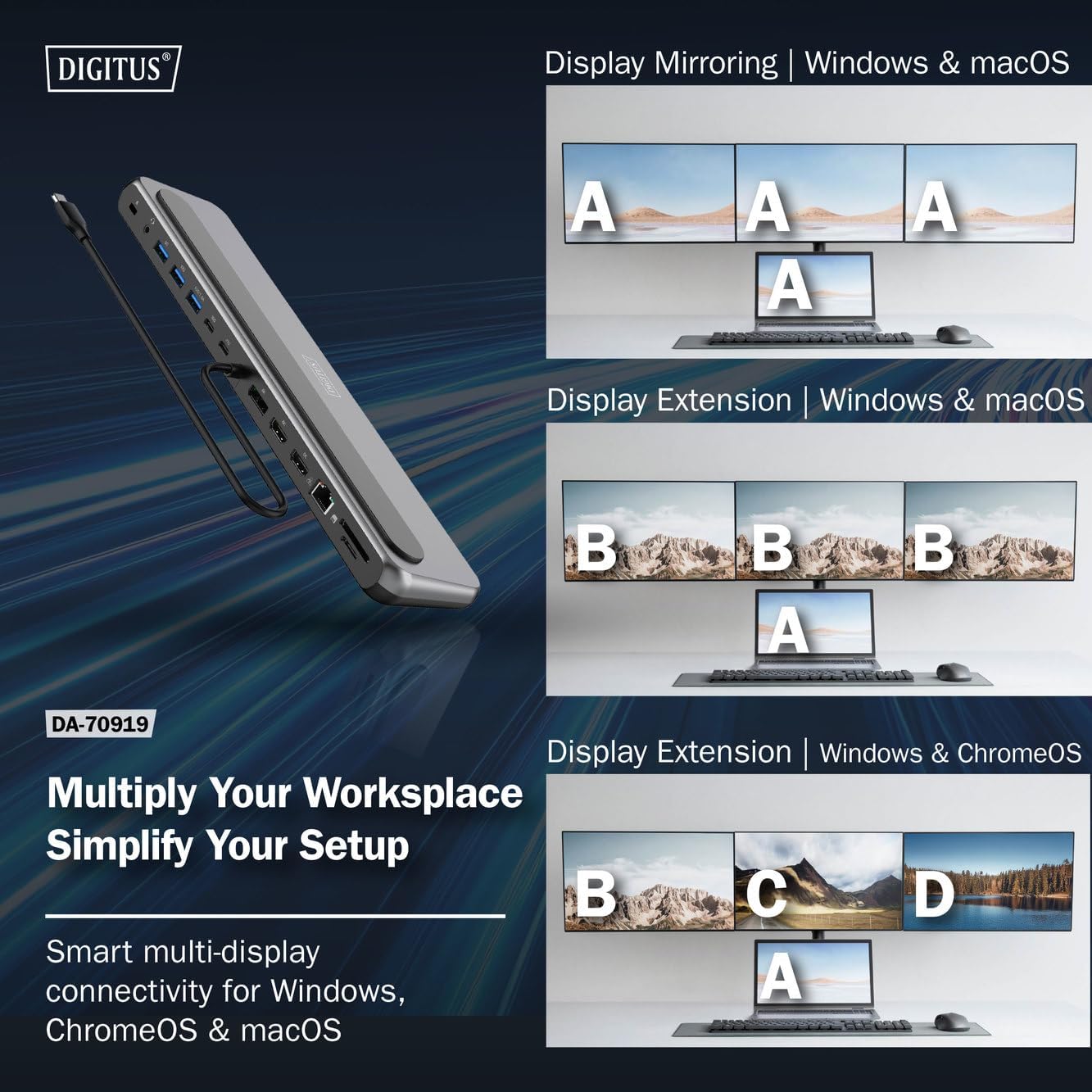
Figear 4: Diagram showing display mirroring and extension modes for Windows, macOS, and ChromeOS. This image illustrates the various display configurations supported by the docking station, including mirroring your screen or extending it across multiple external monitors on Windows, macOS, and ChromeOS.
- Modh sgàthan: Duplicates your laptop's display onto the external monitors.
- Extend Mode (Windows/ChromeOS): Extends your desktop across multiple external monitors, allowing for a multi-tasking environment. Supports dual monitors (2x 4K/60Hz) and triple monitors (1x 4K/60Hz + 2x 4K/30Hz) in MST (Multi Stream Transport) mode.
- Extend Mode (macOS): macOS typically supports extended desktop to one external monitor, with other external monitors mirroring each other.
To configure display settings, access your operating system's display settings (e.g., Windows Display Settings, macOS System Preferences > Displays).
Gluasad dàta
Utilize the USB-A and USB-C data ports for connecting external storage devices, keyboards, mice, and other USB peripherals. The USB 3.2 Gen 2 ports offer speeds up to 10Gbps, while the USB 3.2 Gen 1 port offers speeds up to 5Gbps.
Lìbhrigeadh cumhachd
When a compatible USB-C PD power adapter is connected to the docking station's PD input port, the docking station can deliver up to 85W of power to charge your connected laptop. This allows you to power your laptop and peripherals through a single USB-C connection.
Figear 5: Illustration of the docking station's fast charging capability via USB-C Power Delivery. This image demonstrates the Power Delivery function, showing a 100W input to the docking station and an 85W output to charge the connected laptop.
Ceangal lìonra
Connect an Ethernet cable to the RJ45 port for a stable and high-speed wired network connection (10/100/1000 Mbps Gigabit Ethernet).
Luchd-leughaidh chairtean
Insert SD or MicroSD cards into the dedicated slots for quick access to photos, videos, and other files. The card readers support transfer speeds up to 104 MBps.
Toradh Fuaim
Connect your headphones or speakers to the 3.5mm audio jack for audio output.
Cumail suas
- Glanadh: Use a soft, dry cloth to clean the surface of the docking station. Avoid using liquid cleaners or solvents.
- Stòradh: Stòraich an stèisean docaidh ann an àite fionnar, tioram air falbh bho sholas dìreach na grèine agus teòthachd anabarrach.
- Làimhseachadh: Avoid dropping or subjecting the device to strong impacts. Do not attempt to disassemble the docking station.
Fuasgladh thrioblaidean
Ma thachras duilgheadasan leat leis an stèisean docaidh agad, thoir sùil air na fuasglaidhean cumanta a leanas:
- Gun toradh taisbeanaidh:
- Ensure your laptop's USB-C port supports DisplayPort Alternate Mode.
- Check all video cables (HDMI/DP) are securely connected to both the docking station and the monitor.
- Dearbhaich gu bheil am monitor air a chumhachdachadh agus air a shuidheachadh chun an stòr cuir-a-steach ceart.
- Feuch ri aon sgrìn a cheangal aig aon àm gus an duilgheadas a sgaradh bhon choimpiutair.
- Update your laptop's graphics drivers.
- Gun lìbhrigeadh cumhachd gu laptop:
- Ensure a compatible USB-C PD power adapter (up to 100W) is connected to the docking station's PD input port.
- Dearbhaich gu bheil port USB-C an laptop agad a’ toirt taic do Lìbhrigeadh Cumhachd.
- Thoir sùil air an inneal-atharrachaidh cumhachd agus a’ chàball airson milleadh.
- Innealan USB nach deach aithneachadh:
- Reconnect the USB device to a different port on the docking station.
- Ensure the docking station is properly connected to the host laptop.
- If using a high-power USB device, ensure the docking station is connected to an external power adapter.
- Cùisean Ceangail Ethernet:
- Thoir sùil air a’ cheangal càball Ethernet ris an stèisean docaidh agus ris an router/modem agad.
- Dearbhaich roghainnean an lìonra air an laptop agad.
- Ath-thòisich an router/modem agus an laptop agad.
- Leughadair Cairtean Gun Obrachadh:
- Ensure the SD/MicroSD card is inserted correctly and fully.
- Test the card with another device to confirm it is not damaged.
Sònrachaidhean
| Feart | Sònrachadh |
|---|---|
| Modail | DA-70919 |
| Ceangal aoigheachd | USB-C (integrated cable) |
| Toradh bhidio | 2x HDMI, 1x DisplayPort (DP) |
| Max. Single Display Resolution | 8K (7680x4320) @ 30Hz |
| Max. Dual Display Resolution (MST) | 2x 4K (3840x2160) @ 60Hz |
| Max. Triple Display Resolution (MST) | 1x 4K@60Hz + 2x 4K@30Hz |
| Puirt dàta USB-A | 2x USB 3.2 Gen 2 (10Gbps), 1x USB 3.2 Gen 1 (5Gbps) |
| Port dàta USB-C | 1 x USB 3.2 Gen 2 (10Gbps) |
| Power Delivery (PD) Input | USB-C PD 3.0 (suas ri 100W) |
| Power Delivery (PD) Output to Host | Suas gu 85W |
| Ethernet | RJ45 Gigabit (10/100/1000 Mbps) |
| Luchd-leughaidh chairtean | SD, MicroSD (104 MBps) |
| Fuaim | Seac claisneachd 1x 3.5mm |
| Co-fhreagarrachd | Windows, macOS, ChromeOS |
| Teòthachd Obrachaidh | 0°C gu 45°C (32°F gu 113°F) |
| Teòthachd stòraidh | -10°C gu 70°C (14°F gu 158°F) |
Barantas agus Taic
The Digitus DA-70919 USB-C 8K 12-Port Docking Station comes with a Barantas 2-bliadhna from the date of purchase. This warranty covers manufacturing defects and ensures the product functions as described under normal use.
For technical support, warranty claims, or further assistance, please contact your retailer or visit the official Digitus website for contact information. Please have your product model number (DA-70919) and proof of purchase ready when seeking support.