
Ro-ràdh
Welcome to the user manual for your CORBOBO LINGBAO K108 Pro Wireless Mechanical Keyboard. This guide provides detailed instructions to help you set up, operate, and maintain your new keyboard, ensuring optimal performance and an enhanced typing experience.

Figure 1: LINGBAO K108 Pro Wireless Mechanical Keyboard, showcasing a chruth slàn agus solas-cùil RGB.
Dè th' anns a' Bhocsa
- Meur-chlàr x 1
- Leabhar-làimhe cleachdaiche x 1
- Keycap Puller x 1
- Càball USB-C x 1
- Two extra switches x 1
Suidhich
1. A ’toirt cumhachd air / dheth
Locate the power switch on the back of the keyboard. Slide the switch to the 'ON' position to power on the device. To power off, slide the switch to the 'OFF' position.
2. Modhan Ceangail
The LINGBAO K108 Pro supports three connection modes: 2.4G Wireless, Bluetooth (BT), and Wired (USB-C). You can easily switch between these modes using the multi-functional knob or dedicated keys.
- Modh gun uèir 2.4G: Insert the 2.4G USB receiver into your device's USB port. Select 2.4G mode using the keyboard's knob or shortcut.
- Modh Bluetooth: Activate Bluetooth on your device. Select one of the three Bluetooth channels (BT1, BT2, BT3) on the keyboard. Lorg airson "LINGBAO K108 Pro" in your device's Bluetooth settings and pair. The keyboard can store up to 5 different devices.
- Modh Wired: Connect the keyboard to your device using the provided USB-C cable. The keyboard will automatically switch to wired mode.

Figure 2: Visual representation of the keyboard's tri-mode connection capabilities, supporting wireless 2.4GHz, wired USB-C, and Bluetooth 5.0.
3. A’ cur cosgais air a’ mheur-chlàr
The keyboard is equipped with a 10000mAh battery. To charge, connect the keyboard to your computer's USB port using the USB-C cable. Avoid using mobile phone fast chargers or chargers with excessive current/voltage gus casg a chur air milleadh.

Figure 3: The keyboard's large 10000mAh battery, providing extended usage time.
4. Stàladh dràibhear
For full customization options, including screen time calibration, GIF animation uploads, and macro programming, install the dedicated driver. The driver can be downloaded from: bit.ly/m/corbobo. Note that the driver is only compatible with Windows operating systems and requires a wired connection for setup.
Video 1: Demonstrates the method for uploading custom animations to the K108 Pro's smart screen via the driver software.
Stiùireadh Obrachaidh
1. Smart Screen & Multi-functional Knob
The 1.14-inch smart display shows essential information such as date, time, connection mode, and battery level. The multi-functional knob allows you to navigate and adjust various settings:
- Cuairtich a' Chnap: Adjust keyboard lighting effects, language, and computer volume.
- Brùth am putan: Confirm selections or return to the previous menu.
- FN + Knob: Switch between multimedia control (volume) and screen control modes.
With the driver installed, you can upload custom GIF animations to personalize the screen display.
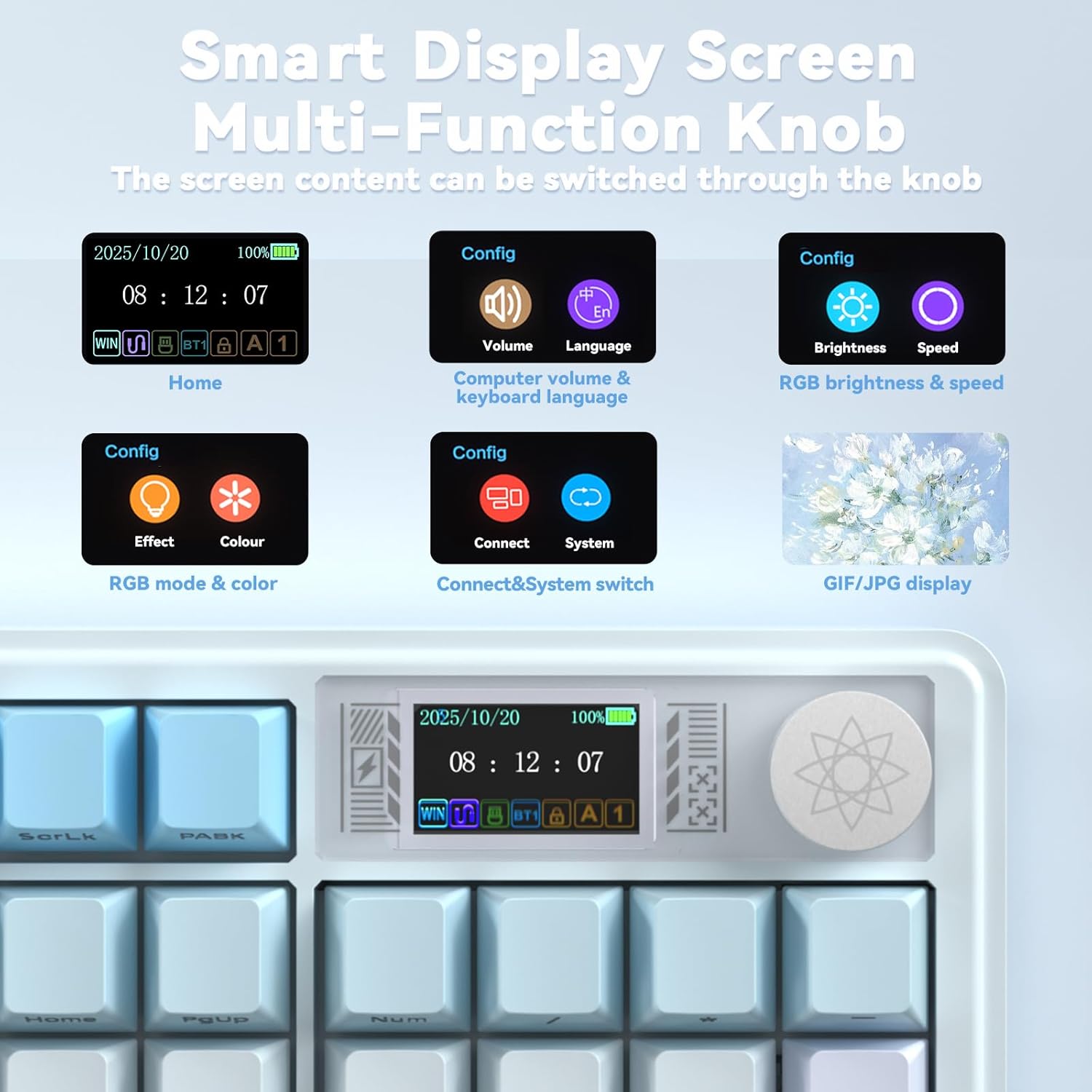
Figure 4: Close-up of the smart display screen and multi-functional knob, illustrating various configuration options like volume, language, brightness, speed, RGB mode, and system switching.
Video 2: Demonstrates the functionality of the K108 Pro's multi-function knob for adjusting settings and controlling media.
2. Smachd air Solas-cùil RGB
The keyboard features 16.8 million RGB colors. You can customize lighting effects, brightness, and speed using the knob or dedicated shortcut keys:
- FN + ||: Toggle light effect.
- FN + Tab: Atharraich dathan.
- FN + ↑/↓: Atharraich soilleireachd.
- FN + ←/→: Atharraich astar.
A unique music rhythm lighting effect mode is also available.
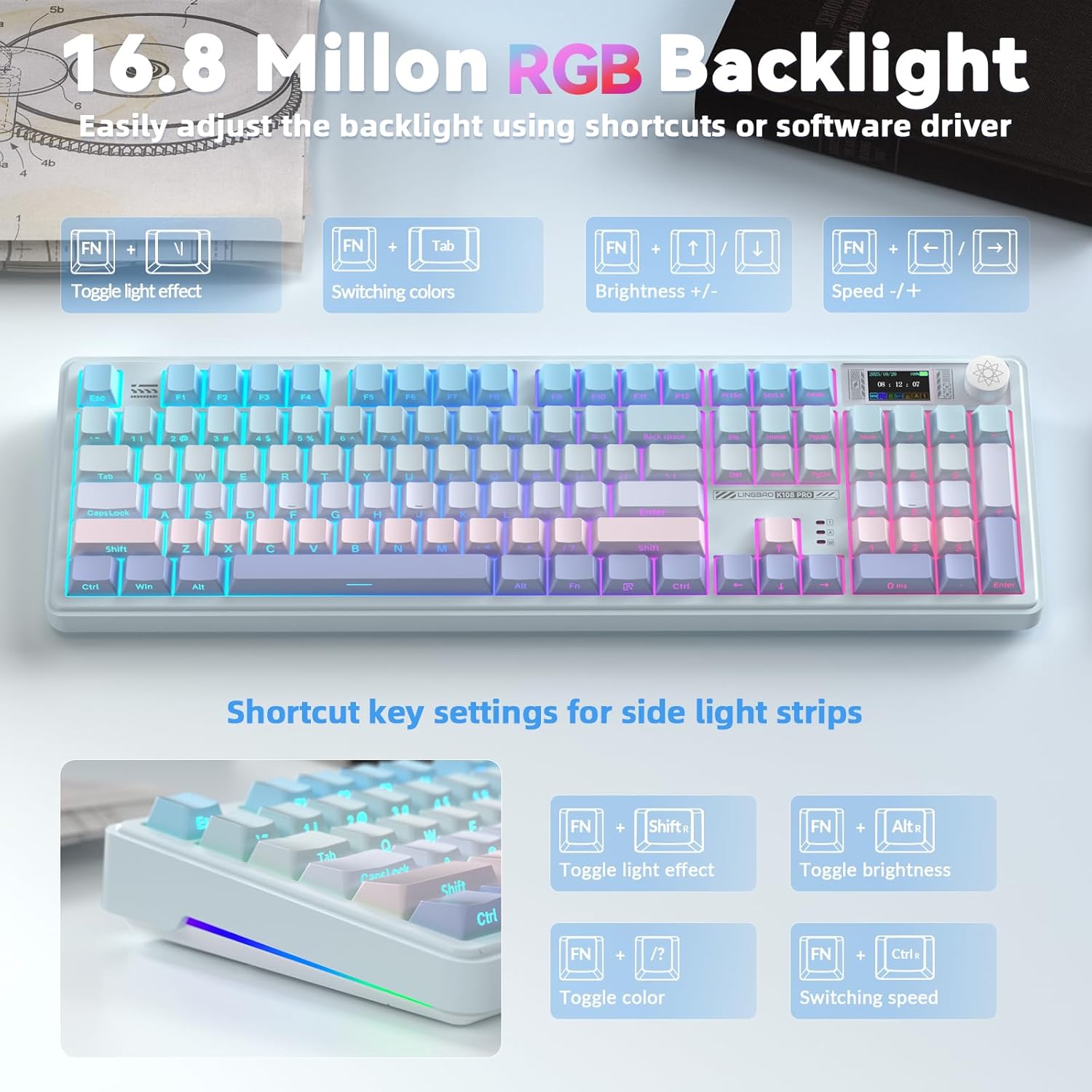
Figure 5: The keyboard displaying its 16.8 million RGB backlight, with shortcut key settings for various lighting adjustments.
3. Key Customization & Macro Programming
The programmable driver allows for full-key macro command programming, enhancing work efficiency or game performance. This feature is accessible only via a wired connection within the driver software.

Figure 6: The multi-functional software driver interface for the K108 Pro, showing options for full key customization, RGB settings, music rhythm, and TFT screen animation customization.
Prìomh fheartan
1. Hot-Swappable Sockets & Linear Mechanical Switches
The keyboard features a hot-swappable base, supporting both 3-pin and 5-pin switches. This allows users to easily replace mechanical switches for a customized typing experience. Pre-lubricated linear switches provide a smooth, creamy typing feel, preventing accidental presses and offering comfort for both office work and gaming.

Figure 7: Detail of the hot-swappable sockets and linear mechanical switches, highlighting the ease of customization.
2. Five-Layer Gasket Structure & PBT Keycaps
The LINGBAO K108 incorporates a single-key slot PCB design and a five-layer gasket structure. This design reduces noise and delivers a more satisfying, "HIFI creamy-like" typing sound with a soft tactile feel. The keyboard is equipped with durable two-color injection-molded PBT keycaps, ensuring wear resistance and preventing character fade over time.

Figear 8: Spreadh view illustrating the five-layer gasket structure, including PBT keycaps, positioning plate, foam layers, and silicone base pad, contributing to a comfortable typing experience.
Cumail suas
- Glanadh: Use a soft, dry cloth to wipe the keyboard surface. For keycaps, a damp cloth with mild soap can be used. Ensure no liquid enters the keyboard.
- Keycap/Switch Replacement: Use the provided keycap/switch puller for safe removal and installation. Apply gentle, even pressure to avoid damaging components.
- Stòradh: Stòraich am meur-chlàr ann an àite fionnar, tioram air falbh bho sholas dìreach na grèine agus teòthachd anabarrach.
Fuasgladh thrioblaidean
- Chan eil am meur-chlàr a’ freagairt:
- Dèan cinnteach gu bheil am meur-chlàr air a stiùireadh.
- Check the connection mode (2.4G, BT, Wired) and ensure it matches your device's connection.
- For wireless modes, ensure the battery is charged.
- Feuch ri ceangal tro chàball USB-C gus duilgheadasan gun uèir a sheachnadh.
- Duilgheadasan ceangail Bluetooth:
- Dèan cinnteach gu bheil Bluetooth air a chomasachadh air an inneal agad.
- Na dìochuimhnich an inneal anns na roghainnean Bluetooth agad agus ath-chàraid.
- Try a different Bluetooth channel (BT1, BT2, BT3).
- Smart screen not displaying correctly:
- Ensure the driver is installed and updated.
- Connect the keyboard in wired mode and check driver settings for screen calibration.
- Solas RGB nach eil ag obair:
- Check lighting settings via the knob or shortcut keys.
- Ensure the keyboard is not in a low power state.
Sònrachaidhean
| Feart | Mion-fhiosrachadh |
|---|---|
| Meudan toraidh | 19.09 x 7.45 x 2.36 òirleach (48.5 x 18.9 x 6 cm) |
| Cuideam nì | 3.79 not (1.72 kg) |
| Brand | CORBOBO |
| Modail Àireamh | K108 Pro |
| Teicneòlas ceangail | 2.4GHz Wireless, Bluetooth (BT), USB-C Wired |
| Tuairisgeul meur-chlàr | Mechanical, Hot-swappable (3-pin/5-pin) |
| Feartan sònraichte | Backlit (RGB), Ergonomic, Smart Screen & Knob, Gasket Structure, PBT Keycaps |
| Bataraidh | 10000mAh (2 Nonstandard Battery batteries included) |
| Beatha Bataraidh (RGB Air) | Suas ri 53 uairean a thìde |
| Beatha Bataraidh (RGB dheth) | Suas ri 114 uairean a thìde |
| Innealan co-fhreagarrach | Consól Gèam, Laptop, PC, Smartphone, Tablet |
Barantas agus Taic
For warranty information and technical support, please refer to the official CORBOBO website or contact their customer service directly. The driver download link (bit.ly/m/corbobo) also serves as a resource for software updates and advanced customization.