
1. Toradh thallview
The Baseus BS1 NC Semi-in-Ear Noise Cancelling Earbuds offer a blend of comfort and advanced audio technology. Featuring Adaptive Hybrid Active Noise Cancellation (ANC), Hi-Res Audio with LDAC support, and a lightweight design, these earbuds are engineered for extended listening and clear communication. They are also equipped with a 6-microphone AI system for clear calls and IP55 water and dust resistance.

Image: Baseus BS1 NC Semi-in-Ear Noise Cancelling Earbuds and their charging case in black.
2. Pasgan-susbaint
Dèan cinnteach gu bheil a h-uile nì anns a’ phacaid:
- Baseus Bass BS1 NC Semi-in-Ear Earbuds (Left and Right)
- Cùis Cìse
- Càball cosgais USB-C
- Stiùireadh tòiseachaidh luath

Image: The complete retail package for the Baseus BS1 NC Earbuds, showing the earbuds, charging case, USB-C cable, and quick start guide.
3. A’ cur cosgais air na cluasan-cluaise agus a’ chùis
For optimal performance, fully charge the earbuds and charging case before first use.
3.1 A' cosg nan Earbuds
- Cuir na fònaichean-cluaise anns a’ chùis cosgais. Dèan cinnteach gu bheil iad nan suidhe gu ceart nan sliotan fa leth (clì airson clì, deas airson deas).
- Dùin a’ chùis cosgais. Tòisichidh na fònaichean-cluaise a’ cur cosgais gu fèin-ghluasadach.
3.2 A’ cur cosgais air a’ chùis
- Ceangail an càball cosgais USB-C a tha air a thoirt seachad ris a’ phort cosgais air a’ chùis.
- Ceangail ceann eile a’ chàball ri inneal-atharrachaidh cumhachd USB (nach eil air a ghabhail a-steach) no ri port USB coimpiutair.
- The LED indicator on the case will show the charging status:
- Uaine: 75% - 100% fo chasaid
- Buidhe: 25% - 75% fo chasaid
- Dearg: Fo 25% fo chasaid
- A full charge for the case provides up to 40 hours of total playtime for the earbuds (with ANC off). A 10-minute charge can provide up to 2 hours of playback.

Image: The Baseus BS1 NC Earbuds resting in their open charging case, highlighting the 40-hour total playtime and rapid charging capabilities.
4. Paidhir agus Ceangalachd
4.1 Paidhreachadh Tùsail
- Fosgail a’ chùis cosgais. Thèid na fònaichean-cluaise a-steach don mhodh paidhreachaidh gu fèin-ghluasadach.
- Air an inneal agad (fòn cliste, tablet, coimpiutair), cuir Bluetooth an gnìomh.
- Lorg airson "Baseus Bass BS1 NC" in the list of available Bluetooth devices.
- Select "Baseus Bass BS1 NC" to connect. A voice prompt will confirm successful pairing.
4.2 Ath-cheangal fèin-ghluasadach
Once paired, the earbuds will automatically reconnect to the last connected device when removed from the charging case and within Bluetooth range.
4.3 Ceangal Ioma-phuing
The Baseus BS1 NC supports Baseus Smart-Connect (BSC) technology, allowing simultaneous connection to two devices. This enables seamless switching between audio sources without manual re-pairing.
To use multipoint connection:
- Paidhir na cluas-cinn leis a’ chiad inneal agad.
- Dì-cheangail na fònaichean-cluaise bho roghainnean Bluetooth a’ chiad inneil (na dì-cheangail iad).
- Ceangail na fònaichean-cluaise ris an dàrna inneal agad.
- Reconnect the earbuds to the first device from its Bluetooth settings. The earbuds should now be connected to both devices.
Bidh claisneachd ag atharrachadh gu fèin-ghluasadach chun inneal a tha a’ cluich susbaint no a’ faighinn gairm.
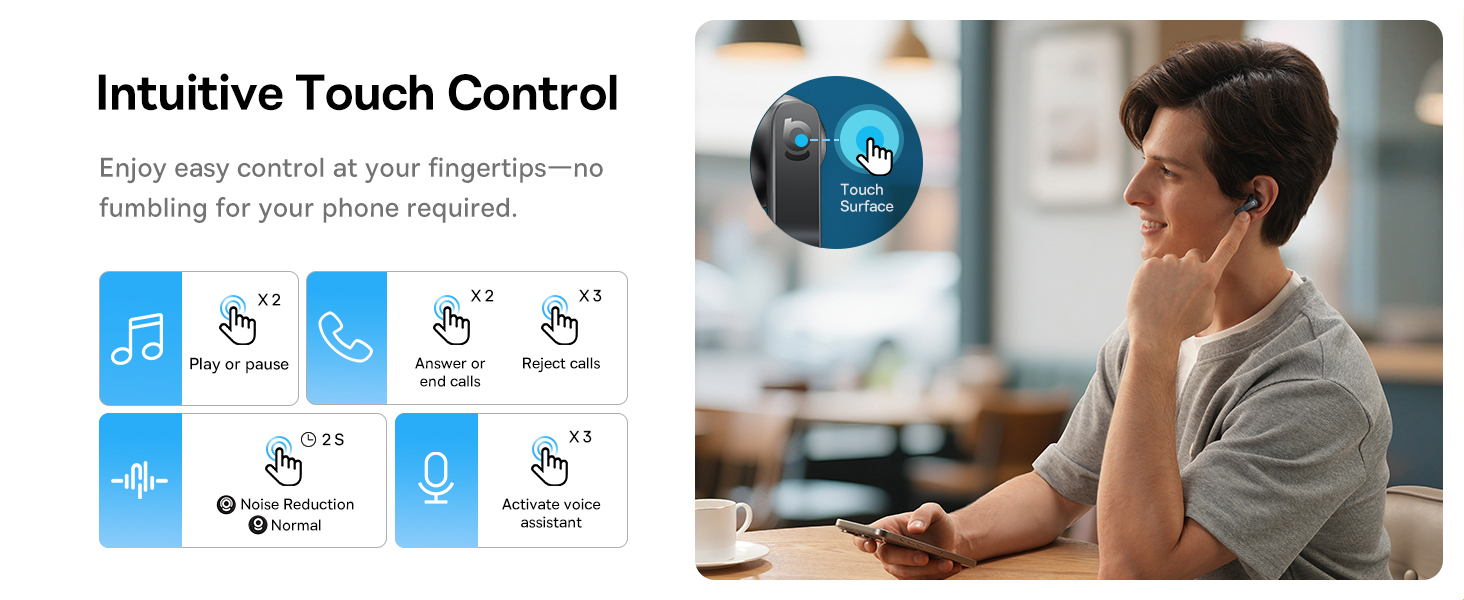
Image: A visual representation of the Baseus BS1 NC Earbuds connected to both a laptop and a smartphone, showcasing the instant multipoint connection feature.
5. A’ caitheamh nan cluasan-cluaise
The Baseus BS1 NC earbuds feature a semi-in-ear design for comfortable, pressure-free wear. For optimal sound quality and noise cancellation, ensure a proper fit.
- Comharraich na earbuds clì (L) agus deas (R).
- Cuir gach cluais-fòn gu socair a-steach do chanàl na cluaise agad.
- Adjust the earbud until it feels secure and comfortable. The stem should point slightly forward or downward.

Image: A person wearing the Baseus BS1 NC Earbuds, illustrating their ergonomic and lightweight design for all-day comfort.
6. Stiùireadh Obrachaidh
6.1 Smachdan suathadh
The earbuds feature intuitive touch controls on their stems. The following are default functions, which may be customizable via the Baseus app:
| Gnìomh | Gnìomh |
|---|---|
| Double-tap (Left or Right Earbud) | Cluich / Pause music, Answer / End call |
| Triple-tap (Left or Right Earbud) | Reject call, Activate voice assistant |
| Brùth agus gleidhidh (2 diogan) | Switch Noise Control Mode (ANC/Normal/Transparency) |

Image: An illustration detailing the intuitive touch controls on the Baseus BS1 NC Earbuds for various functions like play/pause, call management, noise reduction, and voice assistant activation.
6.2 Modhan Smachd Fuaime
The Baseus BS1 NC earbuds offer three noise control modes:
- Adaptive Hybrid ANC (Active Noise Cancellation): Reduces ambient noise for an immersive listening experience. Ideal for noisy environments.
- Modh follaiseachd: Allows you to hear your surroundings while still enjoying your audio. Useful for awareness in urban settings or conversations.
- Modh àbhaisteach: Ath-chluich claisneachd àbhaisteach gun fheartan cuir às do fhuaim gnìomhach no follaiseachd.
Switch between modes by pressing and holding the touch area on either earbud for 2 seconds.

Image: A cutaway diagram of a Baseus BS1 NC earbud in an ear, illustrating the semi-in-ear fit and the availability of Adaptive Noise Cancelling and Transparency Mode.
Fuaim Àrd-rèiteachaidh 6.3 le LDAC
These earbuds support LDAC technology, enabling high-resolution audio transmission for a detailed and rich sound experience. Ensure your device supports LDAC and activate it in your device's Bluetooth settings for the best audio quality.

Image: The Baseus BS1 NC Earbuds surrounded by sound waves, emphasizing features like Hi-Res Audio, SuperBass 2.0, and 13mm dynamic drivers for powerful sound.
6.4 6-Mic AI Clear Calls
The earbuds are equipped with 6 microphones and AI noise isolation technology to ensure your voice is clear during calls, even in noisy environments. Wind noise reduction further enhances call clarity outdoors.
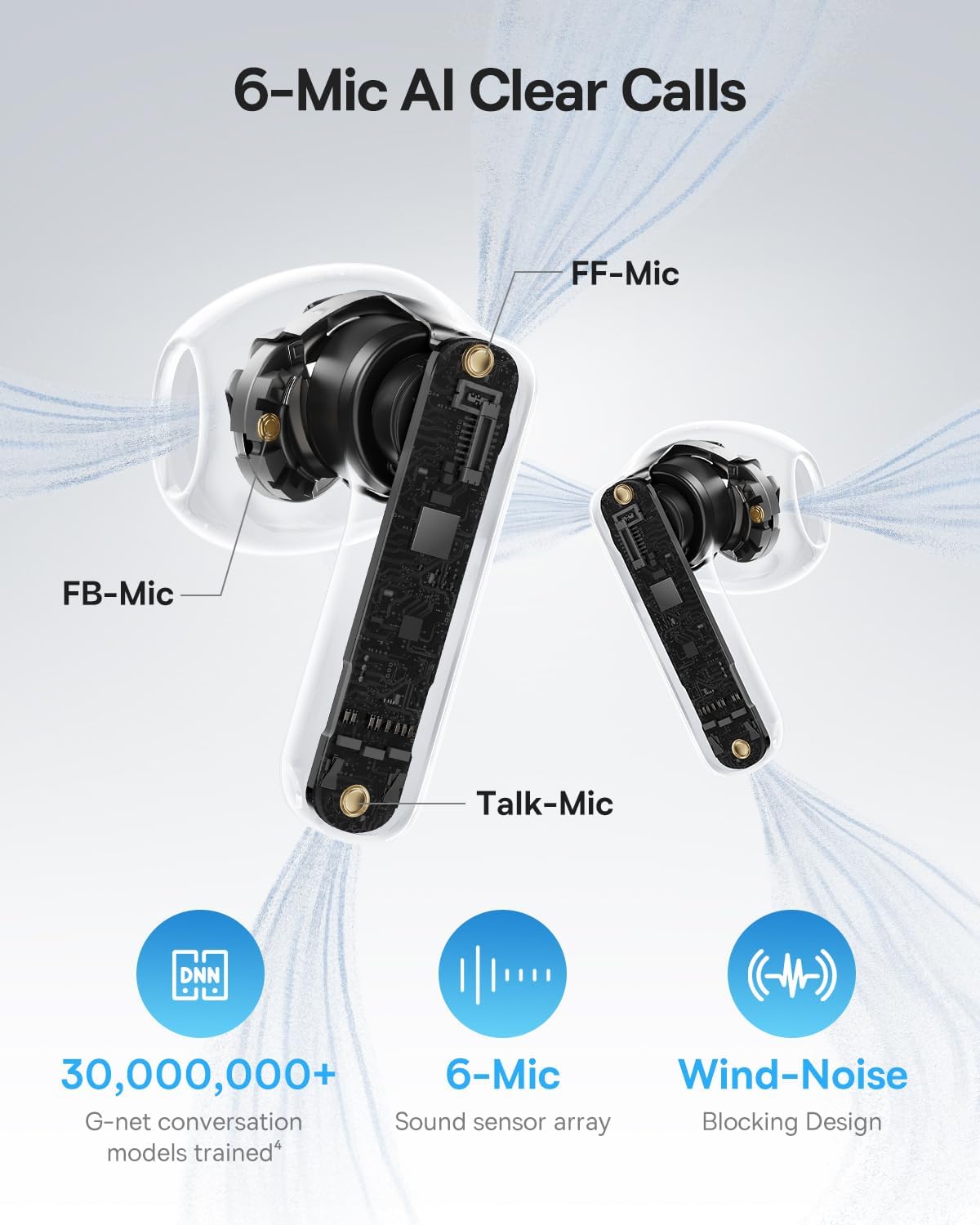
Image: A detailed diagram of the Baseus BS1 NC earbud, highlighting the placement of the FF-Mic, FB-Mic, and Talk-Mic, which contribute to the 6-Mic AI Clear Call technology and wind-noise blocking design.
6.5 Smachd App Smart
Download the dedicated Baseus app for enhanced control and customization options. The app allows you to:
- Adjust Bass Boost levels.
- Select from various EQ Modes.
- Control Spatial Acoustics settings.
- Cleachd am feart “Lorg do Chluas-fhònaichean”.
Note: In guest mode, no account creation or permissions are required to customize features, but GPS access is needed to locate lost earbuds.

Image: A smartphone displaying the Baseus app interface, which offers various sound control options including Bass Boost, EQ Modes, Spatial Acoustics, and a "Find Your Earbuds" function.
7. Cumail suas agus Cùram
7.1 Glanadh
- Glan na fònaichean-cluaise agus a’ chùis cosgais gu cunbhalach le clò bog, tioram, gun lint.
- Na cleachd ceimigean cruaidh, fuasgladh glanaidh, no innealan-glanaidh làidir.
- Gently remove any earwax or debris from the earbud mesh and charging contacts using a small, soft brush or cotton swab.
7.2 Dìon-uisge is duslach (IP55)
The earbuds are rated IP55, meaning they are protected against limited dust ingress and low-pressure water jets from any direction. This makes them suitable for workouts and light rain exposure.
- Na cuir na cluasan-cluaise ann an uisge.
- Dèan cinnteach gu bheil na fònaichean-cluaise tioram mus cuir thu air ais iad anns a’ chùis cosgais gus casg a chuir air milleadh air na ceanglaichean cosgais.
- Chan eil a’ chùis cosgais dìon-uisge.

Image: The Baseus BS1 NC Earbuds shown with water droplets, signifying their IP55 rating for dust and water resistance.
7.3 Stòradh
Glèidh na earbuds anns a ’chùis cosgais aca nuair nach eilear gan cleachdadh gus an dìon agus cùm iad fo chasaid.
8. A ’dèanamh trioblaid
If you encounter issues with your Baseus BS1 NC earbuds, refer to the following common solutions:
- Gun Duilgheadasan Fuaime/Ceangail:
- Dèan cinnteach gu bheil na cluasan-cluaise air an cur fo chasaid.
- Verify Bluetooth is enabled on your device and "Baseus Bass BS1 NC" is selected.
- Try placing earbuds back in the case, closing it, and then reopening to reset the connection.
- Na dìochuimhnich an inneal anns na roghainnean Bluetooth agad agus ath-chàraid.
- Aon earbud nach eil ag obair:
- Dèan cinnteach gu bheilear a’ cur cosgais air an dà earbuds.
- Cuir an dà chluas-cinn air ais anns a’ chùis, dùin iad, agus fosgail a-rithist.
- Glan na ceanglaichean cosgais air an dà chluas-cinn agus taobh a-staigh a’ chùis.
- Càileachd fuaim truagh:
- Dèan cinnteach gu bheil na fònaichean-cluaise nan suidhe gu ceart nad chluasan.
- Clean the earbud mesh to remove any obstructions.
- Check your device's audio settings and ensure LDAC is enabled if supported.
- ANC gun a bhith èifeachdach:
- Ensure ANC mode is activated via touch control or the Baseus app.
- Adjust the earbuds for a better seal in your ears.
9. Sònrachaidhean
| Feart | Mion-fhiosrachadh |
|---|---|
| Ainm Modail | Baseus Bass BS1 NC |
| Smachd fuaim | Adaptive Noise Cancellation, Environmental Noise Cancellation, Hybrid Noise Cancellation |
| Teicneòlas ceangail | Bluetooth 6.0, Gun Uèir |
| Teicneòlas conaltraidh gun uèir | Bluetooth 6.0 |
| Raon Bluetooth | 10 Meatair |
| Seòrsa fuaim driver | Dràibhear Dynamic |
| Meud driver fuaim | 13 millimeters |
| Freagairt Tricead | 40 kHz |
| Latency claisneachd | 60 milliseconds |
| Beatha Bataraidh (Cluais-fònaichean) | 7 Hours (ANC off) |
| Ùine cluiche iomlan (leis a’ chùis) | 40 Hours (ANC off) |
| Charging Time (Rapid Charge) | 10 mionaidean airson 2 uair a thìde de chluich |
| Ìre an aghaidh uisge | IP55 (Cluais-fònaichean a-mhàin) |
| Seòrsa smachd | Smachd-suathaidh |
| Stuth | Acrylonitrile Butadiene Styrene (ABS), Polycarbonate (PC) |
| Cuideam Nì (Cluais-fònaichean) | 4g gach earbud |
| Product Dimensions (Earbuds) | 1.2 x 0.7 x 0.7 òirleach |
| Innealan co-fhreagarrach | Devices with Bluetooth Audio Capability, including iOS, Android, Windows, Mac OS and Switch. |
10. Bhidio Bathar Oifigeil
Watch the official product video for a visual guide on the Baseus BS1 NC Earbuds:
Bhidio: Bhidio toraidh oifigeil bho Baseus showcasing the features and usage of the Baseus BS1 NC Semi-in-Ear True Wireless Earbuds.
11. Barantas agus Taic
For warranty information, technical support, FAQs, and further assistance, please visit the official Baseus support center.
Refer to the Quick Start Guide included in your package for a direct link or visit the Baseus weblàrach.
Note: Protection plans may be available for purchase separately.