
1. Ro-ràdh
This user manual provides detailed instructions for the proper installation, operation, and maintenance of your RAVEMEN FR500 Front Bike Light and TR250 Tail Bike Light Set. Please read this manual thoroughly before using the product to ensure safe and optimal performance. Keep this manual for future reference.
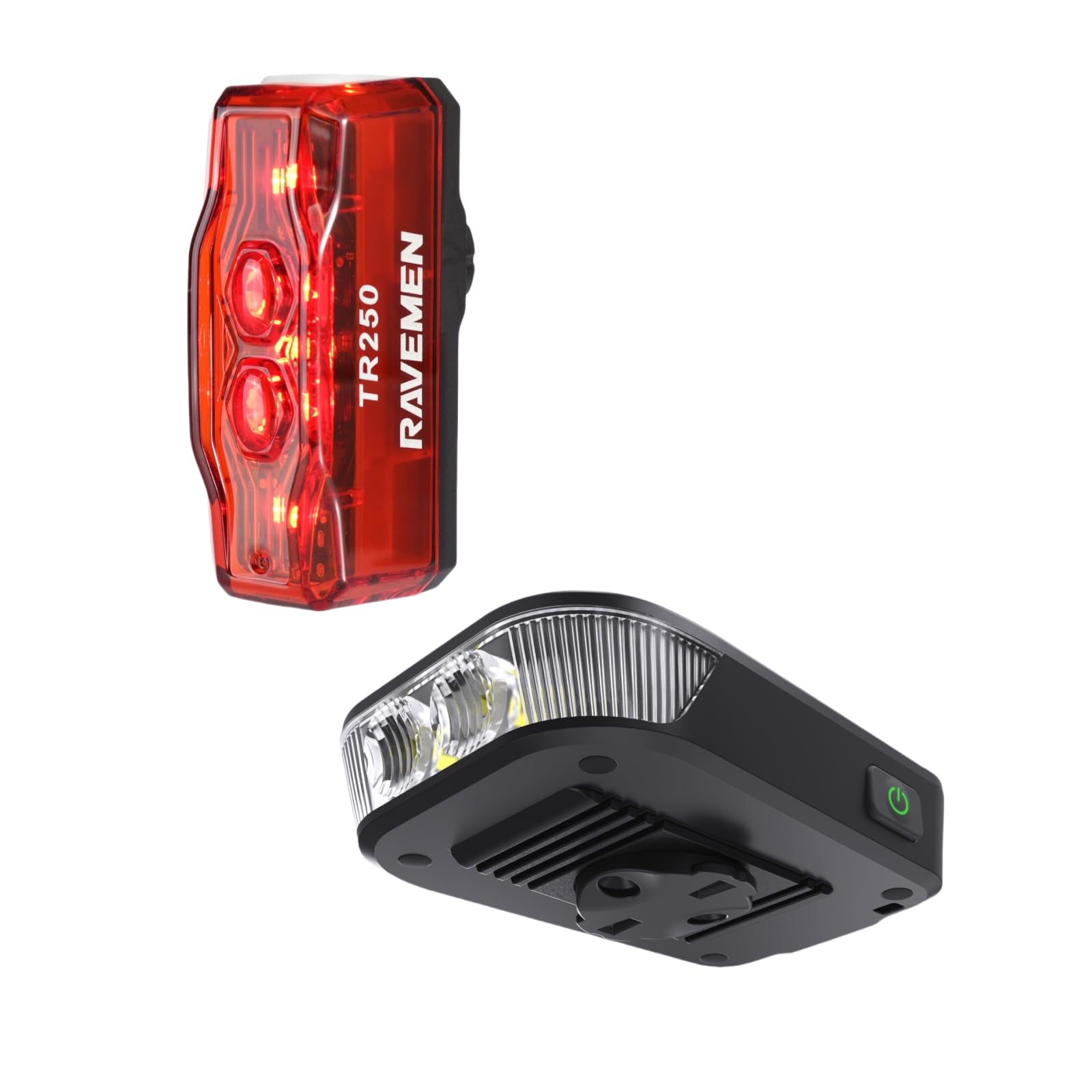
Figear 1: RAVEMEN FR500 Front Light and TR250 Tail Light Bundle. This image displays both the FR500 front light and the TR250 tail light, along with their respective mounting brackets and charging cables, as they appear in the product packaging.
2. Fiosrachadh Sàbhailteachd
- Na seall gu dìreach a-steach don t-seam solais when the front light is on, as it can cause temporary vision impairment or eye damage.
- Ensure the lights are securely mounted before each ride to prevent detachment.
- Cùm na solais air falbh bho chloinn.
- Do not disassemble or modify the lights. This will void the warranty and may cause damage or injury.
- Use only the provided charging cables or certified equivalents.
- Operating temperature range: -10°C to 40°C (14°F to 104°F).
- Cùm na solais ann an àite fionnar, tioram nuair nach eilear gan cleachdadh.
3. Pasgan-susbaint
Dèan cinnteach gu bheil a h-uile rud anns a’ phacaid agad:
- 1 x RAVEMEN FR500 Front Bike Light
- 1 x RAVEMEN TR250 Tail Bike Light
- 1 x Handlebar Mount for FR500
- 1 x Seatpost Mount for TR250
- 2 x USB Charging Cables (Type-C for FR500, Micro-USB for TR250)
- 1 x Leabhar-làimhe Cleachdaiche (an sgrìobhainn seo)
4. Setup agus Stàladh
4.1. FR500 Front Light Installation
- Select a suitable position on your handlebar, ensuring the light beam is unobstructed and points forward.
- Attach the handlebar mount to your handlebar using the provided strap. Ensure it is tight and stable.
- Slide the FR500 front light onto the mount until it clicks securely into place.
- Adjust the angle of the light to illuminate the path ahead without blinding oncoming traffic.
Figear 2: FR500 Front Light mounted on a bicycle handlebar. This image illustrates the FR500 front light securely attached to a bicycle handlebar, demonstrating the correct orientation and positioning for optimal visibility.
4.2. TR250 Tail Light Installation
- Choose a position on your seatpost that provides maximum rear visibility.
- Attach the seatpost mount to your seatpost using the rubber strap. Ensure it is firm and does not rotate.
- Slide the TR250 tail light onto the mount until it locks securely.
- Verify the tail light is facing directly backward.
Figear 3: TR250 Tail Light mounted on a bicycle seatpost. This image shows the TR250 tail light attached to a bicycle seatpost, highlighting its rear-facing orientation for enhanced safety.
5. Stiùireadh Obrachaidh
5.1. FR500 Front Light Operation
- Cumhachd air / dheth: Brùth agus cum am putan cumhachd airson 1 diog.
- Change Brightness Mode: With the light on, short press the power button to cycle through High, Medium, Low, and Eco modes.
- Modh Flash: Double-press the power button to activate flash mode. Short press to cycle through different flash patterns. Double-press again to return to constant mode.
- Cuimhne modh: The light will remember the last used constant mode when turned off and on again.
- Comharra Bataraidh: The power button illuminates to indicate battery level:
- Green: 100% - 75%
- Blue: 75% - 50%
- Yellow: 50% - 25%
- Red: 25% - 10%
- Flashing Red: Below 10% (Charge immediately)
5.2. TR250 Tail Light Operation
- Cumhachd air / dheth: Brùth agus cum am putan cumhachd airson 1 diog.
- Modh atharrachaidh: With the light on, short press the power button to cycle through various constant and flashing modes.
- Cuimhne modh: The light will remember the last used mode.
- Comharra Bataraidh: The power button illuminates to indicate battery level:
- Green: 100% - 75%
- Blue: 75% - 50%
- Yellow: 50% - 25%
- Red: 25% - 10%
- Flashing Red: Below 10% (Charge immediately)
6. Charging the Lights
It is recommended to fully charge both lights before first use.
- FR500 Front Light:
- Locate the USB Type-C charging port on the FR500.
- Connect the provided USB Type-C cable to the light and a USB power source (e.g., computer, wall adapter).
- The power button will flash red during charging and turn solid green when fully charged.
- TR250 Tail Light:
- Locate the Micro-USB charging port on the TR250.
- Connect the provided Micro-USB cable to the light and a USB power source.
- The power button will flash red during charging and turn solid green when fully charged.
- Charging time typically ranges from 2-4 hours depending on the power source.
7. Cumail suas
- Glanadh: Sguab corp an t-solais agus an lionsa le clò bog, tioram.amp aodach. Na cleachd luchd-glanaidh sgudail no solventan.
- Stòradh: If storing for an extended period, charge the lights to approximately 50% every 3 months to prolong battery life. Store in a cool, dry place.
- Seasmhachd uisge: The lights are designed to be water-resistant. Avoid submerging them in water. Ensure charging port covers are securely closed.
8. A ’dèanamh trioblaid
| Trioblaid | Adhbhar a dh’fhaodadh a bhith ann | Fuasgladh |
|---|---|---|
| Cha bhith solas a ’tionndadh. | Bataraidh ìosal no làn-luchdaichte. | Luchdaich an solas gu h-iomlan. |
| Bidh solas a’ tionndadh dheth gun dùil. | Bataraidh ìosal. | Luchdaich a-nuas an solas. |
| Solais priobadh no dims. | Bataraidh ìosal no ceangal sgaoilte. | Charge the light. Ensure the light is securely mounted. |
| Chan urrainnear modhan atharrachadh. | Button malfunction or light is in a specific locked mode. | Ensure the button is pressed correctly. If issue persists, contact customer support. |
| Chan eil am muileann tèarainte. | Mounting strap not tightened sufficiently or incorrect size. | Re-tighten the strap. Ensure the correct mount is used for your handlebar/seatpost diameter. |
9. Sònrachaidhean
Solas aghaidh FR500
- Toradh as motha: 500 Lumen
- Bataraidh: Li-ion ath-phàigheadh
- Port cosgais: USB Type-C
- Ùine ruith: Ag atharrachadh a rèir modh
- Meudan: (Specific dimensions not provided)
- Cuideam: (Specific weight not provided)
- Seasmhachd uisge: IPX6
TR250 Tail Light
- Toradh as motha: 250 Lumen
- Bataraidh: Li-ion ath-phàigheadh
- Port cosgais: Micro-USB
- Ùine ruith: Ag atharrachadh a rèir modh
- Meudan: (Specific dimensions not provided)
- Cuideam: (Specific weight not provided)
- Seasmhachd uisge: IPX4
Note: Specific run times, battery capacities, dimensions, and weights may vary slightly. Refer to product packaging or official Ravemen weblàrach-lìn airson na mion-fhiosrachaidh as cruinne.
10. Barantas agus Taic
RAVEMEN products are manufactured to high-quality standards. This product comes with a limited warranty against defects in materials and workmanship from the date of purchase. Please retain your proof of purchase for warranty claims.
For detailed warranty information, technical support, or service inquiries, please visit the official RAVEMEN website or contact your local distributor. Do not attempt to repair the product yourself, as this may void the warranty.
RAVEMEN Official Weblàrach: www.ravemen.com