
TOPUTURE TP5
TOPUTURE TP5 Folding Treadmill User Manual
Model: TP5 | Brand: TOPUTURE
Ro-ràdh
This manual provides essential instructions for the safe and efficient use of your TOPUTURE TP5 Folding Treadmill. Please read this manual thoroughly before operating the device and retain it for future reference.
Stiùireadh sàbhailteachd cudromach
To reduce the risk of serious injury, read all important precautions and instructions in this manual before using the treadmill. The manufacturer assumes no responsibility for personal injury or property damage sustained by or through the use of this product.
- Always ensure the safety key is properly attached to your clothing before starting the treadmill.
- Cùm clann agus peataichean air falbh bhon mhuileann-treabhaidh fhad 'sa tha iad ag obair.
- Cuir an treidhmill air uachdar rèidh le àite gu leòr timcheall air.
- Na obraich an treidhmill ma tha corda no pluga millte ann, no mura h-eil e ag obair ceart.
- Bruidhinn ri dotair mus tòisich thu air prògram eacarsaich sam bith.
Suidheachadh agus Seanadh
The TOPUTURE TP5 treadmill comes largely pre-assembled. Follow these steps for quick setup:
- A' dì-phapadh: Carefully remove the treadmill from its packaging. Ensure all components are present.
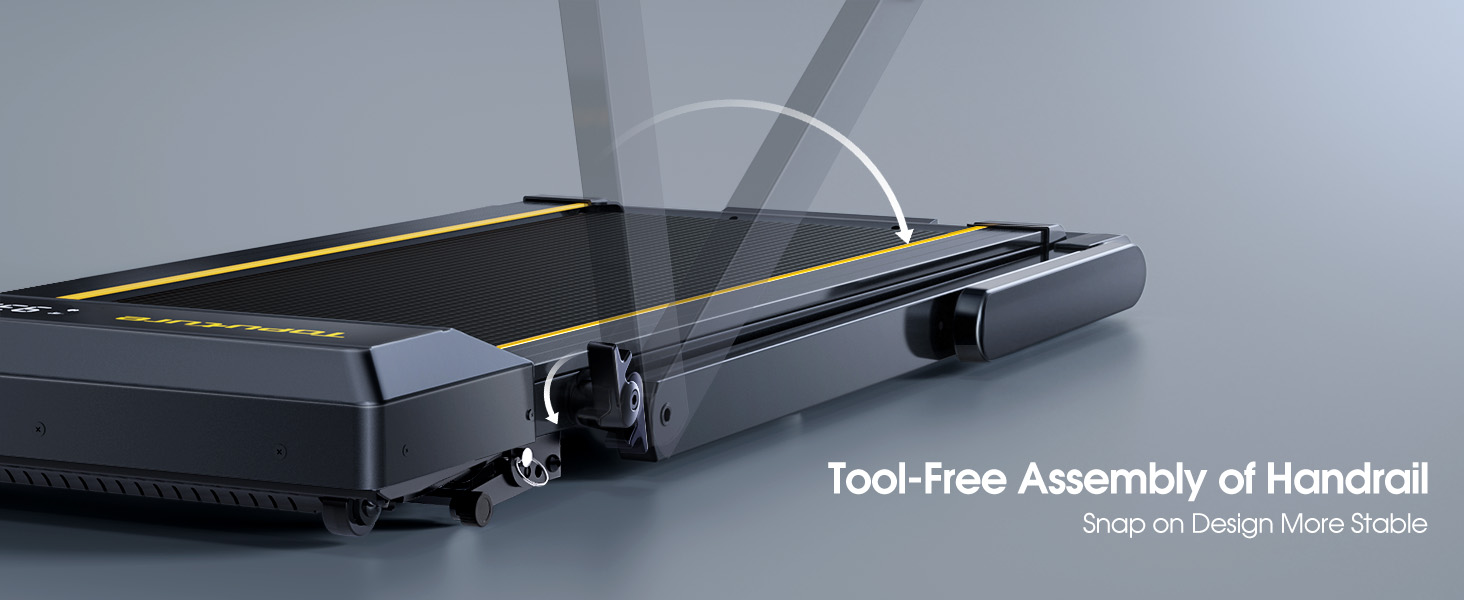
- A’ fosgladh a’ bhàr-stiùiridh: Gently lift the handlebar into its upright position until it locks securely. The quick-release snaps allow for easy transition between walking pad and running treadmill configurations.
- Cumhachd ceangail: Plug an sreang cumhachd a-steach do ionad dealain stèidhichte.
- Sgrùdadh tòiseachaidh: Before first use, ensure the running belt is centered and properly tensioned. Refer to the maintenance section for belt adjustment if needed.

Stiùireadh Obrachaidh
Pannal smachd agus taisbeanadh
The treadmill features a multifunctional LED display and touch controls. Information displayed includes time, speed, calories burned, distance, and heart rate.

Starting and Adjusting Speed
- Tòisich/stad: Press the Start/Pause button on the control panel or remote to begin/end your workout.
- Atharrachadh astair: Use the Speed +/- buttons on the control panel or remote to adjust the speed from 0.6 to 10 MPH.
- Smachd app: Connect your smartphone or tablet via Bluetooth to control the treadmill and access guided workouts.

Gnìomh Incline
The treadmill offers three manual incline levels: 1%, 6%, and 12%. Adjust the incline by manually setting the support legs at the rear of the treadmill to the desired position.

Neach-labhairt Bluetooth
Connect your device to the treadmill's built-in Bluetooth speaker to enjoy music or audio during your workout.
Monitor ìre cridhe
Grip the hand sensors on both sides of the display to monitor your heart rate during exercise.
Cumail suas
- Lubrication: Regularly apply treadmill lubricant under the running belt to ensure smooth operation and prolong belt life. Refer to the lubricant instructions for frequency.
- Glanadh: Sguab sìos an treidhmill le sanasamp clò às dèidh gach cleachdaidh gus fallas is duslach a thoirt air falbh.
- Atharrachadh crios: If the running belt feels loose or is off-center, use the provided tools to adjust the tension and alignment as per the detailed instructions in the full manual.

Fuasgladh thrioblaidean
If you encounter any issues with your treadmill, please refer to the following common solutions:
- Treadmill not starting: Ensure the power cord is securely plugged in and the safety key is correctly placed on the console. Check the power switch on the treadmill.
- Sleamhnachadh crios: The running belt may need tensioning. Refer to the maintenance section or the full manual for instructions on adjusting belt tension.
- Fuaimean neo-àbhaisteach: Check for any loose parts or foreign objects under the belt. Lubricate the running belt if it has not been done recently.
- Chan eil an taisbeanadh ag obair: Dèan cinnteach gu bheil a h-uile ceangal tèarainte. Ma mhaireas a’ chùis, cuir fios gu taic teachdaiche.
Sònrachaidhean
| Feart | Mion-fhiosrachadh |
|---|---|
| Brand | TOPUTURE |
| Ainm Modail | TP5 |
| Dath | Dubh |
| Meudan toraidh | 52.3"D x 28.2"W x 5.1"H |
| Cuideam nì | 78 Punnd |
| Stuth | Alloy Steel |
| Astar as àirde | 10 mìle san uair |
| An ìre as àirde Incline Percentage | 12% |
| Horsepower as àirde | 2.5 HP |
| Moladh cuideam as àirde | 300 Punnd |
| Taisbeanadh | LED |
| Teicneòlas ceangail | Bluetooth |
| Feartan sònraichte | Built-In Speaker, Foldable, Heart Rate Monitor, Portable, Shock Absorbent |
| Co-chruinneachadh a dhìth | Chan eil (Ro-chruinnichte) |
| Co-phàirtean air an toirt a-steach | Corda cumhachd |
Barantas agus Taic
Your TOPUTURE TP5 Treadmill comes with a barantas aon-bhliadhna. For any assistance, questions, or warranty claims, please contact TOPUTURE customer support.
Mar a chuireas tu fios gu neach-taic:
- Log a-steach don chunntas Amazon agad.
- Go to "Your Orders".
- Find the order ID for your treadmill.
- Briog air “Cuir fios chun neach-reic”.
Please have your model name (TP5) and purchase details ready when contacting support.