
Ro-ràdh
Tapadh leibh airson ceannachasing the Anker Soundcore P31i True Wireless Earbuds. This manual provides detailed instructions on how to set up, operate, and maintain your earbuds to ensure optimal performance and longevity. Please read this manual carefully before use and retain it for future reference.
Na tha air a ghabhail a-steach
Your Soundcore P31i package includes the following items:
- Soundcore P31i Earbuds (Left and Right)
- Cùis Cìse
- Ear Tips (XS, S, M, L - M size pre-installed)
- Càball USB-C gu USB-A
- Stiùireadh tòiseachaidh luath
- Leabhar-làimhe sàbhailteachd
Bathar seachadview
The Soundcore P31i earbuds are designed for comfort and high-quality audio. Each earbud features a touch control area and an indicator light. The charging case protects the earbuds and provides additional battery life.
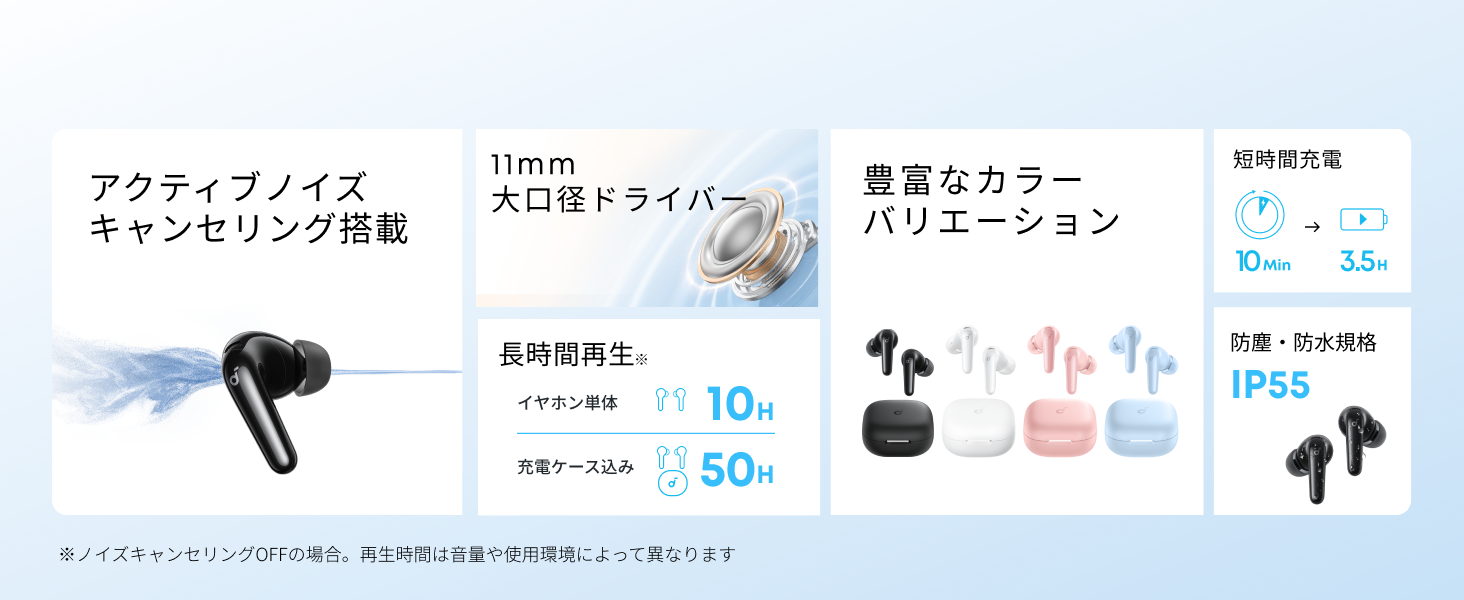
Diagram showing the Soundcore P31i earbuds and charging case with key components labeled.
Fòn-cluaise: Each earbud is equipped with an 11mm dynamic driver for powerful bass and clear sound. They feature active noise cancellation and AI noise reduction for calls. The ergonomic design ensures a secure and comfortable fit.
Cùis cosgais: The compact charging case not only stores and protects your earbuds but also recharges them on the go. It has a USB-C charging port and a strap hole for portability.
A’ cur cosgais air d’ earbuds agus cùis
Mus cleachd thu iad an toiseach, cuir làn-chosgais air na fònaichean-cluaise agus air a’ chùis cosgais.
- A 'cur cosgais air na Earbuds: Place the earbuds into the charging case. The indicator lights on the earbuds will show charging status.
- A’ cur cosgais air a’ chùis: Connect the charging case to a power source using the provided USB-C to USB-A cable. A full charge for the case and earbuds takes approximately 3 hours.
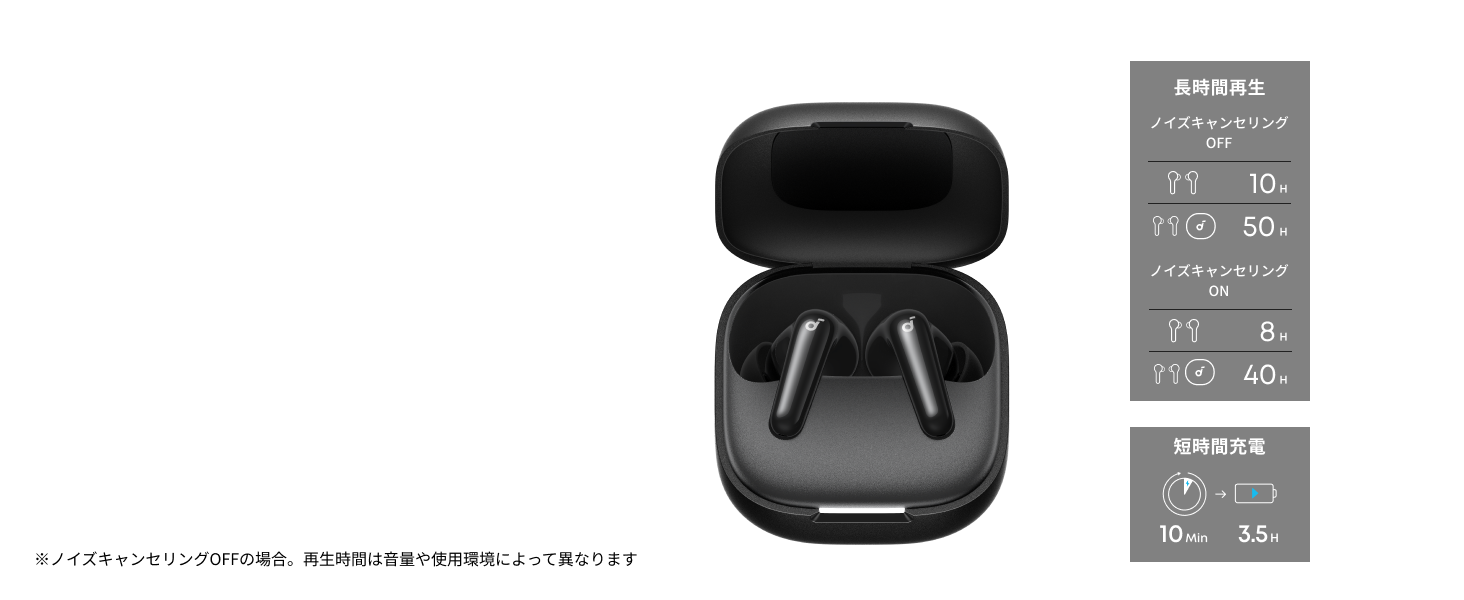
Diagram illustrating charging times and playback duration for Soundcore P31i earbuds.
Beatha bataraidh:
- Up to 10 hours of playback on a single charge (earbuds only).
- Suas ri 50 uairean de chluich gu h-iomlan leis a’ chùis cosgais.
- A quick 10-minute charge provides up to 3.5 hours of listening time.
Note: Playback time varies depending on volume level and audio content.
A’ caitheamh do chluas-cinn
For optimal sound quality and comfort, it is important to wear your earbuds correctly.
- Choose the Right Ear Tips: Select the ear tips that provide the best seal and comfort for your ears. Experiment with different sizes (XS, S, M, L) to find the perfect fit.
- Cuir a-steach na Earbuds: Cuir na fònaichean-cluaise gu socair a-steach do chanàlan do chluas.
- Tionndaidh gus a dhèanamh tèarainte: Twist the earbuds slightly until they fit snugly and securely in your ears.

Image showing a person wearing the Soundcore P31i earbuds correctly.
Paidhir Bluetooth
Follow these steps to pair your Soundcore P31i earbuds with your device:
- Càradh Ciad Ùine:
- Open the charging case. The earbuds will automatically enter Bluetooth pairing mode. The indicator lights on the earbuds will flash white.
- Air an inneal agad (fòn cliste, tablet, msaa.), rach gu na roghainnean Bluetooth.
- Select "Soundcore P31i" from the list of available devices.
- Once connected, the indicator lights on the earbuds will turn solid white for 1 second and then turn off.
- A 'càradh le inneal eile:
- Cuir na fònaichean-cluaise anns a’ chùis cosgais agus fàg am mullach fosgailte.
- Press and hold the button on the charging case for 3 seconds until the earbud indicator lights flash white rapidly.
- Repeat steps 2 and 3 from "First-Time Pairing" on your new device.
Smachdan
The Soundcore P31i earbuds feature touch controls for managing playback, calls, and other functions. Specific control configurations can often be customized via the Soundcore app.
General Touch Controls (Default):
- Cluich / Stad: Tap air aon uair air earbud.
- An ath cheum: Dèan briogadh dùbailte air an earbud cheart.
- Rian roimhe: Dèan dà-tap air an earbud chlì.
- Freagairt/Cuireadh Call: Tap air aon uair air earbud.
- Call a dhiùltadh: Brùth agus cum an dàrna cuid earbud airson 2 dhiog.
- Cuir an gnìomh neach-taic guth: Triple-tap either earbud (may vary).
- Atharraich Modh ANC/Follaiseachd: Press and hold the right earbud for 2 seconds (may vary).
For detailed and customizable controls, please refer to the Soundcore app or the included Quick Start Guide.
Cur às do fhuaim gnìomhach (ANC)
The Soundcore P31i earbuds feature Active Noise Cancelling technology to minimize ambient noise, allowing for an immersive listening experience.

Illustration demonstrating the active noise cancelling feature of the Soundcore P31i earbuds.
ANC detects and reduces various types of noise, such as engine hum on trains or buses, and chatter in cafes. This allows you to enjoy your music or podcasts with greater clarity and fewer distractions.
To switch between ANC, Normal, and Transparency modes, use the touch controls on the earbuds or adjust settings within the Soundcore app.
Càileachd fuaim
The Soundcore P31i earbuds are engineered to deliver a rich audio experience.

Diagram illustrating the 11mm dynamic driver responsible for the audio output.
- Dràibhearan fiùghantach 11mm: Equipped with large 11mm drivers, these earbuds produce a wide frequency range and detailed sound.
- BassUp™ Technology: Anker's proprietary BassUp™ technology enhances low frequencies, delivering powerful and impactful bass.
You can further customize the sound profile using the equalizer settings within the Soundcore app.
Càileachd Call
The Soundcore P31i earbuds ensure clear voice calls and web co-labhairtean.

Illustration depicting AI noise reduction technology for clear voice calls.
Lùghdachadh fuaim AI: Integrated AI noise reduction technology effectively filters out background noise, ensuring your voice is transmitted clearly to the person on the other end of the call, even in noisy environments.
Ceangal ioma-phuing
The Soundcore P31i supports multi-point connection, allowing you to connect to two Bluetooth devices simultaneously.

Illustration showing the Soundcore P31i connected to multiple devices simultaneously.
This feature enables seamless switching between devices. For example, you can listen to music on your laptop and instantly switch to answer a call on your phone without manually re-pairing.
To enable multi-point connection, ensure both devices are paired with your earbuds. The earbuds will automatically connect to the last two paired devices when powered on.
App Soundcore
Download the Soundcore app to enhance your experience with the P31i earbuds. The app offers various features and customization options.

Screenshots of the Soundcore app interface, highlighting customization features.
App Features include:
- Smachdan gnàthaichte: Personalize touch controls for playback, calls, and voice assistant.
- Roghainnean co-ionannachd: Atharraich fuaim profiles to your preference or choose from preset EQs.
- ANC/Transparency Mode Switching: Easily toggle between noise cancelling and transparency modes.
- Ùrachaidhean firmware: Cùm na fònaichean-cluaise agad air an ùrachadh leis na feartan agus na leasachaidhean as ùire.
- AI Translation Function: (Available from Spring 2026, requires Soundcore app ver 4.0.0 or higher).
The Soundcore app is available for download on both iOS and Android devices.
Bathar seachadview Bhideo
Taisbeanadh bhidio oifigeil toraidhasing the key features and design of the Soundcore P31i True Wireless Earbuds, including active noise cancellation, powerful bass, long battery life, and multi-point connectivity.
Cùram agus cumail suas
Proper maintenance ensures the longevity and performance of your Soundcore P31i earbuds.
- Glanadh: Glan na cluasan-cluaise agus a’ chùis cosgais gu cunbhalach le clò bog, tioram, gun lint. Na cleachd ceimigean cruaidh no stuthan sgrìobach.
- Molaidhean cluas: Remove the ear tips and clean them with water and mild soap if necessary. Ensure they are completely dry before reattaching.
- Luchd-fios cosgais: Cùm na ceanglaichean cosgais air an dà chuid na fònaichean-cluaise agus a’ chùis glan agus tioram gus dèanamh cinnteach gu bheil iad gan cosgais gu ceart.
- Stòradh: Nuair nach eilear gan cleachdadh, stòraich na fònaichean-cluaise anns a’ chùis cosgais aca gus an dìon bho dhuslach is milleadh.
- Seasmhachd uisge: The earbuds are rated IP55 for dust and water resistance. This means they can withstand sweat and light rain, but are not designed for submersion in water. Ensure the earbuds are dry before placing them back in the charging case.

Image showing Soundcore P31i earbuds with water droplets, highlighting their IP55 water resistance.
Fuasgladh thrioblaidean
If you encounter any issues with your Soundcore P31i earbuds, refer to the following common solutions:
- Earbuds nach eil a 'càradh:
- Dèan cinnteach gu bheil an dà earbuds làn cosgais.
- Place earbuds in the case, close the lid, then open it again to re-enter pairing mode.
- Forget "Soundcore P31i" from your device's Bluetooth list and try pairing again.
- Reset the earbuds (refer to the Quick Start Guide for specific reset instructions).
- Only One Earbud Playing Audio:
- Place both earbuds back into the charging case and close the lid for 5 seconds, then open it again.
- Ensure both earbuds have sufficient battery.
- Ath-shuidhich na fònaichean-cluaise.
- Càileachd fuaim truagh:
- Dèan cinnteach gu bheil na cinn-cluaise a’ seulachadh gu math sa chanàl cluaise agad. Feuch diofar mheudan.
- Glan sprùilleach sam bith bho cheann-fhuinneagan nan cluais-fòn.
- Gluais nas fhaisge air an inneal ceangailte agad gus casg a chur air bacadh.
- Cùisean Cìsean:
- Thoir sùil air a’ chàball cosgais agus an inneal-atharrachaidh airson milleadh.
- Dèan cinnteach gu bheil na ceanglaichean cosgais air na fònaichean-cluaise agus a’ chùis glan.
- Feuch càball cosgais eadar-dhealaichte no stòr cumhachd.
Sònrachaidhean
| Feart | Mion-fhiosrachadh |
|---|---|
| Brand | Sgòr fuaim |
| Ainm Modail | P31i |
| Modail Àireamh | D1202 |
| Dath | Black (This specific variant) |
| Factor foirm | In-Earrach |
| Teicneòlas ceangail | Gun Uèir (Bluetooth 6.1) |
| Smachd fuaim | Cur às do fhuaim gnìomhach |
| Meud driver | Dràibhearan fiùghantach 11mm |
| Ùine Ath-chluich (Cluais-fònaichean) | Suas ri 10 uairean a thìde |
| Ùine Cluiche Iomlan (le Cùis) | Suas ri 50 uairean a thìde |
| Fastadh cosgais | Cosgais 10 mionaidean airson 3.5 uairean a thìde de chluich |
| Charging Time (Full) | Mu 3 uair a thìde |
| Frith-aghaidh uisge | IP55 |
| Ceangal ioma-phuing | Le taic |
| UPC | 194644251543 |
| Dùthaich Tùs | Sìona |
Barantas agus Taic Luchd-cleachdaidh
Soundcore provides a comprehensive warranty for your P31i earbuds.

Image detailing the warranty period and extension for Soundcore P31i.
- Barantas Coitcheann: An 18-month warranty is provided for products purchased from authorized retailer AnkerDirect.
- Barantas Leudaichte: Anker members can extend their warranty up to a maximum of 24 months.
- Nota Cudromach: Purchases from unauthorized sellers may not be covered under warranty.
For product inquiries, delivery questions, or technical support, please contact Soundcore customer support. Contact details can typically be found on the official Soundcore weblàrach-lìn no anns an Stiùireadh Tòiseachaidh Luath agad.
Fiosrachadh Sàbhailteachd
Leugh agus lean na stiùiridhean sàbhailteachd seo gus casg a chur air milleadh air an inneal agad no leòn ort fhèin:
- Na cuir às do na fònaichean-cluaise no a’ chùis cosgais agus na atharraich iad.
- Cùm an inneal air falbh bho theodhachd anabarrach, solas dìreach na grèine, agus lasraichean fosgailte.
- Avoid exposing the device to excessive moisture or liquids, beyond its IP55 rating.
- Do not use the device at high volume levels for extended periods to prevent hearing damage.
- Cùm a-mach à ruigsinneachd clann is peataichean.
- Cuir às don toradh gu ciallach a rèir riaghailtean ionadail.