
1. Ro-ràdh
Thank you for choosing the RUIZU X55 64GB USB MP3 Player. This portable music player is designed for convenience and high-quality audio, featuring Bluetooth 5.3 connectivity, an integrated clip for active use, FM radio, voice recording, and direct phone file transfer capabilities. This manual provides detailed instructions to help you get the most out of your device.
The RUIZU X55 offers a seamless audio experience with its Bluetooth 5.3, ensuring quick pairing and stable connection to wireless headphones or speakers. Its clip-on design makes it ideal for sports and on-the-go activities. With 64GB of internal storage, you can carry thousands of songs. The device also supports various audio formats, including MP3, WMA, APE, FLAC, WAV, DRM, ACELP, and OGG, providing flexibility for your music library.
2. Dè tha sa bhogsa
- 1 x RUIZU USB Stick MP3 Player with Bluetooth
- 1 x 3.5mm Wired Stereo Headphones
- 1 x USB to USB-C Adapter Cable
- 1 x English & Japan User Manual
3. Toradh thallview
3.1 Cruth is Smachdan an Inneil
The RUIZU X55 features a compact design with a built-in clip and intuitive controls. The device includes a small LCD screen, touch-sensitive buttons for navigation and playback, and physical buttons for volume control and power.
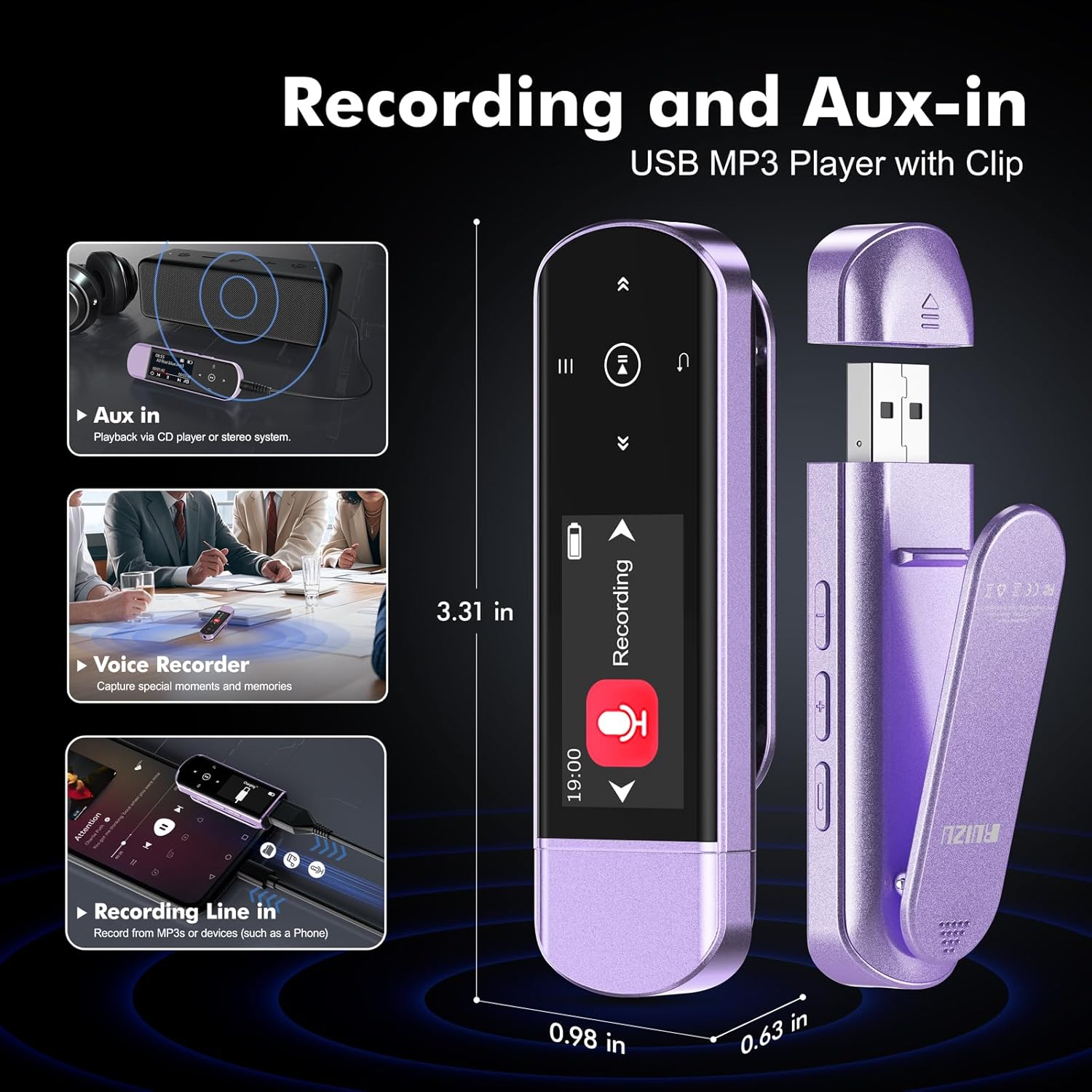
Ìomhaigh: RUIZU X55 MP3 Player showing its compact size (3.31 inches long, 0.98 inches wide, 0.63 inches thick) and key features like Aux In, Voice Recorder, and Recording Line In.
3.2 Prìomh fheartan
- Bluetooth 5.3: For stable and quick connection to wireless headphones and speakers.
- Clip togte: Securely attach the player to clothing or bags for hands-free use during activities.
- Stòradh a-staigh 64GB: Ample space for over 15,000 MP3 songs or 2,000 lossless FLAC files.
- Direct USB Plug: Integrated USB-A connector for direct connection to computers for file gluasad agus cosgais.
- Fòn File Transfer (OTG): Transfer music directly from smartphones using an OTG cable/adapter (not included).
- Rèidio FM: Enjoy local radio stations (requires wired headphones as antenna).
- Neach-clàraidh Guth: Capture audio with the built-in microphone.
- Càileachd fuaim HiFi: Supports various audio formats for an immersive listening experience.
- Modhan ioma-chluiche: Shuffle, playlist loop, sequential play, folder repeat, and more.
- Beatha bataraidh fada: Up to 20 hours of playtime on a 2-hour charge.
4. Suidhich
4.1 A’ cur cosgais air an inneal
Before first use, fully charge your RUIZU X55 MP3 player. The device features a direct USB-A plug for convenient charging.
- Remove the protective cap from the USB-A connector.
- Plug the MP3 player directly into a USB port on your computer or a USB wall adapter.
- The screen will indicate 'Charging'. A full charge typically takes about 2 hours.

Ìomhaigh: The RUIZU X55 MP3 Player connected to a laptop via its integrated USB plug, displaying 'Charging' on its screen. This image also illustrates the 64GB memory, 20 hours playing time, and 2 hours charging time.
4.2 A’ Gluasad Ceòl Files
Faodaidh tu ceòl a ghluasad files from your computer or smartphone.
Bho choimpiutair:
- Plug the MP3 player directly into a USB port on your computer.
- Aithnichidh an coimpiutair an inneal mar dhiosca a ghabhas toirt air falbh.
- Slaod is leig às an ceòl a tha thu ag iarraidh files (MP3, WMA, APE, FLAC, WAV, DRM, ACELP, OGG) into the player's storage.
- Safely eject the device from your computer after transfer is complete.
From a Smartphone (OTG Function):
This feature allows direct transfer from your smartphone. Ensure your phone supports OTG (On-The-Go) functionality.
- Connect the MP3 player to your smartphone using an OTG cable or adapter (not included).
- Your phone should recognize the MP3 player as external storage.
- Use your phone's file manager to transfer music files to the MP3 player.
- Thoir an aire: For best results, transfer files in batches under 1GB.

Ìomhaigh: The RUIZU X55 MP3 Player demonstrating file transfer capabilities from both a smartphone via an OTG adapter and a laptop via its direct USB connection.
5. Stiùireadh Obrachaidh
5.1 Power On/Off and Screen Lock
- Cumhachd air: Press and hold the Power button (usually the top physical button on the side) for a few seconds.
- Cumhachd dheth: Press and hold the Power button. The device will display a countdown before shutting down.
- Sgrion glasadh / fhuasgladh: A quick press of the Power button will toggle the screen and touch controls active or inactive.
5.2 Dealbh-chluich Ciùil
Navigate to the 'Music' icon on the main menu to access your audio files.
- Select 'Music' from the main menu.
- Browse through 'All Songs', 'Artists', 'Albums', 'Genres', or 'Folders'. Using the 'Folders' option allows you to navigate your music as organized on your computer.
- Use the touch controls (Play/Pause, Next/Previous, Menu, Return) to manage playback.
- Adjust volume using the physical volume buttons on the side of the device.
Modhan ath-chluich:
The RUIZU X55 supports various playback modes to customize your listening experience:
- Loop Single: Repeats the current song.
- Shuffle Repeat: Plays songs in a random order and repeats the shuffled list.
- Lùb liosta: Repeats the entire playlist.
- Sequential Play: Plays songs in order.
- Multiple Folder Repeat: Repeats songs within multiple selected folders.
- Single Folder Repeat: Repeats songs within the current folder.

Ìomhaigh: The RUIZU X55 MP3 Player screen showing various playback modes (Loop Single, Shuffle Repeat, List Loop, Sequential Play, Multiple Folder Repeat, Single Folder Repeat) and highlighting its HiFi Lossless Sound capability.
5.3 Ceangal Bluetooth
The RUIZU X55 features Bluetooth 5.3 for connecting to wireless audio devices.
- From the main menu, select the 'Bluetooth' icon.
- Dèan cinnteach gu bheil na fònaichean-cluaise no an neach-labhairt Bluetooth agad ann am modh paidhreachaidh.
- The MP3 player will scan for available devices. Select your device from the list to pair.
- Once paired, audio will be routed to your Bluetooth device.
Important Note: The Bluetooth function of the RUIZU X55 CANNOT connect to computers, cars, or smartphones. It is designed for connecting to Bluetooth headphones or speakers only.

Ìomhaigh: The RUIZU X55 MP3 Player demonstrating stable Bluetooth 5.3 connectivity with various audio devices, including over-ear headphones, earbuds, and a portable speaker.
Rèidio 5.4 FM
To use the FM radio, you must connect wired headphones, which act as the antenna.
- Plug the included 3.5mm wired headphones into the player's headphone jack.
- From the main menu, select the 'FM Radio' icon.
- Use the menu options to perform an auto-tune scan to find available stations.
- You can save up to 30 preset stations. Use the Play/Pause button to scan through presets and the Fast-Forward/Rewind buttons to manually search for stations.

Ìomhaigh: A person using the RUIZU X55 MP3 Player with wired headphones, illustrating the FM radio function with a frequency range of 80.5-108MHz displayed on the player's screen.
5.5 Neach-clàraidh Guth
The RUIZU X55 includes a built-in voice recorder.
- From the main menu, select the 'Recording' icon.
- Brùth air a’ phutan Cluich/Pas gus tòiseachadh air clàradh.
- Press the Play/Pause button again to pause/resume recording.
- Press the Back button to stop and save the recording. Recordings are automatically named by date and time.
- Recordings can be saved in MP3 or WAV format at different bit rates, configurable in the settings.
5.6 AUX and USB in Car
The RUIZU X55 can be used to play music in your car through its 3.5mm AUX port or standard USB plug.
Ceangal AUX:
- Connect the MP3 player to your car's audio system using a 3.5mm audio cable (not included).
- Select the AUX input on your car's stereo.
- Play music on the MP3 player, and it will output through your car's speakers.
Ceangal USB:
- Plug the MP3 player directly into your car's USB port.
- Your car's audio system may recognize the player as a USB drive and allow direct playback.
- If your car has a USB-C port, use the provided USB to USB-C adapter cable.
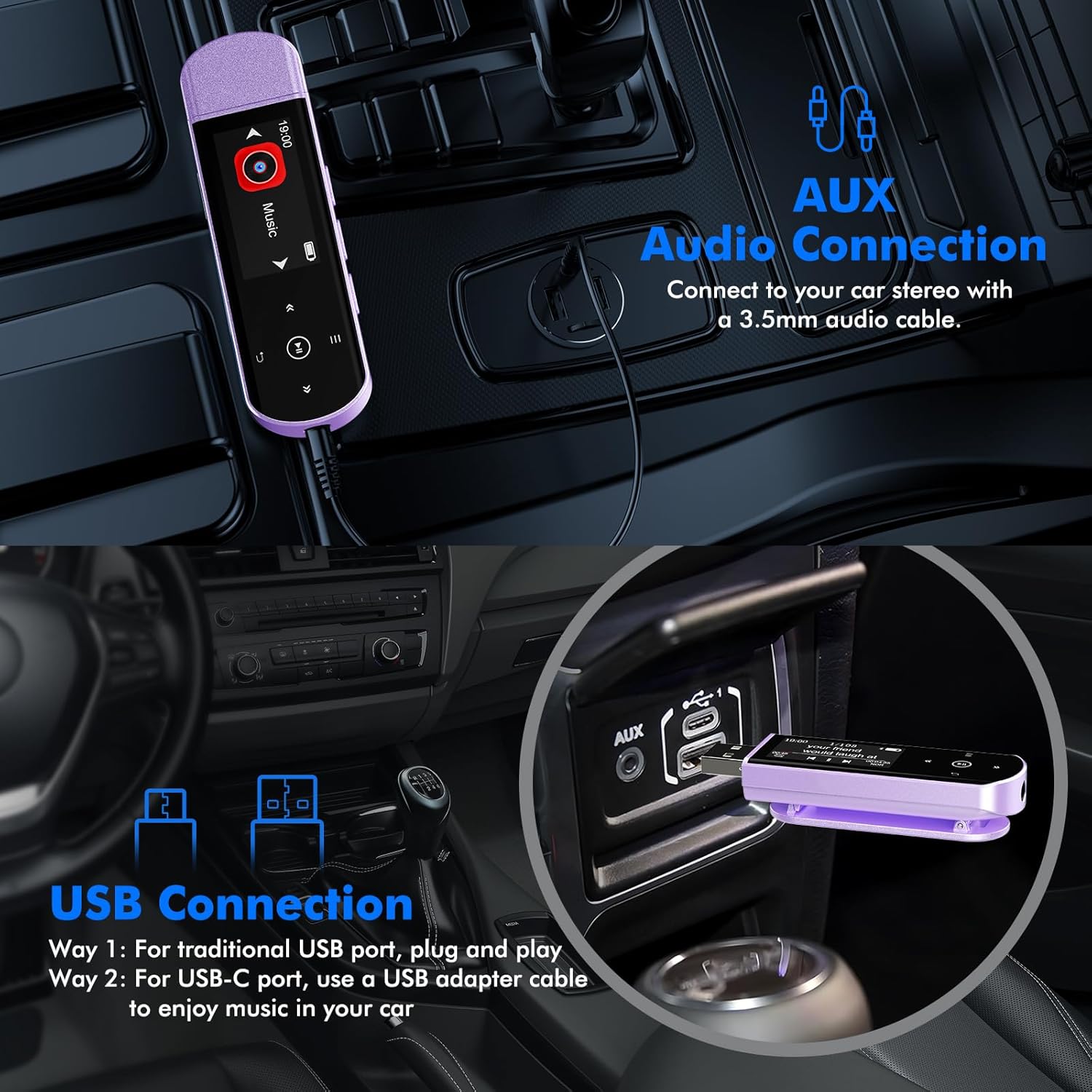
Ìomhaigh: The RUIZU X55 MP3 Player demonstrating connectivity options in a car, showing both a 3.5mm AUX audio connection and a USB connection (direct plug and via USB-C adapter).
5.7 Gnìomhan Eile
The RUIZU X55 offers additional features accessible through its menu:
- Cothromaiche: Adjust audio settings for different sound profiles.
- Comharran-leabhair: Mark specific points in audio files for easy return.
- Crìochan meud: Set a maximum volume level.
- Gnìomh loidhne-a-steach: Record music directly from a phone or other device to the MP3 player (requires appropriate cable, not included).
- Flash Drive: The device can also be used as a standard USB flash drive for data storage.

Ìomhaigh: The RUIZU X55 MP3 Player displaying its main menu with icons for Music, FM Radio, Recording, Settings, File Folder, and Equalizer, indicating its multi-functional capabilities.
6. Cumail suas
- Cùm an inneal tioram. Faodaidh taiseachd milleadh a dhèanamh air co-phàirtean dealain.
- Avoid extreme temperatures. High temperatures can shorten the life of electronic devices and distort plastic parts.
- Na leig às, cnag, no crathadh an inneal. Faodaidh làimhseachadh garbh bùird cuairteachaidh a-staigh a bhriseadh.
- Clean the device with a soft, dry cloth. Do not use harsh chemicals or cleaning solvents.
- Protect the USB connector with its cap when not in use to prevent dust and damage.
7. A ’dèanamh trioblaid
Inneal nach eil a' tionndadh air:
- Dèan cinnteach gu bheil an inneal làn-luchdaichte. Ceangail e ri stòr cumhachd airson co-dhiù 30 mionaid.
- Try resetting the device by pressing and holding the power button for an extended period (e.g., 10-15 seconds).
Chan urrainnear ceangal a dhèanamh tro Bluetooth:
- Confirm that your target device (headphones/speaker) is in pairing mode.
- Ensure the MP3 player's Bluetooth is enabled and scanning.
- Remember, the MP3 player's Bluetooth cannot connect to computers, cars, or smartphones.
- Gluais na h-innealan nas fhaisge air a chèile gus dèanamh cinnteach gu bheil iad taobh a-staigh ruigsinneachd.
Files Not Transferring or Appearing:
- Dèan cinnteach gu bheil an ceòl files are in a supported format (MP3, WMA, APE, FLAC, WAV, DRM, ACELP, OGG).
- Ensure the device is properly connected to your computer or smartphone.
- When transferring from a phone, confirm your phone supports OTG and use an OTG cable/adapter.
- Try transferring files in smaller batches, especially from a smartphone.
FM Radio Signal is Poor:
- Ensure wired headphones are securely plugged in, as they function as the antenna.
- Try moving to an open area or adjusting the position of the headphone cable to improve reception.
8. Sònrachaidhean
| Feart | Mion-fhiosrachadh |
|---|---|
| Brand | Ruaiu |
| Ainm Modail | X55 |
| Comas stòraidh cuimhne | 64 GB |
| Teicneòlas ceangail | Aux, Bluetooth 5.3, USB |
| Feartan sònraichte | Built-In Clip, Equalizer, FM Radio, Voice Recorder |
| Meud sgrion | 1 Inch |
| Innealan co-fhreagarrach | Fòn-cluaise, luchd-labhairt |
| Seòrsa Meadhanan le taic | Micro SD (internal 64GB) |
| Cruthan claisneachd le taic | MP3, WMA, APE, FLAC, WAV, DRM, ACELP, OGG |
| Beatha cuibheasach bataraidh | 20 Uairean |
| Ùine cosgais | Mu thuairmeas. 2 Uairean |
| Teicneòlas taisbeanadh | LCD |
9. Barantas agus Taic
For warranty inquiries or technical support, please contact RUIZU customer service.
- Taic Post-d: taic@ruizutek.com
Please refer to the official RUIZU website or your purchase documentation for the most up-to-date warranty information.
10. Bhideothan Bathar
Watch these official videos for a visual guide on using your RUIZU X55 MP3 Player.
RUIZU 64GB USB MP3 Player with Bluetooth 5.3 Overview
Bhidio: Tha am bhidio seo a’ toirt seachad seachadview of the RUIZU 64GB USB MP3 Player with Bluetooth 5.3, highlighting its features and ease of use for daily activities and workouts.
RUIZU USB MP3 Player with Bluetooth, Clip Music Player
Bhidio: This video showcases the RUIZU USB MP3 Player with Bluetooth, focusing on its clip design and suitability as a portable music player.


