
1. Ro-ràdh
Thank you for choosing the Antec VCX300 ARGB ATX/M-ATX PC Case. This manual provides detailed instructions for the installation, operation, and maintenance of your new computer chassis. Please read this manual thoroughly before installation to ensure proper setup and optimal performance.
2. Fiosrachadh Sàbhailteachd
- Dì-cheangail an solar cumhachd an-còmhnaidh mus cuir thu a-steach no mus toir thu air falbh co-phàirtean sam bith.
- Handle components with care to avoid damage from electrostatic discharge. Use an anti-static wrist strap if available.
- Keep the case away from water, moisture, and direct heat sources.
- Dèan cinnteach gu bheil deagh fhionnarachadh timcheall a’ chùis gus casg a chur air cus teasachadh.
- Do not attempt to open or repair the power supply unit inside the case. Refer to qualified service personnel.
3. Pasgan-susbaint
Dèan cinnteach gu bheil a h-uile nì an làthair sa phacaid agad:
- Antec VCX300 ARGB ATX/M-ATX PC Case
- Accessory Box (Screws, standoffs, cable ties)
- Leabhar-làimhe Cleachdaiche (An sgrìobhainn seo)
4. Toradh thallview
Familiarize yourself with the various parts of your Antec VCX300 ARGB PC Case.
4.1 Pannal aghaidh I/O
- Putan Cumhachd
- Putan Ath-shuidheachadh
- Puirt USB 3.0
- Puirt USB 2.0
- Seicichean Fuaime (Fònaichean-cluaise/Maicreafòn)
- LED Control Button (for ARGB lighting)
4.2 Cruth a-staigh
The VCX300ARGB case supports ATX and Micro-ATX motherboards. It features multiple drive bays for storage and ample space for cooling solutions.
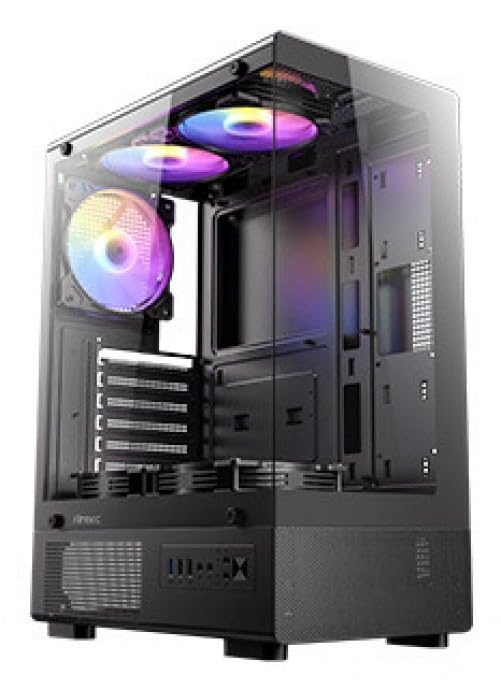
Figear 1: Aghaidh view of the Antec VCX300 ARGB PC Case, showcasing the ARGB lighting elements and front panel I/O ports.
5. Setup agus Stàladh
Follow these steps to install your components into the Antec VCX300 ARGB PC Case.
5.1 A’ cur a’ chùis air dòigh
- Cuir a’ chùis air uachdar rèidh, seasmhach.
- Thoir air falbh na pannalan taobh le bhith a’ dì-sgriubadh nan sgriothan-òrdag aig cùl a’ chùis agus a’ sleamhnachadh nam pannalan air ais.
5.2 Stàladh Motherboard
- Stàlaich an sgiath I/O a-steach do fhosgladh cùil a’ chùis.
- Align the motherboard with the pre-installed standoffs. Ensure the screw holes on the motherboard match the standoffs.
- Secure the motherboard with the provided screws from the accessory box.
5.3 Stàladh Solar Cumhachd
- Position the power supply unit (PSU) in the designated compartment at the bottom rear of the case.
- Daingnich an PSU le sgriothan bhon taobh a-muigh air cùl a’ chùis.
5.4 Stàladh Draibh Stòraidh (HDD/SSD)
- Locate the drive bays. The VCX300ARGB typically features dedicated bays for 3.5" HDDs and 2.5" SSDs.
- For 3.5" HDDs, slide the drive into the bay and secure it with screws or tool-less clips if available.
- For 2.5" SSDs, mount the drive onto the designated brackets or trays and secure with screws.
5.5 Expansion Card Installation (GPU, etc.)
- Thoir air falbh na còmhdaichean slot leudachaidh riatanach bho chùl a’ chùis.
- Insert the expansion card (e.g., graphics card) into the appropriate PCIe slot on the motherboard.
- Daingnich a’ chairt le sgriubha.
5.6 Stiùireadh Càbaill
Utilize the cable routing cutouts and tie-down points behind the motherboard tray to manage cables. This improves airflow and aesthetics.
- Connect all power cables from the PSU to the motherboard and components.
- Connect front panel I/O cables (USB, audio, power/reset switches, LED) to the corresponding headers on the motherboard.
- Connect ARGB cables from the case fans/strips to the motherboard's ARGB header or the integrated ARGB controller.
6. Obrachadh
6.1 A’ cur cumhachd air adhart
- Ensure all components are correctly installed and cables are connected.
- Close and secure the side panels.
- Ceangail an càball cumhachd ris an PSU agus ri socaid balla.
- Flip the power switch on the PSU to the "ON" position.
- Press the Power Button on the front panel of the case.
6.2 Smachd Solais ARGB
The Antec VCX300 ARGB case features customizable ARGB lighting. You can control the lighting effects in two ways:
- Putan Smachd LED: Press the dedicated LED control button on the front panel to cycle through various pre-set ARGB lighting modes and colors. Hold the button for a few seconds to turn off/on the lighting.
- Bathar-bog bòrd-màthar: If the ARGB cables are connected to a compatible motherboard ARGB header, you can synchronize and customize lighting effects using your motherboard's proprietary software (e.g., ASUS Aura Sync, MSI Mystic Light Sync, Gigabyte RGB Fusion, ASRock Polychrome Sync). Refer to your motherboard manual for specific instructions.
7. Cumail suas
Bidh cumail suas cunbhalach a’ cuideachadh le bhith a’ dèanamh cinnteach à coileanadh agus fad-beatha as fheàrr airson pàirtean do PC.
- Filters Dust: The VCX300ARGB includes dust filters. Regularly remove and clean these filters to prevent dust buildup inside the case, which can impede airflow and cooling performance. Use compressed air or a soft brush.
- Glanadh a-staigh: Periodically open the case and use compressed air to remove dust from fans, heatsinks, and other components. Ensure the system is powered off and unplugged before cleaning.
- Glanadh a-muigh: Sguab taobh a-muigh a’ chùis le clò bog, damp clò. Seachain ceimigean cruaidh no stuthan sgrìobach.
8. A ’dèanamh trioblaid
| Trioblaid | Adhbhar a dh’fhaodadh a bhith ann | Fuasgladh |
|---|---|---|
| Chan eil cumhachd a’ dol air a’ PC. | Power cable disconnected, PSU switch off, front panel power button not connected, faulty PSU. | Check power cable connections. Ensure PSU switch is ON. Verify front panel power button cable is correctly connected to motherboard. Test PSU if possible. |
| ARGB lighting not working. | ARGB cables disconnected, incompatible motherboard header, LED control button issue. | Ensure ARGB cables are securely connected to the motherboard or controller. Try cycling modes with the LED control button. Verify motherboard ARGB header compatibility. |
| Poor airflow/overheating. | Dust buildup, incorrect fan orientation, obstructed vents. | Clean dust filters and internal components. Ensure fans are oriented correctly for optimal airflow (intake/exhaust). Check for any obstructions. |
9. Sònrachaidhean
| Feart | Mion-fhiosrachadh |
|---|---|
| Ainm Modail | VCX300ARGB |
| Seòrsa cùise | Tùr Meadhanach |
| Clàr-taice motherboard | ATX, Micro-ATX |
| Meudan (D x W x H) | 14.57"D x 8.07"W x 17.72"H (370mm x 205mm x 450mm approx.) |
| Cuideam nì | 3.6 cileagram |
| Bàigh dràibhidh a-staigh | 5 (combination of 3.5" HDD and 2.5" SSD) |
| Puirt aghaidh I / O. | USB 3.0, USB 2.0, Audio In/Out, Power, Reset, LED Control Button |
| Feartan sònraichte | Built-In Fan, Dust Filter, LED Control Button, Noise Reduction Technology, Partition Plate Cooling Technology, ARGB Lighting |
| Dath | Dubh |
10. Barantas agus Taic
Antec products come with a limited warranty. Please refer to the official Antec website or your regional distributor for specific warranty terms and conditions applicable to your product.
For technical support, product registration, or further inquiries, please visit the official Antec support page: www.antec.com/support
Importer Contact Information: Ariisto House, 5th Floor, Junction of N.S.Phadke Road, Telli Gali, Andheri (E), Mumbai- 400 069 Maharashtra, India