
1. Toradh thallview
The FNIRSI 2C53T is a versatile 3-in-1 handheld device combining the functionalities of a dual-channel digital oscilloscope, a 4.5-digit 19999-count multimeter, and a DDS signal generator. This compact instrument is designed for professionals, students, and hobbyists requiring a portable solution for electronic testing and waveform analysis.
Prìomh fheartan:
- Dual-Channel Oscilloscope: 50 MHz analog bandwidth, 250 MSa/s real-time sampling rate, 1 Kpts record depth, automatic measurement functions, maximum input voltage of 400V, vertical sensitivity from 10 mV/div to 10 V/div. Supports waveform image storage and export.
- 4.5-Digit, 19999-Count Multimeter: Measures AC Voltage (0-750 V), DC Voltage (0-999.9 V), DC/AC Current (0-9.999 A), Resistance (0-19.99 MΩ), and Capacitance (0-99.99 mF). Includes continuity measurement.
- DDS Signal Generator: Generates 13 types of waveforms with a maximum output frequency of 50 kHz and a 1 Hz interval.
- Data Saving Function: One-click saving and screening of data. Connects to PC via Type-C for saved image upload. Allows comparison of reference and measured waveforms on the same screen.
- Dealbhadh làidir: Features an FPGA+MCU+ADC hardware architecture, integrated high-voltage protection module, 2.8-inch LCD display, and a built-in 3000 mAh lithium-ion battery providing up to 6 hours of standby time. Type-C interface supports 5V/1A charging.

Image 1.1: The FNIRSI 2C53T device showcasing its 3-in-1 capabilities as an oscilloscope, multimeter, and signal generator.
2. Fiosrachadh Sàbhailteachd
Please read all safety information carefully before using the device to prevent electric shock, injury, or damage to the instrument. Keep this manual for future reference.
- Always use the correct input terminals, function, and range for measurements.
- Na cuir a-steach voltage or current that exceeds the maximum rated values specified for the device.
- Inspect test leads for damage before each use. Do not use if insulation is damaged or bare metal is exposed.
- Do not operate the device in wet environments or with wet hands.
- Ensure the device is turned off and disconnected from any circuits before changing functions or connecting/disconnecting test leads.
- Refer to the specifications section for maximum input ratings for each function.
- Do not attempt to repair or modify the device. Refer servicing to qualified personnel.
3. Co-phàirtean toraidh
The FNIRSI 2C53T package typically includes the following items:
- FNIRSI 2C53T 3-in-1 Device
- Oscilloscope Probes (x2)
- Multimeter Test Leads (Red and Black)
- Càball USB Type-C
- Leabhar-làimhe cleachdaiche (an sgrìobhainn seo)
- Carrying Case (may vary by package)
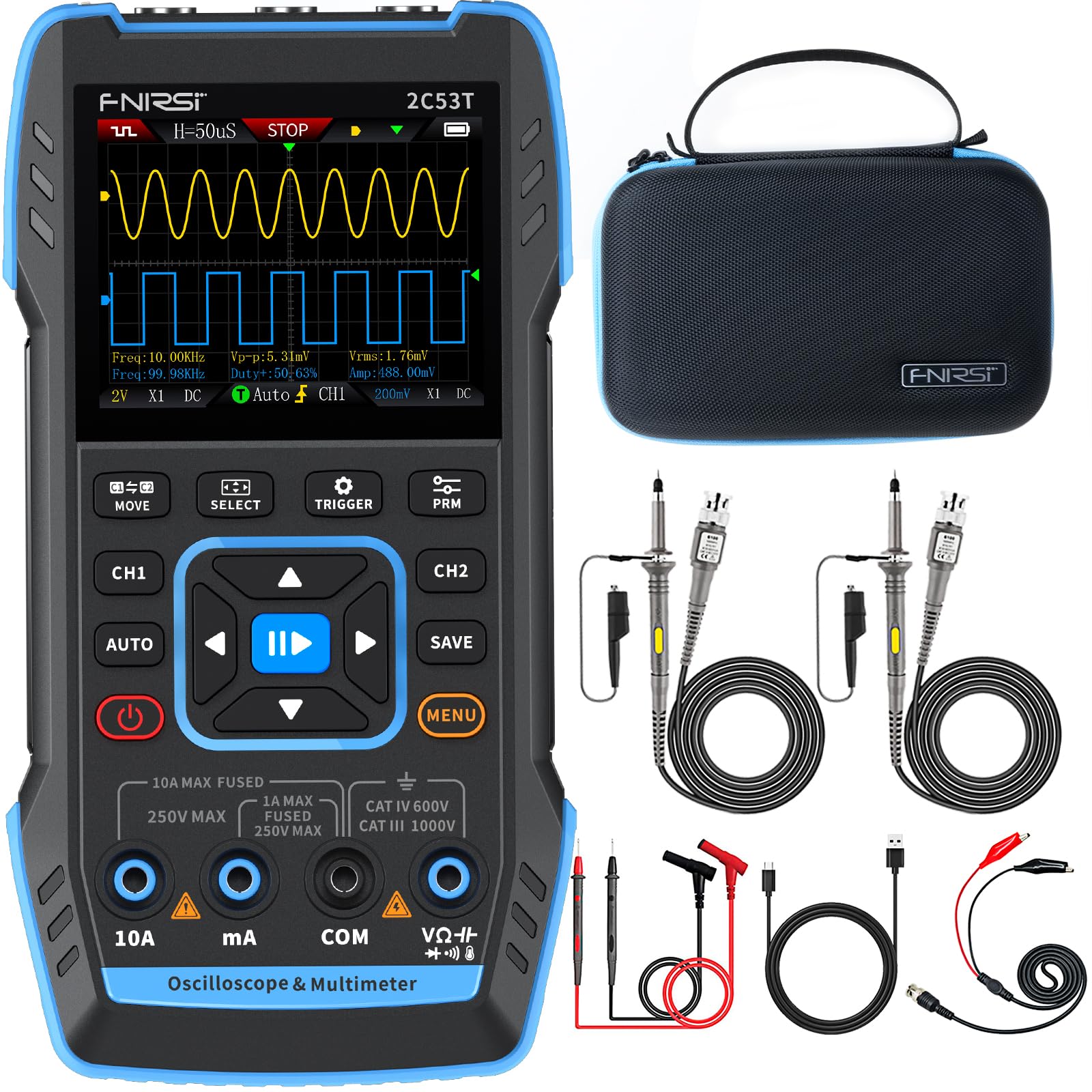
Image 3.1: The FNIRSI 2C53T device along with its standard accessories, including oscilloscope probes and multimeter test leads.
4. Suidheachadh agus Cleachdadh Tùsail
4.1 A’ cur cosgais air an inneal
Before first use, fully charge the internal lithium-ion battery. Connect the supplied Type-C USB cable to the device's Type-C port and to a 5V/1A USB power adapter (not included). The charging indicator on the screen will show the charging status.
4.2 Cumhachd air / dheth
Press and hold the power button (usually marked with a power symbol) for a few seconds to turn the device ON or OFF.
4.3 A’ ceangal nam proban agus nan uèirichean deuchainn
The device features dedicated input ports for oscilloscope channels (CH1, CH2) and the signal generator (DDS), as well as multimeter input jacks (10A, mA, COM, VΩ+). Ensure correct connections for the desired function.

Ìomhaigh 4.1: Sealladh dlùth view of the FNIRSI 2C53T's input ports, including CH1, CH2 for oscilloscope, and DDS for signal generator output.
5. Stiùireadh Obrachaidh
The FNIRSI 2C53T features a user-friendly interface with a central navigation pad and dedicated function buttons (MOVE, SELECT, TRIGGER, PRM, AUTO, SAVE, MENU, CH1, CH2).
5.1 Modh Oscillosgop
To enter Oscilloscope mode, ensure the device is powered on. The default screen often displays the oscilloscope interface. Use the CH1 and CH2 buttons to enable or disable channels.
- Ag atharrachadh paramadairean: Use the navigation pad (up/down/left/right) to select and adjust parameters like vertical sensitivity (V/div), horizontal time base (s/div), and trigger level. The 'SELECT' button confirms selections.
- Roghainnean brosnachaidh: Press the 'TRIGGER' button to access trigger settings, including trigger mode (Auto, Normal, Single), trigger type (Edge, Pulse, Video), and source.
- Tomhas fèin-ghluasadach: Press 'AUTO' for automatic waveform scaling and measurement display.
- Waveform Analysis: The device supports various analysis functions. Access these through the 'MENU' button or dedicated options. These include Math Operations, Cursor Functions for precise measurements, Infinite Afterglow for observing signal changes over time, X-Y Mode for phase relationship analysis, and FFT Spectrum for frequency domain analysis.
- Saving Waveforms: Press the 'SAVE' button to store the current waveform display. Saved images can be transferred to a PC via the Type-C connection.

Image 5.1: The FNIRSI 2C53T displaying various waveform analysis features, including Math Operations, Cursor Functions, Infinite Afterglow, and X-Y Mode.
5.2 Modh Ioma-mheatair
To switch to Multimeter mode, press the 'MENU' button and navigate to the Multimeter option, or use a dedicated button if available. Connect the test leads to the appropriate input jacks (COM and VΩ+ for voltage/resistance/capacitance, 10A or mA for current).
- VoltagTomhas (AC/DC): Select ACV or DCV. Connect test leads in parallel with the circuit or component.
- Current Measurement (AC/DC): Select ACA or DCA. Connect test leads in series with the circuit. Ensure the correct current input jack (10A or mA) is used.
- Tomhas an aghaidh: Select Ω. Connect test leads across the component when the circuit is de-energized.
- Tomhais comas: Select F. Connect test leads across the capacitor when the circuit is de-energized.
- Deuchainn leantainneachd: Select the continuity symbol. The device will emit an audible beep if continuity is detected.

Image 5.2: The FNIRSI 2C53T displaying its multimeter interface, showing voltage measurement and input jack labels.
5.3 Modh Gineadair Comharran
To access the Signal Generator, press the 'MENU' button and select the Signal Generator option. Connect the DDS output to the circuit where the signal is needed.
- Taghadh Tonn-chruth: Use the navigation pad to choose from 13 available waveforms (e.g., Sine Wave, Square Wave, Sawtooth Wave).
- Atharrachadh paramadair: Adjust frequency, amplitude, and duty cycle (for certain waveforms) using the navigation pad and 'SELECT' button.

Image 5.3: The FNIRSI 2C53T displaying the various waveforms available from its DDS signal generator function.
6. Cumail suas
6.1 Glanadh
Sguab an inneal le bog, damp cloth. Do not use abrasive cleaners or solvents. Ensure the device is powered off and disconnected from all circuits before cleaning.
6.2 Cùram Bataraidh
Gus beatha a’ bhataraidh a leudachadh, seachain a bhith ga leigeil às gu tur gu tric. Ma bhios tu a’ stòradh an uidheim airson ùine mhòr, cuir cosgais air gu timcheall air 50% agus ath-lìon e a h-uile beagan mhìosan.
6.3 Stòradh
Store the device in a cool, dry place, away from direct sunlight and extreme temperatures. Use the provided carrying case for protection during transport and storage.
7. A ’dèanamh trioblaid
- Chan eil an inneal a’ dol air: Ensure the battery is charged. Connect the Type-C cable to a power source and try again.
- No waveform displayed in Oscilloscope mode: Check probe connections. Ensure the trigger settings are appropriate for the signal being measured. Adjust vertical and horizontal scales.
- Leughaidhean ioma-mheatair ceàrr: Verify test lead connections to the correct input jacks and ensure the correct measurement function is selected. Check if the circuit is de-energized for resistance and capacitance measurements.
- Gineadair comharran gun a bhith a’ toirt a-mach: Confirm the DDS output is connected correctly and the signal generator function is active with appropriate parameters set.
- Sgrion reòta no gun fhreagairt: Try restarting the device by holding the power button. If the issue persists, contact customer support.
8. Sònrachaidhean
| Feart | Sònrachadh |
|---|---|
| Modail | FNIRSI 2C53T |
| Oscilloscope Channels | 2 |
| Analog Bandwidth | 50 MHz |
| SampÌre ling | 250 MSa/s |
| Record Depth | 1 Kpt |
| Max Input Voltage | 400 v |
| Mothachadh dìreach | 10 mV/div - 10 V/div |
| Multimeter Digits | 4.5 |
| Multimeter Counts | 19999 |
| AC Voltage Raon | 0-750 V |
| DC Voltage Raon | 0-999.9 V |
| Raon gnàthach DC/AC | 0-9.999 A. |
| Raon Resistance | 0-19.99 MΩ |
| Raon Capacitance | 0-99.99 mF |
| Signal Generator Max Freq. | 50 kHz |
| Signal Generator Waveforms | 13 seòrsa |
| Taisbeanadh | LCD 2.8-òirleach |
| Bataraidh | 3000 mAh Li-ion |
| Am Fuireach | Suas ri 6 uairean a thìde |
| Eadar-aghaidh cosgais | Seòrsa C (5V/1A) |
| Meudan | 21.3 x 14.1 x 9.9 cm |
| Cuideam | 890 g |
9. Barantas agus Taic
The FNIRSI 2C53T comes with a standard manufacturer's warranty. For warranty claims, technical support, or service inquiries, please contact your point of purchase or the official FNIRSI customer support channels. Keep your purchase receipt as proof of purchase.


