
1. Ro-ràdh
This manual provides essential information for the safe and efficient operation of your Tornado 65UA5300E 65-inch 4K Frameless Android Smart TV. Please read it thoroughly before using the product and retain it for future reference.

Dealbh 1.1: Aghaidh view of the Tornado 65UA5300E Smart TV, showcasing its frameless design and included stand.
2. Fiosrachadh Sàbhailteachd
Lean ceumannan sàbhailteachd bunaiteach an-còmhnaidh nuair a bhios tu a’ cleachdadh an telebhisean seo gus cunnart teine, clisgeadh dealain agus leòn a lùghdachadh.
- Na nochd an telebhisean gu uisge no taiseachd.
- Dèan cinnteach gu bheil fionnarachadh ceart ann; na cuir bacadh air fosglaidhean fionnarachaidh.
- Na cuir an telebhisean air cairt, seasamh, tripod, bracaid no bòrd nach eil seasmhach.
- Thoir a-mach am pluga bhon telebhisean rè stoirmean dealanaich no nuair nach tèid a chleachdadh airson ùine mhòr.
- Thoir iomradh air a h-uile seirbheis gu luchd-seirbheis le teisteanas.
3. Pasgan-susbaint
Dèan cinnteach gu bheil a h-uile nì anns a’ phacaid:
- Tornado 65UA5300E 65-inch 4K Frameless Android Smart TV
- Smachd Iomallach
- Càball cumhachd
- Seasamh Tbh (2 phìos)
- Sgriothan airson Co-chruinneachadh Seasamh
- Leabhar-làimhe cleachdaiche (an sgrìobhainn seo)
4. Suidhich
4.1 A’ dì-phapadh
Thoir an telebhisean gu faiceallach a-mach às a phacaid. Thathar a’ moladh am pasgan tùsail a chumail airson còmhdhail no seirbheis san àm ri teachd.
4.2 A 'ceangal an Stand
If you are not wall-mounting the TV, attach the included stand pieces. Place the TV face down on a soft, flat surface to prevent screen damage. Align each stand piece with the corresponding slots on the bottom of the TV and secure them with the provided screws.
Ìomhaigh 4.1: Bun view of the TV, illustrating the designated areas for stand attachment.
4.3 Stàladh balla
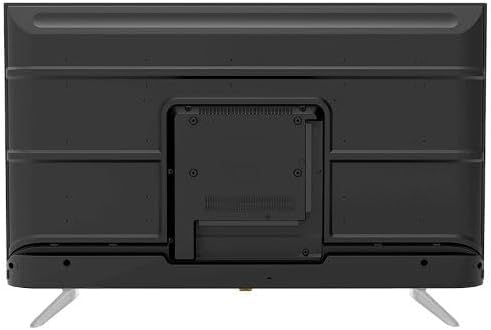
For wall mounting, remove the stand (if attached). Use a VESA-compatible wall mount (not included) that supports the TV's weight and dimensions. Consult a professional for wall mounting to ensure safety and proper installation.

Dealbh 4.2: Cùl view of the TV, highlighting the VESA mounting pattern and various input/output ports.
4.4 Ceangal iomaill
Ceangail na h-innealan taobh a-muigh agad ris an telebhisean a’ cleachdadh nam puirt iomchaidh:
- HDMI: For high-definition devices like Blu-ray players, gaming consoles, or set-top boxes. The TV has 3 HDMI ports, one with ARC support.
- USB: For connecting USB storage devices to play media (video, photos, music). The TV has 2 USB ports.
- LAN: Airson ceangal eadar-lìn uèirleas.
- Cuir a-steach RF: For connecting an antenna or satellite dish for the built-in digital receiver.
- Toradh claisneachd didseatach (Optical): Airson ceangal ri siostam claisneachd taobh a-muigh.
- Jack headphone (3.5mm): Airson fònaichean-làimhe a cheangal.

Ìomhaigh 4.3: Taobh view of the TV, illustrating the accessible side input ports.
4.5 Draoidh Cumhachd is Suidheachaidh Tùsail
After connecting the power cable, press the power button on the remote control or TV. The TV will guide you through an initial setup wizard, including language selection, network connection (Wi-Fi or LAN), channel scanning, and Google account setup for Android TV features.
5. A’ cleachdadh an telebhisean
5.1 Smachd Iomallach thairisview
The included remote control allows you to navigate the TV's functions. It features dedicated buttons for power, volume, channel, input selection, smart TV apps (Netflix, YouTube, Prime Video, Disney+), Google Assistant voice search, and menu navigation.
5.2 Gnìomhan Bunaiteach
- Cumhachd air / dheth: Brùth am putan cumhachd.
- Smachd tomhas-lìonaidh: Cleachd na putanan Meud suas/sìos.
- Taghadh seanail: Use the Channel Up/Down buttons or numeric keypad.
- Tobar a-steach: Press the 'Input' button to select between HDMI, AV, TV, etc.
5.3 Smart TV Features (Android 11)
Your TV runs on Android 11, providing access to a wide range of smart features:
- Iarrtasan: Access pre-installed apps like Netflix, YouTube, Prime Video, Disney+, Shahid VIP, and download more from the Google Play Store.
- Neach-taic Google: Cleachd àitheantan gutha tron smachd iomallach airson rannsachadh, smachd agus fiosrachadh.
- Chromecast air a thogail a-steach: Tilg susbaint bhon fhòn-smart no an tablet agad gu dìreach chun Tbh.
- Web Brabhsair: Brobhsadh an eadar-lìn gu dìreach air an telebhisean agad.
- Bluetooth 5.0: Ceangail fònaichean-cluaise gun uèir, luchd-labhairt, no innealan Bluetooth eile.
5.4 Roghainnean Dealbh is Fuaime
Dèan gnàthachadh air do vieweòlas èisteachd is èisteachd tro chlàr-taice roghainnean an telebhisean:
- Modhan dealbh: Select from Dynamic, Game, Sports, Cinema, or User-defined modes.
- Teòthachd dath: Adjust to Normal, Cool, or Warm.
- Modhan fuaim: Choose from Smart, User, Game, Movie, Music, or News.
- Dolby Digital Plus: Enhanced audio processing for compatible content.
6. Cumail suas
6.1 Glanadh an telebhisean
- Sgrion: Sguab an sgrion gu socair le clò bog, gun lint. Airson comharran stòlda, cleachd inneal-glanaidh sgrion a chaidh a dhealbhadh gu sònraichte airson telebhiseanan, air a chur air a’ chlò, chan ann gu dìreach air an sgrion.
- Corp: Wipe the TV's frame and back panel with a soft, dry cloth. Do not use abrasive cleaners or solvents.
6.2 Ùrachaidhean bathar-bog
Ensure your TV's software is up to date for optimal performance and security. Connect the TV to the internet and check for updates periodically through the settings menu.
7. A ’dèanamh trioblaid
Ma thachras tu ri duilgheadasan, thoir sùil air na fuasglaidhean cumanta a leanas:
| Trioblaid | Fuasgladh comasach |
|---|---|
| Gun chumhachd | Check if the power cable is securely plugged into the TV and the wall outlet. Ensure the outlet is functional. |
| Gun dealbh, ach tha fuaim ann | Thoir sùil air an stòr cuir-a-steach. Dèan cinnteach gu bheil innealan taobh a-muigh air an tionndadh air agus ceangailte gu ceart. |
| Gun fhuaim, ach tha dealbh ann | Check the volume level and mute status. Verify audio settings and external audio connections. |
| Chan eil smachd iomallach ag obair | Cuir bataraidhean ùra nan àite. Dèan cinnteach nach eil bacadh sam bith eadar an smachd iomallach agus mothachaire IR an Tbh. |
| Chan urrainn dhuinn ceangal a dhèanamh ri Wi-Fi | Thoir sùil air an router agus am modem agad. Cuir a-steach am facal-faire Wi-Fi a-rithist. Feuch ri an telebhisean agus an router ath-thòiseachadh. |
Ma mhaireas an duilgheadas, cuir fios gu taic teachdaiche.
8. Sònrachaidhean
| Feart | Mion-fhiosrachadh |
|---|---|
| Modail Àireamh | 65UA5300E |
| Meud sgrion | 65 òirlich |
| Teicneòlas taisbeanadh | LED |
| Fuasgladh | 4K UHD (3840 x 2160) |
| Co-mheas taobh | 16:9 |
| Viewann an Ceàrn | 178 ceum |
| Gile | 250 cd / m² |
| Ìre Ath-nuadhachaidh | 50/60 Hz |
| Taic HDR | HDR10, HLG |
| Teicneòlas claisneachd | Dolby Digital Plus, Surround Sound |
| Cumhachd Toraidh Fuaim | 10W x 2 |
| Siostam-obrachaidh | Android 11 |
| Cuimhne a-staigh | 16 GB |
| Ceangalachd | Wi-Fi, Bluetooth 5.0, LAN |
| Cur a-steach | RF Input (Digital) x1, Video Input x1, HDMI x3 (ARC), USB x2, LAN x1 |
| Toraidhean | Digital Audio Output (Optical) x1, Headphone Jack (3.5mm) x1 |
| Solar cumhachd | AC 90-240V / 50Hz |
| Cumhachd cùl-taic | 0.5W |
| Meudan (W x H x D) gun sheasamh | 1446 x 832 x 84 mm |
| Meudan (W x H x D) le seasamh | 1446 x 892 x 305 mm |
| Cuideam lom | 15.32 kg |
| Cuideam Làn | 21.32 kg |
| Dùthaich Tùs | An Èiphit |
9. Barantas
This Tornado TV comes with a 3-year full free warranty. Please retain your proof of purchase for warranty claims. For specific terms and conditions, refer to the warranty card included with your product or contact Tornado customer service.
10. Taic
For further assistance, technical support, or service inquiries, please contact Tornado customer service. Contact details can typically be found on the manufacturer's official weban làrach no air a’ chairt barantais.