
Oakcastle IR200
Leabhar-làimhe Cleachdaiche Rèidio Eadar-lìn Oakcastle IR200
Modail: IR200
1. Ro-ràdh
Thank you for choosing the Oakcastle IR200 Internet Radio. This manual provides essential information for the safe and efficient operation of your device. Please read it thoroughly before use and retain it for future reference.
The Oakcastle IR200 is a versatile audio system offering multiple listening options, including Internet Radio, DAB+, FM, Bluetooth 5.3, and AUX input. It features a color display, remote control, and podcast support for a comprehensive audio experience.
2. Pasgan-susbaint
Fosgail am bogsa gu faiceallach agus dèan cinnteach gu bheil na nithean gu lèir a tha air an liostadh gu h-ìosal an làthair agus ann an deagh staid:
- Oakcastle IR200 Internet Radio Unit
- Càball cumhachd
- Smachd Iomallach
- Leabhar-làimhe cleachdaiche (an sgrìobhainn seo)
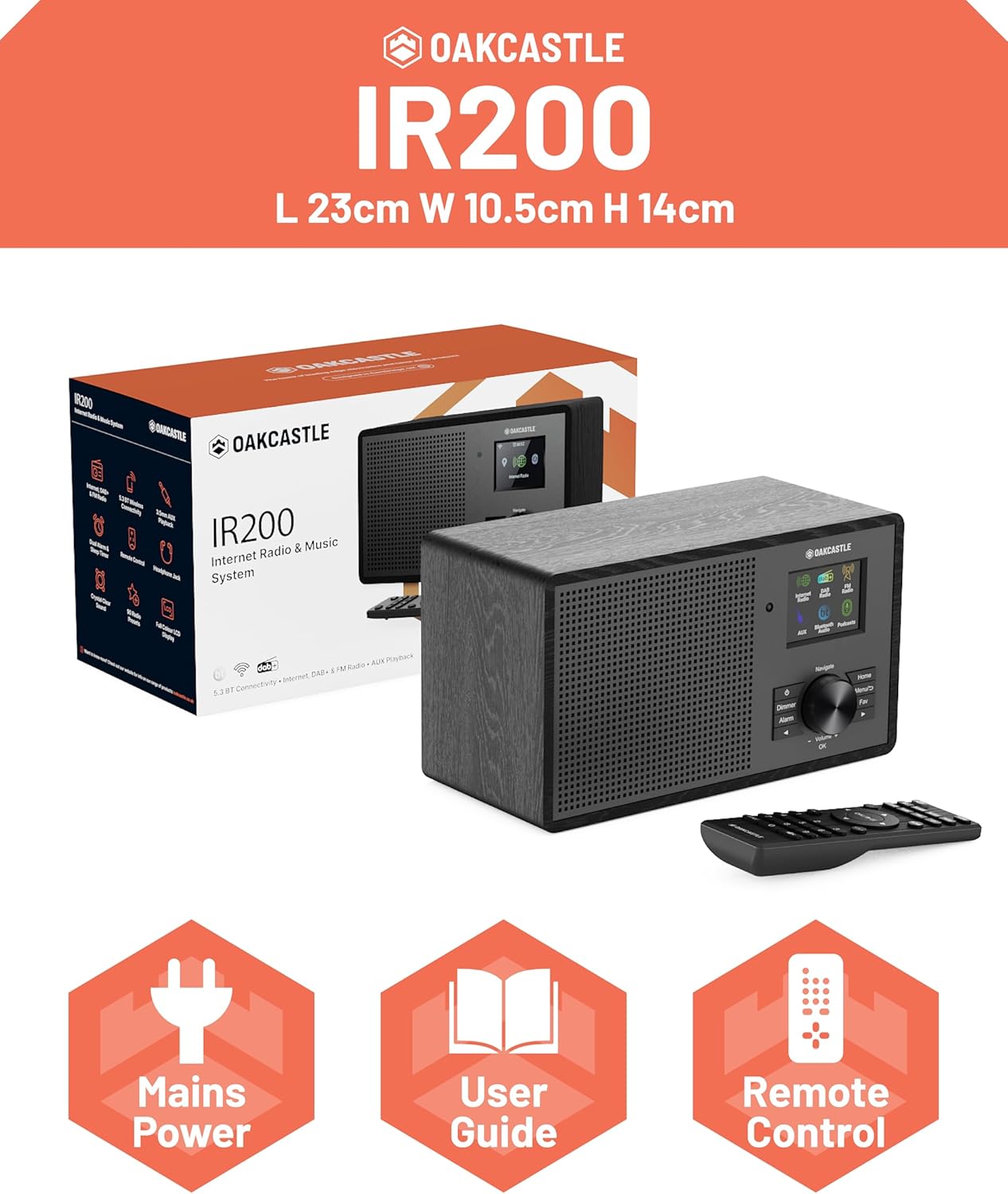
Image 2.1: Contents of the Oakcastle IR200 package, including the radio unit, its box, power cable, remote control, and user manual.
3. Toradh thallview
Familiarize yourself with the main components and controls of your Oakcastle IR200 radio.
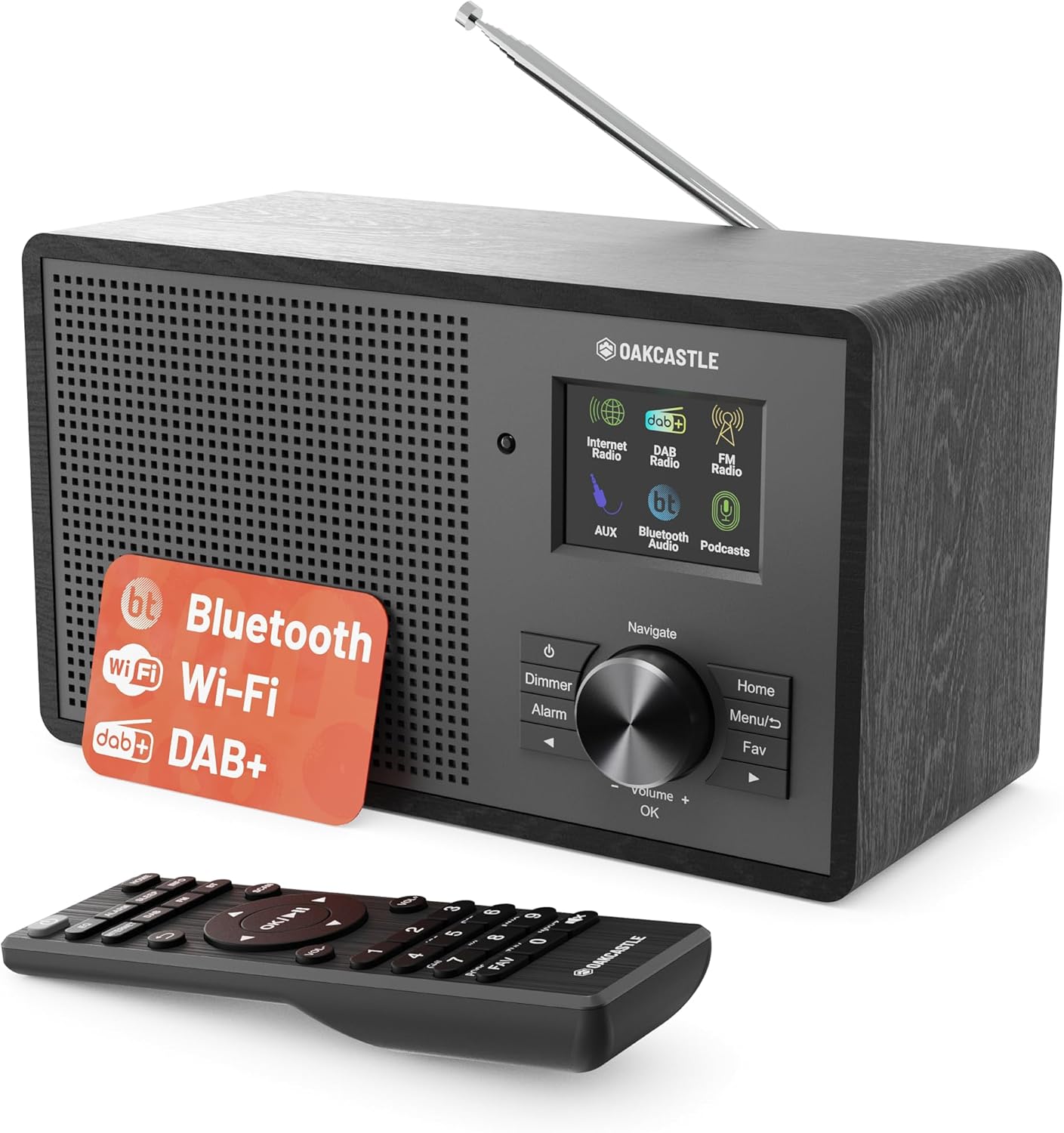
Dealbh 3.1: Aghaidh view of the Oakcastle IR200 radio, showcasing the display, control knob, buttons, and the included remote control.
3.1 Smachdan Pannal aghaidh
- Sgrion Taisbeanaidh: A’ sealltainn fiosrachadh mu stèiseanan, an t-àm, agus roghainnean clàr-taice.
- Navigate/Volume/OK Knob: Rotate to navigate menus or adjust volume; press to confirm selections.
- Putan Cumhachd: Turns the unit on/off or puts it into standby.
- Putan Dimmer: Atharraich soilleireachd taisbeanaidh.
- Putan-rabhaidh: A’ faighinn cothrom air roghainnean an rabhaidh.
- Putan Dachaigh: A ’tilleadh chun phrìomh chlàr.
- Putan Clàr-taice: Accesses mode-specific menus.
- Fav Button: Accesses favorite station presets.
3.2 Ceanglaichean pannal cùil

Dealbh 3.2: Cùl view of the Oakcastle IR200, highlighting the headphone output and AUX input ports.
- Antenna teileasgopach: For DAB+ and FM reception.
- Input AUX: Ceangail innealan claisneachd taobh a-muigh.
- Toradh Fòn-cluaise: Ceangail fònaichean-làimhe airson èisteachd prìobhaideach.
- DC ANN: Ceangal cumhachd adapter.
4. Suidheachadh tòiseachaidh
4.1 Ceangal cumhachd
- Insert the power cable into the DC IN port on the rear of the radio.
- Cuir ceann eile a’ chàball cumhachd a-steach do socaid balla.
- Brùth am putan Cumhachd air a’ phannal aghaidh no air an smachd iomallach gus an rèidio a thionndadh air.
4.2 Atharrachadh Antenna
For optimal DAB+ and FM reception, fully extend the telescopic antenna located at the rear of the unit.
4.3 Network Connection (for Internet Radio)
- Upon first power-on, the radio will guide you through the network setup.
- Select "Network Wizard" or "Wi-Fi Setup" from the menu.
- Nì an rèidio sganadh airson lìonraidhean Wi-Fi a tha rim faighinn. Tagh do lìonra bhon liosta.
- Enter your Wi-Fi password using the navigation knob and OK button.
- Once connected, the radio will display a confirmation message.
5. Modhan obrachaidh
The Oakcastle IR200 offers several listening modes. Press the "Home" button to access the main menu and select your desired mode.
5.1 Rèidio eadar-lìn
Access thousands of global radio stations via your Wi-Fi connection.

Image 5.1: The radio's display screen in Internet Radio mode, showing station information.
- Bho phrìomh chlàr-taice, tagh “Rèidio Eadar-lìn”.
- You can browse stations by location, genre, or search by name.
- Rotate the Navigate knob to scroll through options and press OK to select.
- To save a station as a favorite, press the "Fav" button during playback.
5.2 Rèidio DAB+
Faigh tlachd à craolaidhean rèidio didseatach àrd-inbhe.

Image 5.2: The radio's display screen in DAB+ Radio mode, showing the current station.
- From the main menu, select "DAB+ Radio".
- Nì an rèidio sganadh gu fèin-ghluasadach airson stèiseanan DAB+ a tha rim faighinn.
- Use the Navigate knob to select a station from the list.
- To save a station as a favorite, press the "Fav" button during playback.
Rèidio 5.3 FM
Èist ri craolaidhean FM analogach traidiseanta.
- Bho phrìomh chlàr-taice, tagh "Rèidio FM".
- To auto-scan for stations, press and hold the OK button or use the scan function via the menu.
- To manually tune, rotate the Navigate knob.
- To save a station as a favorite, press the "Fav" button during playback.
5.4 Ceangal Bluetooth
Sruthaich claisneachd gun uèir bho na h-innealan agad le comas Bluetooth.

Image 5.3: The radio's display screen in Bluetooth mode, indicating readiness for pairing.
- From the main menu, select "Bluetooth". The radio will enter pairing mode.
- On your external device (e.g., smartphone), enable Bluetooth and search for "Oakcastle IR200".
- Select "Oakcastle IR200" to pair. Once connected, you can stream audio.
Cuir a-steach 5.5 AUX
Ceangail stòran claisneachd taobh a-muigh le bhith a’ cleachdadh càball claisneachd 3.5mm.
- Ceangail aon cheann de chàball claisneachd 3.5mm ris a’ phort AUX IN air cùl an rèidio.
- Ceangail an ceann eile ri jack headphone no toradh claisneachd an inneil taobh a-muigh agad.
- From the main menu, select "AUX".
- Smachd air ath-chluich bhon inneal taobh a-muigh agad.
5.6 Podchraolaidhean
Browse and listen to a wide range of podcasts.
- From the main menu, select "Podcasts".
- Browse podcasts by category or search for specific titles.
- Select a podcast to start listening.
6. Roghainnean agus Feartan
6.1 suidheachadh siostam
Access general system settings via the main menu to configure time, language, display, and more.
- Ùine / Ceann-latha: Set time format, synchronize time.
- Cànan: Select your preferred language for the menu.
- Taisbeanadh: Adjust backlight, color scheme.
- Lìonra: Reconfigure Wi-Fi settings.
- Ùrachadh bathar-bog: Check for and install firmware updates.
6.2 Cothromaiche (EQ)
Customize the audio output to your preference using the equalizer settings, accessible via the remote control or system menu.
6.3 ro-shuidhichte
The radio supports over 90 presets for your favorite Internet, DAB+, and FM stations. To recall a preset, press the "Fav" button and select from the list.
6.4 Inneal-rabhaidh
Set alarms to wake up to your favorite radio station or a buzzer sound. Access alarm settings via the "Alarm" button on the front panel or remote.
7. Smachd Iomallach
The included remote control provides convenient access to all radio functions from a distance.
Ensure batteries are correctly inserted. Point the remote control towards the front of the radio for optimal response.
7.1 Gnìomhan Smachd Iomallach
- Cumhachd: On/Off/Standby.
- Leabhar +/-: Atharraich ìre an lìonaidh.
- Putanan Seòlaidh (Suas/Sìos/Clì/Deas): Seòladh clàran-bìdh.
- Ceart gu leòr: Dearbhaich taghadh.
- Mode Buttons (Internet, DAB, FM, Bluetooth, AUX): Atharraich eadar modhan.
- Preset Buttons (1-90+): Directly select saved favorite stations.
- EQ: Faigh cothrom air roghainnean equalizer.
- Clàr-bìdh: Access mode-specific menus.
- As fheàrr leat: Access favorite station list.
8. Cumail suas
8.1 Glanadh
To clean the radio, use a soft, dry cloth. Do not use abrasive cleaners, waxes, or solvents as these may damage the finish.
8.2 Cùram Coitcheann
- Cùm an aonad air falbh bho sholas dìreach na grèine, stòran teas agus taiseachd.
- Seachain an aonad a leigeil sìos no a chur fo bhuaidhean làidir.
- Dèan cinnteach gu bheil fionnarachadh ceart timcheall an aonaid.
9. A ’dèanamh trioblaid
| Trioblaid | Adhbhar a dh’fhaodadh a bhith ann | Fuasgladh |
|---|---|---|
| Gun chumhachd | Càball cumhachd gun cheangal; socaid balla gun obrachadh. | Check power cable connection; try a different wall socket. |
| Gun fhuaim | Fuaim ro ìosal; Mothachadh air a ghnìomhachadh; Stòr ceàrr air a thaghadh. | Increase volume; Check mute status; Select correct input mode. |
| Internet Radio not connecting | Incorrect Wi-Fi password; Weak Wi-Fi signal; Router issue. | Re-enter Wi-Fi password; Move radio closer to router; Restart router. |
| Droch ghlacadh DAB+/FM | Antenna gun a bhith air a shìneadh a-mach; Raon comharra bochd. | Fully extend antenna; Reposition radio for better signal. |
| Bluetooth nach eil a 'càradh | Radio not in pairing mode; Device too far; Device already paired. | Ensure radio is in Bluetooth mode; Move device closer; Unpair from other devices. |
10. Sònrachaidhean
| Feart | Mion-fhiosrachadh |
|---|---|
| Brand | Caisteal Oak |
| Modail | IR200 |
| Dath | Dubh |
| Teicneòlas ceangail | Wi-Fi, Bluetooth 5.3, AUX |
| Teicneòlas Tiùnaidh | Rèidio Eadar-lìn, DAB+, FM |
| Feartan sònraichte | Bluetooth, EQ, Podcasts, Internet Radio, Remote Control |
| Stòr cumhachd | Electric Cable (Mains) |
| Meudan toraidh (H x W x D) | 14 cm x 10.5 cm x 23 cm (timcheall air) |
| Cuideam toraidh | 0.94 kg |
| Innealan co-fhreagarrach | Cluicheadair MP3, Fòn-làimhe, Clàr |
11. Barantas agus Taic
11.1 Fiosrachadh Barantais
The Oakcastle IR200 comes with a standard warranty. An extended 3-year warranty is available upon product registration on the manufacturer's website. Please refer to the warranty card included in your package or visit the official Oakcastle weblàrach airson mion-fhiosrachadh.
11.2 Taic teachdaiche
For technical assistance, troubleshooting, or further inquiries, please contact Oakcastle customer support. Contact details can typically be found on the official Oakcastle weban làrach no air a’ chairt barantais.