
1. Failte
Thank you for choosing the AWEI T1 Pro Wireless Bluetooth Headphones. This manual provides detailed instructions for setting up, operating, and maintaining your new earbuds. Please read this manual carefully before use to ensure optimal performance and longevity of your device.
2. Toradh thallview
2.1. Pasgan-susbaint
- Cluas-cinn gun uèir (clì is deas)
- Cùis Cìse
- Càball cosgais USB
- Cluais-mheudan (diofar mheudan)
- Leabhar-làimhe cleachdaiche
2.2. Earbud and Charging Case Components
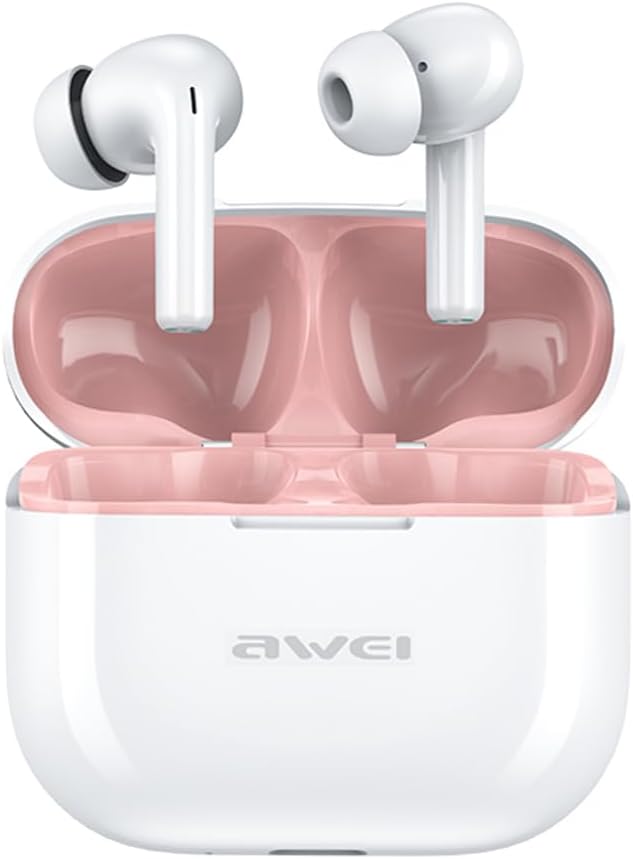
Image: The AWEI T1 Pro wireless earbuds are shown in their open charging case. The earbuds are white with a stem design, and the interior of the charging case is a light pink color. The AWEI logo is visible on the front of the white charging case.
The AWEI T1 Pro earbuds feature an ergonomic in-ear design for a comfortable and secure fit. The compact charging case not only protects the earbuds but also provides multiple charges on the go.
2.3. Prìomh fheartan
- Càileachd fuaim Hi-Fi: Equipped with 13mm speakers for an immersive audio experience and clear call performance.
- Teicneòlas Bluetooth 5.4: Ensures a faster, more stable signal transmission with low latency and a wireless range of up to 10 meters. (Note: Some packaging may indicate Bluetooth 5.3, but the device supports 5.4 for enhanced performance).
- Smachd Touch Smart: Intuitive touch sensors on each earbud allow for easy control of music playback, calls, and voice assistant activation.
- Beatha bataraidh fada: Enjoy up to 7 hours of continuous playback per charge. The 300mAh charging case extends total playtime to 36 hours in dual-ear mode or up to 60 hours in single-ear mode. The case fully charges in approximately 1 hour via Type-C.
- Dealbhadh dìon-uisge IPX6: Resistant to sweat and rain, making them suitable for sports and outdoor activities.

Image: A detailed diagram illustrating the internal components of an earbud speaker, labeled as 'Drive Units HiFi Stereo', highlighting the layered structure of the audio driver for high-fidelity sound.

Image: A stylized depiction of a microchip labeled '5.3 Bluetooth', surrounded by circuit board elements, emphasizing lower latency and increased stability in wireless communication.

Image: A black earbud is shown next to a smartphone displaying a music player interface. Text indicates 'Touch Control Wake up Voice Assistant', illustrating how touch gestures on the earbud can control phone functions like answering calls or activating a voice assistant.

Image: A smartphone displaying a music player is shown alongside a transparent block, symbolizing extended power. Text highlights 'Full of Energy Long Battery Life', indicating the 300mAh charging case provides 7 hours of continuous use per charge.

Image: Two black earbuds are depicted, one dry and the other surrounded by water droplets, illustrating the 'No Fear of Sweat & Rain IPX6 Waterproof Rate' feature, which prevents water penetration during sports.
3. Suidhich
3.1. Cosgais Tùsail
- Mus cleachd thu an toiseach iad, cuir an dà chluas-cinn anns a’ chùis cosgais.
- Ceangail an càball cosgais USB Seòrsa-C a tha air a thoirt seachad ris a’ phort cosgais air a’ chùis agus ri stòr cumhachd (me, inneal-atharrachaidh balla USB, port USB coimpiutair).
- The indicator lights on the charging case will show charging status. A full charge for the case takes approximately 1 hour.
- Dèan cinnteach gu bheil na fònaichean-cluaise làn-luchdaichte mus dèan thu paidhreachadh an toiseach.
3.2. Paidhir le inneal
- Fosgail a’ chùis cosgais. Bidh na fònaichean-cluaise a’ tionndadh air gu fèin-ghluasadach agus a’ dol a-steach do mhodh càraideachaidh.
- Air an inneal agad (fòn cliste, tablet, laptop), cuir Bluetooth an gnìomh.
- Lorg airson innealan Bluetooth rim faighinn.
- Select "AWEI T1 Pro" from the list of devices.
- Cho luath ‘s a bhios tu ceangailte, cluinnidh tu tòna dearbhaidh, agus bidh na fònaichean-cluaise deiseil airson an cleachdadh.
- Ath-cheanglaicheidh na fònaichean-cluaise gu fèin-ghluasadach ris an inneal mu dheireadh a chaidh a phaireadh nuair a thèid an toirt a-mach às a’ chùis, ma tha Bluetooth air a chomasachadh air an inneal.
4. Stiùireadh Obrachaidh
4.1. Cumhachd air / dheth
- Cumhachd air: Fosgail a’ chùis cosgais, no brùth fada air an raon suathaidh air an dà chluas-cinn airson 3 diogan.
- Cumhachd dheth: Cuir na fònaichean-cluaise air ais anns a’ chùis cosgais agus dùin am mullach, no brùth fada air an raon suathaidh air an dà chluas-cluaise airson 5 diogan.
4.2. Smachdan suathaidh
| Gnìomh | Gnìomh |
|---|---|
| Cluich / Stad Ceòl | Tap singilte air gach earbud |
| An ath òran | Tap dà uair air a’ chluas-cinn deas |
| Òran roimhe | Tap dà uair air a’ chluas-cinn chlì |
| Tomhais Suas | Tap trì-fhillte air an earbud cheart |
| Meud Sìos | Tap trì-fhillte air an earbud chlì |
| Freagairt / Cuir crìoch air a’ ghairm | Tap singilte air gach earbud |
| Call a dhiùltadh | Brùth fada air gach cluais-fòn airson 2 dhiog |
| Cuir an gnìomh neach-cuideachaidh guth | Long press on either earbud for 2 seconds (when not on a call) |
4.3. Dèanamh agus Gabhail Ghairmean
When a call comes in, you can answer or reject it using the touch controls as described above. During a call, a single tap will end the conversation.
4.4. Cluich Ciùil
Control your music directly from the earbuds. Use single, double, or triple taps to play, pause, skip tracks, or adjust volume.
5. Cumail suas
5.1. Glanadh
- Glan na fònaichean-cluaise agus a’ chùis cosgais gu cunbhalach le clò bog, tioram, gun lint.
- Na cleachd innealan-glanaidh sgrìobach, deoch làidir, no fuasglaidhean ceimigeach.
- Gently remove any earwax or debris from the earbud mesh and charging contacts using a dry cotton swab or a small, soft brush.
5.2. Stòradh
- Nuair nach eilear gan cleachdadh, stòraich na fònaichean-cluaise anns a’ chùis cosgais aca an-còmhnaidh gus an dìon bho dhuslach is milleadh.
- Stòraich an inneal ann an àite fionnar, tioram, air falbh bho theodhachd anabarrach agus solas dìreach na grèine.
5.3. Resistance uisge
The AWEI T1 Pro earbuds are rated IPX6 waterproof, meaning they are protected against high-pressure water jets from any direction. This makes them suitable for workouts and light rain. However, they are not designed for swimming or submersion in water. Ensure the earbuds are dry before placing them back into the charging case to prevent damage.
6. A ’dèanamh trioblaid
6.1. Cùisean agus Fuasglaidhean Cumanta
- Fònaichean-cluaise gun a bhith a’ paidhreachadh leis an inneal:
Ensure both earbuds are charged. Turn off and on your device's Bluetooth. Forget "AWEI T1 Pro" from your device's Bluetooth list and try pairing again. - Aon chluas-cinn a-mhàin ag obair:
Place both earbuds back into the charging case, close the lid, wait a few seconds, then open the lid and take them out. This should reset their connection. If the issue persists, try resetting the earbuds (refer to manufacturer's weblàrach-lìn airson stiùiridhean sònraichte airson ath-shuidheachadh ma tha feum orra). - Gun fhuaim no meud ìosal:
Check the volume level on both your device and the earbuds. Ensure the earbuds are properly seated in your ears. Try cleaning the earbud mesh for any obstructions. - Cùis cosgais gun a bhith a’ cur cosgais:
Ensure the USB cable is securely connected to both the case and the power source. Try a different charging cable or power adapter. - Chan eil na cluasan-cluaise a’ cur cosgais orra ma thachras:
Ensure the charging contacts on both the earbuds and the case are clean and free of debris. Make sure the earbuds are correctly seated in the case.
7. Sònrachaidhean

Image: A graphic displaying the technical specifications of the AWEI T1 Pro, including basic information, horn details, Bluetooth version, and battery capacities.
| Fiosrachadh Coitcheann | |
|---|---|
| Ainm Modail | T1 Pro |
| Seòrsa Bathar | Fòn-cluaise stereo TWS |
| Cuideam lom | 36g |
| Tomhas (Cùis) | 58*50*24mm |
| Suidheachadh cluais | Anns an Ear |
| Seòrsa smachd | Smachd-suathaidh |
| Ìre an aghaidh uisge | IPX6 uisge-dhìonach |
| Smachd fuaim | Cur às do fhuaim atharrachail |
| Sònrachaidhean claisneachd | |
| Trast-thomhas neach-labhairt | 13mm |
| Cugallachd | 100±3dB |
| Raon Freagairt Tricead | 20 Hz ~ 20,000 Hz |
| bacadh | 32 Ach |
| Ceangalachd | |
| Tionndadh Bluetooth | 5.4 (Image shows 5.3) |
| Raon gun uèir | Suas gu 10 meatair |
| Pròtacalan le taic | HSP, HFP, A2DP, AVRCP |
| Innealan co-fhreagarrach | Coimpiutairean-uchd, tablaidean, fònaichean-làimhe |
| Bataraidh & cosgais | |
| Bataraidh cùis cosgais | 300mAh / 3.7V |
| Comas Bataraidh Earbud | 45mAh * 2 |
| Ùine Cluich Ciùil | Suas ri 7 uairean a thìde (gach cosgais) |
| Ùine Còmhraidh | Suas ri 8 uairean a thìde |
| Am Fuireach | Suas ri 300 uairean a thìde |
| Ùine cosgais (cùis) | Mu 1 uair a thìde |
| Port luchdadh a-nuas | USB Type-C |
8. Barantas agus Taic
AWEI products are designed and manufactured to the highest quality standards. For information regarding warranty coverage, please refer to the warranty card included in your product packaging or visit the official AWEI website. If you encounter any issues or require technical assistance, please contact AWEI customer support through the contact information provided on the official weblàrach no an àrd-ùrlar ceannach agad.