
1. Ro-ràdh
This manual provides instructions for the Ceybo EN2D36H ZDA1221216 Replacement Remote Control. This remote is designed to be fully compatible with various Hisense VIDAA Smart TV models, offering a direct replacement without the need for complex programming. Simply insert batteries, and the remote is ready for use.
The remote features dedicated shortcut buttons for popular streaming services, allowing quick access to your favorite entertainment platforms.
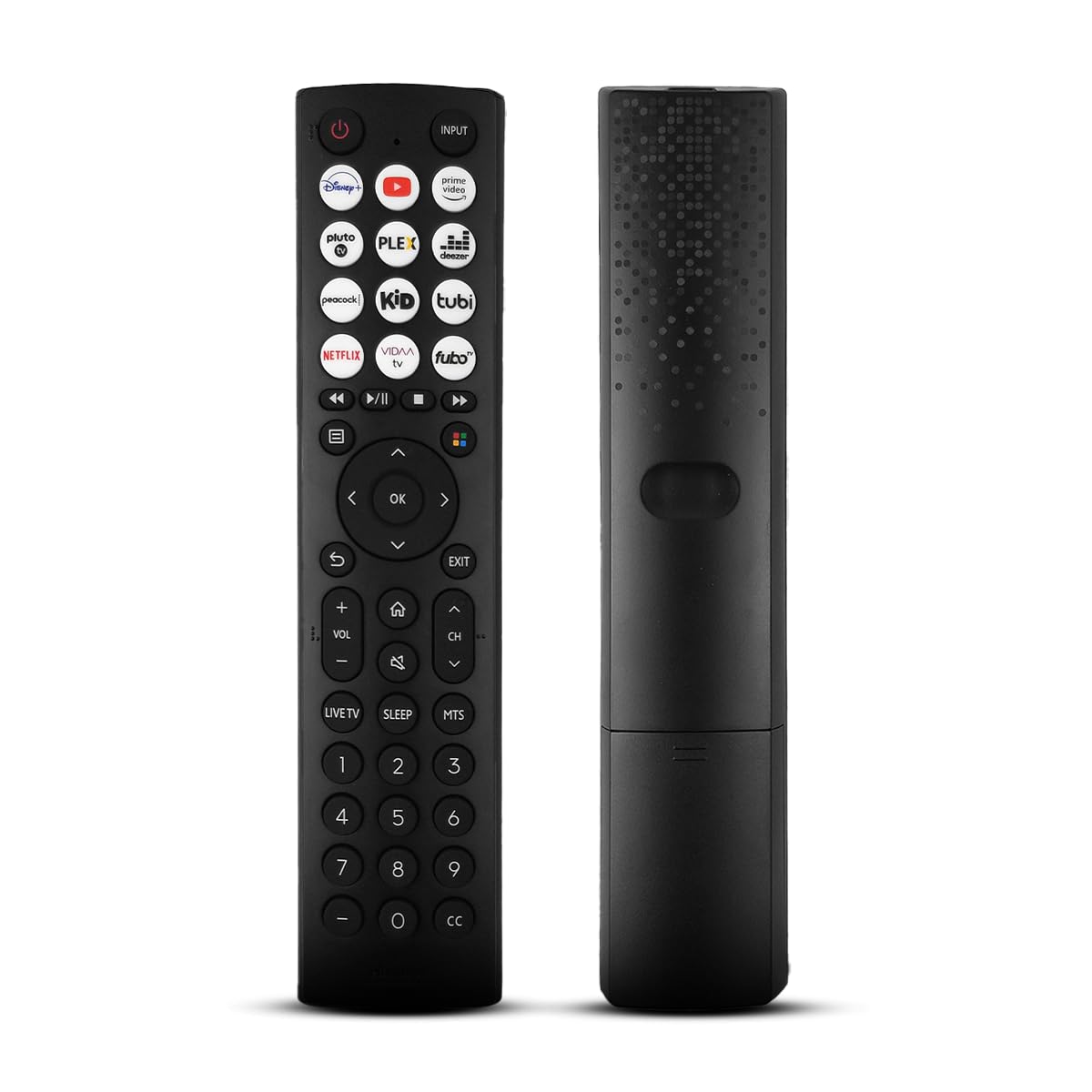
Aghaidh view of the Ceybo EN2D36H ZDA1221216 replacement remote control, designed for Hisense televisions.
2. Feartan
- Co-fhreagarrachd farsaing: Works with Hisense A4 Series UHD TVs and A6 Series UHD Smart TVs, including models such as 32A35HUV, 32A45GV, 40A35HUV, 40A45GV, 43A6GV, 43A35HUV, 43A45GV, 50A6GV, 55A6GV, and 65A6GV.
- Instant Streaming Access: Dedicated shortcut buttons for Disney+, YouTube, Prime Video, Pluto TV, Plex, Deezer, Peacock, Kidoodle, Tubi, Netflix, Vida, and Fubo.
- Gnìomhachd Plug & Play: No setup or programming required. The remote is ready to use immediately after battery installation.
- Full TV Control: Provides comprehensive control over TV functions including power, volume, input selection, channel navigation, and menu access.
- Dealbhadh ergonomic: Lightweight and designed for comfortable handling.

This image displays the Ceybo EN2D36H ZDA1221216 remote control alongside several Hisense televisions, illustrating its compatibility with Hisense A4 and A6 Series UHD Smart TVs.
3. Suidhich
The Ceybo EN2D36H ZDA1221216 remote control is designed for immediate use without any programming steps.
3.1 Stàladh bataraidh
- Lorg an roinn bataraidh air cùl an smachd iomallach.
- Sleamhnaich còmhdach a’ bhataraidh sìos no brùth air a’ ghlas agus tog suas e gus fhosgladh.
- Cuir a-steach dà (2) bataraidh AAA, a’ dèanamh cinnteach gu bheil na cinn-uidhe adhartach (+) agus àicheil (-) a’ freagairt gu ceart ris na comharran taobh a-staigh an roinn.
- Cuir còmhdach a’ bhataraidh air ais na àite le bhith ga shleamhnadh air ais gus an cliog e gu tèarainte.
Once batteries are installed, the remote is ready to operate your compatible Hisense TV.

This image illustrates the battery compartment of the remote control, indicating that it is powered by two AAA batteries for lasting performance.

This image emphasizes the effortless setup of the remote control, stating that it requires no pairing and is ready to use immediately after battery insertion.
4. Stiùireadh Obrachaidh
Point the remote control directly at your Hisense TV's infrared receiver for optimal performance.
4.1 Gnìomhan Bunaiteach
- Putan Cumhachd (⏻): Brùth gus an Tbh a thionndadh air no dheth.
- Putan a-steach: Press to cycle through available input sources (HDMI, AV, etc.).
- Volume Up / Down (VOL +/-): Atharraichidh seo ìre fuaim an telebhisean.
- Sianal Suas/Sìos (CH +/-): Atharraich an t-sianal Tbh.
- Putan Mute (🔇): A’ cuir dheth no a’ cuir dheth fuaim an TBh.
4.2 Seòladh agus Clàr-taice
- Pad Treòrachaidh (Suas, Sìos, Clì, Deas): Navigates through menus and on-screen options.
- Putan ceart gu leòr: Dearbhaich taghaidhean no fosgail clàir-thaice.
- Putan Cùl (↩): Tilleadh chun sgrion no clàr-taice roimhe.
- Putan fàgail: A’ fàgail a’ chlàr-taice no an aplacaid làithreach.
- Putan Dachaigh (🏠): A’ faighinn cothrom air prìomh ionad snasail no scrion dachaigh an telebhisean.
4.3 Streaming Shortcut Buttons
Press any of the dedicated shortcut buttons to directly launch the corresponding streaming application:
- Disney+
- YouTube
- Prìomh bhidio
- Tbh Pluto
- Plex
- Deezer
- Peucag
- Kidoodle
- Tubi
- Netflix
- Vida
- Fubo

The remote control is shown with a magnified view of its dedicated shortcut buttons for popular streaming services like Disney+, YouTube, Prime Video, Pluto TV, Plex, Deezer, Peacock, Kidoodle, Tubi, Netflix, Vida, and Fubo.

The remote control is presented to highlight its user-friendly design, featuring large and clearly labeled buttons for intuitive navigation and access to all functions.
5. Cumail suas
5.1 Glanadh
Gus an smachd iomallach a ghlanadh, cleachd clò bog, tioram. Airson salachar stòlda, suathadh gu socairampen the cloth with water. Avoid using harsh chemicals, abrasive cleaners, or solvents, as these can damage the remote's surface or internal components.
5.2 Ath-nuadhachadh bataraidh
Replace batteries when the remote's response becomes sluggish or it stops functioning. Always replace both AAA batteries at the same time with new ones. Do not mix old and new batteries, or different types of batteries, as this can lead to leakage or improper operation. Dispose of used batteries according to local regulations.
6. A ’dèanamh trioblaid
If you experience issues with your Ceybo EN2D36H ZDA1221216 remote control, refer to the following common solutions:
| Trioblaid | Adhbhar a dh’fhaodadh a bhith ann | Fuasgladh |
|---|---|---|
| Chan eil an inneal-iomallach ag obair. | Bataraidhean marbh no air an cur a-steach gu ceàrr. | Cuir bataraidhean AAA ùra an àite nam bataraidhean, a’ dèanamh cinnteach gu bheil am polarachd cheart (+/-). |
| Chan eil an inneal iomallach a’ freagairt. | Bacadh eadar an smachd iomallach agus an telebhisean, no tha an smachd iomallach ro fhada air falbh. | Dèan cinnteach gu bheil loidhne-sheallaidh shoilleir agad gu glacadair IR an Tbh. Gluais nas fhaisge air an Tbh. |
| Specific buttons are not working. | Dirt or debris under the button, or internal malfunction. | Clean the remote. If the issue persists, the remote may require replacement. |
| TV does not respond to remote. | TV's IR receiver is blocked or malfunctioning. | Check the TV's IR receiver for obstructions. Test with another remote if available to confirm TV functionality. |
7. Sònrachaidhean
- Brand: Ceybo
- Ainm a' mhodail: EN2D36H ZDA1221216
- Teicneòlas ceangail: In-dhearg (IR)
- Seòrsa Rianadair: Smachd putan
- Innealan co-fhreagarrach: Television (Hisense VIDAA Smart TVs)
- Stòr cumhachd: 2 x Bataraidh AAA (gun a thoirt a-steach)
- Raon as àirde: 30 troigh (mu 9 meatairean)
- Feartan sònraichte: Ergonomic, Lightweight, No Programming Required
- Dath: Dubh
8. Barantas agus Taic
For warranty information or technical support, please refer to the product packaging or contact Ceybo customer service through the retailer where the product was purchased. Keep your purchase receipt as proof of purchase.