
1. Ro-ràdh
The NGTeco NG-MB1 4-in-1 APP-Based Time Clock is a versatile attendance management system designed for small businesses. It offers multiple verification methods including facial recognition, fingerprint scanning, RFID card, and PIN entry to accurately track employee work hours. This manual provides detailed instructions for setting up, operating, maintaining, and troubleshooting your device.
2. Fiosrachadh Sàbhailteachd
- Ensure the device is installed indoors and away from direct sunlight, heat sources, and moisture.
- Cleachd an inneal-atharrachaidh cumhachd a tha air a thoirt seachad a-mhàin gus casg a chur air milleadh.
- Na feuch ris an inneal a thoirt às a chèile no a chàradh thu fhèin. Cuir fios gu taic teachdaiche airson cuideachadh.
- Cùm an inneal glan agus saor bho dhuslach is sprùilleach.
3. Pasgan-susbaint
Dèan cinnteach gu bheil a h-uile nì anns a’ phacaid:
- NGTeco NG-MB1 Time Clock Unit
- Adapter cumhachd
- Bracaid sreap balla
- Bathar-cruaidh stàlaidh (sgriuban, acairean)
- RFID Cards (multiple)
- USB Drive (for data transfer)
- Stiùireadh tòiseachaidh luath
- Contact Information Card
4. Toradh thallview
The NGTeco NG-MB1 Time Clock features a compact design with multiple input options for employee verification.
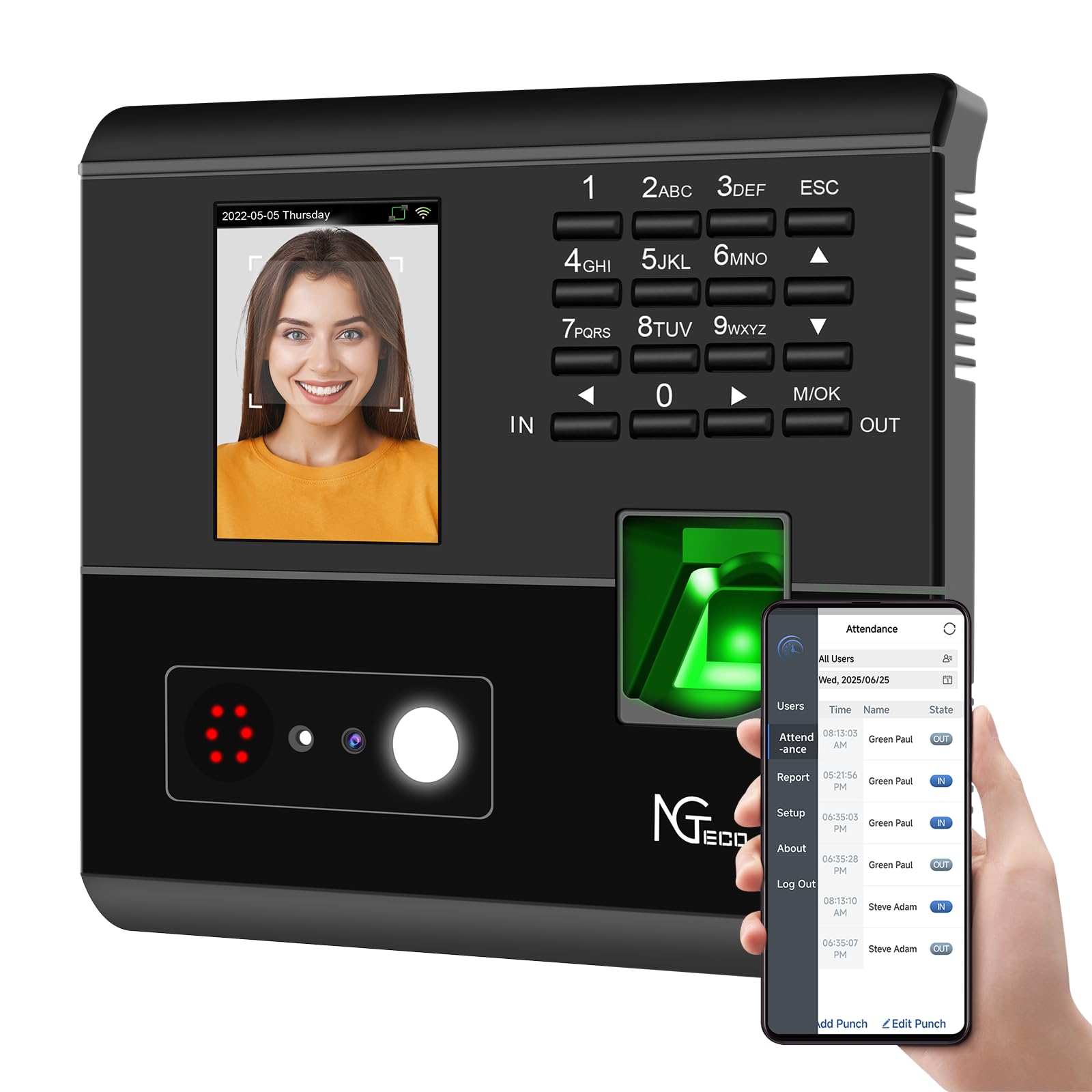
Figear 1: Aghaidh view of the NGTeco NG-MB1 Time Clock highlighting its four verification methods: Face Scan, Fingerprint, RFID Card, and Password.
Feartan pannal aghaidh:
- Sgrion Taisbeanaidh: Shows time, date, user information, and menu options.
- Meur-chlàr: Numeric keys for PIN entry and navigation.
- Leughadair lorgan-meòir: For biometric fingerprint verification.
- Face Recognition Camera: For facial recognition verification.
- RFID/Card Reading Area: For scanning RFID cards.
Side and Back Panel Features:

Figear 2: Cùl view of the NGTeco NG-MB1 Time Clock, illustrating the power input, Ethernet port, and USB port for connectivity and data transfer.
- Port USB: For direct data transfer using a USB drive.
- Port cumhachd: A’ ceangal ris an inneal-atharrachaidh cumhachd a tha air a thoirt seachad.
- Port Ethernet: Airson ceangal lìonra uèirleas.
5. Suidhich
5.1 Stàladh inneal
- Choose a suitable indoor location for mounting the time clock, ensuring it is at an appropriate height for all users.
- Use the provided mounting template to mark drill holes on the wall.
- Secure the wall mounting bracket using the supplied screws and anchors.
- Connect the power adapter and, if desired, an Ethernet cable to the device.
- Attach the time clock unit to the mounted bracket.
5.2 Luchdaich sìos App
Luchdaich sìos an NGTeco Time App from your mobile device's app store (Apple App Store for iOS or Google Play Store for Android). This app is essential for managing users, attendance records, and generating reports.
Bhidio 1: This video demonstrates the two methods for registering employee information on the NGTeco Time Clock, including using the device directly and through the NGTeco Time App.
Ceangal Wi-Fi 5.3
To connect your device to a Wi-Fi network:
- On the device, navigate to the [Comm] clàr-taice.
- Tagh [Lìonra gun uèir].
- Tagh an lìonra Wi-Fi a tha thu ag iarraidh bhon liosta.
- Enter the Wi-Fi password using the keypad and confirm.
- The device will attempt to connect to the network. A successful connection will be indicated on the screen.
Bhidio 2: This video provides a step-by-step guide on how to configure the Wi-Fi settings on your NGTeco Time Clock device.
6. Stiùireadh Obrachaidh
6.1 Luchd-cleachdaidh a chur ris
Employees can be added directly on the device or through the NGTeco Time App.
Adding Users via Device:
- Brùth agus cùm an M/Ceart putan gus faighinn chun phrìomh chlàr.
- Seòl gu [Cleachdaichean] agus tagh [Cuir cleachdaiche ris].
- Cuir a-steach an ID cleachdaiche, A’ chiad ainm, Ainm deireannach, agus shuidhich an Dleastanas Cleachdaiche (e.g., Employee, Admin).
- Tagh a Modh dearbhaidh (Password, Fingerprint, Card, or Face).
- Follow the on-screen prompts to enroll the chosen verification method(s).
Adding Users via NGTeco Time App:
- Open the NGTeco Time App on your smartphone.
- Seòl gu na Luchd-cleachdaidh section and tap Cuir cleachdaiche ris.
- Enter the employee's details including A’ chiad ainm, Ainm deireannach, PIN, agus Cead ìre.
- Save and sync the data with the device.
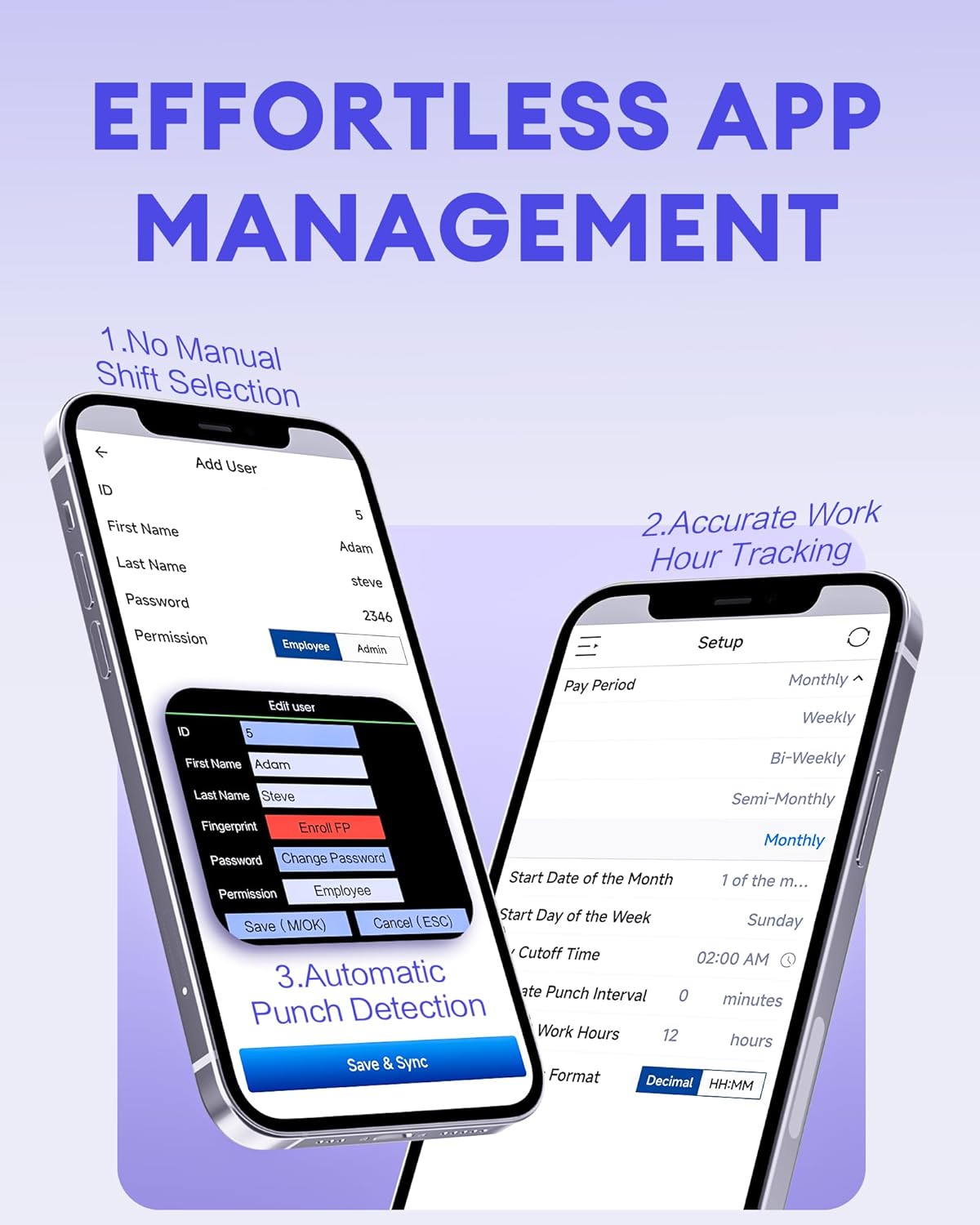
Figear 3: The NGTeco Time App interface for effortless management, including adding users, setting up work hour tracking, and automatic punch detection.
6.2 Enrolling Biometrics and Cards
Clàradh lorgan-meòir:
For optimal fingerprint recognition:
- Always use clean fingers and avoid angled or tilted finger positions during enrollment.
- Place your finger belly completely in the middle of the reader.
- Do not slide the finger while enrolling. Apply some pressure for 1 second until the result is shown.
- If a finger is dry, gently breathe on it to moisten it before scanning.

Figear 4: Visual representation of the high-precision fingerprint module, emphasizing reliable, fast, and secure access.
Face Enrollment:
Follow the on-screen instructions to position your face correctly in front of the camera for enrollment.
RFID Card Enrollment:
When prompted, hold the RFID card near the designated reading area on the device until it is successfully registered.
6.3 Clocking In and Out
The NGTeco NG-MB1 supports automatic detection for clocking in and out, eliminating the need to press specific 'IN' or 'OUT' keys. Simply present your chosen verification method (face, fingerprint, RFID card, or enter your PIN) to the device.
Bhidio 3: This video demonstrates the four recognition methods (Face, Fingerprint, RFID, PIN) for clocking in on the NGTeco Time Clock.
6.4 Managing Attendance Records
Attendance records can be modified directly on the device or through the NGTeco Time App.
Adding/Editing Missing Punches:
- Tro inneal: Access the menu, navigate to [Time Data], an uair sin [Add Missing Punch]. Select the user, date, time, and punch state (Check In/Check Out).
- Tro App: In the NGTeco Time App, go to the Frithealadh section. You can add a new punch or edit an existing one by selecting the user, date, time, and punch state.

Figear 5: The NGTeco Time App's punch record correction feature, allowing easy fixes for errors or missing punches.
Bhidio 4: This video illustrates how to modify attendance records directly on the NGTeco Time Clock device and through the mobile application.
6.5 A' cruthachadh aithisgean
The NGTeco Time Clock supports various payroll cycles and offers multiple ways to download attendance reports.

Figear 6: The NGTeco Time Clock supports various payroll cycles, including Monthly, Semi-Monthly, Bi-Weekly, and Weekly, for flexible attendance management.
Report Download Options:
- App Email Download: Use the NGTeco Time App to email detailed reports directly to your inbox.
- USB Drive Download: Insert the provided USB drive into the device's USB port to download attendance data.

Figear 7: Illustration of the two convenient methods for downloading attendance reports: directly to a USB drive or via email through the NGTeco Time App.
7. Cumail suas
- Glanadh: Regularly wipe the device's screen, keypad, and fingerprint sensor with a soft, dry cloth. Avoid using abrasive cleaners or liquids.
- Ùrachaidhean bathar-bog: Check the NGTeco Time App or website for any available firmware or software updates to ensure optimal performance and security.
- Cùl-taic dàta: Periodically back up your attendance data using the USB drive or through the app to prevent data loss.
8. A ’dèanamh trioblaid
- Inneal nach eil a’ cur cumhachd air: Dèan cinnteach gu bheil an inneal-atharrachaidh cumhachd ceangailte gu tèarainte ris an inneal agus ri socaid cumhachd a tha ag obair.
- Cùisean Ceangal Wi-Fi: Verify your Wi-Fi password and ensure the device is within range of your router. Restarting the device or router may help.
- Fingerprint/Face Recognition Failure: Ensure the sensor/camera is clean. For fingerprints, ensure fingers are clean and placed correctly with adequate pressure. Re-enrollment may be necessary if issues persist.
- Cùisean sioncronachaidh aplacaidean: Check your device's internet connection and ensure the time clock is connected to the same Wi-Fi network as your phone.
- Missing Punches: Refer to Section 6.4 for instructions on adding or editing missing punches.
For further assistance, consult the Quick Start Guide or contact NGTeco customer support.
9. Sònrachaidhean
| Feart | Mion-fhiosrachadh |
|---|---|
| Brand | NGTeco |
| Modail Àireamh | NG- MB1 |
| Dath | Dubh |
| Seòrsa Taisbeanaidh | Didseatach |
| Feart sònraichte | Face/Fingerprint/Card/PIN |
| Meudan toraidh | 5"L x 4"À |
| Stòr cumhachd | Electric Corded |
| Teicneòlas ceangail | WiFi |
| Cuideam nì | 0.79 cileagram |
| Seòrsa Stuth | Plastaig ABS Premium |
10. Barantas agus Taic
- Barantas: The NGTeco NG-MB1 comes with a 1-year manufacturer's warranty.
- Taic Teicnigeach: Enjoy free lifetime technical support from NGTeco's U.S.-based service team. Support is available Monday to Friday, 6 AM to 6 PM EST.
- For support, refer to the contact information provided in your Quick Start Guide or visit the official NGTeco weblàrach.