
1. Ro-ràdh
The FNIRSI DST-210 is a compact and versatile 3-in-1 handheld device designed for electronic testing and measurement. It integrates the functions of a digital oscilloscope, a true RMS multimeter, and a signal generator into a single portable unit. This manual provides detailed instructions to help you effectively use and maintain your device.
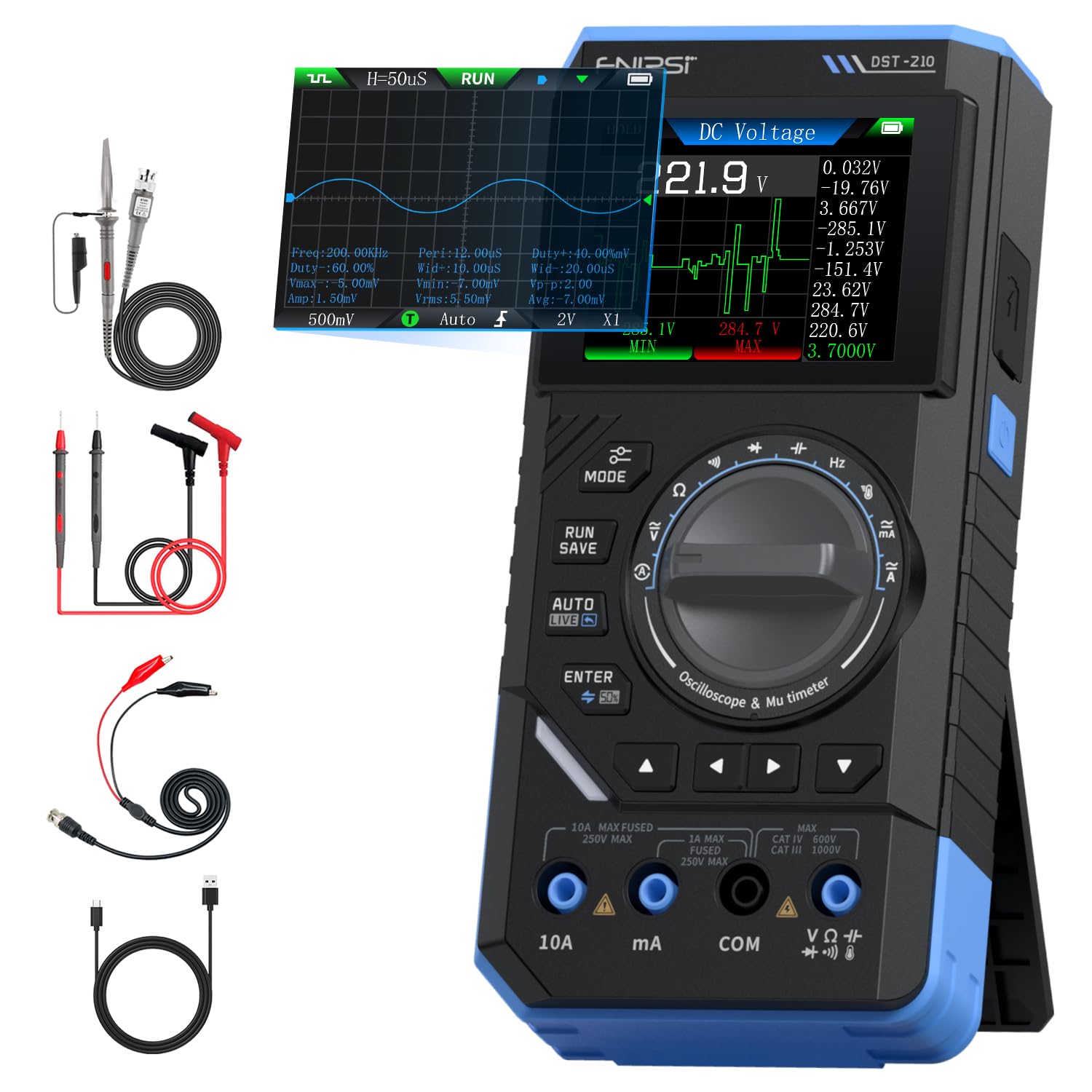
Figure 1: FNIRSI DST-210 3-in-1 Handheld Device
2. Toradh thallview
2.1 Prìomh fheartan
- Gnìomhachd 3-in-1: Combines a digital oscilloscope, a true RMS multimeter, and a signal generator.
- Taisbeanadh: 2.8-inch TFT color LCD for clear data visualization.
- Oscilloscope: 10MHz analog bandwidth, 48MSa/s real-time sampling rate, supports Auto/Normal/Single trigger modes, waveform image saving and display.
- Multimeter: 19999-count true RMS measurement for DC/AC voltage, DC/AC current, resistance, capacitance, frequency, temperature, diode, and continuity. Features data hold, record mode with graphical display, and LIVE function for voltage presence detection.
- Gineadair comharran: Outputs 13 types of waveforms (Sine, Square, Sawtooth, Half-wave, Full-wave, Step, Reverse Step, Index Up/Down, DC, Multi-audio, Sink Pulse, Lorentz Wave) with adjustable frequency (0-50KHz), amplitude (0.1-3.0V), and duty cycle (0-100%).
- So-ghiùlain: Compact design with an integrated stand, powered by a 3000mAh rechargeable lithium battery providing up to 10 hours of continuous use. Type-C charging supported.
2.2 Susbaint a’ phacaid
Dèan cinnteach gu bheil a h-uile nì anns a’ phacaid:
- FNIRSI DST-210 Main Unit
- P6100 Meud Àrdtage Dèan sgrùdadh
- Ceangalan Deuchainn (Dearg is Dubh)
- Criomagan ailigator
- Càball Cìsean Type-C
- Instruction Manual (PDF version available online)
- Bogsa Pacaidh

Figear 2: Goireasan a tha air an toirt a-steach
3. Suidhich
3.1 A’ cur cosgais air an inneal
Before initial use, fully charge the DST-210. Connect the provided Type-C charging cable to the device's Type-C port and a compatible USB power adapter (5V/1A). The battery indicator on the display will show charging status.
3.2 Connecting Probes
For accurate measurements, ensure probes are correctly connected:
- Tomhais ioma-mheatair: Insert the red test lead into the VΩHzmA or 10A jack (depending on the measurement) and the black test lead into the COM jack.
- Tomhaisean Oscilloscope: Connect the P6100 high voltage probe to the oscilloscope input jack. Ensure the probe's attenuation setting (e.g., X1 or X10) matches the device's setting for accurate readings.
- Toradh Gineadair Comharran: Connect the output cable to the signal generator output port.

Figure 3: Input Jacks and Controls
4. Stiùireadh Obrachaidh
4.1 Cumhachd air / dheth
Press and hold the power button (located on the side) to turn the device on or off.
4.2 Taghadh Modh
Rotate the central knob to switch between Multimeter, Oscilloscope, and Signal Generator modes. Within each mode, further sub-functions can be selected using the knob or dedicated buttons.

Figure 4: Using the Oscilloscope Function
4.3 Multimeter Operation
In Multimeter mode, the device offers various measurement functions:
- Voltage/Current (DC/AC): Select the appropriate DC V, AC V, DC A, or AC A setting. Connect test leads to the circuit. The device supports a record mode that displays measurement trends graphically, and can store up to 10 sets of data.
- Frith-aghaidh (Ω): Select the resistance function. Connect test leads across the component.
- Comas (F): Select the capacitance function. Connect test leads across the capacitor.
- Tricead (Hz): Select the frequency function. Connect test leads to the signal source.
- Deuchainn Diode: Select the diode function. Connect test leads across the diode to check its forward voltage tuiteam.
- Deuchainn leantainneachd: Select the continuity function. Connect test leads across a conductor; a beep indicates continuity.
- Teòthachd: Use a K-type thermocouple (not included) connected to the appropriate jacks for temperature measurement.
- LIVE Function: For single-probe voltage presence detection.

Figure 5: Multimeter Measurement Examples
4.4 Oscilloscope Operation
In Oscilloscope mode, the device displays waveforms:
- Taisbeanadh Tonn-chruth: Connect the oscilloscope probe to the circuit. The device automatically adjusts settings for stable waveform display.
- Modhan brosnachaidh: Select between Auto, Normal, and Single trigger modes to capture different types of signals.
- Waveform Saving: Press the 'RUN/SAVE' button to save the current waveform image. Saved images can be reviewed agus às-mhalairt.

Figure 6: Oscilloscope Waveform Display
4.5 Signal Generator Operation
In Signal Generator mode, the device outputs various waveforms:
- Taghadh Tonn-chruth: Choose from 13 different waveform types using the menu options.
- Atharrachadh paramadair: Adjust the frequency (0-50KHz), amplitude (0.1-3.0V), and duty cycle (0-100%) as required for your application.

Figure 7: Signal Generator Waveform Selection
4.6 PC Connection and Data Export
The DST-210 can connect to a PC via its Type-C USB port for data management and firmware updates.
- Waveform Screenshots: Long-press the 'RUN/SAVE' button to save waveform screenshots.
- Às-mhalairt Dàta: Connect the device to a computer to view, save, and export recorded waveform images and data.
- Ùrachaidhean firmware: Periodically check the official FNIRSI website for firmware updates to ensure optimal performance and access to new features. Follow the instructions provided with the firmware update package.

Figure 8: PC Connection for Data Management
5. Cumail suas
- Glanadh: Cleachd clò bog, tioram airson an inneal a ghlanadh. Na cleachd innealan-glanaidh sgrìobach no fuasglaidhean.
- Stòradh: Stòraich an inneal ann an àite fionnar, tioram air falbh bho sholas dìreach na grèine agus teòthachd anabarrach.
- Cùram Bataraidh: Gus beatha a’ bhataraidh a leudachadh, seachain a bhith ga leigeil às gu tur gu tric. Cuir cosgais air an inneal gu cunbhalach, eadhon ged nach eilear ga chleachdadh airson ùine mhòr.
- Cùram Probe: Inspect test leads and probes for damage before each use. Replace any damaged accessories immediately.
6. A ’dèanamh trioblaid
| Trioblaid | Adhbhar a dh’fhaodadh a bhith ann | Fuasgladh |
|---|---|---|
| Chan eil cumhachd aig an inneal. | Low battery or faulty power button. | Charge the device fully. If the issue persists, contact support. |
| Unstable or inaccurate readings in Multimeter mode. | Poor probe connection, incorrect mode selection, or external interference. | Ensure probes are securely connected. Verify the correct measurement mode is selected. Minimize external electrical interference. |
| Oscilloscope waveform is not stable. | Incorrect trigger settings or probe attenuation. | Adjust trigger level and mode. Ensure probe attenuation (X1/X10) matches the device setting. |
| Signal generator output is incorrect. | Incorrect waveform type, frequency, amplitude, or duty cycle settings. | Verify all signal generator parameters are set as desired. |
| Cannot connect to PC or export data. | Faulty USB cable, incorrect PC driver, or software issue. | Try a different Type-C cable. Ensure necessary drivers are installed on your PC. Refer to the official website for software and driver downloads. |
7. Sònrachaidhean
7.1 Oscilloscope Parameters
| Roinn-seòrsa | Sònrachadh |
|---|---|
| Fìor-ùine S.ampÌre ling | 48MSa / s |
| Analog Bandwidth | 10MHz |
| Impedance cuir a-steach | 1 mhàth |
| Dòigh-còmhla | AC/DC |
| Tomhais Voltage Raon | 1:1 Probe: ±80Vpp (±40V), 10:1 Probe: ±800Vpp (±400V) |
| Mothachadh dìreach | 10mV/div ~ 10V/div (at X1) |
| Inghearach Offset | Adjustable (with indicator) |
| Horizontal Time Base Range | 50ns ~ 20s |
| Modh brosnachaidh | Auto, àbhaisteach, singilte |
| Iomall Trigger | Rising/Falling Edge |
| Ìre brosnachaidh | Adjustable (with indicator) |
| Reothadh cruth tonn | Supported (HOLD function) |
| Tomhas fèin-ghluasadach | Max, Min, Average, RMS, Peak-to-Peak, Frequency, Duty Cycle, etc. |
7.2 Multimeter Parameters
| Gnìomh Tomhais | Raon | Cruinneas |
|---|---|---|
| DC Voltage | 1.9999V/19.999V/199.99V/1000V | ±(0.5%+3) |
| AC Voltage | 1.9999V/19.999V/199.99V/750V | ±(1.0%+3) |
| DC an-dràsta | 19.999mA/199.99mA/1.9999A/9.999A | ±(1.2%+3) |
| AC gnàthach | 19.999mA/199.99mA/1.9999A/9.999A | ±(1.5%+3) |
| Resistance | 19.999MΩ/199.99kΩ/19.999kΩ | ±(2.0%+5) |
| Capacitance | 999.9uF/99.99uF/9.999uF/999.9nF/99.99nF, 9.999mF/99.99mF | ±(2.0%+5) |
| Tricead | 9.999MHz/999.9kHz/99.99kHz/9.999kHz/999.9Hz/99.99Hz | ±(0.1%+2) |
| Teòthachd | [-55~1300°C] / [-67~2372°F] | ±(2.5%+5) |
| Diod/Leantainneachd | Le taic | Chan eil |
| Gnìomh BEÒ | Le taic | Chan eil |
7.3 Signal Generator Parameters
| Roinn-seòrsa | Sònrachadh |
|---|---|
| Output Waveforms | 13 seòrsa |
| Tricead cruth tonn | 0 ~ 50KHz |
| Cearcall Dleastanas | 0 ~ 100% (adjustable) |
| Cruth tonn Ampaotromachd | 0.1 ~ 3.0V |
7.4 Sònrachaidhean Coitcheann
| Roinn-seòrsa | Sònrachadh |
|---|---|
| Modail Bathar | DST-210 |
| Taisbeanadh | Taisbeanadh TFT Dathte 2.8-òirleach |
| Cùl-sholais | Soilleireachd a ghabhas atharrachadh |
| Solar cumhachd | Seòrsa C (5V/1A) |
| Bataraidh | 3000 mAh |
| Taic Cànain | Sìnis, Beurla |
| Meud toraidh | Mu thuairmeas. 177.43 mm x 87 mm x 35 mm |
| Cuideam toraidh | Mu thuairmeas. 300g |
8. Barantas agus Taic
For any questions, issues, or support needs regarding your FNIRSI DST-210, please contact us through the following methods:
- Teachdaireachd Amazon: If you purchased the product on Amazon, you can contact us via the Amazon messaging system. Go to your 'Order History', select the relevant order, and click 'Problem with order' or 'Contact Seller'.
- Taic Post-d: You can also reach our after-sales service center directly via email at taic@fnirsi.com. Please include your order number and a detailed description of your issue for faster assistance.
When attaching large photos or videos, email support is recommended due to potential attachment size limits on Amazon's messaging system.
Video 1: Demonstration of FNIRSI DST-210's Multimeter, Oscilloscope, and Signal Generator Functions.