
1. Ro-ràdh agus Os a chionnview
Thank you for choosing the Ninkear L12Pro Gaming Mini PC. This compact yet powerful desktop computer is designed to deliver exceptional performance for a wide range of applications, from demanding gaming and 4K video editing to business productivity and multi-display setups. Featuring an Intel Core i9-12900HK processor, 32GB of RAM, and a 1TB NVMe SSD, the L12Pro offers a seamless and responsive computing experience. This manual provides essential information for setting up, operating, maintaining, and troubleshooting your new Mini PC.
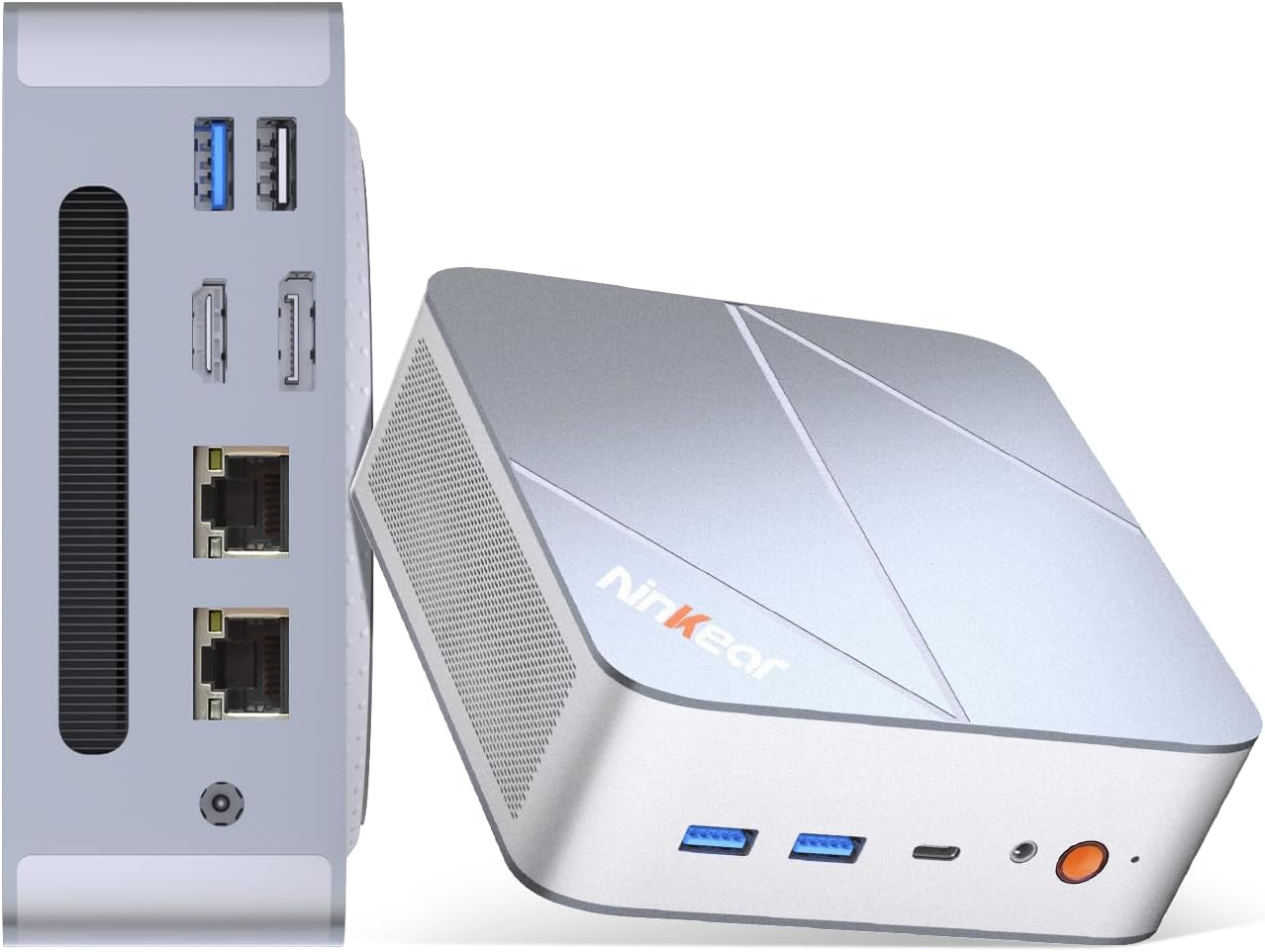
Figure 1.1: Ninkear L12Pro Mini PC - Front and Side View le Puirt.
2. Feartan toraidh
- Coileanadh Luath-dealanaich: Powered by Intel’s 12th Gen i9-12900HK processor (14 cores, 20 threads, up to 5.0GHz), capable of handling 4K video editing, coding, and intensive multitasking.
- Cuimhne is Stòradh Àrd-astar: Equipped with 32GB DDR4 RAM and an ultra-fast 1TB NVMe SSD for instant file access, smooth application performance, and rapid boot times.
- Triple 8K UHD Display Support: Create an immersive multi-screen setup with HDMI 2.0 (up to 4K@60Hz), DisplayPort 1.4 (up to 8K@60Hz), and USB4/Thunderbolt 4 (up to 8K@60Hz) outputs.
- Compact and Flexible Design: Small form factor allows for versatile placement behind monitors, under desks, or in backpacks, offering powerful desktop capabilities in a portable size.
- Ceangal adhartach: Features USB4.0, USB-C, WiFi 6, Bluetooth 5.2, dual 2.5G LAN ports, and multiple USB 3.2 Gen 2 and USB 2.0 ports for comprehensive peripheral support and high-speed data transfer.
- Siostam fuarachaidh èifeachdach: Designed with an all-metal cooling system for quiet and efficient operation, ensuring stable performance even under heavy loads.
- Stòradh a ghabhas leudachadh: Supports additional M.2 NVMe PCIe SSD (up to 4TB) and an optional 2.5-inch HDD for expanded storage capacity.

Figure 2.1: Key Features and Specifications Overview.

Figure 2.2: Triple 8K Display Setup for Enhanced Productivity.

Figure 2.3: Comprehensive Connectivity Options.
3. Dè tha sa bhogsa
Nuair a dh’fhosglas tu am pasgan, dèan cinnteach gu bheil na nithean a leanas uile an làthair:
- Ninkear L12Pro Mini PC
- Càball HDMI
- Adapter cumhachd
- Leabhar-làimhe cleachdaiche (an sgrìobhainn seo)
4. Stiùirich rèiteachaidh
Follow these steps to set up your Ninkear L12Pro Mini PC:
- Unpack the Mini PC: Carefully remove the Mini PC and all accessories from the packaging.
- Ceangail ri taisbeanadh:
- Connect one end of the HDMI cable (included) to the HDMI port on the Mini PC and the other end to an available HDMI input on your monitor or TV.
- For DisplayPort or USB4/Thunderbolt 4 connections, use appropriate cables (not included) to connect to compatible displays.
- For triple display setup, connect additional monitors using the available DisplayPort, USB4/Thunderbolt 4, or a USB-C to HDMI/DP adapter (not included).
- Ceangail peripherals:
- Plug your USB keyboard and mouse into any available USB ports on the Mini PC.
- If using wireless peripherals, ensure their receivers are plugged into a USB port.
- Ceangail ri cumhachd: Plug the power adapter into the DC-in port on the Mini PC, then plug the other end into a power outlet.
- Ceangal Lìonra (Roghainneil):
- For a wired connection, connect an Ethernet cable from your router or modem to one of the 2.5G LAN ports on the Mini PC.
- For a wireless connection, the Mini PC supports WiFi 6. You will configure this after the initial boot.
- Tòiseachadh Tùsail: Press the power button on the front of the Mini PC. The system will power on and begin the initial setup process for Windows 11 Pro. Follow the on-screen instructions to complete the operating system setup.
5. Stiùireadh Obrachaidh
5.1 Cumhachd air / dheth
- Cumhachd air: Brùth am putan cumhachd aon uair.
- Dùin sìos: Briog air a’ phutan Tòisich ann an Windows, agus an uairsin tagh Cumhachd > Dùin sìos.
- Ath-thòiseachadh: Briog air a’ phutan Tòisich ann an Windows, agus an uair sin tagh Cumhachd > Ath-thòisich.
- Force Shut Down: If the system is unresponsive, press and hold the power button for approximately 5-7 seconds until the unit powers off. Use this only as a last resort.
5.2 Configuration Taisbeanaidh
The Ninkear L12Pro supports up to three independent displays simultaneously. After connecting your monitors, Windows will typically detect them automatically. If not, or to configure display settings:
- Briog deas air àite falamh air an deasg agad.
- Tagh “Roghainnean taisbeanaidh”.
- From here, you can detect displays, arrange them, change resolution, and set display modes (Extend, Duplicate, Second screen only).
5.3 Ceangal Lìonra
- Uèirleichte (Ethernet): Ensure an Ethernet cable is connected to one of the 2.5G LAN ports. Windows will automatically establish a connection.
- Gun uèir (Wi-Fi):
- Click the Wi-Fi icon in the system tray (bottom right of the taskbar).
- Tagh an lìonra Wi-Fi a tha thu ag iarraidh bhon liosta.
- Cuir a-steach facal-faire an lìonraidh ma thèid iarraidh ort agus cliog air “Ceangail”.
5.4 A’ ceangal innealan taobh a-muigh
The Mini PC offers a variety of ports for connecting external devices:
- Puirt USB: Use USB 3.2 Gen 2 ports for high-speed devices like external hard drives or SSDs, and USB 2.0 for standard peripherals like keyboards, mice, or printers.
- USB4/Thunderbolt 4: This versatile port supports high-speed data transfer (40Gbps), video output, and power delivery (with compatible devices).
- Seacaid claisneachd: Ceangail fònaichean-cluaise no luchd-labhairt taobh a-muigh ris an t-seacaid claisneachd 3.5mm.
6. Cumail suas
Proper maintenance ensures the longevity and optimal performance of your Ninkear L12Pro Mini PC:
- Cùm uinneagan soilleir: Ensure the ventilation openings on the Mini PC are not obstructed. Blocked vents can lead to overheating and reduced performance.
- Glanadh cunbhalach: Use a soft, dry cloth to clean the exterior of the Mini PC. For dust in vents, use compressed air. Do not use liquid cleaners directly on the device.
- Ùrachaidhean bathar-bog: Regularly update your Windows operating system, drivers, and applications to ensure security, stability, and performance.
- Dùin gu sàbhailte: Dùin sìos am Mini PC gu ceart tron t-siostam obrachaidh an-còmhnaidh gus casg a chur air truailleadh dàta.
- Suidheachaidhean Àrainneachdail: Operate the Mini PC in a clean, dry environment, away from direct sunlight, excessive heat, and humidity.

Figure 6.1: Smart Cooling System for Quiet Operation.
7. A ’dèanamh trioblaid
If you encounter issues with your Ninkear L12Pro Mini PC, refer to the following common problems and solutions:
| Trioblaid | Adhbhar a dh’fhaodadh a bhith ann | Fuasgladh |
|---|---|---|
| Gun chumhachd | Power adapter not connected; Power outlet issue; Faulty power adapter. | Ensure power adapter is securely connected to the Mini PC and a working power outlet. Try a different outlet. |
| Gun Taisbeanadh | Monitor not connected; Incorrect input selected on monitor; Faulty cable; Display driver issue. | Check display cable connections. Ensure monitor is on and set to the correct input source (HDMI, DP, USB-C). Try a different cable or monitor. Update display drivers in Windows. |
| No Internet Connection (Wired) | Ethernet cable disconnected; Router/modem issue; Network driver issue. | Check Ethernet cable connection. Restart your router/modem. Check network adapter settings in Windows Device Manager. |
| No Internet Connection (Wi-Fi) | Wi-Fi disabled; Incorrect password; Router too far; Driver issue. | Ensure Wi-Fi is enabled in Windows. Re-enter Wi-Fi password. Move closer to the router. Update Wi-Fi drivers. |
| Coileanadh Slow | Too many applications running; Overheating; Low disk space; Malware. | Close unnecessary applications. Ensure vents are clear. Free up disk space. Run a malware scan. |
8. Sònrachaidhean
Detailed technical specifications for the Ninkear L12Pro Mini PC:
| Feart | Mion-fhiosrachadh |
|---|---|
| Brand | Nincear |
| Modail Àireamh | L12 pro |
| Pròiseasar | Intel Core i9-12900HK (14 Cores, 20 Threads, up to 5.0GHz) |
| RAM | 32GB DDR4 (Leudachail suas gu 64GB) |
| Stòradh | 1TB NVMe SSD (M.2 PCIe 3.0, Expandable up to 4TB) |
| Grafaigeachd coprocessor | Grafaigean Intel Iris Xe (96EU) |
| Fuasgladh sgrion as àirde | 8K (7680x4320) via DisplayPort/USB4, 4K (4096x2160) via HDMI |
| Toraidhean bhidio | 1x HDMI 2.0, 1x DisplayPort 1.4, 1x USB4/Thunderbolt 4 |
| Puirt USB | 3x USB 3.2 Gen 2, 1x USB 2.0, 1x USB4/Thunderbolt 4 (Type-C) |
| Lìonra | Dual 2.5G LAN (RJ45), WiFi 6 (802.11ax) |
| Bluetooth | Bluetooth 5.2 |
| Siostam-obrachaidh | Windows 11 pro |
| Cuideam nì | 2.51 notaichean (timcheall air 1.14 kg) |
| Meudan | 10.44 x 6.73 x 2.79 òirleach (tomhasan pacaid) |
| Dath | Premium Brushed Silver |
9. Barantas agus Taic
The Ninkear L12Pro Mini PC comes with a standard manufacturer's warranty. For specific warranty terms and conditions, please refer to the documentation included with your purchase or visit the official Ninkear weblàrach.
For technical support, troubleshooting assistance, or any inquiries regarding your product, please contact Ninkear customer service through their official channels.
Taic air-loidhne: Tadhail air an Ninkear Store on Amazon airson Ceistean Cumanta agus roghainnean conaltraidh.