
1. Ro-ràdh
The ATUVOS Dual System Air Tracker Tag AT2501 is a versatile Bluetooth tracking device designed to help you locate your belongings. It offers compatibility with both Apple's Find My network (for iOS devices) and Google's Find Hub network (for Android devices), providing broad usability. This tag is water-resistant and features a replaceable battery for extended use.

Image: ATUVOS Air Tracker Tag certified by Apple and Google, demonstrating compatibility with both iOS and Android systems. Note: Each product can only be paired with one phone per operating system. To switch systems, you must delete the information from the original phone and reset the product before re-pairing it with a phone running the other operating system.

Image: ATUVOS Air Tracker Tag supporting Apple Find My and Google Find Hub apps, compatible with various Apple devices (iPhone) and most Android phones (Google, Samsung, OPPO, Xiaomi, and others). Huawei devices are not supported.
2. Suidhich
2.1. Paidhreachadh Tùsail
The ATUVOS Air Tracker Tag AT2501 is designed for easy pairing with your smartphone. Please ensure your device's Bluetooth is enabled before starting the pairing process.
For Apple Find My App (iOS):
- Turn on the Apple Find My App and Bluetooth on your iOS device.
- Tap "Items" at the bottom menu, then tap "Add Item".
- Select "Other Supported Item".
- Press and hold the button on your ATUVOS Tag for 10 seconds to reset it and initiate pairing.
- Follow the in-app instructions to complete the pairing process.
For Google Find Hub App (Android):
- Open the Android Find Hub App and ensure Bluetooth is enabled on your Android device (requires Android version 9+).
- Turn on your ATUVOS Air Tracker Tag.
- Cuir an tag near your Android device. A connection pairing window should automatically pop up.
- Click "Connect" and follow the prompts to add the tag to the Android Find Hub App.
Nota Cudromach: The ATUVOS Air Tracker Tag cannot be paired with iOS and Android devices simultaneously. If you wish to switch between systems, you must first remove the tag from the currently paired app and reset the tag before pairing it with the new system.

Image: Visual guide for pairing the ATUVOS Air Tracker Tag with the Apple Find My app, showing the steps to add a new item.

Image: Visual guide for linking the ATUVOS Air Tracker Tag with Google Find Hub, illustrating the connection process.
Video: Official guide on how to pair the ATUVOS Air Tracker Tag with either Google Find Hub or Apple Find My App, demonstrating the connection process.
3. Operating the ATUVOS Air Tracker Tag
3.1. Finding Nearby Items
When your ATUVOS Tag is within Bluetooth range (up to 200 feet or 60 meters), you can use the paired app (Apple Find My or Google Find Hub) to make the tag emit a loud sound (80-100 decibels). This helps you pinpoint the exact location of your item, even if it's hidden from view.
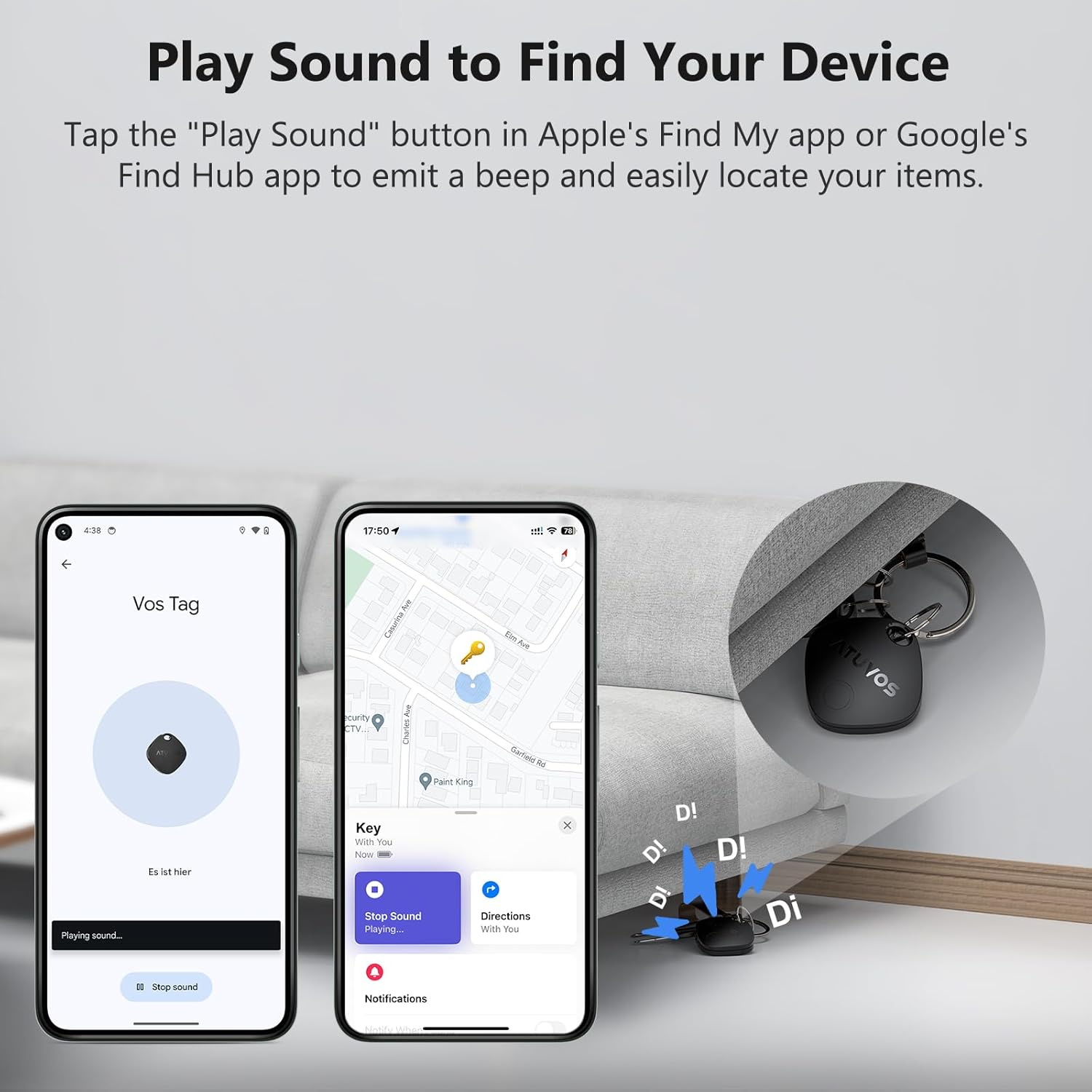
Image: The 'Play Sound' feature in the Find My or Find Hub app, used to make your ATUVOS Tag beep for easy location of nearby items.
3.2. Finding Far Away Items
If your item is outside the Bluetooth range of your device, the Apple Find My network or Google Find Hub network can help. These networks leverage millions of Apple or Android devices worldwide to anonymously detect your tag's location. You can then view its last known location on a map within the app and navigate to it using the route guidance feature. There are no monthly or annual fees for this service.
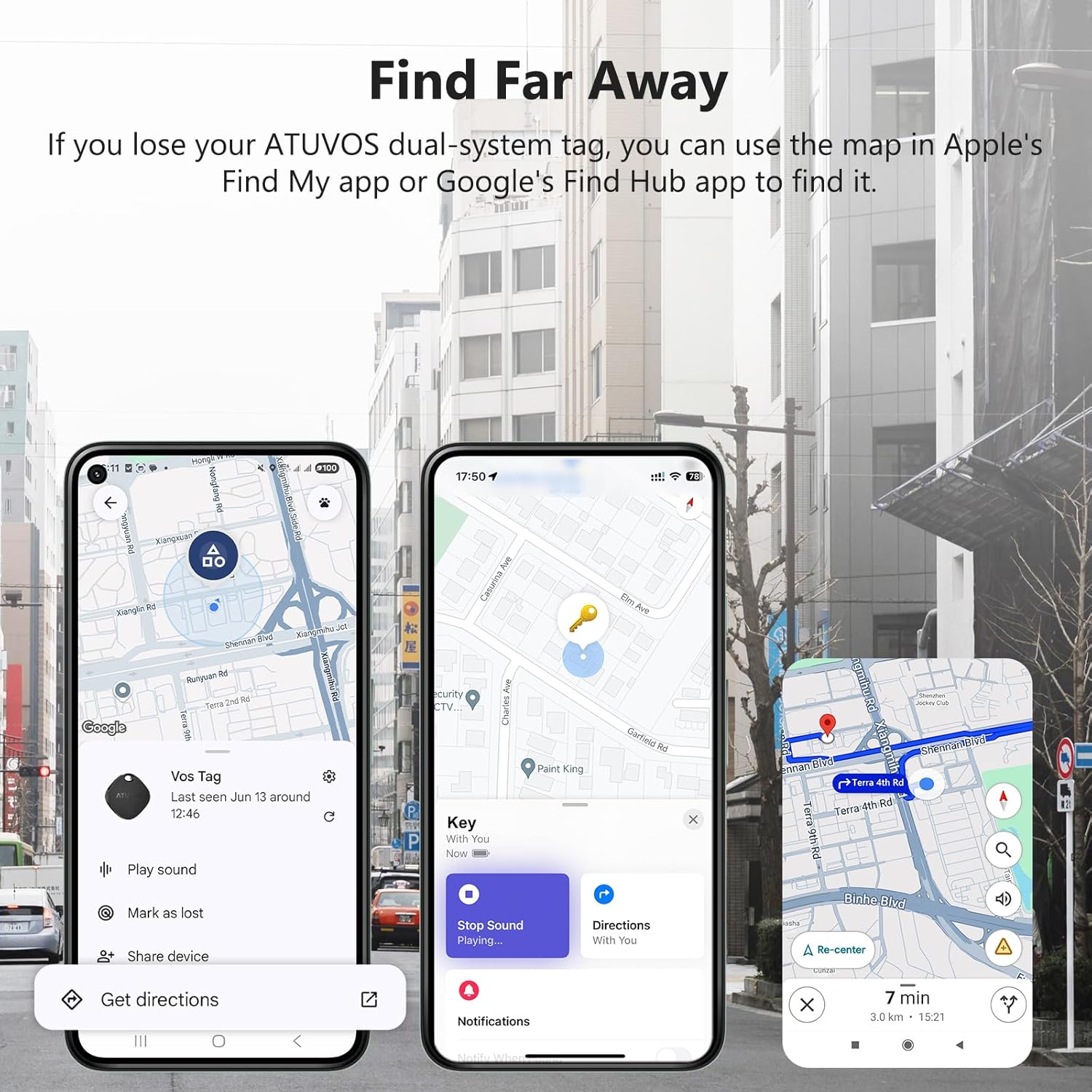
Image: The map view in the Find My or Find Hub app, showing how to locate your ATUVOS Tag when it is far away, utilizing the extensive network of devices.
3.3. Left Behind Reminders and Lost Mode
The ATUVOS Air Tracker Tag can notify you if you accidentally leave your item behind. If the tag disconnects from your iOS device's Bluetooth connection, you will receive an instant notification. Additionally, you can activate 'Lost Mode' in the app, which can display a message and contact information to anyone who finds your tag.
3.4. Sharing Location with Family
Both the Apple Find My App and Google Find Hub App support sharing the location of your ATUVOS Tag with family members or friends. This allows trusted contacts to view the item's location on a map. For Apple devices, ensure your iOS device is updated to iOS 17. Android devices require Android 9 or later for this feature.

Image: The sharing feature within the Find My or Find Hub app, allowing users to share the location of their ATUVOS Tag with trusted family and friends.
Bhidio: Thar-shealladhview of the ATUVOS Dual System Air Tracker Tag's features, including its dual compatibility and various tracking capabilities.
4. Cumail suas
4.1. Ath-nuadhachadh bataraidh
The ATUVOS Air Tracker Tag uses a replaceable CR2032 button cell battery, which typically lasts for about one year. When the battery is low, you can easily replace it.
- Locate the small opening on the side of the tag.
- Use a small screwdriver or a guitar pick to gently pry open the battery cover.
- Thoir air falbh an seann bataraidh CR2032.
- Cuir a-steach bataraidh CR2032 ùr leis an taobh adhartach (+) a’ coimhead suas.
- Align the battery cover and press firmly until it clicks into place.

Image: Step-by-step visual instructions for replacing the CR2032 battery in the ATUVOS Air Tracker Tag.
Video: A detailed demonstration on how to replace the battery of the ATUVOS Air Tracker Tag.
4.2. Resistance uisge
The ATUVOS Air Tracker Tag has an IP67 water-resistant rating. This means it is protected against dust ingress and can withstand immersion in water up to 1 meter for up to 30 minutes. It is designed to endure splashes, rain, and brief submersion, but it is not recommended for prolonged underwater use.

Image: The ATUVOS Air Tracker Tag demonstrating its IP67 water-resistant capability by being submerged in water.
5. A ’dèanamh trioblaid
- Tag gun a bhith a’ paidhreachadh: Ensure your smartphone's Bluetooth is on and the respective Find My or Find Hub app is updated to the latest version. Try resetting the tag by pressing and holding its button for 10 seconds.
- Chan eil fuaim bho tag: Check the battery level in the app. If the battery is low, replace it. Ensure your phone's volume is up and the tag tha taobh a-staigh raon Bluetooth.
- Àite mì-chruinn: Location accuracy depends on the density of the Apple Find My or Google Find Hub network in the area. In remote areas, updates might be less frequent.
- Cannot pair with both iOS and Android simultaneously: This is a design limitation. The tag can only be paired with one operating system at a time. To switch, unpair from the current device and reset the tag.
- Random beeping: Some users have reported occasional random beeping. If this occurs frequently and is not related to a 'Left Behind' alert or manual activation, please contact customer support for assistance.
6. Sònrachaidhean
| Brand | ATUVOS |
| Modail | AT2501 |
| Meudan | 35mm x 35mm x 10mm (1.37in x 1.37in x 0.39in) |
| Cuideam | 11g |
| Seòrsa bataraidh | 1 x CR2032 (air a thoirt a-steach) |
| Beatha bataraidh | Mu thuairmeas bliadhna |
| Ceangalachd | Bluetooth |
| Raon | Suas gu 200 troigh (60 meatairean) |
| Frith-aghaidh uisge | IP67 |
| Ìre Fuaim | 80-100 dB |
| Co-fhreagarrachd | Apple Find My (iOS 17+), Google Find Hub (Android 9+). Not compatible with Huawei devices. |
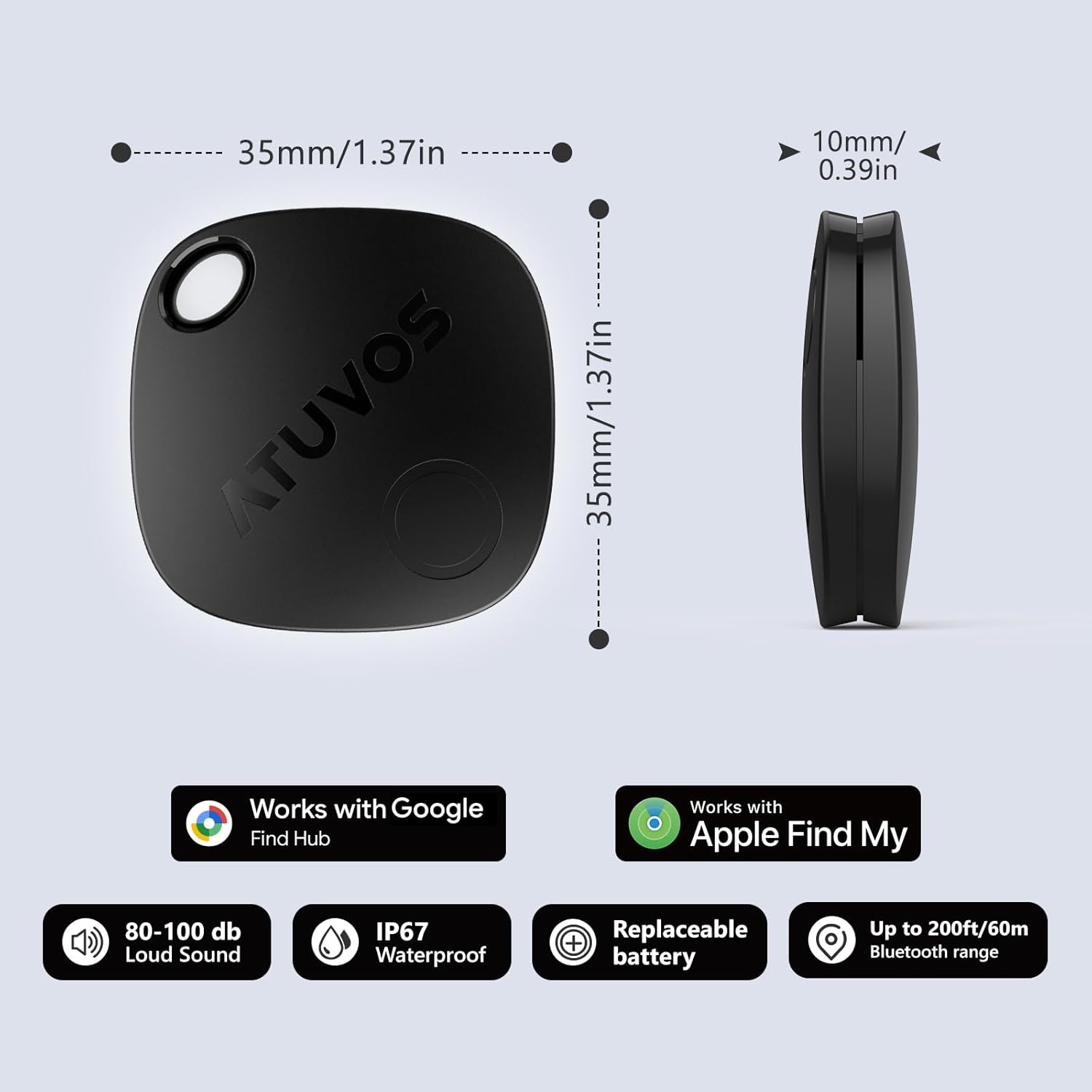
Image: Detailed diagram illustrating the dimensions (35mm x 35mm x 10mm) and key features of the ATUVOS Air Tracker Tag, including sound level, water resistance, replaceable battery, and Bluetooth range.
7. Barantas
The ATUVOS Air Tracker Tag AT2501 comes with a Barantas 1-bliadhna bho cheann-latha a’ cheannaich. Tha am barantas seo a’ còmhdach lochdan saothrachaidh agus mì-ghnìomhachd fo chleachdadh àbhaisteach. Cùm do dhearbhadh ceannach airson tagraidhean barantais.
8. Taic teachdaiche
For any questions, technical assistance, or support regarding your ATUVOS Air Tracker Tag, please contact our customer service team. We offer Seirbheis teachdaiche 24-uair to ensure you receive prompt and helpful support.
Contact information can typically be found on the product packaging or the official ATUVOS weblàrach.