
voijump M681
voijump Professional Wireless Microphone Instruction Manual
Modail: M681
1. Ro-ràdh
Thank you for choosing the voijump Professional Wireless Microphone. This compact and versatile lavalier microphone system is designed to deliver broadcast-quality audio for content creators, vloggers, podcasters, and anyone needing clear sound for video recording, interviews, and live streaming. Featuring instant plug-and-play functionality, intelligent noise reduction, and broad compatibility with iPhone, iPad, and Android devices, this system ensures high-quality audio capture with ease.
2. Dè tha sa bhogsa
Thoir sùil air susbaint a’ phacaid gus dèanamh cinnteach gu bheil a h-uile rud ann:
- 2 Mini Mic Wireless Microphones
- 1 Receiver (Lightning & USB-C)
- 1 Type-C to Lightning Adapter
- 2 High-Density Sponge Tips
- 2 Deadcat Windshields
- 1 Càball Cìsean USB
- 1 Leabhar-làimhe Cleachdaiche

Image: All components included in the voijump Professional Wireless Microphone package.
Video: An unboxing of the voijump Professional Wireless Microphone, demonstrating the contents and initial impressions.
3. Toradh thallview
The voijump wireless microphone system consists of two mini microphones (transmitters) and one receiver. Each component is designed for ease of use and portability.

Image: The compact and portable design of the voijump wireless microphones.

Image: Dimensions and weight of the mini microphone, emphasizing its lightweight nature.
Microphone (Transmitter) Features:
- Sgiathan gaoithe microfòn: (Furry deadcat or sponge tips) Reduces wind noise and plosives.
- Port Cìsean USB: For charging the microphone.
- Clip microfòn: Airson a cheangal ri aodach.
- Putan Cumhachd: To turn the microphone on/off.
- Microphone Indicator: A’ sealltainn inbhe cumhachd is ceangail.
Feartan an neach-gabhail:
- Ceangal inneal: USB-C or Lightning (depending on the adapter used) to connect to your phone/device.
- Port Cosgais Fòn: Allows charging of your phone/device while the receiver is connected.
4. Suidhich
The voijump wireless microphone system is designed for instant plug-and-play operation, requiring no Bluetooth pairing or app installation.
- Ceangail an neach-gabhail: Plug the receiver directly into the charging port of your smartphone, tablet, or laptop. Use the appropriate adapter (USB-C or Lightning) for your device.
- Power On the Microphone(s): Press and hold the power button on each mini microphone you intend to use. The microphone indicator light will turn green, indicating it is powered on and ready to connect.
- Ceangal fèin-ghluasadach: The microphone(s) will automatically connect to the receiver within approximately 1.3 seconds. The indicator light on the microphone will remain solid green once connected.
- Tòisich a’ clàradh: Open your device's camera or recording app and begin recording. The audio will now be captured by the wireless microphone(s).
Nota airson luchd-cleachdaidh Android: Before using the microphone, please ensure the "OTG" function is enabled on your Android device. This setting is usually found in your device's system settings under 'Connected devices' or 'USB preferences'.
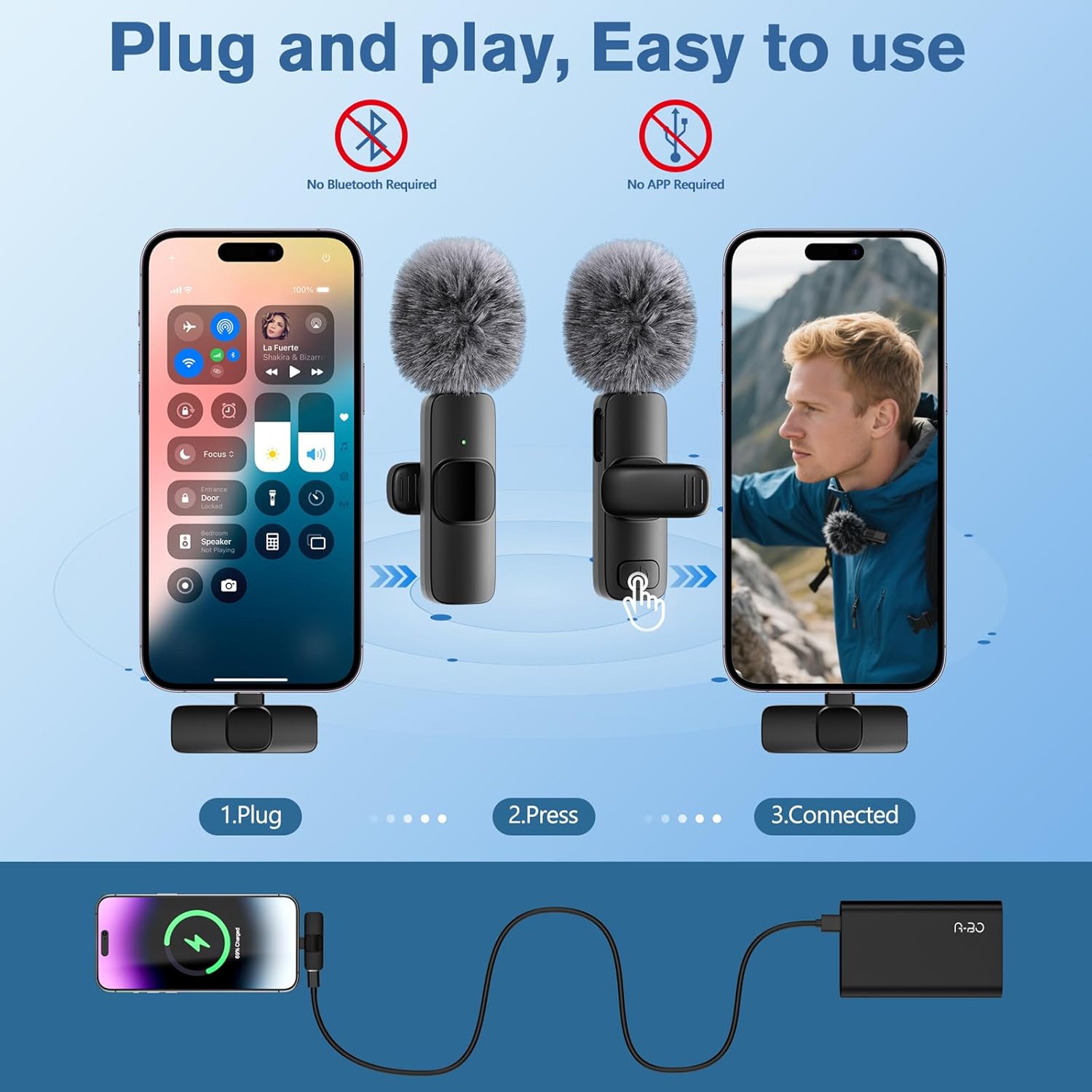
Image: Visual guide for the simple plug-and-play setup process.
Video: A short demonstration of the microphone's plug-and-play functionality, showing immediate readiness for use.
5. Stiùireadh Obrachaidh
Gnìomh mute:
During recording, a short press of the microphone's power button will toggle the mute function. The indicator light will change to a flashing green when muted and solid green when unmuted.
Charging While Recording:
The receiver features a pass-through charging port, allowing you to charge your smartphone or tablet simultaneously while recording. This ensures uninterrupted creative sessions.
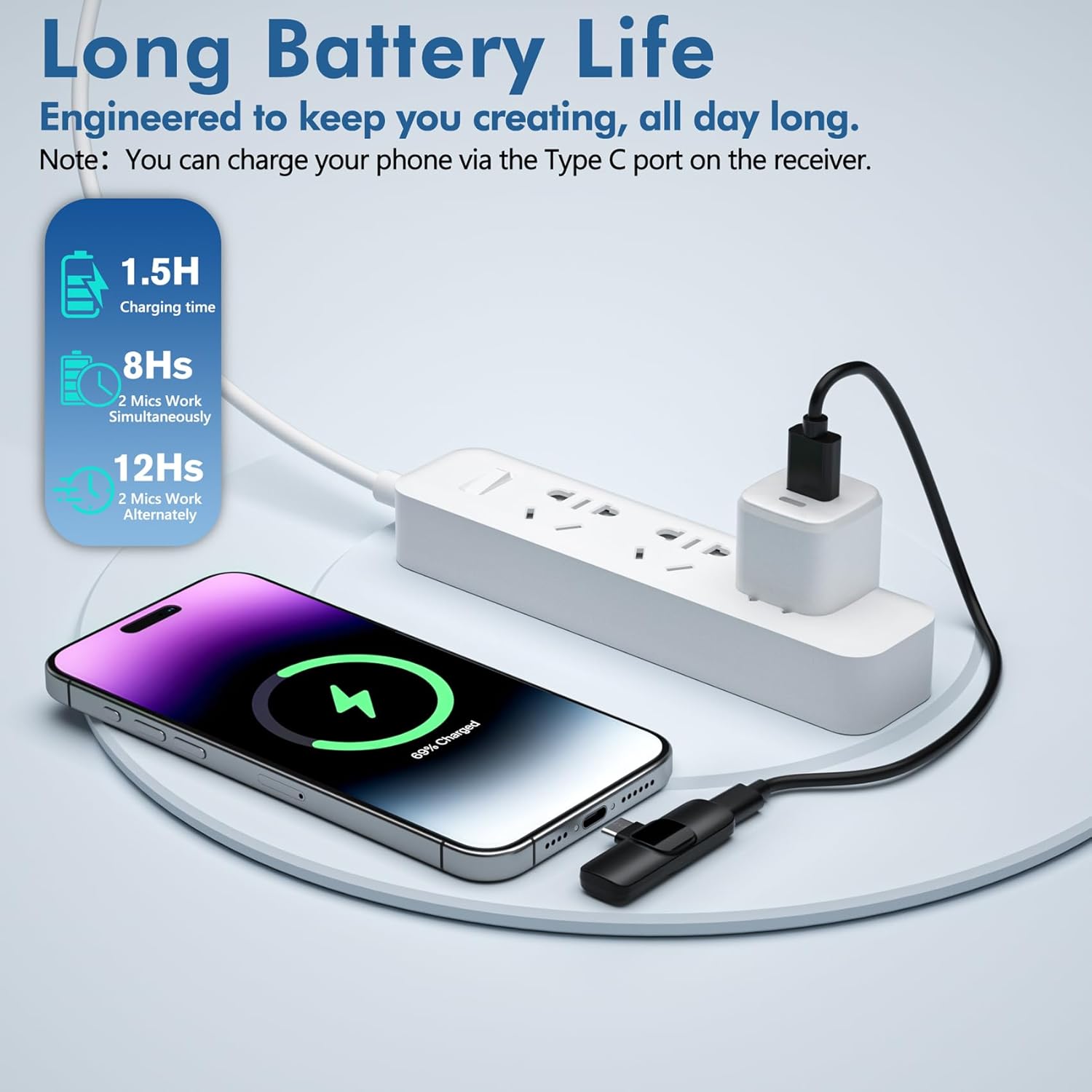
Image: Illustrates charging a phone via the receiver's port during recording.
Microphone Charging:
To charge the mini microphones, use the provided USB charging cable. Connect the cable to the microphone's USB charging port and a power source. The indicator light will show charging status.

Image: Details on battery life and charging time for the microphones.
6. Co-fhreagarrachd
The voijump Professional Wireless Microphone system is broadly compatible with a variety of devices:
- iPhones: All iPhones with Lightning or USB-C ports (e.g., iPhone 7/Plus, 8/Plus, X/XR/XS/XS Max, 11/Pro/Pro Max, 12/Mini/Pro/Pro Max, 13/Mini/Pro/Pro Max, 14/Plus/Pro/Pro Max, 15/Plus/Pro/Pro Max, 16/Pro/Pro Max).
- iPads: iPad mini series, iPad series, iPad Air series.
- Innealan Android: Smartphones and tablets with USB-C ports. (Remember to enable OTG function if required by your device).
- Laptops: Compatible with laptops featuring USB-C ports.

Image: Demonstrates compatibility with various iPhone and Android devices.

Image: Detailed compatibility list for iPhone and iPad models, with a note for Android OTG function.
7. Prìomh fheartan
- Càileachd claisneachd proifeasanta: Delivers broadcast-quality 48kHz/24-bit audio.
- Omnidirectional Sound & Noise Reduction: Equipped with an upgraded intelligent AI chip and 360° omnidirectional pickup mode. Includes high-density anti-spray sponge and windproof deadcat windshields to cut plosives and wind interference for crystal-clear indoor/outdoor recordings.
- Extended Range & Long Battery Life: Features 2.4GHz wireless transmission technology, providing a 66ft (20 meters) barrier-free effective distance. The rechargeable microphones last for 12 hours in single-mic mode or 8 hours in dual-mic sessions.
- Aotrom & seasmhach: Made of high-quality materials, weighing less than an ounce, making it extremely portable and suitable for everyday use.

Image: Demonstrates the active noise cancellation technology for clear sound quality.

Image: Highlights the intelligent noise reduction features.

Image: Illustrates the 66ft wireless reception range in an outdoor setting.
Bhidio: Taisbeanadh bhidio brosnachaidhasing the features and benefits of the voijump wireless microphone system.
8. Cumail suas
- Glanadh: Use a soft, dry cloth to clean the microphone and receiver. Do not use liquid cleaners or aerosols.
- Stòradh: Stòraich an inneal ann an àite fionnar, tioram air falbh bho sholas dìreach na grèine agus teòthachd anabarrach.
- Sgiathan gaoithe: The sponge tips and deadcat windshields can be gently cleaned with mild soap and water, then air-dried completely before re-use.
9. A ’dèanamh trioblaid
| Trioblaid | Adhbhar a dh’fhaodadh a bhith ann | Fuasgladh |
|---|---|---|
| Gun fhuaim no droch chàileachd claisneachd | Microphone not powered on; Receiver not properly connected; Android OTG function disabled; Device audio input not set to external microphone. | Ensure microphone is powered on (solid green light). Re-plug the receiver firmly into your device. For Android, enable OTG in settings. Check your recording app's settings to ensure external microphone input is selected. |
| Fuaim statach no fuaim eadar-theachd | Environmental interference; Microphone too far from source; Loose connection. | Ensure you are within the 66ft operating range. Check for strong electromagnetic interference sources. Ensure the receiver is securely plugged in. Use the appropriate windshield (deadcat for outdoor, foam for indoor) to minimize noise. |
| Microphone not connecting | Microphone not powered on; Receiver not recognized by device. | Press and hold the microphone power button until the green light appears. Try unplugging and re-plugging the receiver. Restart your recording device. |
| Beatha bataraidh goirid | Microphone not fully charged; Using dual microphones for extended periods. | Ensure microphones are fully charged before use (approx. 1.5 hours). Note that dual-mic usage provides 8 hours, while single-mic usage provides 12 hours. |
10. Sònrachaidhean
| Feart | Mion-fhiosrachadh |
|---|---|
| Ainm Modail | Wireless Microphones (M681) |
| Factaraidh cruth microfòn | Lavalier |
| Teicneòlas ceangail | Gun uèir (2.4GHz) |
| Seòrsa ceangail | Lightning, USB Seòrsa-C |
| Pàtran Polar | Omndirectional |
| Co-mheas Signal-to-Noise | 78 dB |
| Cuideam nì | 2.4 ounces (for the system) |
| Meudan toraidh | 0.39 x 0.59 x 2.17 inches (per microphone) |
| Stòr cumhachd | Cumhachd bataraidh |
| Beatha bataraidh | Up to 12 hours (single mic), 8 hours (dual mic) |
| Raon gun uèir | Suas gu 66 troigh (20 meatairean) |
| Stuth | Plastaig |
| Feartan sònraichte | 1-Touch Recording, Battery Indicator Light, Clip, Lightweight, Noise Reduction |
11. Barantas agus Taic
For warranty information, technical support, or any inquiries regarding your voijump Professional Wireless Microphone, please refer to the manufacturer's official website or contact their customer service directly. Details can typically be found in the packaging or on the product page where you made your purchase.