
AJAZZ 308i
AJAZZ 308i Wireless Bluetooth Keyboard User Manual
Modail: 308i
Ro-ràdh
Tapadh leibh airson ceannachasing the AJAZZ 308i Wireless Bluetooth Keyboard. This manual provides detailed instructions on how to set up, operate, and maintain your keyboard. Please read this manual carefully before use to ensure optimal performance and longevity of your device.
Bathar seachadview
The AJAZZ 308i is a compact 84-key wireless Bluetooth keyboard featuring a unique typewriter-inspired design with round keycaps. It offers multi-system compatibility and a comfortable typing experience.

Figure 1: AJAZZ 308i Wireless Bluetooth Keyboard (Gradient Green)
Prìomh fheartan:
- Typewriter-Inspired Design: Round keycaps provide a retro aesthetic and comfortable typing feel.
- Cruth teann 84-iuchrach: Lightweight and portable, measuring 32cm x 13.6cm x 3cm, making it easy to carry.
- Ceangal gun uèir Bluetooth: Stable connection up to 10 meters, compatible with various devices.
- Co-chòrdalachd ioma-shiostam: Supports Windows, Mac OS, iOS, and Android operating systems.
- Sàbhaladh cumhachd glic: Bidh e a’ dol a-steach gu modh cadail gu fèin-ghluasadach an dèidh 15 mionaidean de neo-ghnìomhachd gus bataraidh a shàbhaladh.
- Clò-sgrìobhadh sàmhach: Soft chocolate keys ensure a smooth and silent typing experience.
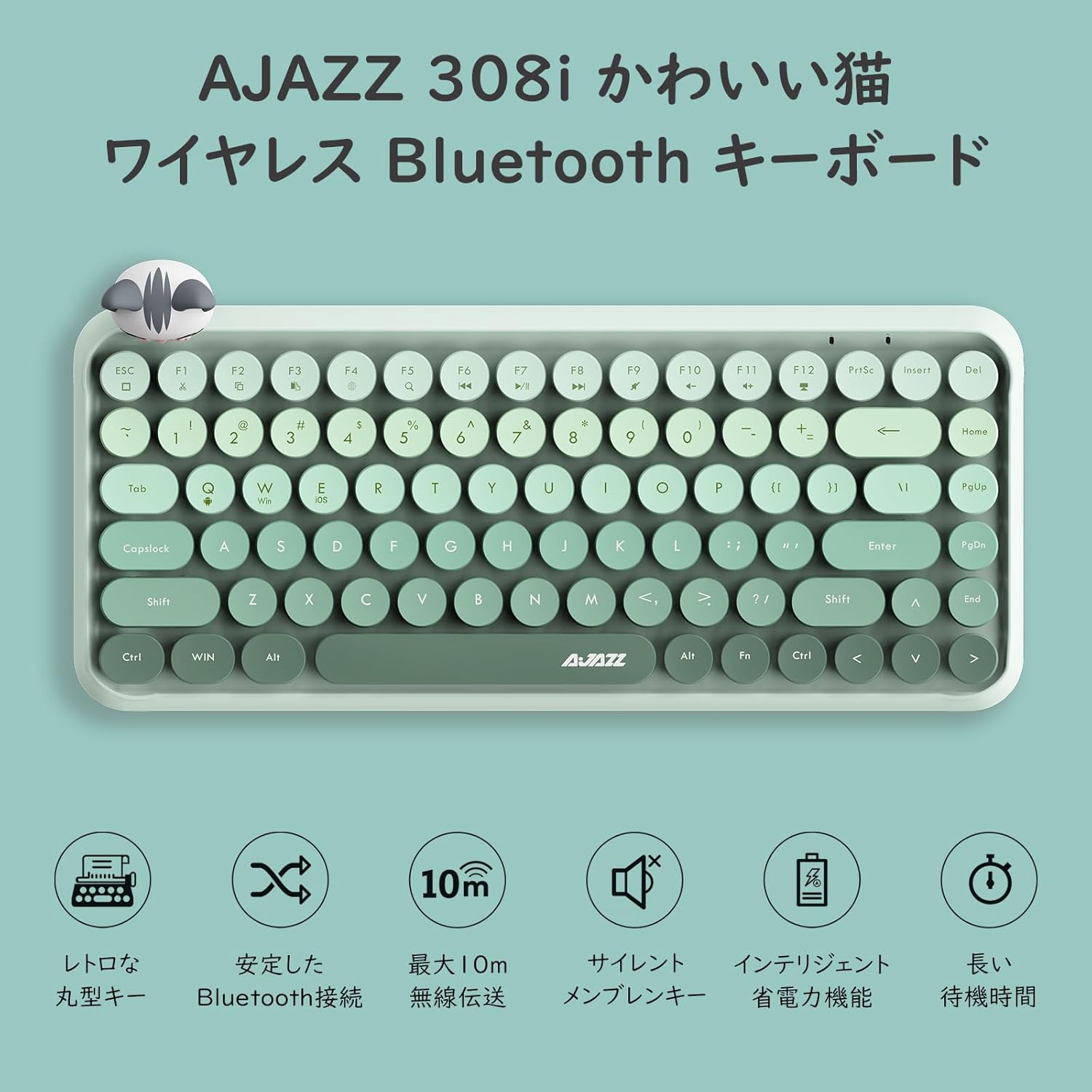
Figear 2: Os a chionnview of AJAZZ 308i Keyboard Features
Setup: Bluetooth Pairing
Follow these steps to connect your AJAZZ 308i keyboard via Bluetooth:
- Ensure your device's Bluetooth is turned ON.
- Tionndaidh ON the power switch on the keyboard.
- Brùth agus cùm an FN + C keys simultaneously on the keyboard. The keyboard will enter Bluetooth device search mode.
- On your device (tablet, smartphone, computer), search for Bluetooth devices.
- When "AJAZZ BLUETOOTH 5.0 KEYBOARD" appears in the list of available devices, tap or click on it to initiate pairing.
- A code will be displayed on your device's screen. Type this code using the AJAZZ 308i keyboard and press A steach.
- The keyboard is now successfully connected to your device.

Figure 3: Multi-device compatibility and connection example
Stiùireadh Obrachaidh
Iuchraichean Meadhanan:
The keyboard includes dedicated media function keys, accessible by pressing the FN key in combination with the F-keys:
- FN + F1: Gearr
- FN + F2: Dèan lethbhreac
- FN + F3: Paste
- FN + F5: Rannsachadh
- FN + F6: Rian roimhe
- FN + F7: Cluich / Stad
- FN + F8: An ath Rian
- FN + F9: Mut
- FN + F10: Meud Sìos
- FN + F11: Tomhais Suas
- FN + F12: Glasadh
Note: On some devices like iPad, certain F-keys (e.g., F2, F3) might function directly without the FN key for copy/paste. Experimentation may be required depending on your operating system.
Modh Sàbhalaidh Cumhachd:
The AJAZZ 308i features a smart power-saving mechanism. If there is no key operation for more than 15 minutes, the keyboard will automatically enter sleep mode. To reactivate it, simply double-click any key.
Cumail suas
Stàladh agus ath-nuadhachadh bataraidh:
The keyboard is powered by two AAA alkaline batteries. To install or replace batteries:
- Lorg roinn a’ bhataraidh air taobh sìos a’ mheur-chlàir.
- Fosgail an còmhdach roinn bataraidh.
- Cuir a-steach dà bataraidh alcalin AAA ùra, a’ dèanamh cinnteach gu bheil am polarachd cheart (+/-).
- Dùin an còmhdach roinn bataraidh gu tèarainte.
With smart power-saving technology, two AAA alkaline batteries can last for several months under normal use. Avoid using rechargeable lithium batteries as their performance degradation can lead to keyboard malfunction.
Fuasgladh thrioblaidean
Key Layout Differences (English vs. Japanese Input):
The AJAZZ 308i keyboard has an English layout. When using Japanese input, some characters output may not match the characters printed on the keycaps. In such cases:
- Switch your device's input method to English and type according to the characters displayed on the keycaps.
- Alternatively, for Japanese input, refer to the standard Japanese keyboard layout for character mapping.
If you encounter any other issues or have questions, please refer to the warranty and support section for assistance.
Sònrachaidhean
| Feart | Mion-fhiosrachadh |
|---|---|
| Brand | AJAZZ |
| Modail Àireamh | 308i |
| Teicneòlas ceangail | Bluetooth 5.0 |
| Innealan co-fhreagarrach | Windows, Mac OS, iOS, Android (Bluetooth function required) |
| Àireamh de dh'Iuchraichean | 84 |
| Cruth meur-chlàr | QWERTY (English Layout) |
| Seòrsa Prìomh Atharrachadh | Membrane (Chocolate Key) |
| Raon gun uèir | Suas gu 10 meatair |
| Stòr cumhachd | Batmanan alcaileach 2 x |
| Cuideam nì | 590 gram |
| Meudan | 32cm x 13.6cm x 3cm |
| Co-phàirtean air an toirt a-steach | Magnetic Cat Figurine |
| Dath | Uaine caisead |
Barantas agus Taic
The AJAZZ 308i Wireless Bluetooth Keyboard comes with a Barantas 12 mìosan bhon cheann-latha ceannach.
If you have any questions, concerns, or require technical assistance, please do not hesitate to contact our customer support. Contact details can typically be found on the product packaging or the retailer's weblàrach far an do cheannaich thu.
Ask a question about this manual
Ask about setup, troubleshooting, compatibility, parts, safety, or missing instructions. Manuals+ will review the question and use this page’s manual context to help answer it.