
1. Ro-ràdh
Tapadh leibh airson ceannachasing the AIKELA ZJ-027 5-in-1 Induction Bluetooth Speaker. This versatile device combines a wireless induction speaker, Bluetooth speaker, power bank, phone stand, and LED light, designed to enhance your audio and mobile experience. Please read this manual carefully to ensure proper use and optimal performance.
2. Fiosrachadh Sàbhailteachd
- Cùm an inneal air falbh bho uisge, taiseachd, agus teòthachd anabarrach.
- Na feuch ris an inneal a thoirt às a chèile no a chàradh thu fhèin. Cuir fios gu taic teachdaiche airson cuideachadh.
- Cleachd an càball cosgais a tha air a thoirt seachad no fear co-ionann le teisteanas a-mhàin.
- Seachain a bhith a 'cur rudan trom air an inneal.
- Cùm a-mach à ruigsinn chloinne.
3. Pasgan-susbaint
Dèan cinnteach gu bheil a h-uile rud anns a’ phacaid agad:
- AIKELA 5-in-1 Induction Speaker (Model: ZJ-027) x 1
- Càball cosgais Type-C x 1
- Leabhar-làimhe an Neach-cleachdaidh x 1
- Stiùireadh Tòiseachaidh Luath x 1

Image: What you will receive with your AIKELA ZJ-027 speaker.
4. Toradh thallview
The AIKELA ZJ-027 is a multifunctional device designed for convenience and enhanced audio. It features:
- Induction Speaker: Play audio by simply placing your phone on the stand, no Bluetooth pairing needed.
- Neach-labhairt Bluetooth: Connect wirelessly via Bluetooth 5.3 for stable, high-quality audio.
- Seas fòn: Adjustable 360° vertical rotation for optimal viewing ceàrnan.
- Banca Cumhachd: Built-in 3500mAh battery for emergency phone charging.
- Solas LED: Colorful ambient lighting with multiple modes.

Image: The AIKELA ZJ-027 5-in-1 Induction Speaker in use, highlighting its multiple functions.

Ìomhaigh: Mion-fhiosrachadh view of the speaker driver, illustrating its capability for massive, booming sound with crystal-clear quality.
5. Suidhich
5.1 A’ cur cosgais air an neach-labhairt
Before first use, fully charge the speaker. Connect the provided Type-C cable to the charging port on the speaker and the other end to a USB power adapter (not included). A full charge takes approximately 2 hours and provides 5-8 hours of playtime, depending on volume levels.

Image: Battery life and charging time information.
5.2 Adjusting the Phone Stand
The integrated phone stand can be rotated 360° vertically to achieve your desired viewing angle. Ensure the non-slip silicone on the base, back, and slot keeps your phone secure.
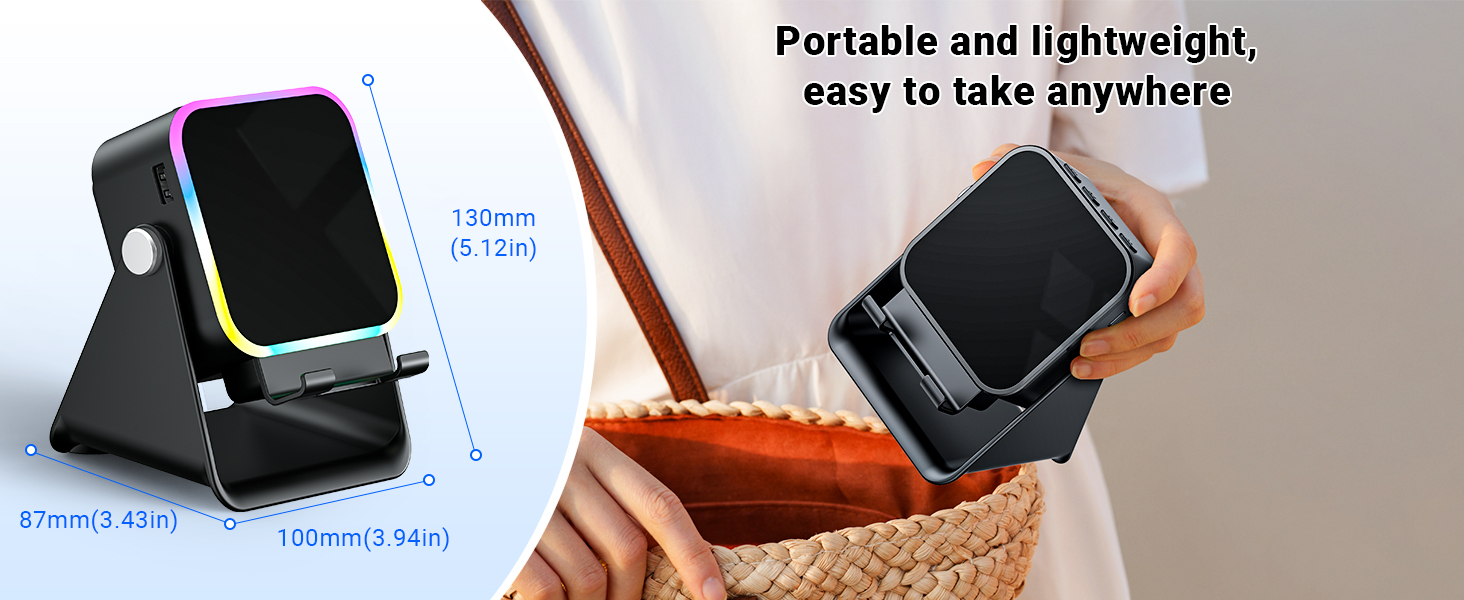
Image: Adjustable stand with 360° rotation and non-slip base for stability.
6. Obrachadh
6.1 Cumhachd air / dheth
Fada brùth am putan cumhachd (⏻) gus an inneal a thionndadh air no dheth.
6.2 Switching Modes (Induction / Bluetooth)
After powering on, the device will typically start in Induction Mode. To switch between Induction Mode and Bluetooth Mode, short press the 'M' button.
Video: Demonstrates how to use both Induction and Bluetooth modes, including switching between them and proper phone placement.
6.3 Modh Inntrigidh
In Induction Mode, no Bluetooth connection is required. Simply place your smartphone correctly on the stand. The speaker's inductive chip will capture and amplify audio directly from your phone.
- Suidheachadh Fòn: Ensure your phone is placed correctly on the stand, typically in portrait orientation, for optimal sound transfer.
- Atharrachadh tomhas-lìonaidh: Adjust your phone's volume to 50% or higher for the best playback experience. You can also use the volume buttons on the speaker.
- Co-chòrdalachd: Induction mode is primarily compatible with smartphones. It does not support iPads or tablets.
- Cuir dheth gu fèin-ghluasadach: The speaker will automatically turn off after 10 minutes of standby in Induction Mode.

Image: Guide on how to correctly place your phone and adjust volume for Induction Mode.
6.4 Modh Bluetooth
For wireless audio streaming, switch to Bluetooth Mode:
- Fada brùth air a’ phutan cumhachd gus an neach-labhairt a thionndadh air.
- Short press the 'M' button to switch to Bluetooth Mode (you will hear an audible prompt).
- On your phone or tablet, go to Bluetooth settings and search for "ZJ-027".
- Select "ZJ-027" to pair. For Android devices, enable "Sync volume with phone" in Bluetooth settings after pairing for optimal control.
- Cho luath ‘s a bhios e ceangailte, faodaidh tu claisneachd a chluich bhon inneal agad tron neach-labhairt.
In Bluetooth mode, you can place your phone horizontally or vertically on the stand. The Bluetooth range is approximately 10 meters.

Image: Visual representation of Induction Mode (no Bluetooth) and Bluetooth Mode (10m range).
6.5 Gnìomhan Solais LED
The speaker features colorful LED lights:
- Modhan Solais Atharraich: Single-click the 'M' button to cycle through different light colors and patterns.
- Tionndaidh air / dheth solais: Long-press the 'M' button to turn the LED lights on or off.

Image: Multiple light strip patterns to choose from.
6.6 Power Bank Function (Emergency Charge)
The speaker can act as an emergency power bank for your phone. Connect your phone's charging cable (not included) to the USB-A output port on the speaker and to your phone. This is a wired charging function, not wireless charging.
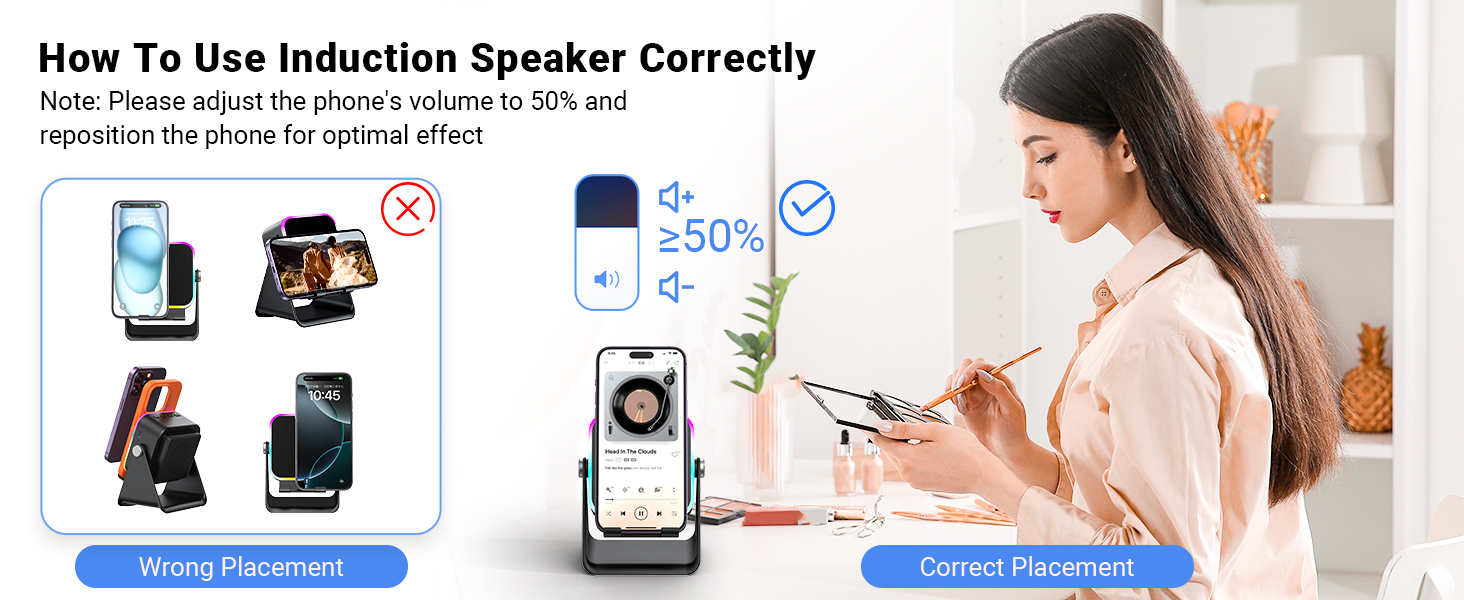
Image: The speaker's 3500mAh power bank function for emergency charging.
7. Cumail suas
- Glan an inneal le clò bog, tioram. Na cleachd innealan-glanaidh sgrìobach no fuasglaidhean.
- Seachain an inneal a nochdadh do sholas dìreach na grèine airson ùine mhòr.
- Cùm an inneal ann an àite fionnar, tioram nuair nach eilear ga chleachdadh.
8. A ’dèanamh trioblaid
Q1: What should I do if the volume is too low?
- If in Induction mode, place the phone correctly on the holder, and then adjust the phone's volume to 50% or higher.
- If you are using an Android device and using Bluetooth mode, first pair the Bluetooth device. Then enable "Sync volume with phone" in your phone's Bluetooth settings.
Q2: What should I do if the sound cuts in and out in Induction mode?
- Ensure the phone is correctly placed on the holder.
- The working principle of Induction mode is that the speaker's inductive chip captures audio from the phone and amplifies it through the speaker. The louder the phone's volume, the louder the speaker's output. Therefore, we recommend setting the phone's volume to 50% or higher to ensure uninterrupted playback.
9. Sònrachaidhean
| Feart | Mion-fhiosrachadh |
|---|---|
| Ainm Modail | ZJ-027 |
| Seòrsa neach-labhairt | Labhraiche so-ghiùlain |
| Feartan sònraichte | Bluetooth Speaker, Built-In Powerbank, Induction Speaker, LED Light, Phone Stand |
| Innealan co-fhreagarrach | Android Phone, iPad, iPhone |
| Dath | Dubh |
| Meudan toraidh | 5"D x 2"W x 3"H |
| Cuideam nì | 0.34 cileagram (12 unnsa) |
| Raon Bluetooth as àirde | 10 Meatair |
| Bataraidh | 1 Bataraidh a dhìth (air a ghabhail a-steach) |
| Dèanadair | AIKELA |
| Neach-labhairt cumhachd toraidh as àirde | 1 watt |
| Teicneòlas ceangail | Bluetooth, Induction |
| Stuth | Styrene acrylonitrile butadiene (ABS) |
10. Barantas & Taic
AIKELA provides 12 months of support for your Phone Amplifier Speaker. If you encounter any issues or have questions, please contact customer service. You can typically find contact information by navigating to 'Find Order' on the platform where you purchased the product.