
Ro-ràdh
This manual provides essential information for setting up, operating, and maintaining your NIMO 15.6" FHD Laptop Computer (Model NIMO N157). Please read this manual thoroughly before using your device to ensure optimal performance and longevity.
Dè th' anns a' Bhocsa
- 1 x Coimpiutair NIMO N157
- 1 x Charger Luath Seòrsa-C 65W PD
- 1 x Leabhar-làimhe Cleachdaiche (an sgrìobhainn seo)
- Windows 11 Home (pre-installed)
- 2 Years Warranty, 90 Days Return information
Stiùireadh rèiteachaidh
1. A’ chiad chumhachd air agus a’ cur cosgais air
Before first use, ensure your NIMO laptop is fully charged. Connect the provided Type-C 65W PD Fast Charger to the laptop's Type-C charging port and a power outlet. The charge LED indicator will illuminate. A full charge is recommended for optimal battery calibration.

Image: NIMO laptop connected to its Type-C 65W GaN II PD charger. This charger provides fast charging capabilities.
2. Operating System Setup (Windows 11 Home)
Upon first power-on, the laptop will guide you through the Windows 11 Home setup process. Follow the on-screen instructions to configure language, region, network settings, and create a user account. An internet connection (Wi-Fi 6 supported) is recommended for the initial setup to download necessary updates.

Image: The NIMO laptop screen showing the Windows 11 desktop interface.
3. Suidheachadh Leughadair Meòir-lorg
For enhanced security and quick login, set up the integrated fingerprint reader. Navigate to Windows Settings > Accounts > Sign-in options and follow the prompts to register your fingerprint. This allows for secure one-touch login.

Ìomhaigh: Sealladh dlùth view of the fingerprint reader on the NIMO laptop, illustrating its use for secure login.
Stiùireadh Obrachaidh
1. Keyboard and Backlight
The NIMO laptop features a full-size keyboard with a numeric keypad and a backlit function. To activate or adjust the keyboard backlight, use the dedicated function keys (Fn + Fx, refer to your keyboard layout for specific key). This feature allows for comfortable typing in low-light environments.
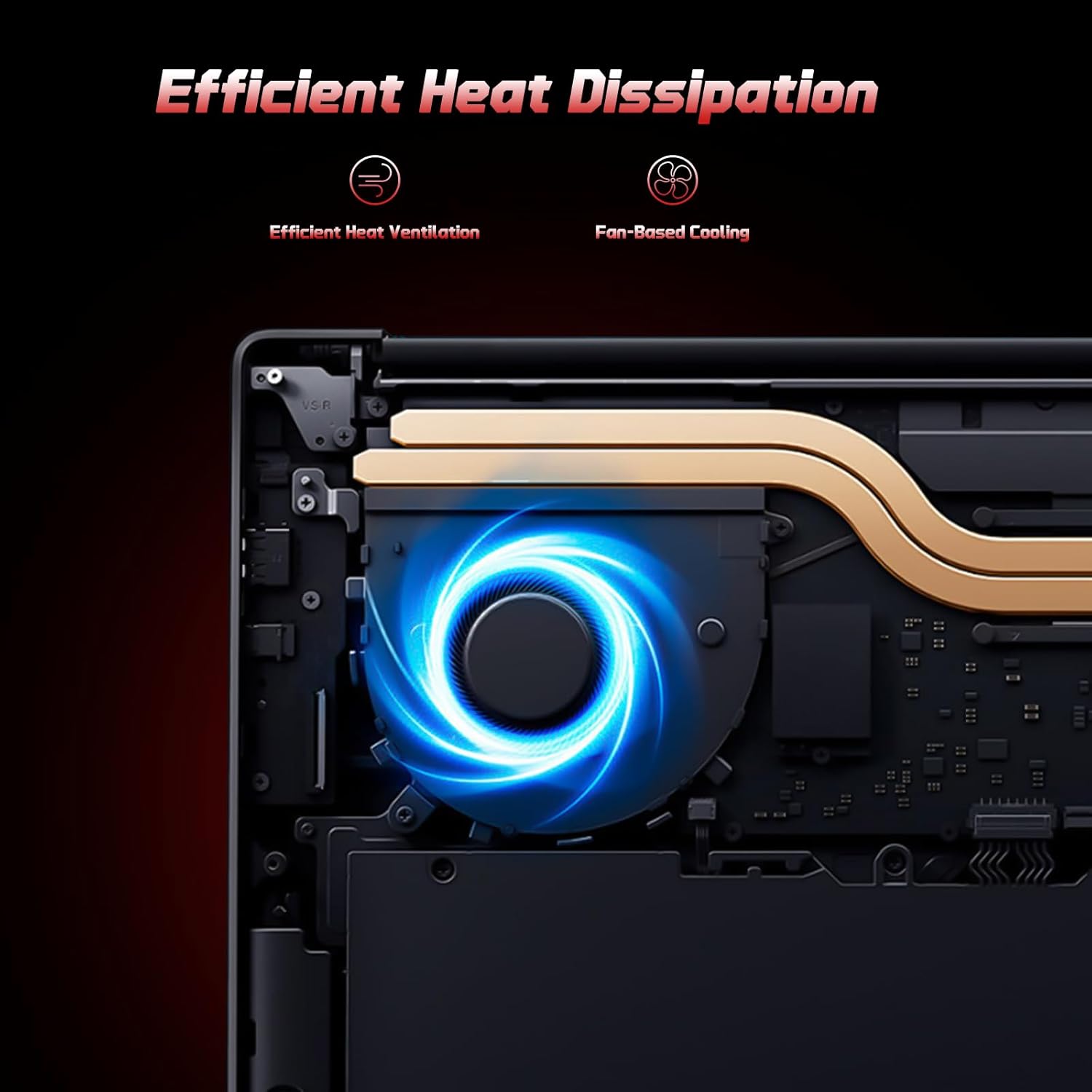
Image: A user typing on the NIMO laptop's backlit keyboard in a dim environment.
2. Ceangal Peripherals
The laptop is equipped with multiple ports for various peripherals:
- Puirt USB: Connect USB devices such as external drives, mice, or keyboards.
- Port HDMI: Ceangail ri monitor no Tbh taobh a-muigh airson taisbeanadh leudaichte.
- Puirt Seòrsa-C: One port supports 65W PD fast charging, and another is a multifunction port for data transfer and display output.
- Slot Micro SD: Insert a Micro SD card for expandable storage.
- Seabhag Jack: Ceangail fònaichean-cluaise no luchd-labhairt taobh a-muigh.
- Slot Lock Kensington: Airson tèarainteachd corporra.
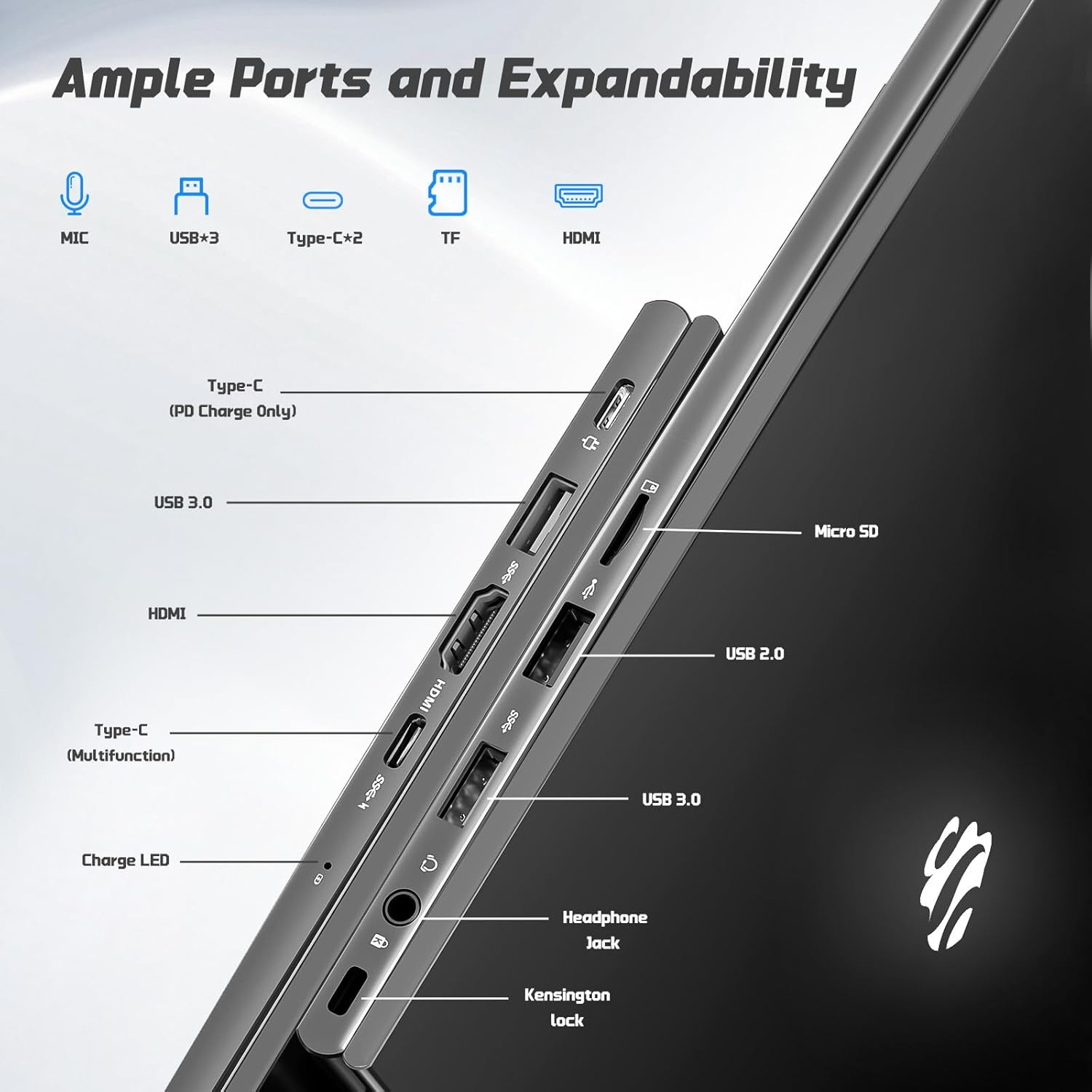
Ìomhaigh: Taobh view of the NIMO laptop highlighting the available ports including USB, HDMI, Type-C, Micro SD, and headphone jack.
3. Webcam and Privacy
The integrated 2MP webcam is suitable for video calls and online meetings. For privacy, ensure the camera is covered or disabled when not in use, if a physical privacy shutter is present (refer to product images for confirmation).
Video: This video demonstrates the NIMO laptop's features, including the webcam and various ports. It shows the laptop being used for work, school, and play, highlighting the backlit keyboard and fingerprint unlock feature.
Video: This video showcases the NIMO laptop's versatility for different users, including students and professionals. It highlights the 15.6" FHD display, backlit keyboard, and multiple connectivity options.
Video: A comprehensive introduction to the NIMO 15.6" laptop, detailing its design, performance, and user experience for various tasks.
Video: This video emphasizes the efficiency and convenience of the NIMO laptop, showcasing its features that contribute to productivity and ease of use.
Video: This video highlights the NIMO 15.6" FHD laptop's suitability for students, home use, and work, demonstrating its performance in various daily scenarios.
Cumail suas
1. Glanadh an Laptop
Gus an sgrion a ghlanadh, cleachd clò bog, gun lint a chaidh a dhealbhadh gu sònraichte airson electronics. Airson a’ mheur-chlàir agus an chassis, cleachd clò beagan bog.amp cloth with mild cleaning solution can be used. Avoid excessive moisture and abrasive materials. Ensure the laptop is powered off before cleaning.
2. Cùram Bataraidh
The NIMO laptop features a 53.58 Watt Hours Lithium Polymer battery. To prolong battery life, avoid fully discharging the battery frequently. It is recommended to keep the battery charge between 20% and 80% when possible. Store the laptop in a cool, dry place when not in use for extended periods.
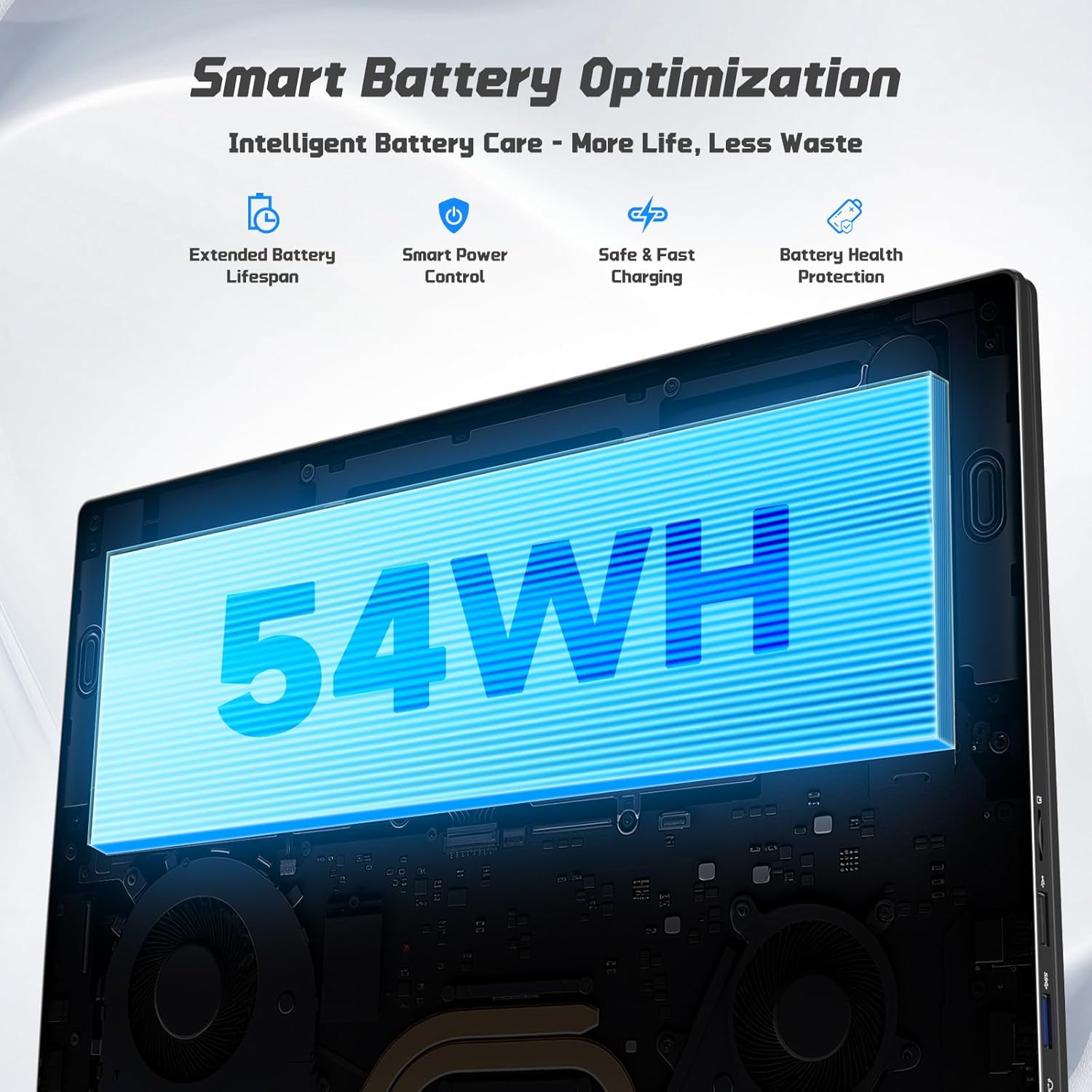
Image: Diagram illustrating the NIMO laptop's smart battery optimization features, including extended lifespan, smart power control, safe and fast charging, and battery health protection.
3. Ùrachaidhean bathar-bog
Regularly check for and install Windows updates to ensure your system has the latest security patches and performance improvements. Go to Settings > Windows Update to manage updates.
4. Sgaoileadh teas
The laptop is designed with efficient heat ventilation and fan-based cooling. To prevent overheating, ensure that the ventilation openings are not blocked during use. Avoid placing the laptop on soft surfaces like beds or couches that can obstruct airflow.
Ìomhaigh: Taobh a-staigh view of the NIMO laptop showing its efficient heat dissipation system with fan-based cooling.
Fuasgladh thrioblaidean
1. Laptop gun a bhith a’ tionndadh air
- Dèan cinnteach gu bheil an charger ceangailte gu tèarainte ris an laptop agus ri socaid cumhachd a tha ag obair.
- Check the charge LED indicator. If it's not lit, try a different outlet or charger.
- Brùth is cum sìos am putan cumhachd airson 10-15 diogan gus ath-shuidheachadh cruaidh a dhèanamh.
2. Duilgheadasan leis an sgrion (Gun taisbeanadh, a’ priobadh)
- Connect an external monitor via the HDMI port to check if the issue is with the laptop's display or graphics output.
- Ath-thòisich an laptop.
- Ensure display drivers are up to date via Windows Update or NIMO's support weblàrach.
3. Coileanadh Mall
- Dùin aplacaidean neo-riatanach a tha a’ ruith sa chùlaibh.
- Thoir sùil airson ùrachaidhean Windows sam bith a tha ri thighinn agus stàlaich iad.
- Ensure sufficient free space on the 128GB SSD. Consider expanding storage using the Micro SD slot or upgrading the SSD if needed.
- Ruith sganadh bhìoras.
4. Cùisean Ceangail Wi-Fi no Bluetooth
- Ensure Wi-Fi and Bluetooth are enabled in Windows Settings.
- Ath-thòisich an router/modem agad airson duilgheadasan Wi-Fi.
- Update network drivers via Windows Update or NIMO's support weblàrach.
Sònrachaidhean
| Feart | Mion-fhiosrachadh |
|---|---|
| Brand | NIMO |
| Ainm Modail | NIMO N157G |
| Meud sgrion | 15.6 òirlich |
| Fuasgladh Taisbeanaidh | 1920x1080 piogsail (FHD) |
| Seòrsa Taisbeanaidh | IPS LCD, Anti-glare |
| Pròiseasar | Intel Pentium N150 (4-Core, up to 3.6 GHz) |
| RAM | 4 GB DDR4 (Expandable up to 16 GB) |
| Stòradh | 128 GB SSD (Expandable via Micro SD) |
| Siostam-obrachaidh | Windows 11 dachaigh |
| Grafaigean | Grafaigean Intel aonaichte |
| Webcam | Camara aghaidh 2 MP |
| Ceangalachd | Wi-Fi 6, Bluetooth 5.3 |
| Puirt | 2x USB 3.0, 1x USB 2.0, 2x Type-C (1x PD Charge Only, 1x Multifunction), 1x HDMI, 1x Micro SD Slot, 1x Headphone Jack, 1x Kensington Lock |
| Bataraidh | 53.58 Wh Lithium Polymer (Up to 12.75 hours life) |
| Charger | 65W Type-C PD Fast Charger |
| Feartan sònraichte | Meur-chlàr le solas cùil, Leughadair lorgan-meòir, Fuaim HD, Meur-chlàr àireamhach |
| Meudan | 14.07"F x 8.98"L x 0.76"À |
| Cuideam | 3.75 Punnd |
Barantas & Taic
Tha an laptop NIMO agad a’ tighinn le Barantas 2-bliadhna from NIMO Direct Inc. Additionally, a 90-Day Hassle-Free Return Policy is provided. For any product-related questions, technical assistance, or warranty claims, please contact NIMO customer support.
Fiosrachadh conaltraidh:
- Post-d: seirbheis@nimopc.com
- Taic air-loidhne: Refer to the official NIMO weblàrach airson tuilleadh ghoireasan taic.
Please have your model number (NIMO N157) and purchase details ready when contacting support.