
SVITOO SVITOO Tab 10 GMS Certified 1027C
SVITOO Kids Tablet 10 Inch User Manual
Model: SVITOO Tab 10 GMS Certified 1027C
Ro-ràdh
This manual provides essential instructions for setting up, operating, and maintaining your SVITOO Kids Tablet 10 Inch. Designed for young users, this Android 15 tablet features parental controls, a durable shockproof case, and a vibrant 10-inch HD IPS display. Please read this guide thoroughly to ensure proper use and to maximize your tablet's functionality.
Dè th' anns a' Bhocsa
- SVITOO Kids Tablet 10 Inch
- Protective Cover (Pre-installed)
- Càball cosgais USB-C
- Leabhar-làimhe cleachdaiche
- Bogsa Tiodhlac
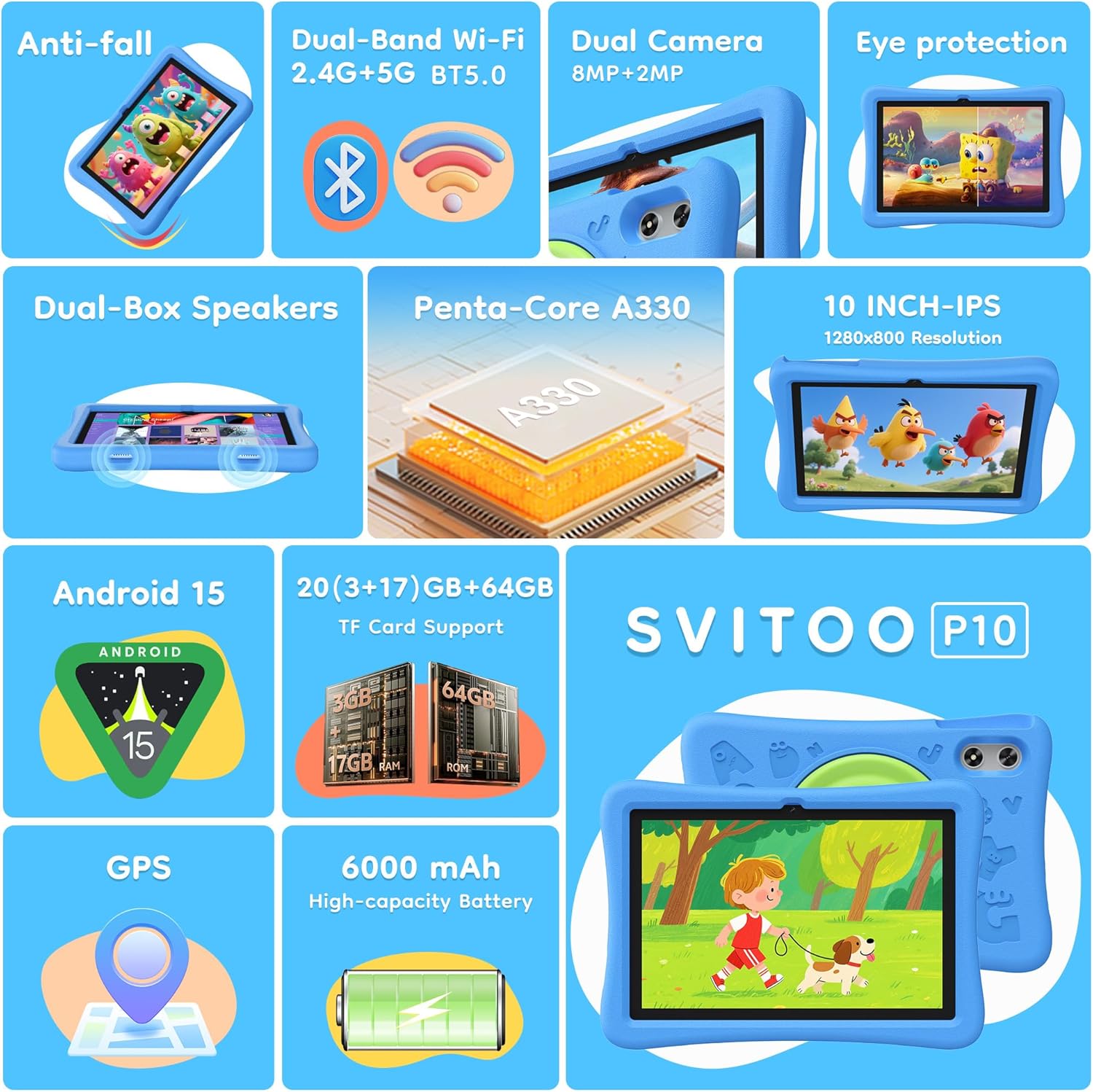
Image: The SVITOO Kids Tablet 10 Inch, shown in its blue protective case, highlighting its robust design suitable for children.
Bathar seachadview
Prìomh fheartan
- Siostam-obrachaidh: Android 15 with GMS Certification for full Google Play access.
- Taisbeanadh: 10-inch HD IPS (1280 x 800 pixels) touchscreen with eye protection mode.
- Pròiseasar: Unisoc T7200 8-core CPU for smooth performance.
- Cuimhne & Stòradh: 20GB RAM (3GB physical + 17GB virtual) and 64GB internal storage, expandable up to 1TB via microSD card (sold separately).
- Camara: Camara cùil 8MP agus camara aghaidh 2MP.
- Ceangal: Dual-Band Wi-Fi (2.4/5 GHz) and Bluetooth 5.0.
- Bataraidh: 6000mAh high-capacity battery for extended usage.
- Fuaim: Dual-box speakers and a 3.5mm headphone jack.
- Seasmhachd: Kid-friendly EVA shockproof case with a 360° rotating handle and 180° rotating stand.
- Smachdan Phàrant: Advanced settings for screen time limits, content filtering, and app management.
Co-phàirtean tablet
Dèan eòlas air na pàirtean fiosaigeach den chlàr-bhùird agad:

Ìomhaigh: Mion-fhiosrachadh view of the tablet's side and rear, indicating the USB Type-C port, headphone jack, power ON/OFF button, volume controls, speakers, rear camera, and front camera.
- Port USB Type-C: Airson cosgais agus gluasad dàta.
- Jack headphone (3.5mm): Airson fònaichean-cluaise uèirleas a cheangal.
- Putan Cumhachd ON / OFF: To turn the tablet on/off or put it to sleep.
- Putanan tomhas-lìonaidh: Gus meud an fhuaim atharrachadh.
- Luchd-labhairt: Dual-box speakers for audio output.
- Camara aghaidh: Airson gairmean bhidio agus selfies.
- Camara cùil: Airson dealbhan is bhideothan a thogail.
- Slot cairt MicroSD: Located under a protective flap, for storage expansion.

Image: The tablet's protective case featuring a versatile 360-degree rotating handle that also functions as a 180-degree rotating stand, allowing for various viewing ceàrnan.
Stiùireadh rèiteachaidh
- Cuir cosgais air a’ chlàr: Before first use, fully charge the tablet using the provided USB-C cable and a compatible power adapter.
- Cumhachd air: Press and hold the Power ON/OFF button until the screen lights up.
- Suidheachadh tùsail: Lean na stiùiridhean air an sgrion gus do chànan a thaghadh, ceangal ri lìonra Wi-Fi, agus do chunntas Google a stèidheachadh.
- Google Kids Space / Parental Controls: During setup, you will have the option to configure Google Kids Space or other parental control settings. It is highly recommended to set these up immediately to ensure a safe environment for your child.
- Stàlaich Apps: Once setup is complete, you can download age-appropriate apps and games from the Google Play Store.
Stiùireadh Obrachaidh
Seòladh bunaiteach
- Sgrion Dachaigh: Sguab clì no deas gus faighinn gu diofar dhuilleagan aplacaid.
- Drathair an aplacaid: Swipe suas bho bhonn na sgrìn gu view a h-uile aplacaid stàlaichte.
- Fiosan & Roghainnean Luath: Swipe down from the top of the screen to access notifications and quick settings like Wi-Fi, Bluetooth, and screen brightness.
- Air ais, Dachaigh, Aplacaidean O chionn ghoirid: Use the navigation buttons at the bottom of the screen to go back, return to the home screen, or view recently opened applications.
A ’togail a’ chlàir
Connect the USB-C charging cable to the tablet's USB-C port and the other end to a power adapter. The battery icon on the screen will indicate charging status. A full charge provides approximately 12 hours of mixed use.

Image: The tablet connected to a charger, displaying a battery icon with 99% charge, illustrating the charging process and battery life features like Night Mode and Energy Saving.
Modh dìon sùla
To reduce eye strain, especially during prolonged use, activate the Eye Protection Mode (often called Night Mode or Reading Mode) from the quick settings panel or display settings. This mode adjusts screen colors to warmer tones.
Smachdan Phàrant
The SVITOO Kids Tablet features robust parental controls to help manage your child's digital experience. These controls are integrated with Android 15 and Google Family Link.

Image: A family using the tablet, with an overlay showing various parental control options such as setting screen time limits, blocking harmful apps/websites, approving app downloads, and tracking child's location.
Configuring Parental Controls:
- Roghainnean inntrigidh: Rach gu Suidhichidhean > Sunnd didseatach & Smachdan Phàrant or search for "Family Link" in your app drawer.
- Set Screen Time Limits: Define daily limits for tablet usage to encourage balanced screen time.
- Criathradh susbaint: Bacadh ruigsinneachd gu neo-iomchaidh weblàraichean-lìn agus aplacaidean.
- App Approvals: Require parental approval for new app downloads or in-app purchases.
- Lorg àite: Monitor your child's device location (if enabled and configured).
For detailed instructions on Google Family Link, please refer to Google's official support documentation.
Cumail suas
- Glanadh: Use a soft, lint-free cloth to clean the screen and tablet body. Avoid abrasive cleaners or solvents.
- Cùram Bataraidh: To prolong battery life, avoid fully discharging the tablet frequently. Charge it regularly and avoid exposing it to extreme temperatures.
- Ùrachaidhean bathar-bog: Keep the tablet's operating system and apps updated to ensure optimal performance and security.
- Stòradh: Stòraich an tablet ann an àite fionnar, tioram air falbh bho sholas dìreach na grèine nuair nach eilear ga chleachdadh.
- Cùis dìon: The included EVA shockproof case provides protection against drops and bumps. Ensure it is properly fitted at all times.
Fuasgladh thrioblaidean
| Trioblaid | Fuasgladh |
|---|---|
| Chan eil an tablet a’ tionndadh air. | Ensure the tablet is fully charged. Connect it to a charger for at least 30 minutes, then try powering it on again. |
| Tha an sgrion neo-fhreagairt. | Perform a force restart by holding the Power ON/OFF button for 10-15 seconds. If the issue persists, contact support. |
| Duilgheadasan le ceangal Wi-Fi. | Check if other devices can connect to the Wi-Fi network. Restart your router and the tablet. Forget the network and reconnect. |
| Tha aplacaidean a’ tuiteam no slaodach. | Close background apps. Clear app cache (Settings > Apps > [App Name] > Storage > Clear Cache). Ensure sufficient storage space is available. Restart the tablet. |
| Bidh bataraidh a’ drèanadh gu sgiobalta. | Lùghdaich soilleireachd na sgrìn. Dùin aplacaidean nach eilear a’ cleachdadh. Cuir dheth Wi-Fi/Bluetooth nuair nach eilear gan cleachdadh. Thoir sùil air cleachdadh bataraidh anns na roghainnean gus aplacaidean a tha ag ithe mòran cumhachd aithneachadh. |
Sònrachaidhean
| Feart | Mion-fhiosrachadh |
|---|---|
| Ainm Modail | SVITOO Tab 10 GMS Certified 1027C |
| Siostam-obrachaidh | Android 15 |
| Meud sgrion | 10 òirlich |
| Fuasgladh sgrion | 1280 x 800 piogsail (HD IPS) |
| Pròiseasar | 1.8 GHz (Unisoc T7200 8-core CPU) |
| RAM | 20 GB (3GB corporra + 17GB brìgheil) |
| Stòradh a-staigh | 64 GB |
| Stòradh a ghabhas leudachadh | Up to 1TB via MicroSD (sold separately) |
| Grafaigeachd coprocessor | Mali-G57 processor Imagination Tech |
| Seòrsa gun uèir | 802.11a/b/g/n/ac (Dual-Band 2.4/5 GHz) |
| Bluetooth | Bluetooth 5.0 |
| Comas Bataraidh | 6000 mAh |
| Beatha bataraidh cuibheasach | 12 Uairean |
| Camara aghaidh | 2 megapixel |
| Camara cùil | 8 megapixel |
| Cuideam nì | 2.44 not |
| Meudan toraidh | 9.7 x 6.4 x 0.4 òirleach |
Barantas agus Taic
Your SVITOO Kids Tablet comes with a 1-Year Manufacturer Protection. This warranty covers manufacturing defects under normal use. It does not cover damage caused by misuse, accidents, natural disasters, or unauthorized modifications.
For technical support, warranty claims, or any questions regarding your product, please contact SVITOO customer service through your Amazon order page. Look for the "Contact Us" option next to your order details.
Cùm dearbhadh do cheannach airson adhbharan barantais.
Ask a question about this manual
Ask about setup, troubleshooting, compatibility, parts, safety, or missing instructions. Manuals+ will review the question and use this page’s manual context to help answer it.