
Ro-ràdh
This manual provides comprehensive instructions for the OMAIC EN2Q36H replacement remote control, designed for Hisense Smart TVs. It covers essential information regarding setup, operation, and maintenance to ensure optimal performance and user experience. This remote offers a direct replacement solution without the need for complex programming.
Suidhich
The OMAIC EN2Q36H remote control is designed for immediate use with compatible Hisense Smart TVs. No programming or pairing is required.
Stàladh bataraidh
- Lorg an roinn bataraidh air cùl an smachd iomallach.
- Slide the battery cover downwards or in the direction indicated by the arrow to open it.
- Insert two AAA alkaline batteries (not included), ensuring the positive (+) and negative (-) terminals align correctly with the markings inside the compartment.
- Cuir còmhdach a’ bhataraidh air ais na àite le bhith ga shleamhnadh air ais gus an cliog e gu tèarainte.
Once batteries are installed, the remote is ready to operate your Hisense Smart TV.

Stiùireadh Obrachaidh
This remote control utilizes infrared (IR) technology for communication with your Hisense Smart TV. Ensure a clear line of sight between the remote and the TV's IR receiver for optimal performance.
Prìomh fheartan
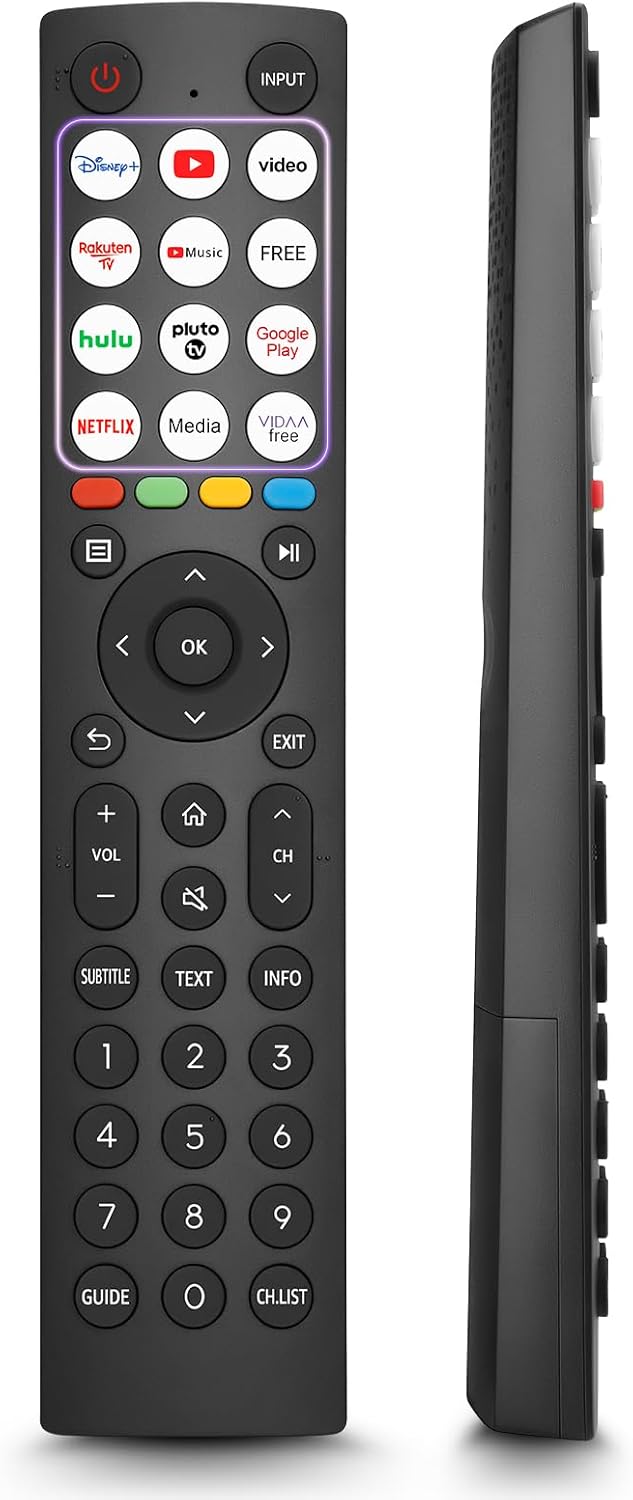
- 12 Shortcut Buttons: Quickly access popular streaming services and applications with dedicated buttons.
- Strong IR Signal: Provides a longer transmission distance and quick response without noticeable delay.
- Togail seasmhach: Made from high-quality ABS and silicone materials for extended lifespan.

Gnìomhan Putan
Familiarize yourself with the functions of each button on your OMAIC EN2Q36H remote control:
| Putan | Gnìomh |
|---|---|
| CUMHACHD | Switches the TV on or into standby mode. |
| IOMPACHADH | A’ taghadh stòran cuir-a-steach (HDMI, AV, msaa.). |
| APP Buttons | Quick access buttons for specific applications (e.g., Disney+, Netflix, YouTube). |
| MENU | Displays the Quick Setup menu. |
| Smachd MEADHANAN | Buttons for Play, Pause, Stop, Fast Forward, Rewind. |
| Seòladh (Suas/Sìos/Clì/Deas) | Navigates on-screen menus and adjusts system settings. |
| OK | Confirms selection in on-screen menus. |
| DUAN | A ’tilleadh chun chlàr roimhe. |
| Exit | A-mach às a’ chlàr gnàthach. |
| VOL +/- | Atharraich an ìre fuaim. |
| DACHAIGH | Enters the Home screen. |
| Mute | A’ cuir dheth no ag ath-nuadhachadh fuaim an Tbh. |
| CH ^/v | Switches channels. |
| SUBTITLE | Activates or deactivates subtitle mode. |
| TEAGASG | Turns teletext function on and off. |
| FIOSRACHADH | A’ taisbeanadh fiosrachadh mun phrògram làithreach. |
| NUMBER Buttons (0-9) | Direct channel selection or number input. |
| GUIDHEACH | Displays the Electronic Programme Guide (DTV input). |
| CH.LIST | Displays the Channel List on the screen. |

Compatible Hisense TV Models
The OMAIC EN2Q36H replacement remote control is compatible with the following Hisense VIDAA 4K HDTV Smart TV series:
- 32A4K, 40A4K, 43A4K
- 32A5KQ, 40A5KQ
- 43A6K, 50A6K, 55A6K, 58A6K, 65A6K, 70A6K, 75A6K, 85A6K
- 55U6KQ, 65U6KQ
- 43A7KQ, 50A7KQ, 55A7KQ, 65A7KQ, 75A7KQ
- 43E7KQ, 50E7KQ, 55E7KQ, 65E7KQ, 75E7KQ
Cumail suas
Gus dèanamh cinnteach gum mair an smachd iomallach agad fad-beatha agus gum bi e ag obair gu ceart, lean na stiùiridhean cumail suas seo:
- Glanadh: Use a soft, dry cloth to clean the remote. Avoid using liquid cleaners or abrasive materials, as they may damage the surface or internal components.
- Ath-nuadhachadh bataraidh: Replace batteries when the remote's response becomes sluggish or stops working. Always replace both batteries at the same time with new ones of the same type (AAA alkaline).
- Stòradh: Stòraich an smachd iomallach ann an àite fionnar, tioram air falbh bho sholas dìreach na grèine, teòthachd anabarrach, agus taiseachd àrd.
- Seachain Drops: Dìon an inneal iomallach bho bhuaidh chorporra, oir faodaidh boinneagan cron a dhèanamh air na cuairtean a-staigh.
Fuasgladh thrioblaidean
Ma thachras duilgheadasan leis an smachd iomallach agad, thoir sùil air na ceumannan fuasgladh-cheistean a leanas:
| Trioblaid | Adhbhar a dh’fhaodadh a bhith ann | Fuasgladh |
|---|---|---|
| Iomallach gun a bhith a ’freagairt | Bataraidhean marbh no air an cur a-steach gu ceàrr. | Cuir bataraidhean alcaileach AAA ùra nan àite, a’ dèanamh cinnteach gu bheil am polarachd cheart. |
| Iomallach gun a bhith a ’freagairt | Bacadh eadar an smachd iomallach agus an telebhisean. | Ensure a clear line of sight to the TV's IR receiver. Remove any objects blocking the path. |
| Iomallach gun a bhith a ’freagairt | Tha an smachd iomallach ro fhada bhon telebhisean. | Move closer to the TV. The remote has an extended range, but extreme distances may affect performance. |
| Tha putanan steigeach no neo-fhreagairt | Salachar no sprùilleach fo na putanan. | Gently clean around the buttons with a soft, dry cloth. Avoid liquids. |
| Specific functions not working | TV model incompatibility (rare). | Verify your Hisense TV model is listed in the 'Compatible Hisense TV Models' section. |
Sònrachaidhean
| Feart | Mion-fhiosrachadh |
|---|---|
| Ainm Modail | EN2Q36H |
| Brand | OMAIC |
| Innealan co-fhreagarrach | Hisense Smart TVs |
| Teicneòlas ceangail | In-dhearg (IR) |
| Àireamh de phutanan | 48 |
| Seòrsa smachd | Smachd putan |
| Feartan sònraichte | Universal, Comfortable |
| Dath | Dubh |
| Tuairisgeul bataraidh | AAA (Alkaline) |
| Supported Devices (Max) | 1 |
| Meudan Bathar (Mu thuairmse) | 34.7 x 24.7 x 2.2 cm |
| Cuideam toraidh (timcheall air.) | 80 gram |

Barantas agus Taic
OMAIC is committed to the quality and compatibility of its replacement remote controls. We provide professional after-sales support to ensure customer satisfaction.
If you have any questions or concerns regarding your OMAIC EN2Q36H remote control or your order, please contact us directly. Our support team aims to respond to inquiries within 12 working hours.