
Ro-ràdh
Welcome to the user manual for your new VAIO SX-R Laptop. This document provides essential information to help you set up, operate, maintain, and troubleshoot your device. Please read this manual thoroughly to ensure optimal performance and longevity of your laptop.
Bathar seachadview
The VAIO SX-R is a high-performance laptop designed for productivity and creative tasks. It features an Intel Core Ultra 7 processor, a vibrant 14-inch WQXGA Touch Display, ample memory, and fast storage.
Prìomh fheartan
- Pròiseasar: Intel Core Ultra 7 (16-Core, AI-Boosted) for enhanced speed and responsiveness.
- Taisbeanadh: 14-inch WQXGA Touch Display (2560x1600) offering high resolution and wide color gamut.
- Cuimhne: 32GB LPDDR5 RAM for superior multitasking.
- Stòradh: 1TB PCIe NVMe SSD for fast data access and ample stòradh.
- Siostam-obrachaidh: Windows 11 Pro with enterprise-grade security and productivity features.
- Tèarainteachd: Integrated IR Camera and Fingerprint Reader for secure login.
- Cassis: Durable Carbon Fiber construction.
Laptop Components and Ports

Figure 1: VAIO SX-R Laptop, illustrating the overall design.
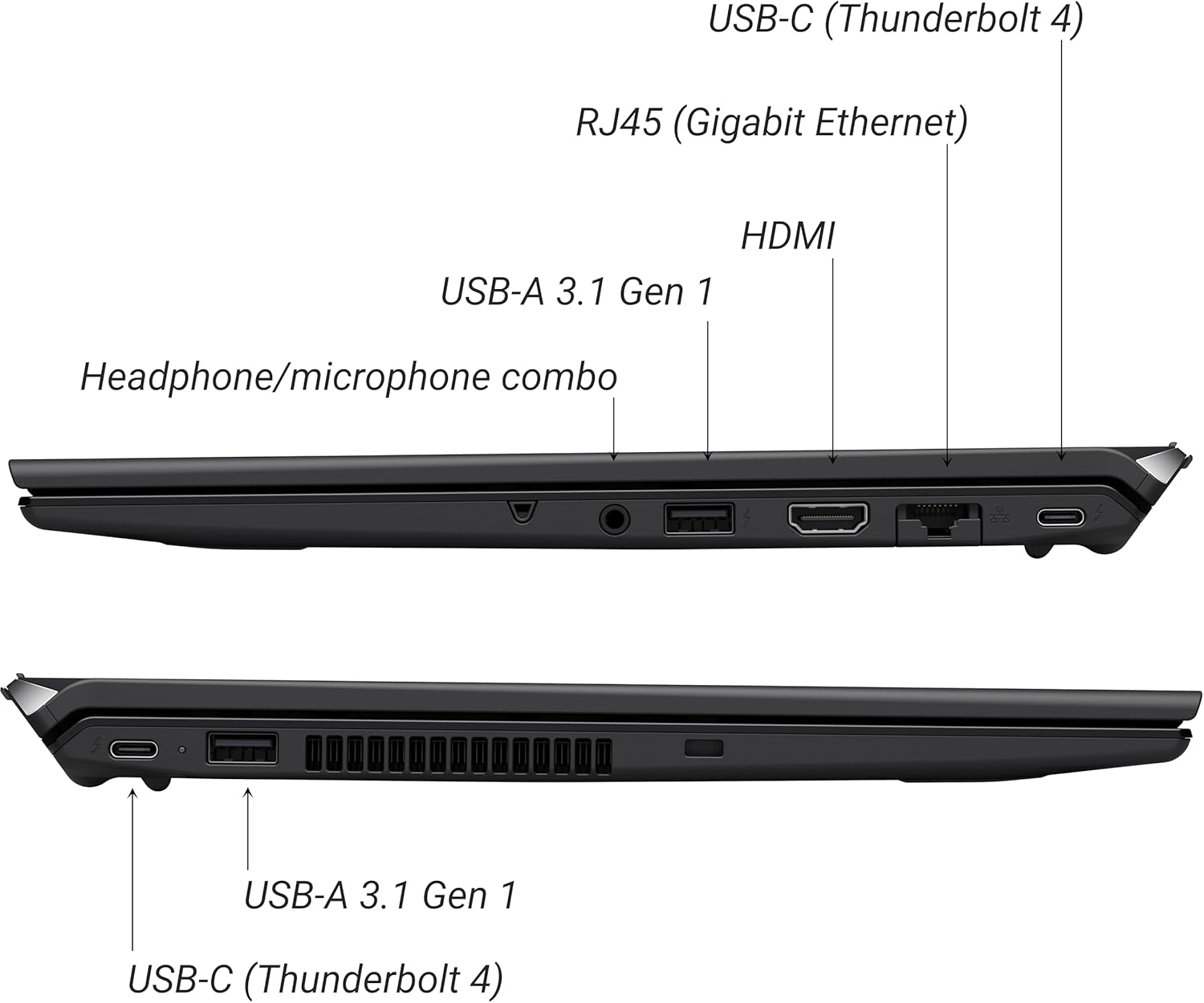
Figure 2: Port layout of the VAIO SX-R Laptop. The left side includes a headphone/microphone combo jack, USB-A 3.1 Gen 1, HDMI, RJ45 (Gigabit Ethernet), and USB-C (Thunderbolt 4). The right side features another USB-C (Thunderbolt 4) and USB-A 3.1 Gen 1 port.
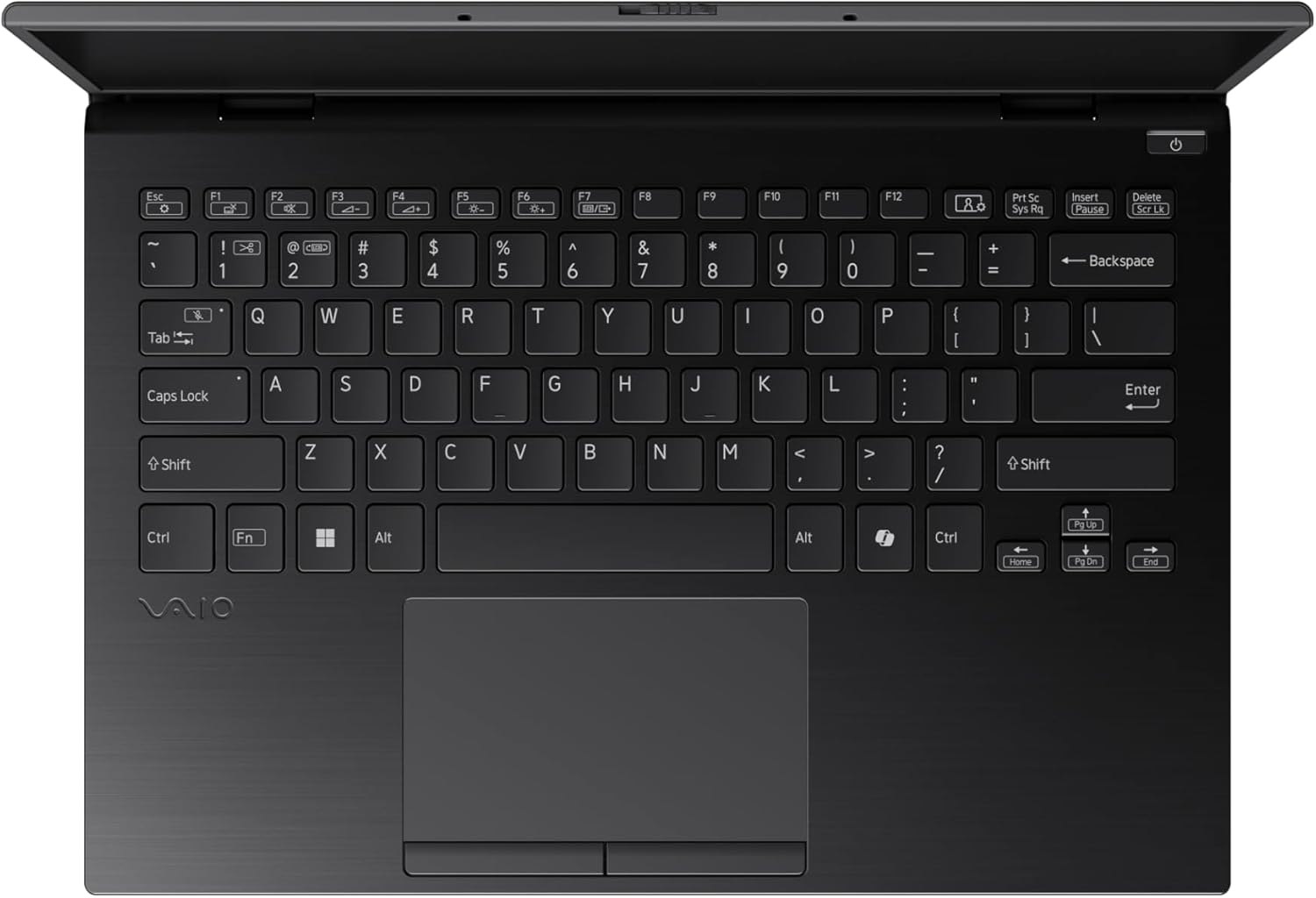
Figure 3: The VAIO SX-R Laptop keyboard and touchpad, featuring a backlit keyboard and integrated fingerprint sensor.
Suidhich
1. A’ chiad chumhachd air
- Ceangal cumhachd: Cuir an inneal-atharrachaidh AC a-steach do phort cumhachd an laptop agus an uairsin a-steach do socaid balla.
- Laptop Fosgailte: Fosgail còmhdach an laptop gu faiceallach.
- Cumhachd air: Press the power button, typically located on the top right of the keyboard deck. The power indicator light will illuminate.
2. Windows 11 Pro Setup
Follow the on-screen instructions to complete the initial Windows 11 Pro setup. This includes:
- A’ taghadh do roinn agus cruth a’ mheur-chlàir.
- A 'ceangal ri lìonra Wi-Fi.
- A’ gabhail ris an aonta ceadachais.
- Creating or logging in with a Microsoft account.
- Setting up your PIN, fingerprint, or facial recognition (IR Camera).
3. Ceangal Peripherals
You can connect external devices such as mice, keyboards, external monitors, and USB drives to the available ports as shown in Figure 2.
Ag obrachadh
1. Cleachdadh Bunaiteach
- Meur-chlàr: Use the integrated backlit keyboard for typing. Function keys (F1-F12) often have secondary functions accessible via the 'Fn' key.
- Touchpad: The precision touchpad supports multi-touch gestures for navigation.
- Sgrion-touch: Interact directly with the 14-inch WQXGA display using touch gestures.
2. Feartan tèarainteachd
- Leughadair lorgan-meòir: Enroll your fingerprints through Windows Settings > Accounts > Sign-in options for quick and secure login.
- Camara IR: Utilize Windows Hello facial recognition for convenient and secure access. Set this up in Windows Settings > Accounts > Sign-in options.
3. Riaghladh Cumhachd
- Modh cadail: Close the lid or press the power button briefly to put the laptop to sleep.
- Dùin sìos: Go to Start > Power > Shut down to turn off the laptop completely.
- Ath-thòiseachadh: Go to Start > Power > Restart to reboot the system.
Cumail suas
1. Glanadh
- Sgrion: Cleachd clò bog, gun lint beagan dampair a nighe le uisge no inneal-glanaidh sgrion. Seachain ceimigean làidir.
- Meur-chlàr agus Chassis: Cleachd clò bog. Airson salachar stòlda, cleachd clò beagan bog.amp Faodar clò le siabann tlàth a chleachdadh, a’ dèanamh cinnteach nach tèid leaghan a-steach do na fosglaidhean.
- Puirt: Cleachd èadhar teannaichte gus duslach a ghlanadh gu socair bho phuirt.

Figure 4: The VAIO SX-R features a water-resistant keyboard, designed to withstand minor spills.
2. Ùrachaidhean bathar-bog
Regularly update your Windows operating system and device drivers to ensure optimal performance, security, and compatibility. Access updates via Windows Settings > Windows Update.
3. Cùram Bataraidh
- Seachain teòthachd anabarrach.
- Na cuir às don bhataraidh gu tur gu tric.
- Airson stòradh fad-ùine, cuir cosgais air a’ bhataraidh gu timcheall air 50-60%.
Fuasgladh thrioblaidean
Tha an earrann seo a’ dèiligeadh ri cùisean cumanta a dh’ fhaodadh tu a thighinn tarsainn orra.
1. Chan eil an laptop a’ dol air
- Dèan cinnteach gu bheil an inneal-atharrachaidh AC ceangailte gu tèarainte ris an laptop agus ri socaid cumhachd a tha ag obair.
- Thoir sùil a bheil an socaid cumhachd ag obair le bhith a’ cur inneal eile a-steach.
- Ma tha am bataraidh air a dhrèanadh gu tur, leig leis cosgais a chuir air airson co-dhiù 30 mionaid mus feuch thu ri cumhachd a chuir air.
2. Cùisean Taisbeanaidh
- Gun taisbeanadh: Ceangail monitor taobh a-muigh ris a’ phort HDMI gus faicinn a bheil a’ chùis leis an taisbeanadh a-staigh aig an laptop.
- Taisbeanadh a’ priobadh/a’ saobhadh: Update your graphics drivers. Adjust display resolution and refresh rate in Windows Settings > System > Display.
3. Duilgheadasan Ceangail Wi-Fi
- Ensure Wi-Fi is enabled in Windows Settings > Network & internet > Wi-Fi.
- Ath-thòisich an router agus am modem agad.
- Run the Windows Network Troubleshooter.
4. Coileanadh Mall
- Dùin aplacaidean neo-riatanach a tha a’ ruith sa chùlaibh.
- Thoir sùil air Manaidsear Gnìomhan (Ctrl+Shift+Esc) airson pròiseasan a tha dian air goireasan.
- Ensure your system is up to date and free from malware.
Sònrachaidhean
Below are the detailed specifications for the VAIO SX-R Laptop (Model: VJS4R1X0511B).
| Feart | Sònrachadh |
|---|---|
| Brand | VAIO |
| Ainm Modail | VAIO SX-R |
| Àireamh Modail Nì | VJS4R1X0511B |
| Siostam-obrachaidh | Windows 11 pro |
| Pròiseasar | Intel Core Ultra 7 (1.4 GHz) |
| Cuimhne RAM | 32 GB LPDDR5 |
| Dràibhear cruaidh | SSD 1 TB PCIe NVMe |
| Meud sgrion | 14 òirlich |
| Fuasgladh sgrion | 2560 x 1600 piogsail (WQXGA) |
| Cairt grafaigeachd | Grafaigean Intel aonaichte |
| Seòrsa gun uèir | 802.11bgn |
| Puirt USB 3.0 | 3 |
| Beatha bataraidh cuibheasach | 10 Uairean |
| Cuideam nì | 3.1 not |
| Meudan toraidh | 14.2 x 15 x 3.3 òirleach |
| Feartan sònraichte | Backlit Keyboard, Fingerprint Reader, HD Audio, Memory Card Slot, Webcam |
Barantas agus Taic
1. Fiosrachadh Barantais
Your VAIO SX-R Laptop is covered by a manufacturer's warranty. Please refer to the warranty card included with your product packaging for specific terms, conditions, and duration. Keep your proof of purchase for warranty claims.
2. Taic Teicnigeach
For technical assistance, troubleshooting beyond this manual, or service inquiries, please contact VAIO customer support. You can typically find contact information on the official VAIO weblàrach-lìn no anns na sgrìobhainnean a chaidh a thoirt seachad leis an laptop agad.
- Taic air-loidhne: Visit the official VAIO support weblàrach airson Ceistean Cumanta, luchdachadh sìos draibhearan, agus roghainnean conaltraidh.
- Taic Fòn: Refer to your product documentation for regional support phone numbers.