
EW3295
Leabhar-làimhe Cleachdaiche Meur-chlàr Gun Uèir le Solas Cùil Ewent EW3295
Model: EW3295 | Brand: Ewent
1. Ro-ràdh
Thank you for choosing the Ewent EW3295 Backlit Wireless Keyboard. This full-size keyboard offers versatile connectivity options, including Bluetooth 5.0 and 2.4GHz wireless, allowing you to connect up to three devices simultaneously. Its slim design, silent keys, and adjustable backlight provide a comfortable and efficient typing experience. This manual provides detailed instructions for setup, operation, and maintenance to ensure optimal performance of your keyboard.

Figure 1.1: Slim and sturdy design of the EW3295 keyboard.
2. Prìomh fheartan
- Wireless Multi-Device Connection: Connect up to 3 devices simultaneously via Bluetooth 5.0 (x2) or wireless 2.4 GHz. Easily switch between devices with just one button.
- Solas cùil a ghabhas atharrachadh: The keyboard's backlight is dimmable and can be turned off completely, ideal for various lighting conditions.
- Flat & Quiet Design: Flat, silent keys ensure a comfortable and low-noise typing experience, suitable for quiet environments.
- 12 Iuchraichean ioma-mheadhain: Quick access to functions like volume control, email, and other operations.
- Bataraidh ath-thagraidh maireannach: Equipped with a 300mAh lithium battery and intelligent energy-saving function for extended use.
- Co-fhreagarrachd farsaing: Compatible with Windows (XP, 7, 8.1, 10, 11) and Android, suitable for PCs, laptops, and tablets.
- Dealbhadh seasmhach agus seasmhach: Made of high-density polycarbonate, lightweight yet durable, with a compact design.
- Cruth Eadailteach: Features an Italian QWERTY keyboard layout.
3. Pasgan-susbaint
Thoir sùil air susbaint a’ phacaid nuair a dh’fhosglas tu am bogsa:
- Ewent EW3295 Backlit Wireless Keyboard
- USB-A 2.4GHz Wireless Receiver
- Càball USB-C gu USB-A
- Leabhar-làimhe cleachdaiche (an sgrìobhainn seo)
4. Stiùirich rèiteachaidh
4.1 A’ cur cosgais air a’ mheur-chlàr
The EW3295 keyboard is equipped with a built-in rechargeable 300mAh lithium battery. Before first use, it is recommended to fully charge the keyboard.
- Locate the USB Type-C charging port on the rear panel of the keyboard.
- Connect one end of the provided USB-C charging cable to the keyboard's USB-C port.
- Connect the other end of the USB-A cable to a USB power source (e.g., computer USB port, USB wall adapter).
- The charging indicator light (if present) will illuminate during charging and turn off when fully charged. A full charge takes less than 1 hour and provides over 1 month of use.

Figure 4.1: Rear panel of the keyboard with charging port and receiver compartment.
4.2 A’ ceangal a’ mheur-chlàir
The EW3295 keyboard supports three connection modes: 2.4GHz wireless and two Bluetooth 5.0 channels (BT1, BT2). You can connect up to three devices and switch between them.
Ceangal gun uèir 4.2.1 2.4GHz
- Locate the USB-A wireless receiver, typically stored in a compartment on the rear panel of the keyboard.
- Plug the USB-A receiver into an available USB port on your computer or device.
- Brùth an Fn+1 keys on the keyboard to switch to 2.4GHz mode. The indicator light for channel 1 will illuminate.
- Bu chòir don mheur-chlàr ceangal ris an inneal agad gu fèin-ghluasadach.

Figure 4.2: Ewent EW3295 keyboard and its USB wireless receiver.
4.2.2 Ceangal Bluetooth (BT1 / BT2)
- Brùth an Fn+2 keys to select Bluetooth channel 1 (BT1) or Fn+3 keys to select Bluetooth channel 2 (BT2). The corresponding indicator light will flash, indicating pairing mode.
- Air an inneal agad (PC, laptop, tablet), cuir Bluetooth an gnìomh agus rannsaich airson innealan ùra.
- Select "EW3295" or a similar name from the list of available Bluetooth devices.
- Follow any on-screen prompts to complete the pairing process. Once connected, the indicator light will stop flashing and remain solid.
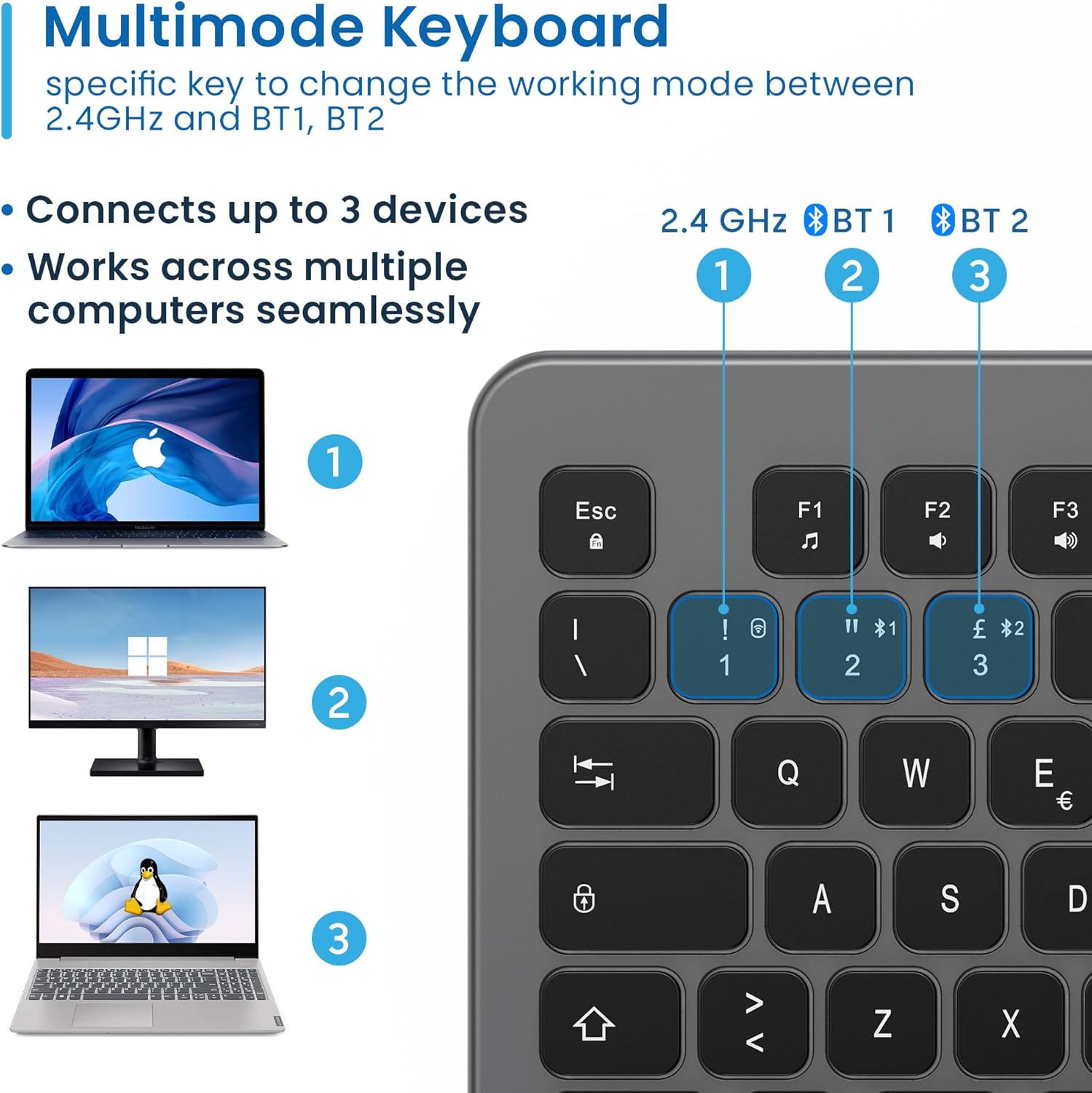
Figure 4.3: Multi-device connectivity options for the EW3295 keyboard.
4.2.3 Ag atharrachadh eadar innealan ceangailte
Once multiple devices are paired, you can easily switch between them:
- Brùth Fn+1 to switch to the 2.4GHz connected device.
- Brùth Fn+2 to switch to the Bluetooth 1 connected device.
- Brùth Fn+3 to switch to the Bluetooth 2 connected device.
5. Stiùireadh Obrachaidh
5.1 Clò-sgrìobhadh Bunasach
The EW3295 features a full-size Italian QWERTY layout. Its flat and silent keys provide a comfortable and precise typing experience, reducing noise in quiet environments.

Figure 5.1: Illuminated Italian QWERTY Keyboard Layout.

Figure 5.2: Silent keys for reduced noise.
5.2 smachd backlight
The keyboard features an adjustable backlight for improved visibility in low-light conditions.
- Solas cùil AIR / OFF: Brùth an Bloc Scorr key (often labeled with a lightbulb icon) to toggle the backlight on or off.
- Backlight Brightness Up: Brùth Fn + Pag ↑ gus soilleireachd an t-solais-cùil a mheudachadh
- Backlight Brightness Down: Brùth Fn + Pag ↓ gus soilleireachd an t-solais-cùil a lùghdachadh
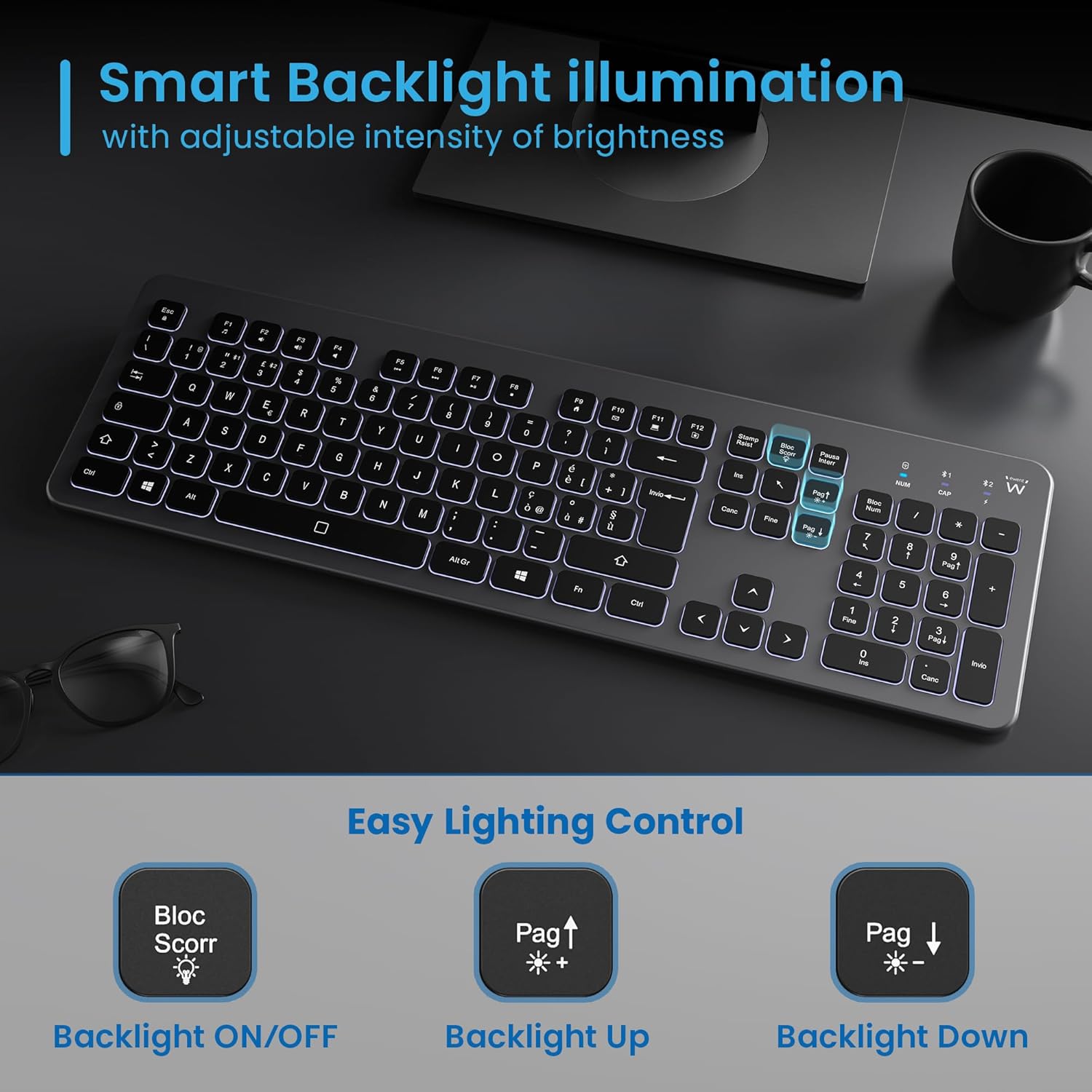
Figure 5.3: Backlight control keys.
5.3 Iuchraichean Ioma-mheadhain
The keyboard includes 12 dedicated multimedia keys (F1-F12) that provide quick access to various functions. To use these functions, press the Fn iuchair aig an aon àm ris an iuchair F a tha thu ag iarraidh.
| Prìomh cho-chruinneachadh | Gnìomh |
|---|---|
| Fn + f1 | Cluicheadair mheadhanan |
| Fn + f2 | Meud Sìos |
| Fn + f3 | Tomhais Suas |
| Fn + f4 | Mut |
| Fn + f5 | Rian roimhe |
| Fn + f6 | An ath Rian |
| Fn + f7 | Cluich / Stad |
| Fn + f8 | Stad |
| Fn + f9 | Duilleag-dhachaigh |
| Fn + f10 | Post-d |
| Fn + f11 | Mo choimpiutair |
| Fn + f12 | Àireamhair |
6. Cumail suas agus Cùram
Nì deagh chumail suas cinnteach gum mair am meur-chlàr agad fad-beatha agus gum bi e ag obair gu math.
- Glanadh: Cleachd clò bog, tioram, gun lint gus uachdar a’ mheur-chlàir a ghlanadh. Airson salachar stòlda, cuir beagan dheth e.ampnigh an clò le uisge no le inneal-glanaidh tlàth, neo-sgrìobach. Seachain cus taiseachd.
- Seachain Liquids: Do not spill liquids on the keyboard. In case of accidental spills, immediately disconnect the keyboard and allow it to dry completely before re-using.
- Stòradh: Nuair nach eilear ga chleachdadh airson ùine mhòr, stòraich am meur-chlàr ann an àite fionnar, tioram air falbh bho sholas dìreach na grèine agus teòthachd anabarrach.
- Cùram Bataraidh: Gus beatha a’ bhataraidh a leudachadh, seachain a bhith ga leigeil às gu tur gu tric. Cuir cosgais air a’ mheur-chlàr nuair a nochdas comharra bataraidh ìosal.
- Stòradh an ghlacadair: When transporting the keyboard, store the USB wireless receiver in its dedicated compartment on the rear panel to prevent loss.
7. A ’dèanamh trioblaid
If you encounter issues with your EW3295 keyboard, please refer to the following common solutions:
| Trioblaid | Adhbhar a dh’fhaodadh a bhith ann | Fuasgladh |
|---|---|---|
| Keyboard not responding (2.4GHz) | Low battery; Receiver not plugged in; Incorrect channel selected. | Charge the keyboard; Ensure USB receiver is securely plugged in; Press Fn+1 to select 2.4GHz mode. |
| Chan eil am meur-chlàr a’ freagairt (Bluetooth) | Low battery; Bluetooth not enabled on device; Not paired; Incorrect channel selected. | Charge the keyboard; Enable Bluetooth on your device; Re-pair the keyboard (see Section 4.2.2); Press Fn+2 or Fn+3 to select the correct Bluetooth channel. |
| Backlight nach eil ag obair | Solas cùil dheth; Bataraidh ìosal. | Brùth Bloc Scorr to turn on/off; Increase brightness with Fn + Pag ↑; Charge the keyboard. |
| Tha na h-iuchraichean steigeach no neo-fhreagairteach | Dirt or debris under keys; Physical damage. | Clean the keyboard (see Section 6); If physical damage, contact support. |
| Beatha bataraidh goirid | Frequent backlight use; Battery degradation over time. | Reduce backlight brightness or turn it off when not needed; Ensure full charge cycles. |
8. Sònrachaidhean
| Feart | Mion-fhiosrachadh |
|---|---|
| Ainm Modail | Tastiera Wireless Retroilluminata EW3295 |
| Àireamh Modail Nì | EW3295 |
| Brand | Ewent |
| Teicneòlas ceangail | Bluetooth 5.0 (x2), 2.4GHz Wireless |
| Tuairisgeul meur-chlàr | Multimedia, Full-size, Italian Layout |
| Innealan co-fhreagarrach | PC (Windows XP, 7, 8.1, 10, 11), Android |
| Seòrsa bataraidh | Bataraidh lithium 300mAh ath-thagraidh |
| Cùl-sholais | Adjustable Intensity |
| Meudan (L x W x H) | Mu thuairmeas. 432mm x 122mm x 22mm |
| Cuideam | Mu thuairmeas. 390g |
| Stuth | High-density Polycarbonate |

Figure 8.1: Keyboard dimensions and weight.
9. Fiosrachadh Barantais
Ewent products are designed and manufactured to the highest quality standards. This product is covered by a limited warranty from the date of purchase. Please refer to the warranty card included with your product or visit the official Ewent weblàrach-lìn airson teirmichean is cumhaichean barantais mionaideach a tha sònraichte don roinn agad. Mar as trice bidh am barantas a’ còmhdach lochdan ann an stuthan agus obair-ciùird fo chleachdadh àbhaisteach.
10. Taic teachdaiche
For technical support, troubleshooting assistance, or any questions regarding your Ewent EW3295 keyboard, please contact Ewent customer support. You can typically find contact information (phone, email, support portal) on the official Ewent weblàrach no ann am pasgan toraidh.
Please have your product model number (EW3295) and purchase details ready when contacting support.