
1. Ro-ràdh
The Innex DS200 is a professional USB book scanner designed for efficient digitization of various documents, including books, magazines, and loose papers. It features a 26MP camera, A3 scanning capability, and advanced software functions to enhance scanning quality and workflow. This manual provides detailed instructions for setting up, operating, and maintaining your DS200 scanner.

Figure 1.1: Innex DS200 Scanner in operation with an open book.
2. Pasgan-susbaint
Dearbhaich gu bheil na nithean uile a tha air an liostadh gu h-ìosal air an toirt a-steach sa phacaid agad. Ma tha nithean sam bith a dhìth no millte, cuir fios gu taic luchd-cleachdaidh.
- Innex DS200 Scanner Unit
- Pad sganaidh
- Càball USB
- Inneal-atharrachaidh Cumhachd (Seòrsa A)
- Power Plugs (Type C, Type G)
- Putan làimhe
- Pedal-coise
- Adapter (USB-C to USB-A)
- Stiùireadh tòiseachaidh luath
- Cairt seirbheis
- Aithris GPSR
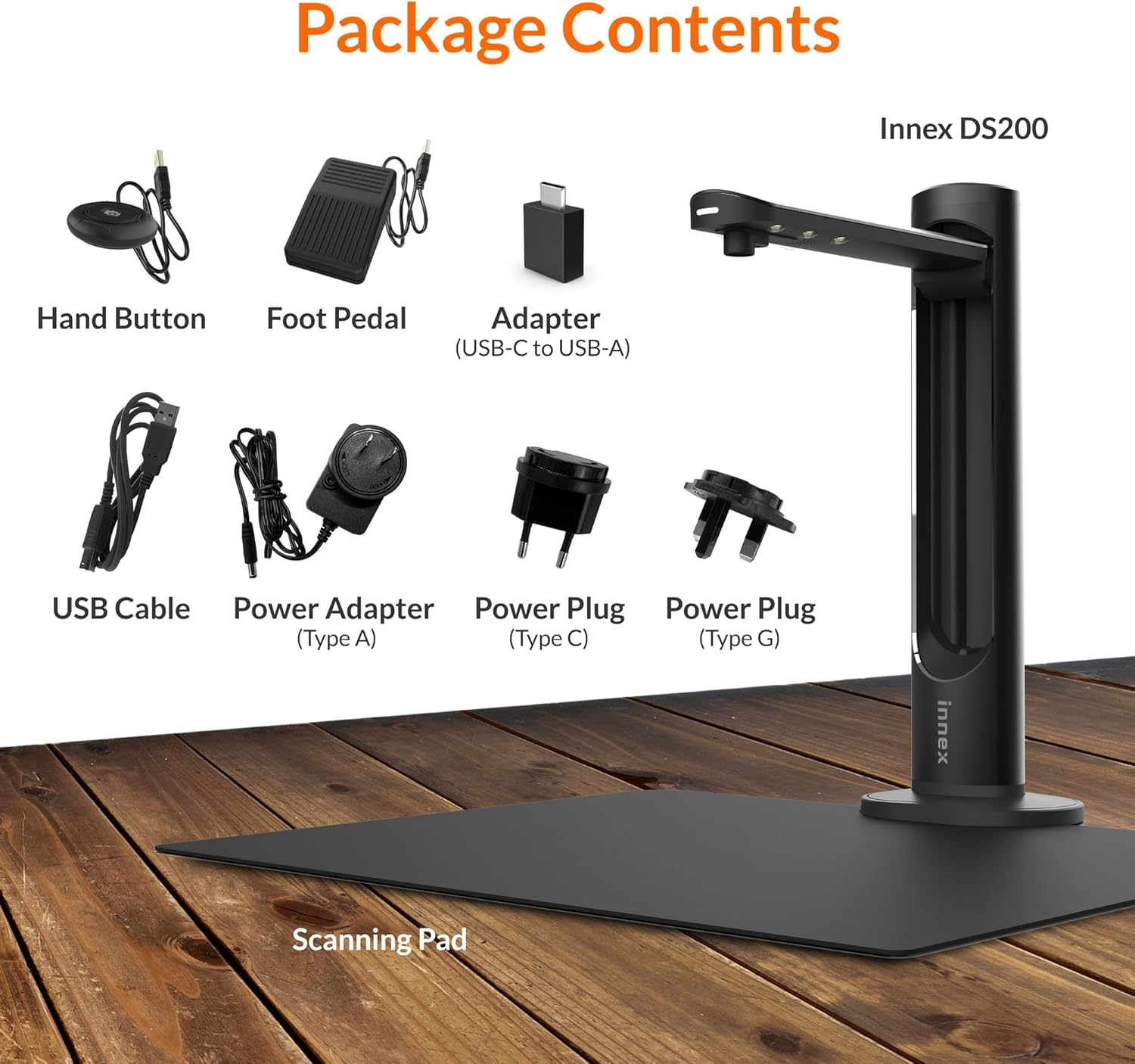
Figure 2.1: Contents of the Innex DS200 package.
3. Suidhich
- Dì-phacaich na co-phàirtean: Thoir air falbh a h-uile nì gu faiceallach bhon phacaid.
- Position the Scanner: Place the Innex DS200 scanner unit on a stable, flat surface.
- Place the Scanning Pad: Position the black scanning pad directly beneath the scanner head. Ensure it is centered and flat.
- Ceangal cumhachd: Connect the power adapter to the scanner and plug it into an electrical outlet. Use the appropriate power plug for your region.
- Ceangail ris a’ choimpiutair: Connect the scanner to your computer using the provided USB cable. If your computer only has USB-C ports, use the included USB-C to USB-A adapter.
- Stàlaich bathar-bog: Download and install the Innex Scan software from the official Innex website. Follow the on-screen instructions for installation. The software is compatible with Windows and macOS.
- Ceangail Accessories: Plug in the hand button and foot pedal to the designated ports on the scanner unit.
4. Stiùireadh Obrachaidh
4.1. Modh-obrach Sganaidh Bunasach
- Launch Innex Scan Software: Open the Innex Scan application on your computer.
- Sgrìobhainn Àite: Place the document or book you wish to scan on the scanning pad. Ensure it is within the scanning area. The laser guide can assist with alignment.
- Atharraich roghainnean: In the software, select your desired scanning mode (e.g., Document, Book, Photo) and adjust settings such as color mode, resolution, and output format.
- Tòisich air sganadh: Trigger the scan using one of the available methods: the software capture button, the hand button, or the foot pedal.
- Review agus Sàbhail: Às dèidh sganadh, ath-view the image in the software. Apply any necessary corrections and save the file to your preferred location and format.

Figure 4.1: Using the laser guide for document alignment.

Figure 4.2: Multiple options for triggering a scan.
4.2. Feartan bathar-bog
The Innex Scan software includes several features to optimize your scanning experience:
- Curve Flattening: Automatically corrects the curvature of book pages for flat, readable scans.
- OCR (Aithneachadh Caractar Optigeach): Converts scanned images into editable and searchable text in over 120 languages.
- Auto-Cropping: Automatically detects and crops the document edges.
- Page-Turn Detection: For book scanning, the software can detect when a page has been turned and automatically initiate the next scan.
- Finger Removal: Intelligently removes images of fingers holding down pages during scanning.
- Multi Scan Mode: Allows scanning multiple small items simultaneously, such as business cards or photos, and separates them into individual files.
- Visualizer Mode: Enables the scanner to function as a document camera for presentations or live demonstrations.
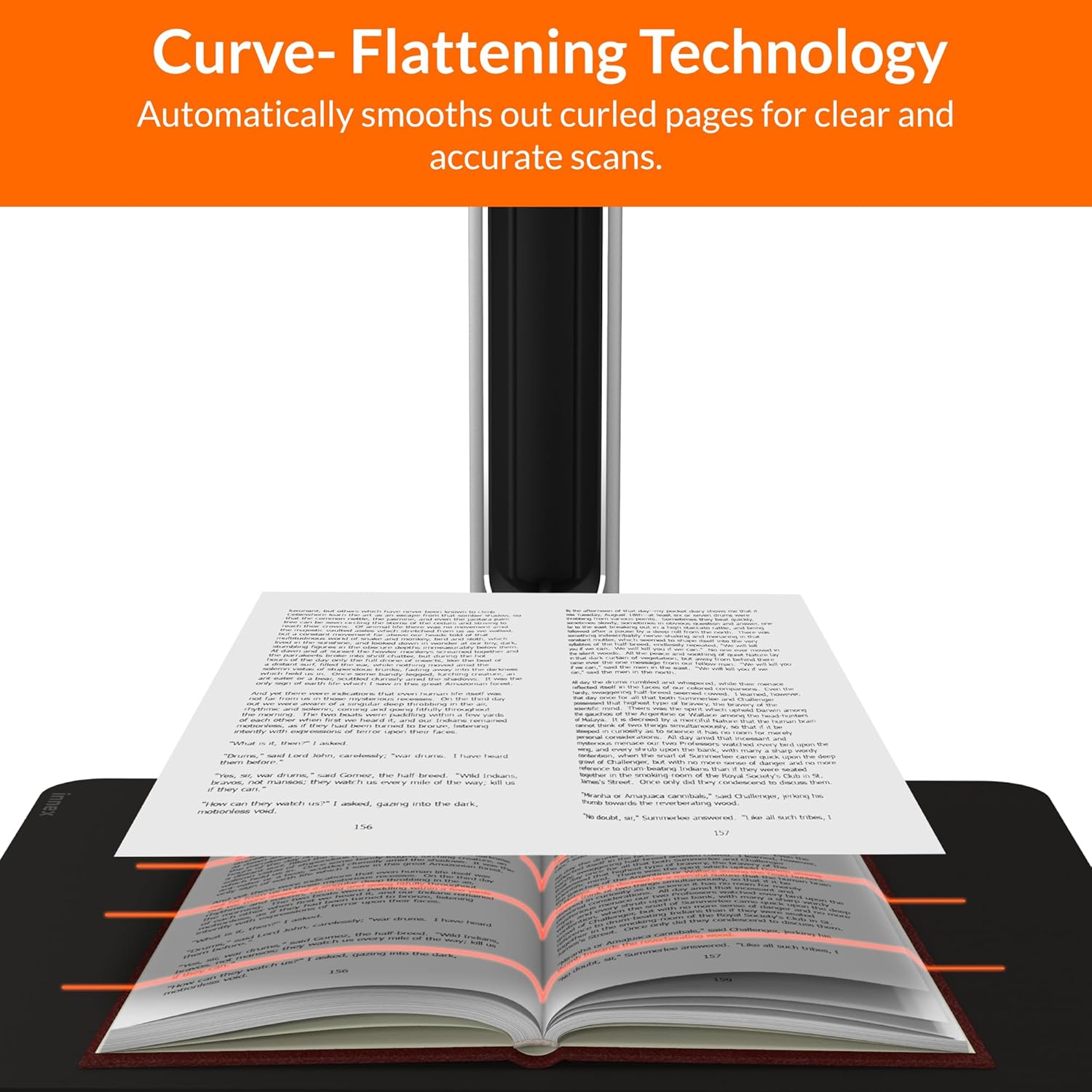
Figure 4.3: Curve Flattening Technology in use.

Figure 4.4: OCR Text Recognition and export options.

Figear 4.5: Os a chionnview of Innex Scan software features.
4.3. Export Options
The Innex DS200 supports various export formats for both image and text files:
- Dealbh Files: JPEG, PNG, BMP, TIFF
- Sgrìobhainn Files: PDF (searchable), DOC, EXCEL, TEXT
- E-leabhar Files: EPUB
- Fuaim Files (Text-to-Speech): MP3, WAV
- Bhideo Files (Visualizer Mode): MP4, AVI, FLV, WMV

Figure 4.6: Available export formats in Innex Scan software.
5. Cumail suas
- Glanadh: Regularly wipe the scanner lens and LED lamp with a soft, dry, lint-free cloth to ensure optimal scan quality. Clean the scanning pad with a damp aodach ma tha sin riatanach.
- Ùrachaidhean bathar-bog: Periodically check the official Innex website for software updates to ensure you have the latest features and performance improvements.
- Stòradh: Nuair nach eilear ga chleachdadh, stòraich an sganair ann an àrainneachd ghlan, thioram, air falbh bho sholas dìreach na grèine agus teòthachd anabarrach.
6. A ’dèanamh trioblaid
6.1. Cùisean agus Fuasglaidhean Cumanta
| Cùis | Adhbhar a dh’fhaodadh a bhith ann | Fuasgladh |
|---|---|---|
| Cha deach an sganair a lorg | Loose USB connection, driver issue, power issue | Ensure USB cable is securely connected. Check power connection. Reinstall scanner drivers or software. Try a different USB port. |
| Poor scan quality | Dirty lens, insufficient lighting, incorrect settings, document not flat | Clean the scanner lens. Ensure adequate ambient lighting or use the built-in LED lamp. Adjust resolution and color settings in software. Ensure documents are flat on the scanning pad. |
| Bidh bathar-bog a’ tuiteam no a’ reothadh | Outdated software, system incompatibility, insufficient system resources | Update Innex Scan software to the latest version. Ensure your computer meets minimum system requirements. Close other demanding applications. Restart the software and computer. |
| OCR not working correctly | Poor scan quality, incorrect language setting, complex font | Improve scan quality. Verify the correct OCR language is selected in the software. For highly stylized or handwritten text, OCR accuracy may vary. |
7. Sònrachaidhean
Detailed technical specifications for the Innex DS200 scanner:

Figure 7.1: Innex DS200 Technical Specifications.
- Modail: DS200
- Sensor ìomhaigh: Sensor CMOS
- Max. Fuasgladh: 5800 x 4522 piogsail (26MP)
- Output DPI: Approx. 300 dpi (A3)
- Max. Raon seilg: A3 (16.77" x 12.59" / 426 x 320mm)
- Doimhneachd dath: 24-bit
- Lens Focus: Chàirich
- Astar sganaidh: 1.5 sec per A3 page
- Sgrionadh sganaidh: Putan-làimhe, Peidal-coise, Putan Bathar-bog, Sganadh Fèin-ghluasadach
- Cruthan toraidh: Picture (JPG, TIFF, BMP, PNG), Document (PDF, Image, PDF Searchable), Text (DOC, EXCEL, TEXT), E-book (EPUB), Audio (MP3, WAV), Video (AVI, MPEG, FLV, WMV)
- Ro-mheasadh Leusair: Air a thogail a-steach
- Stòr solais: LED àrd-shoilleireachd togte a-steach
- Eadar-aghaidh: USB 2.0 Type B x 1 (for PC Connection), USB 2.0 Type-A x 1 (for USB Extension)
- Cumhachd: 5V/2A
- Riatanasan siostam as ìsle: Windows 10, 11, macOS 11 or later; Intel i5 Processor or higher; 8GB RAM (Recommended 16GB or more); 20GB Available HDD Space; USB 2.0 Port
- Meudan toraidh (fillte): 4.33"D x 5.91"W x 15.75"H (110 x 150 x 400mm)
- Product Dimensions (In Use): 12.05"D x 5.91"W x 15.75"H (307 x 150 x 400mm)
- Cuideam lom: Mu thuairmeas. 2.64 lbs (1.2 kg)
8. Barantas agus Taic
For warranty information and technical support, please refer to the service card included in your package or visit the official Innex website. You can also contact FunTech Innovation, the manufacturer, for assistance.
Dèanadair: FunTech Innovation
Weblàrach: Innex Official Store on Amazon