
RSH Android Smart Tag
RSH Android Smart Tag Leabhar-làimhe cleachdaiche
Model: Android Smart Tag
Brand: RSH
Ro-ràdh
The RSH Android Smart Tag is a compact and efficient device designed to help you locate your valuable items using the Google Find My Device app. This manual provides comprehensive instructions to ensure you get the most out of your Smart Tag.

Image: Four RSH Android Smart Tags, taisbeanadhasing their design and quantity in the pack.
Suidhich
1. Powering On and Off
The RSH Android Smart Tag features a function button for basic operations. Refer to the diagram below for the button's location.
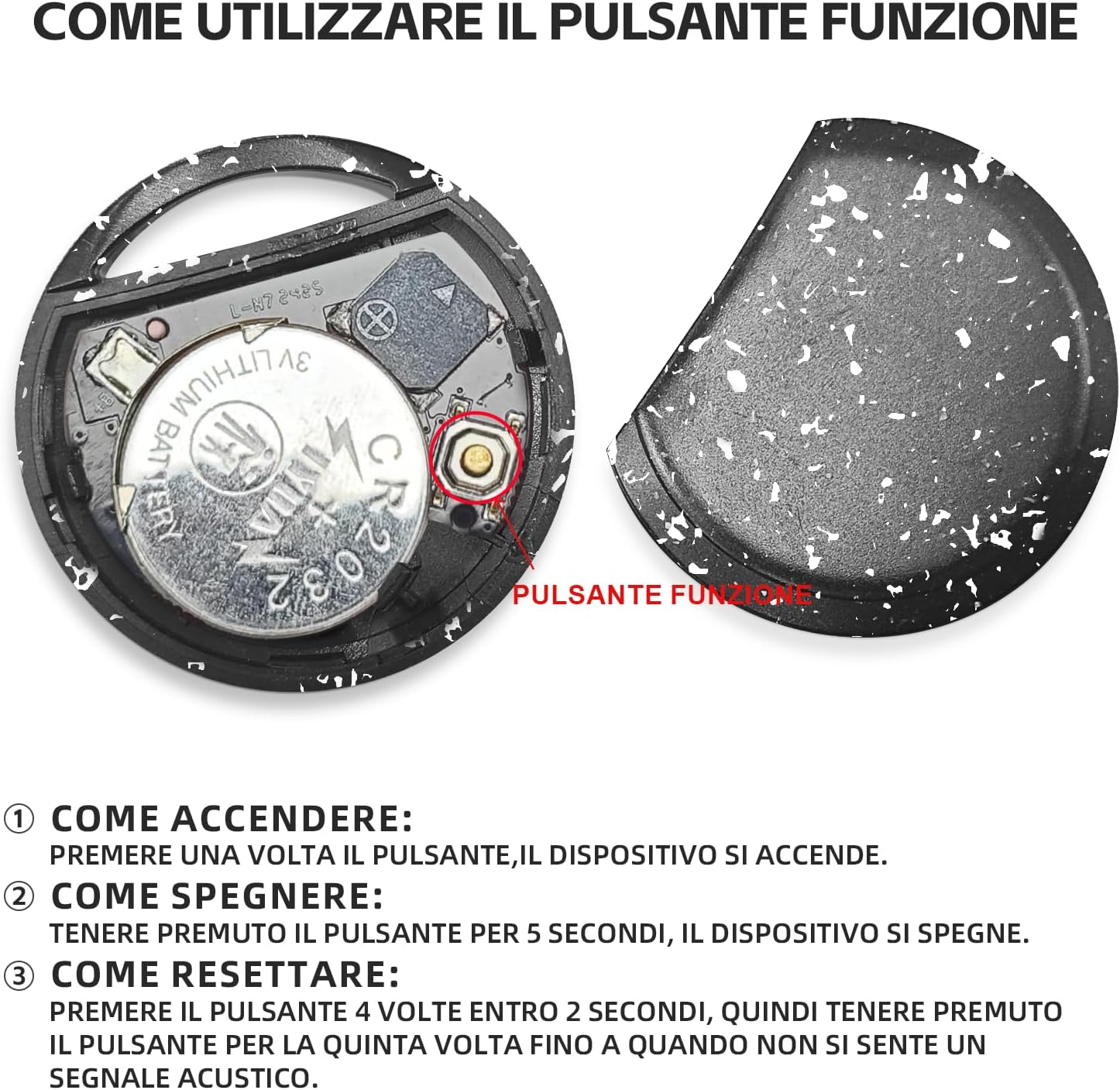
Ìomhaigh: A-staigh view na Smart Tag, illustrating the battery and function button.
- Mar a chuireas tu air: Press the function button once. The device will turn on.
- Mar a chuireas tu dheth: Press and hold the function button for 5 seconds. The device will turn off.
2. Fast Pairing with Android Devices
An Smart Tag is designed for quick and seamless pairing with your Android smartphone.
- Dèan cinnteach gu bheil Bluetooth air a chomasachadh air an fhòn Android agad.
- Bring the RSH Android Smart Tag close to your phone.
- A connection invitation will automatically appear on your phone's screen. Follow the on-screen prompts to complete the pairing process.

Ìomhaigh: Riochdachadh lèirsinneach den Smart Tag's compatibility with a wide range of Android devices.
Stiùireadh Obrachaidh
1. Tracking and Item Search
Utilize the Google Find My Device app to locate your RSH Android Smart Tag.
- Within Bluetooth Range: Open the Google Find My Device app. If the tag is within Bluetooth range, you can activate its built-in speaker to emit an audible signal, helping you pinpoint its exact location.
- Out of Bluetooth Range: Ma tha an tag is outside Bluetooth range, the app will display its last known location on a map, leveraging the Google Find My Device network.

Image: Demonstration of the 'Play sound' feature within the Google Find My Device app.

Image: The Smart Tag attached to a backpack, illustrating its use for tracking items.

Image: The Smart Tag attached to luggage, emphasizing its utility for travel.
2. Loss Mode
Activate Loss Mode in the Google Find My Device app if your item is missing. This feature leverages the vast network of billions of Android devices to help locate your lost item.
3. Sharing Items
Faodaidh tu ruigsinneachd a cho-roinn chun Smart agad Tag with others through the Google Find My Device app. This allows multiple users to view the item's location on the map.

Image: Various use cases for the Smart Tag, demonstrating its versatility for tracking different items.
Cumail suas
1. Ath-nuadhachadh bataraidh
The RSH Android Smart Tag uses a replaceable CR2032 battery, which typically lasts up to 1 year. To replace the battery:
- Fosgail an Smart gu faiceallach Tag casing.
- Thoir air falbh an seann bataraidh CR2032.
- Cuir a-steach bataraidh CR2032 ùr, a’ dèanamh cinnteach à polarity ceart.
- Dùin an casing gu tèarainte.
2. Resistance uisge
The MiTag tracker is IP67 certified, meaning it is protected from dust and can withstand immersion in 1 meter of water for up to 30 minutes. While it is water-resistant, it is not recommended for prolonged submersion or use during swimming.
Fuasgladh thrioblaidean
Ath-shuidheachadh an inneal
If you experience connectivity issues or unusual behavior, you may need to reset your RSH Android Smart Tag:
- Press the function button 4 times within 2 seconds.
- Immediately after the fourth press, press and hold the function button for the fifth time until you hear an audible signal. This indicates the device has been reset.
Sònrachaidhean
| Feart | Mion-fhiosrachadh |
|---|---|
| Brand | RSH |
| Stuth | Plastaig |
| Meudan toraidh | 36L x 36W x 8Th millimetres |
| Cuideam nì | 7.6 gram |
| Innealan co-fhreagarrach | Smartphone (Android Only) |
| Modh smachd | App (Google Find My Device) |
| Seòrsa bataraidh | 1 CR2032 (included, replaceable) |
| Frith-aghaidh uisge | IP67 Certified |
Barantas agus Taic
Information regarding product warranty and customer support is not provided in the available data. Please refer to the product packaging or the seller's weblàrach-lìn airson fiosrachadh mu chòmhdach barantais agus mar a chuireas tu fios gu taic luchd-cleachdaidh.
Ask a question about this manual
Ask about setup, troubleshooting, compatibility, parts, safety, or missing instructions. Manuals+ will review the question and use this page’s manual context to help answer it.