
1. Ro-ràdh
This manual provides detailed instructions for the ATTACK SHARK X68PRO HE Mechanical Wireless Gaming Keyboard and the ATTACK SHARK X3 Wireless Gaming Mouse Combo. Please read this manual carefully before using the products to ensure proper functionality and to maximize your gaming experience.
2. Toradh thallview
2.1 ATTACK SHARK X68PRO HE Keyboard
The X68PRO HE is a 60% layout mechanical gaming keyboard featuring Hall Effect magnetic switches, an 8000Hz polling rate, and multi-mode connectivity. It is designed for high-performance gaming with adjustable actuation and rapid trigger capabilities.

Image: ATTACK SHARK X68PRO HE Keyboard. This image displays the keyboard's overall design, highlighting its BT/2.4G/Wired 3 modes connection, magnetic switches, 0.01mm RT accuracy, DKS support, full RGB backlit, PBT keycaps, MAC/WIN compatibility, and web driver. Dimensions are shown as 12.80 inches length, 4.645 inches width, 1.57 inches height, and a weight of 0.78 KG.
Prìomh fheartan:
- Ìre Bhòtaidh 8000Hz: Ensures ultra-low 0.125ms latency in wired mode for instant keystroke registration.
- Suidsichean Magnetic Buaidh Talla: Self-developed switches with adjustable actuation from 0.1mm to 3.4mm, offering 0.01mm sensitivity.
- Brosnachadh Luath: Eliminates debounce delay, allowing keys to reset instantly for faster, more precise movements.
- Dual-Action Key Function: Assign two different actions to a single key based on pressure.
- Cruth teann 60%: Space-saving design with an aircraft-grade anodized aluminum frame.
- Ceangal: Supports Bluetooth, 2.4GHz wireless, and wired (USB-C) connections.
- Solais-cùil RGB: Full RGB with multiple lighting effects.
- Còpannan iuchrach PBT: Durable, side-engraved PBT keycaps.
- Web Driver: Customizable settings via a dedicated web dràibhear.

Image: Keyboard highlighting 8000Hz Polling Rate. This image emphasizes the keyboard's lightning-fast response with an 8000Hz polling rate in wired mode and ultra-low 0.125ms latency.

Image: Linear Magnetic Switch. This image provides a close-up of the linear magnetic switch, detailing its specifications: Total Travel 3.8±0.3mm, Operation Force 40±5gf, Initial Magnetic Flux 95±15GS, Bottom Magnetic Flux 580±50GS, and a Lifespan of 100 Million clicks.

Image: Gasket Structure. This diagram illustrates the internal gasket structure of the keyboard, showing components such as side engraving PBT keycaps, thick rubber top case, ATTACK SHARK magnetic switch, aluminum alloy plate, PORON foam, PCB positioning board, custom silicone mold, and thick rubber bottom case.
2.2 ATTACK SHARK X3 Mouse
The X3 is an ultra-lightweight wireless gaming mouse equipped with a Pixart PAW3395 optical sensor and Kailh GM8.0 switches. It offers tri-mode connectivity and high DPI settings for precise control.

Image: ATTACK SHARK X3 Mouse. This image presents the X3 mouse in red, along with its USB receiver, highlighting its ultra-lightweight design, tri-mode connectivity, PixArt PAW 3395 sensor, up to 26000 DPI, and Kailh GM 8.0 switches.
Prìomh fheartan:
- Pixart PAW3395 Sensor: Flagship optical sensor with 6-level adjustable DPI (800/1600/2400/3200/5000/26000), 650 IPS tracking speed, 1000Hz response speed, and 50G acceleration.
- Kailh GM8.0 Switches: High-end micro switches with an 80 million click lifespan, providing crisp clicks and fast rebound.
- TTC Encoder: Scroll wheel encoder for precise positioning.
- Dealbhadh Ultra-Aotrom: Weighs approximately 49g for effortless action.
- Ceangal trì-mhodh: Supports 2.4GHz wireless, Bluetooth 5.0, and wired (USB-C) connections.

Image: Kailh GM 8.0 Switches & TTC Encoder. This image shows a cutaway view of the mouse, highlighting the Kailh GM 8.0 switches with an 80 million click lifespan and the TTC encoder for well-defined scroll steps, designed to eliminate unintended double clicks.

Image: Ultra-Light Design. This image illustrates the lightweight nature of the X3 mouse, stating it weighs only 49±4g (1.72oz).
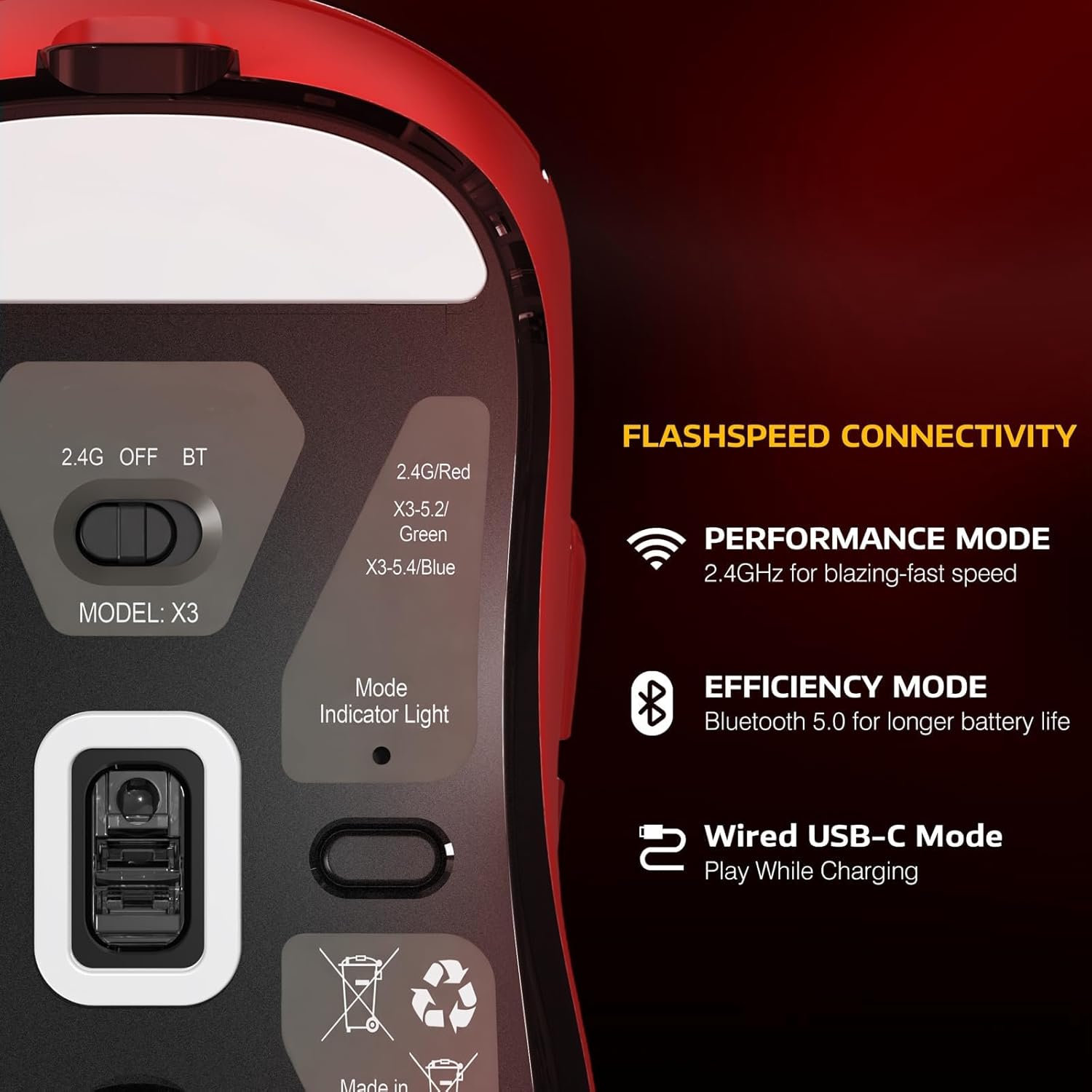
Image: Flashspeed Connectivity. This image shows the bottom of the X3 mouse, detailing its connectivity options: a switch for 2.4G, OFF, and BT modes, and a mode indicator light. It also describes Performance Mode (2.4GHz for blazing-fast speed), Efficiency Mode (Bluetooth 5.0 for longer battery life), and Wired USB-C Mode (play while charging).
3. Stiùireadh Stèidheachaidh
3.1 Connecting the Keyboard (X68PRO HE)
- Modh Wired: Connect the provided USB-C cable from the keyboard to an available USB port on your computer. The keyboard will be recognized automatically.
- Modh gun uèir 2.4GHz:
- Lorg an glacadair USB 2.4GHz.
- Plug an cuidhteas a-steach do phort USB a tha ri fhaighinn air do choimpiutair.
- On the keyboard, switch the mode selector to '2.4G'. The keyboard should connect automatically.
- Modh Bluetooth:
- Switch the keyboard's mode selector to 'BT'.
- Air a’ choimpiutair no an inneal agad, cuir Bluetooth an gnìomh agus rannsaich airson innealan ùra.
- Select 'ATTACK SHARK X68PRO HE' from the list of available devices to pair.
3.2 Connecting the Mouse (X3)
- Modh Wired: Connect the provided USB-C cable from the mouse to an available USB port on your computer. The mouse will function immediately and charge simultaneously.
- Modh gun uèir 2.4GHz:
- Locate the 2.4GHz USB receiver (usually stored in a compartment on the mouse's underside).
- Plug an cuidhteas a-steach do phort USB a tha ri fhaighinn air do choimpiutair.
- On the mouse's underside, switch the mode selector to '2.4G'. The mouse should connect automatically.
- Modh Bluetooth:
- On the mouse's underside, switch the mode selector to 'BT'.
- Air a’ choimpiutair no an inneal agad, cuir Bluetooth an gnìomh agus rannsaich airson innealan ùra.
- Select 'ATTACK SHARK X3' from the list of available devices to pair.
3.3 stàlaich draibhear
For advanced customization of both the keyboard and mouse, download the official web driver from the ATTACK SHARK website. This driver allows for actuation adjustment, key remapping, macro creation, and RGB lighting control.
4. Stiùireadh Obrachaidh
4.1 Keyboard Operation (X68PRO HE)
- Atharrachadh gnìomh: Cleachd an web driver software to precisely adjust the actuation point of each magnetic switch from 0.1mm to 3.4mm with 0.01mm sensitivity.
- Brosnachadh Luath: This feature is enabled and configured via the web driver. It allows keys to register a reset immediately upon release, without needing to return to the full up position.
- Dual-Action Key Function: Configure this feature through the web driver. Assign a primary action for a light press and a secondary action for a deeper press on the same key.
- Smachd Solais RGB: Adjust lighting effects, brightness, and color patterns using the web driver or specific keyboard shortcuts (refer to the driver software for default key combinations).
- Atharrachadh modh: Use the physical switch on the keyboard to toggle between Wired, 2.4G, and Bluetooth modes.
- MAC/WIN Compatibility: The keyboard supports both operating systems. Use the web driver to switch layouts or specific key functions if needed.
4.2 Mouse Operation (X3)
- Atharrachadh DPI: The mouse features 6 adjustable DPI levels (800/1600/2400/3200/5000/26000). Use the dedicated DPI button (usually located behind the scroll wheel) to cycle through these settings. The current DPI level may be indicated by an LED color or pattern.
- Atharrachadh modh: Use the physical switch on the underside of the mouse to select between 2.4G, OFF, and Bluetooth modes.
- A' cur cosgais: Connect the mouse to your computer using the USB-C cable to charge. The mouse can be used in wired mode while charging.
- Comharra Bataraidh: The mouse typically has an LED indicator that shows battery status (e.g., blinking for low battery, solid for charging, off for full charge).
5. Cumail suas
- Glanadh: Use a soft, dry cloth to wipe down the keyboard and mouse. For deeper cleaning, use a cotton swab lightly dampair a lìonadh le deoch-làidir isopropyl airson àiteachan a tha doirbh an ruigsinn. Seachain cus taiseachd.
- Toirt air falbh Caip-iuchrach (Meur-chlàr): Keycaps can be carefully removed using a keycap puller for cleaning or replacement. Be gentle to avoid damaging the switches.
- Cùram Bataraidh: For wireless devices, avoid fully discharging the battery frequently. Charge regularly. If storing for an extended period, charge the battery to about 50% to prolong its lifespan.
- Stòradh: Stòraich na h-innealan ann an àite fionnar, tioram air falbh bho sholas dìreach na grèine agus teòthachd anabarrach.
6. A ’dèanamh trioblaid
6.1 Keyboard Troubleshooting
- Chan eil am meur-chlàr a’ freagairt:
- Ensure the keyboard is charged if in wireless mode.
- Check the mode switch (Wired/2.4G/BT) is set correctly.
- For 2.4G, ensure the USB receiver is securely plugged in.
- For Bluetooth, ensure it's paired correctly and your device's Bluetooth is active. Try re-pairing.
- Try connecting in wired mode to rule out wireless issues.
- Iuchraichean nach eil a’ clàradh no a’ taipeadh dà uair:
- Thoir sùil airson sprùilleach fon chaip iuchair.
- If using Rapid Trigger, ensure settings in the web driver are appropriate for your use.
- Consider resetting keyboard settings via the web dràibhear.
- Solas RGB nach eil ag obair:
- Ensure lighting is enabled in the web dràibhear.
- Thoir sùil air roghainnean soilleireachd.
6.2 Mouse Troubleshooting
- Mouse not moving or erratic cursor:
- Ensure the mouse is charged if in wireless mode.
- Check the mode switch (2.4G/BT) is set correctly.
- For 2.4G, ensure the USB receiver is securely plugged in.
- For Bluetooth, ensure it's paired correctly and your device's Bluetooth is active. Try re-pairing.
- Glan an sensor optigeach air taobh shìos na luchaige.
- Try connecting in wired mode.
- DPI gun atharrachadh:
- Ensure the DPI button is functioning.
- Check if any software is overriding DPI settings.
- Cùisean ceangail:
- Ensure the mouse is within range of the receiver/Bluetooth device.
- Seachain bacadh bho innealan gun uèir eile.
7. Sònrachaidhean
7.1 ATTACK SHARK X68PRO HE Keyboard
- Ìre bhòtaidh: 8000Hz (Wired Mode)
- Ùine: 0.125mh
- Switches: Hall Effect Magnetic Switches
- Atharrachadh gnìomh: 0.1mm - 3.4mm (0.01mm sensitivity)
- Cruth: 60%
- Stuth frèam: Aircraft-grade Anodized Aluminum
- Ceapan-iuchrach: Side-Engraved PBT
- Ceangal: Bluetooth, gun uèir 2.4GHz, uèirleasach USB-C
- Solas cùil: RGB slàn
- Co-fhreagarrachd an t-siostam obrachaidh: Windows, macOS
- Meudan: Mu 12.80 x 4.645 x 1.57 òirleach
- Cuideam: Mu 0.78 KG
7.2 ATTACK SHARK X3 Mouse
- Sensor: Braitear Optaigeach Pixart PAW3395
- DPI: 800/1600/2400/3200/5000/26000 (Adjustable)
- Astar tracadh: 650 XNUMX IPS
- Astar freagairt: 1000 Hz
- Luathachadh: 50g
- Switches: Kailh GM8.0 Micro Switches (80 Million Clicks Lifespan)
- Encoder: TTC Scroll Wheel Encoder
- Cuideam: Mu 49 g
- Ceangal: Bluetooth 5.0, 2.4GHz gun uèir, USB-C le uèir
- Co-fhreagarrachd an t-siostam obrachaidh: Windows, macOS, Linux
8. Barantas agus Taic
ATTACK SHARK products typically come with a limited manufacturer's warranty. Please refer to the warranty card included with your product or visit the official ATTACK SHARK website for detailed warranty terms and conditions. For technical support, driver downloads, or further assistance, please visit the ATTACK SHARK support page or contact their customer service.
Oifigeil Weblàrach: www.attackshark.com (exampan ceangal, dearbhaich an fhìrinn weblàrach)