
EVERSOLO DMP-A6 Master Gen 2-Black
Eversolo DMP-A6 Master Gen 2-Black Hi-Fi Music Streamer User Manual
Model: DMP-A6 Master Gen 2-Black
Ro-ràdh
This manual provides comprehensive instructions for the setup, operation, and maintenance of your Eversolo DMP-A6 Master Gen 2-Black Hi-Fi Music Streamer. Please read this manual thoroughly before using the device to ensure optimal performance and longevity.
The Eversolo DMP-A6 Master Gen 2-Black is an advanced Hi-Fi music streamer designed for high-fidelity audio playback. It features an upgraded Op-amp Chip OPA1612 for enhanced sound output and a newly designed linear power supply for ultra-low noise operation. It supports a wide range of audio formats and streaming services, offering versatile connectivity options for integration into various audio systems.
Fiosrachadh Sàbhailteachd
Always adhere to the following safety guidelines to prevent damage to the device or personal injury:
- Na cuir an inneal fo uisge no cus taiseachd.
- Dèan cinnteach gu bheil fionnarachadh ceart ann gus casg a chuir air cus teasachadh. Na cuir bacadh air fosglaidhean fionnarachaidh.
- Cleachd an càball cumhachd agus na goireasan a tha air an toirt seachad a-mhàin.
- Na feuch ri an inneal fhosgladh no a chàradh thu fhèin. Thoir aire do luchd-obrach teisteanasach airson a h-uile seirbheis.
- Cùm an inneal air falbh bho sholas dìreach na grèine, stòran teas, agus raointean magnetach làidir.
- Clean the device with a soft, dry cloth. Avoid using abrasive cleaners or solvents.
Susbaint pacaid
Dèan cinnteach gu bheil a h-uile nì anns a’ phacaid:
- Eversolo DMP-A6 Master Gen 2-Black Unit
- Càball cumhachd
- Càball USB
- Screwdriver (for internal storage installation, if applicable)
- Leabhar-làimhe cleachdaiche (an sgrìobhainn seo)
- Càball piobrachaidh
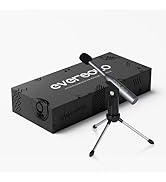
Image: Illustration of the Eversolo DMP-A6 Master Gen 2-Black package contents.
Suidhich
1. Suidheachadh Corporra
Place the DMP-A6 Master Gen 2-Black on a stable, flat surface with adequate ventilation. Ensure there is sufficient space around the unit for airflow, especially at the rear and sides where heat dissipation occurs.
2. Ceangal Cumhachd
Connect the provided power cable to the AC inlet on the rear of the unit and then to a suitable power outlet. Ensure the power switch is in the OFF position before connecting.
3. Ceanglaichean claisneachd
The DMP-A6 Master Gen 2-Black offers various audio input and output options:
- Toraidhean analog: Use XLR or RCA outputs to connect to active speakers or power ampluchd-losgaidh.
- Toraidhean didseatach: Optical, Coaxial, and HDMI (for audio only, no video output).
- Toraidhean didseatach: Coaxial, Optical, Type-C USB, and HD Bluetooth for connecting external digital audio sources.
- HDMI ARC: Connect your TV's HDMI ARC port to the DMP-A6's HDMI ARC input to transmit TV audio directly.

Image: Rear panel connections of the DMP-A6 Master Gen 2-Black.
4. Ceangal Lìonra
Connect the unit to your network via Ethernet cable for the most stable connection, or use the built-in Wi-Fi for wireless connectivity. A stable network connection is essential for streaming services and firmware updates.
5. A’ chiad chumhachd air
After all connections are made, switch on the power. The device will boot up, and the 6-inch LCD color touchscreen will display the initial setup wizard.
Stiùireadh Obrachaidh
1. User Interface and Control
The DMP-A6 Master Gen 2-Black can be controlled via its integrated 6-inch LCD color touchscreen or through the dedicated mobile application for Android and iOS devices.

Image: Front panel and touchscreen display.
2. Iarrtas gluasadach
Download the official Eversolo mobile application from your device's app store. The app provides comprehensive control over the streamer, including music playback, settings adjustment, and personalized playlist management.

Image: Eversolo mobile application interface.
3. Music Playback and Streaming
The device supports a wide array of music services and streaming protocols:
- Seirbheisean Amalaichte: Access Amazon Music, TIDAL, Qobuz, HIRESAUDIO, Deezer, Tuneln Radio, and more directly from the device.
- Sruth gun uèir: Compatible with Roon Ready, TIDAL Connect, and DLNA for seamless streaming from compatible devices and servers.
- Local/Network Playback: Cluich ceòl files from local drives (USB) or network storage (NAS). The device supports cross-platform addition of music files.
- Cruthan le taic: Plays almost all ultra-high sampling master recording formats, including FLAC, WAV, APE, DSD512 (dsf/.dff/.iso/.dst) stereo/multichannel, and MQA.
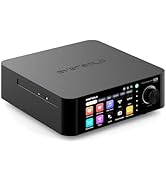
Image: Supported music services and streaming platforms.
4. Feartan adhartach
- EOS Audio Engine: Utilizes an innovative audio processing engine that bypasses SRC limitations for high-resolution audio direct output.
- HDMI ARC & TRIGGER: HDMI ARC allows direct TV audio transmission. The TRIGGER function enables linked devices to automatically power on/off with the streamer.
- Professional EQ: Fine-tune your audio output with the built-in professional equalizer.
- OPA1612 Op-amp Chip: Features an upgraded Op-amp chip for a warmer voice output and improved audio quality.
- Ultra-Low Noise Linear Power Supply: Ensures a clean audio signal with noise levels below 40uV.

Image: Key technical features and specifications.
Cumail suas
1. Glanadh
Regularly clean the exterior of the unit with a soft, dry, lint-free cloth. Do not use liquid cleaners, aerosols, or solvents, as they may damage the finish or internal components.
2. Ùrachaidhean Firmware
Eversolo frequently releases firmware updates to improve performance, add features, and fix bugs. It is recommended to keep your device's firmware up to date. Updates can typically be performed directly through the device's settings menu when connected to the internet.
3. Stòradh
If storing the device for an extended period, disconnect it from power and store it in a cool, dry place, away from direct sunlight and extreme temperatures.
Fuasgladh thrioblaidean
| Trioblaid | Adhbhar a dh’fhaodadh a bhith ann | Fuasgladh |
|---|---|---|
| Gun chumhachd | Càball cumhachd gun cheangal; Suidsiche cumhachd dheth; Duilgheadas leis a’ phuing-cumhachd. | Ensure power cable is securely connected. Check power switch. Test power outlet with another device. |
| Gun toradh fuaim | Incorrect audio output selected; Cables not connected properly; Ampduilgheadas leis an neach-labhairt/luathaiche. | Verify correct output in settings. Check all audio cable connections. Test amplifier/speakers with another source. |
| Chan urrainn dhuinn ceangal ris an lìonra | Incorrect Wi-Fi password; Router issue; Ethernet cable disconnected. | Re-enter Wi-Fi password. Restart router. Check Ethernet cable connection. |
| Streaming services not loading | Poor internet connection; Service outage; App issue. | Check internet speed. Verify service status online. Restart the streamer and the app. |
| Inneal gun fhreagairt | Mearachd bathar-bog sealach. | Perform a soft reset by holding the power button, or disconnect power for 30 seconds and reconnect. |
If the problem persists after attempting these solutions, please contact Eversolo customer support.
Sònrachaidhean
| Feart | Mion-fhiosrachadh |
|---|---|
| Ainm Modail | DMP-A6 Master Gen 2-Black |
| Meudan (L x W x H) | 10.63 x 7.36 x 5.34 òirleach (approx.) |
| Cuideam | 9.24 not |
| Siostam-obrachaidh | Android 11 (deeply tailored system) |
| Taisbeanadh | 6-inch LCD Color Touchscreen |
| RAM | 4 GB |
| Ceangalachd | Bluetooth, Ethernet, HDMI, IR |
| Toraidhean claisneachd | Coaxial, Optical, Type-C USB, HD Bluetooth |
| Toraidhean claisneachd | HDMI (audio only), USB, Optical, Coaxial, XLR, RCA |
| Supported Streaming Services | Amazon Music, Deezer, HIRESAUDIO, Qobuz, Tidal, Tuneln Radio, Roon Ready, TIDAL Connect, DLNA |
| Cruthan claisneachd le taic | FLAC, WAV, APE, DSD512, MQA, PCM768kHz/32Bit |
| Feartan sònraichte | Professional EQ, Roon Ready, Squeezelite, TIDAL Connect, HDMI ARC, TRIGGER, OPA1612 Op-amp, Ultra-Low Noise Linear Power Supply |
Barantas agus Taic
Fiosrachadh Barantais
The Eversolo DMP-A6 Master Gen 2-Black typically comes with a Barantas cuibhrichte 1-bliadhna bho cheann-latha a’ cheannaich. Tha am barantas seo a’ còmhdach lochdan saothrachaidh agus obair-ciùird fo chleachdadh àbhaisteach. Feuch an glèidh thu dearbhadh do cheannach airson tagraidhean barantais.
The warranty does not cover damage caused by misuse, accident, unauthorized modification, improper installation, or natural disasters. For detailed warranty terms and conditions, please refer to the official Eversolo weblàrach-lìn no cuir fios chun t-seirbheis teachdaiche aca.
Taic Luchd-cleachdaidh
For technical assistance, troubleshooting, or warranty inquiries, please contact Eversolo customer support through their official channels. You can typically find contact information on the Eversolo website, including support forums, email addresses, or phone numbers.
Eversolo aims to provide monthly firmware updates and encourages users to submit comments or questions via their official service channels (website forum, Facebook, Instagram, or email) for prompt responses.
Ask a question about this manual
Ask about setup, troubleshooting, compatibility, parts, safety, or missing instructions. Manuals+ will review the question and use this page’s manual context to help answer it.